Quality AssuranceLLM EvaluationAI Testing
Deepchecks favicon

Deepchecks

Automate LLM app evaluation to accelerate deployment and ensure quality

Monthly Visits: 105.9K
Visit Website
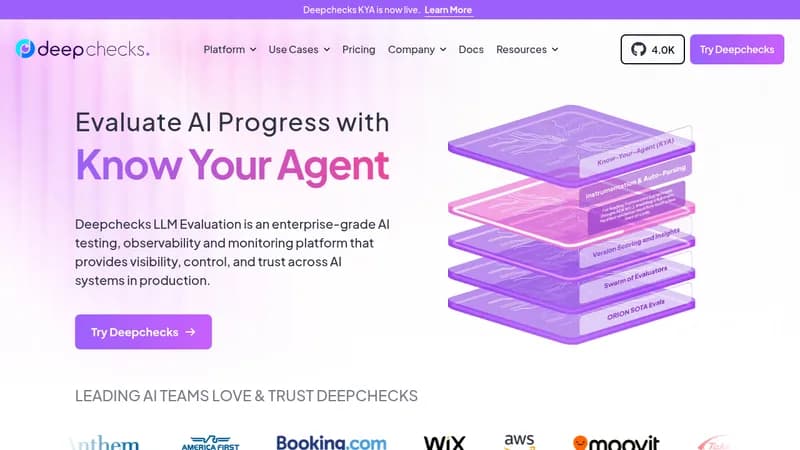
Deepchecks screenshot

What is Deepchecks?

Deepchecks helps AI teams test and monitor their large language model applications by automating the evaluation process. It allows you to set up auto-scoring pipelines and compare different versions without manual effort, so you can release high-quality apps faster. This reduces risks like hallucinations and speeds up innovation for organizations.

Key Features of Deepchecks

  1. 1

    Auto-Scoring

    Automatically score LLM responses for accuracy and relevance

  2. 2

    Version Comparison

    Compare prompts, models, and agents to choose the best version

  3. 3

    CI/CD Integration

    Test and monitor LLM apps within continuous integration pipelines

  4. 4

    Evaluation Agents

    Use a swarm of small language models for precise assessments

  5. 5

    Custom Evaluators

    Create no-code evaluators using LLMs and chain-of-thought

Deepchecks AI Tool Use Cases

  • 🔍
    Evaluate RAG systems
  • ⚙️
    Test agentic workflows
  • 📊
    Monitor production LLM apps
  • 🔄
    Compare model versions

FAQs from Deepchecks

What problem does Deepchecks solve?

It addresses the complexity of evaluating LLM applications by providing standardized metrics, auto-scoring, and streamlined version comparisons to reduce risks and speed up deployment.

How accurate is Deepchecks?

It offers superior accuracy for groundedness and retrieval relevance, backed by studies, using a swarm of small language models and multi-step NLP pipelines.

Can Deepchecks evaluate agentic workflows?

Yes, it can evaluate anything from simple RAG systems to complex agentic workflows using evaluation agents that assess different spans.

Pros & Cons of Deepchecks

Pros (4)

  • Improves time to production by 2x for new LLM apps
  • Reduces hallucinations and low-quality responses by 28%
  • Enables comparison of 6x more versions before selection
  • Offers customizable and accurate evaluation with small language models

Cons (2)

  • Requires integration into existing workflows and systems
  • May need expertise in AI systems for optimal use

More Info About Deepchecks

Who is using deepchecks?

This tool is best for:

  1. AI Developers
  2. ML Engineers
  3. Data Science Teams

Deepchecks's Tags

Explore more niche AI tool websites by clicking on a tag* (works only if it has enough tools).

#AITesting #GenAI#QualityAssurance#LLMEvaluation#Deepchecks

Integrate Deepchecks With This App

Deepchecks can be integrated with this app or service:

  • AWS Sagemaker

Website Analytics of Deepchecks

Deepchecks Website Traffic & SEO Analysis:

Recent data shows that Deepchecks has 105.9K monthly visits (-2.9% decrease from the previous month), 43.0% bounce rate, and average 1.83 pages per visit.
Traffic is primarily driven by 6 different sources, with users from 5 countries worldwide, led by India contributing 6% of total traffic. SEO performance is shown by 5 tracked keywords, with "deepchecks" being the top-performing keyword with 1.2K monthly searches. See below for more info.

Monthly Visits

105.9K

(-2.9%)

Pages per Visit

1.83

Bounce Rate

43.0%

Average Time on Site

40s

Traffic Trend(Jul 2025 - Oct 2025)

Loading chart...

Top Keywords

SEO KeywordVolumeCPC
deepchecks
1.2K$4.30
rag architecture
5.6K$2.60
is pooling in cnn with activation function
280-
f1 curve explained
0-
rag structure intro
170-

Traffic Sources Distribution

Traffic Share by Source

Loading chart...

Source Breakdown Details

SourceTraffic Share
Direct
36%
Search
52%
Social
3%
Referrals
8%
Paid Referrals
1%

Global Traffic Distribution

Traffic Share by Country

Loading chart...

Geographic Breakdown Details of top 5 countries

Country NameTraffic Share
India6%
United States6%
Nigeria5%
Germany4%
Portugal4%
Analytics data is estimated (from third-party analytics providers) and for reference only.

🚀 Deepchecks Launch Badge

Promote your Toolbit Launch by using the badge on your website. It can be inserted on your home page or footer easily.

How to use: Simply copy and paste the embed code into your homepage or footer HTML to display it instantly and build community support.

ToolBit badge

Reviews for Deepchecks