FillApp

Automate form filling and multi-tab browser workflows

Monthly Visits: 3.8K
Subscription
Free Version
Visit Website
FillApp

What is FillApp?

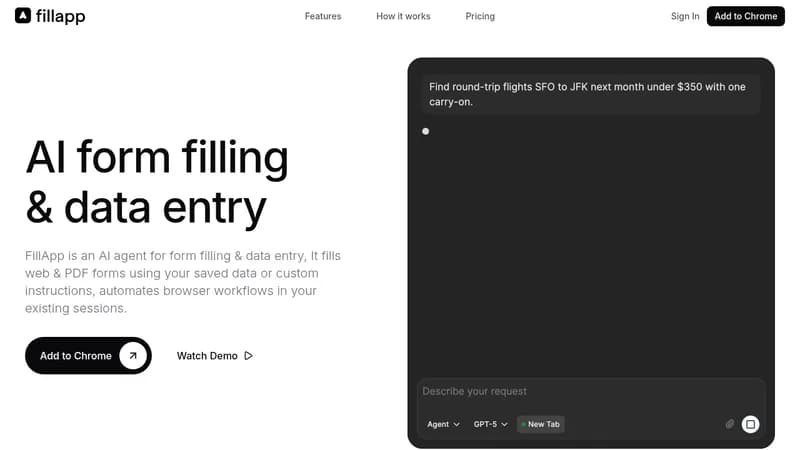
FillApp is an AI agent that works directly in your browser to handle repetitive tasks like filling out forms and automating multi-step processes. It uses your existing logged-in sessions, so no setup or credential sharing is needed, keeping your data secure. This saves you time by reducing manual work and streamlining daily browser activities, making it ideal for professionals who deal with lots of data entry.

Key Features of FillApp

  1. 1

    Multi-Tab Automation

    Executes tasks across multiple browser tabs seamlessly.

  2. 2

    Visible Trace

    Shows every action with cursor and highlights for control.

  3. 3

    Reusable Snippets

    Save and use data snippets for consistent form filling.

  4. 4

    Cross-Tab Execution

    Switches between tabs to complete workflows without interruption.

  5. 5

    PDF Analysis

    Extracts data from PDFs and images for task use.

FillApp AI Tool Use Cases

  • πŸ“
    Fill out forms automatically
  • πŸ”„
    Automate multi-step workflows
  • πŸ“Š
    Summarize web content and PDFs
  • 🏠
    Post listings on multiple sites
  • πŸ“ˆ
    Update CRM data from notes

FAQs from FillApp

How secure is FillApp?

Runs in your environment without sharing credentials or monitoring in the background, ensuring your data stays private and under your control.

Do I need to set up anything to use FillApp?

Zero setup required; it works directly in your browser using existing sessions for instant automation.

Can FillApp handle tasks across multiple browser tabs?

Yes, it handles workflows across multiple tabs seamlessly, switching context only when necessary to minimize disruption.

Pros & Cons of FillApp

Pros (4)

  • Zero setup required for instant use
  • Runs securely in your browser without credential sharing
  • Handles multi-tab workflows seamlessly
  • Provides full visibility and control over actions

Cons (2)

  • Credit-based usage may limit heavy automation tasks
  • Browser-only, no standalone desktop application

FillApp's Pricing Plans

Free

monthly
$0

Features

  • 20 credits per month
  • Fill mode: precision form filling
  • Assist mode: page summaries & Q&A
  • Snippet library for reusable data
  • GPT-5-mini model
  • Visible action trace

Starter

monthly
$14.99

Features

  • 150 credits per month
  • Agent mode: multi-step web automation
  • Custom system prompts
  • Premium AI models (GPT-5, Claude 4.5, Grok 4)
  • Cross-tab task execution
  • Purchase additional credits at $0.10/credit

Pro

monthly
$29.99

Features

  • 300 credits per month
  • Advanced workflow automation
  • Premium support with faster response
  • Early access to new features
  • Usage analytics & insights
  • Purchase additional credits at $0.10/credit
For the latest pricing info, pleaseΒ visit the official website

More Info About FillApp

Who is using fillapp?

This tool is best for:

  1. Recruiters
  2. Sales Professionals
  3. Real Estate Agents
  4. Logistics Coordinators

FillApp's Tags

Explore more niche AI tool websites by clicking on a tag* (works only if it has enough tools).

#TaskAutomation #BrowserAutomation#FormFilling#DataEntry#FillApp#AIBrowserAgent

Integrate FillApp With These Apps

FillApp can be integrated with these apps and services:

  • Google Forms
  • Microsoft Forms
  • Salesforce
  • HubSpot
  • Jotform
  • Airtable
  • Workday
  • Greenhouse
  • Atlassian
  • ServiceNow

Website Analytics of FillApp

FillApp Website Traffic & SEO Analysis:

Recent data shows that FillApp has 3.8K monthly visits (124.3% increase from the previous month), 29.0% bounce rate, and average 1.85 pages per visit.
Traffic is primarily driven by 6 different sources, with users from 3 countries worldwide, led by United States contributing 57% of total traffic. SEO performance is shown by 5 tracked keywords, with "chrome extension ai form filler" being the top-performing keyword with 220 monthly searches. See below for more info.

Monthly Visits

3.8K

(+124.3%)

Pages per Visit

1.85

Bounce Rate

29.0%

Average Time on Site

52s

Traffic Trend(Jul 2025 - Oct 2025)

Loading chart...

Top Keywords

SEO KeywordVolumeCPC
chrome extension ai form filler
220-
fillapp
510-
ai form filler agent
50-
ai form filler
690$10.01
automate forms selection in chrome
240-

Traffic Sources Distribution

Traffic Share by Source

Loading chart...

Source Breakdown Details

SourceTraffic Share
Direct
60%
Search
27%
Social
4%
Referrals
8%
Paid Referrals
1%

Global Traffic Distribution

Traffic Share by Country

Loading chart...

Geographic Breakdown Details of top 3 countries

Country NameTraffic Share
United States57%
Germany29%
Vietnam14%
Analytics data is estimated (from third-party analytics providers) and for reference only.

πŸš€ FillApp Launch Badge

Promote your Toolbit Launch by using the badge on your website. It can be inserted on your home page or footer easily.

How to use: Simply copy and paste the embed code into your homepage or footer HTML to display it instantly and build community support.

ToolBit badge

Reviews for FillApp