Interior DesignHome Renovation ToolsAI Visualization

Paintit.ai

Transform empty rooms into personalized living spaces with AI

Monthly Visits: 53.1K
Freemium
Free Version
Visit Website
Paintit.ai

What is Paintit.ai?

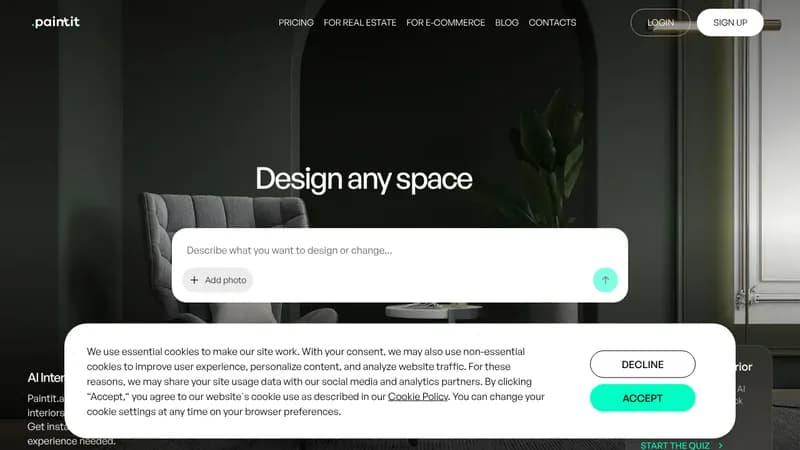
Paintit.ai helps you visualize and redesign any room using artificial intelligence. Simply upload photos of your space and choose styles to see instant AI-generated makeovers. Homeowners get design ideas without professional training, while interior designers can quickly create client presentations. The tool works for both empty rooms and existing spaces needing refresh.

Key Features of Paintit.ai

  1. 1

    Style Transformation

    Redesign existing rooms in 15+ architectural styles instantly

  2. 2

    Empty Room Design

    Turn blank spaces into furnished designs matching your taste

  3. 3

    Object Removal

    Erase unwanted items from room photos with AI precision

  4. 4

    Commercial Solutions

    Create brand-aligned designs for offices and retail spaces

Paintit.ai Tool Use Cases

  • 🏠
    Redesign living spaces without contractors
  • 🎨
    Visualize kitchen renovations before remodeling
  • 🏒
    Stage properties for real estate listings
  • β˜•
    Design cafe interiors that match brand identity

FAQs from Paintit.ai

Is Paintit.ai free to use?

Yes, we offer a Free plan with 3 generations. Paid Personal ($5) and Pro ($49) plans unlock more features.

How does the AI design process work?

Upload room photos, select style preferences, and receive multiple AI-generated designs you can refine.

Can professionals use this tool?

Yes, interior designers and real estate agents use Paintit Pro for client presentations and property staging.

Pros & Cons of Paintit.ai

Pros (4)

  • No interior design experience required
  • Produces photorealistic room visualizations
  • Supports both residential/commercial projects
  • Preserves original architectural features

Cons (1)

  • Free plan limited to 3 designs

Paintit.ai's Pricing Plans

Free

monthly
$0

Features

  • 3 free generations
  • Basic design tools
  • Standard resolution exports

Personal

monthly
$5

Features

  • 10 additional options
  • Priority support
  • HD exports

Pro

monthly
$49

Features

  • 100 tokens/month
  • Commercial usage rights
  • 4K renderings
  • Bulk processing
For the latest pricing info, pleaseΒ visit the official website

More Info About Paintit.ai

Who is using paintit.ai?

This tool is best for:

  1. Homeowners
  2. Interior Designers
  3. Real Estate Agents
  4. Architecture Firms

Paintit.ai's Tags

Explore more niche AI tool websites by clicking on a tag* (works only if it has enough tools).

Website Analytics of Paintit.ai

Paintit.ai Website Traffic & SEO Analysis:

Recent data shows that Paintit.ai has 53.1K monthly visits (-10.0% decrease from the previous month), 35.0% bounce rate, and average 3.44 pages per visit.
Traffic is primarily driven by 6 different sources, with users from 5 countries worldwide, led by India contributing 24% of total traffic. SEO performance is shown by 5 tracked keywords, with "paint it" being the top-performing keyword with 640 monthly searches. See below for more info.

Monthly Visits

53.1K

(-10.0%)

Pages per Visit

3.44

Bounce Rate

35.0%

Average Time on Site

1m 24s

Traffic Trend(Apr 2025 - Oct 2025)

Loading chart...

Top Keywords

SEO KeywordVolumeCPC
paint it
640-
exterior home decorator online free
180-
best free ai tool to design a room room photos
280-
home exterior ai
560-
paintit.ai
390-

Traffic Sources Distribution

Traffic Share by Source

Loading chart...

Source Breakdown Details

SourceTraffic Share
Direct
35%
Search
45%
Social
4%
Referrals
15%
Paid Referrals
1%

Global Traffic Distribution

Traffic Share by Country

Loading chart...

Geographic Breakdown Details of top 5 countries

Country NameTraffic Share
India24%
United States18%
United Kingdom8%
Ukraine8%
Australia4%
Analytics data is estimated (from third-party analytics providers) and for reference only.

πŸš€ Paintit.ai Launch Badge

Promote your Toolbit Launch by using the badge on your website. It can be inserted on your home page or footer easily.

How to use: Simply copy and paste the embed code into your homepage or footer HTML to display it instantly and build community support.

ToolBit badge

Reviews for Paintit.ai