PicStudio.AI

Generate professional portraits quickly without a photographer

Monthly Visits: 29.8K
Tiered
Visit Website
PicStudio.AI

What is PicStudio.AI?

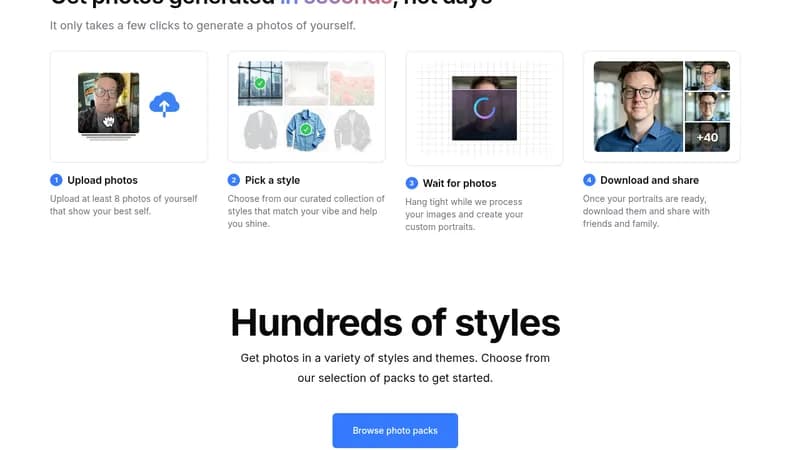
PicStudio.AI allows you to create stunning AI-generated portraits effortlessly. With just a few steps, you can have high-quality images that look completely real. This tool is perfect for anyone needing professional photos in a hurry.

Key Features of PicStudio.AI

  1. 1

    Quick Delivery

    Receive your portraits in just 30 minutes.

  2. 2

    Variety of Styles

    Choose from hundreds of unique photo packs.

  3. 3

    User-Friendly Process

    Easily upload photos and download results.

  4. 4

    Business Ready

    Invoices suitable for business expenses.

  5. 5

    Affordable Pricing

    Starting at just $29.99 for 40 photos.

PicStudio.AI Tool Use Cases

  • ๐Ÿ’ผ
    Enhance LinkedIn profiles
  • ๐ŸŽฅ
    Create eye-catching video thumbnails
  • ๐Ÿ“ธ
    Generate headshots for business
  • ๐Ÿ‘ค
    Design dating profile images
  • ๐ŸŽจ
    Explore artistic portrait styles

FAQs from PicStudio.AI

How fast can I receive my portraits?

Your portraits can be delivered in just 30 minutes.

Can I choose different styles for my portraits?

Yes, you can select from hundreds of styles and themes.

Is there a referral program?

Yes, PicStudio.AI offers a referral program.

Pros & Cons of PicStudio.AI

Pros (4)

  • Fast turnaround time for portrait generation
  • High-quality images that appear realistic
  • Multiple styles to fit various needs
  • Cost-effective packages for bulk photos

Cons (2)

  • Limited to one person per order
  • No mention of free trial or free version

PicStudio.AI's Pricing Plans

Starter Kit

one-time
$29.99

Features

  • One person
  • 40 photos
  • One photo pack
  • Delivered in 30 mins

Pro Bundle

one-time
$39.99

Features

  • One person
  • 120 photos
  • Three photo packs
  • Delivered in 30 mins

Pro+ Bundle

one-time
$59.99

Features

  • One person
  • 200 photos
  • Five photo packs
  • Delivered in 30 mins
For the latest pricing info, pleaseย visit the official website

More Info About PicStudio.AI

Who is using picstudio.ai?

This tool is best for:

  1. Job seekers
  2. Content creators
  3. Business professionals
  4. Social media influencers

PicStudio.AI's Tags

Explore more niche AI tool websites by clicking on a tag* (works only if it has enough tools).

#PhotoEditing #AIPortraits #ProfessionalPhotos#LinkedInHeadshots

PicStudio.AI Social Media

Visit PicStudio.AI on social media to stay updated with the latest news and features.

Website Analytics of PicStudio.AI

PicStudio.AI Website Traffic & SEO Analysis:

Recent data shows that PicStudio.AI has 29.8K monthly visits (168.9% increase from the previous month), 51.0% bounce rate, and average 3.61 pages per visit.
Traffic is primarily driven by 6 different sources, with users from 5 countries worldwide, led by United States contributing 39% of total traffic. SEO performance is shown by 5 tracked keywords, with "remove blur with ai" being the top-performing keyword with 0 monthly searches. See below for more info.

Monthly Visits

29.8K

(+168.9%)

Pages per Visit

3.61

Bounce Rate

51.0%

Average Time on Site

1m 26s

Traffic Trend(Apr 2025 - Oct 2025)

Loading chart...

Top Keywords

SEO KeywordVolumeCPC
remove blur with ai
0-
free no login ai photo restore
0-
restoration photo ai online
0-
color correct photo
100$1.89
repair damage photo free online ai restoration
0-

Traffic Sources Distribution

Traffic Share by Source

Loading chart...

Source Breakdown Details

SourceTraffic Share
Direct
56%
Search
29%
Social
7%
Referrals
7%
Paid Referrals
1%

Global Traffic Distribution

Traffic Share by Country

Loading chart...

Geographic Breakdown Details of top 5 countries

Country NameTraffic Share
United States39%
United Kingdom34%
India6%
Brazil5%
Canada5%
Analytics data is estimated (from third-party analytics providers) and for reference only.

๐Ÿš€ PicStudio.AI Launch Badge

Promote your Toolbit Launch by using the badge on your website. It can be inserted on your home page or footer easily.

How to use: Simply copy and paste the embed code into your homepage or footer HTML to display it instantly and build community support.

ToolBit badge

Reviews for PicStudio.AI