



Time ManagementEmployee MonitoringProductivity Tracking

Screen Time for Windows

Monitor PC usage and boost productivity with AI insights

Monthly Visits: 338
Subscription
Visit Website
Screen Time for Windows

What is Screen Time for Windows?

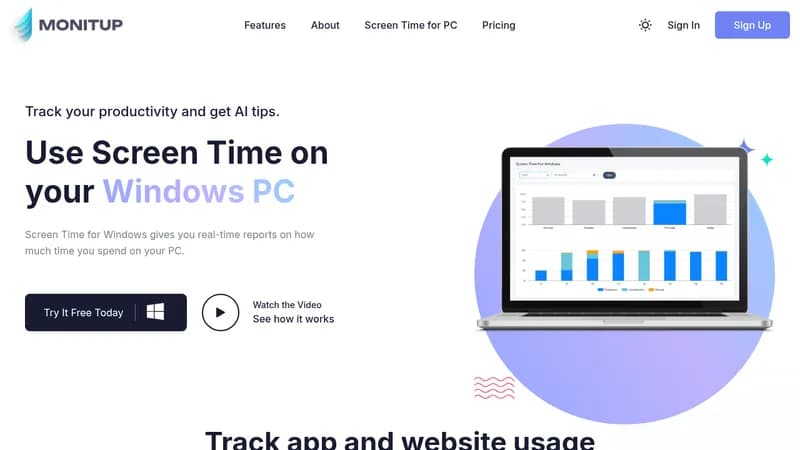
Screen Time for Windows tracks how much time you spend on apps and websites on your PC. It provides detailed reports and AI-powered tips to help you work smarter and reduce unproductive habits. You can customize app categories to get accurate insights into your or your team's productivity.

Key Features of Screen Time for Windows

  1. 1

    App Tracking

    Tracks time spent on apps and websites in real-time

  2. 2

    AI Tips

    Provides personalized productivity suggestions based on usage

  3. 3

    App Categorization

    Label apps as productive, unproductive, or neutral

  4. 4

    Productivity Reports

    Generates reports on productive and unproductive hours

  5. 5

    Silent Tracking

    Runs in background without interrupting your work

Screen Time for Windows AI Tool Use Cases

  • 📊
    Monitor team productivity
  • ⏱️
    Track personal screen time
  • 🤖
    Get AI productivity advice
  • 📈
    Analyze app usage patterns

FAQs from Screen Time for Windows

How can I check what apps are using most of my Windows screen time?

Screen Time gives you a high-level overview of the apps you’re using the most, but only a basic overview.

How do I view my Screen Time Windows usage statistics?

You can log in with your account on the MonitUp website and view your current data or retrospective computer usage habits.

How long is my data kept?

Your data for the last 365 days is securely stored.

How do I see hours on my Windows?

Screen Time shows how much time you spend on apps, and for more details, consider using the MonitUp PREMIUM package.

Pros & Cons of Screen Time for Windows

Pros (4)

  • Real-time tracking of app and website usage
  • AI-powered productivity suggestions for improvement
  • Customizable app categorization for accurate reports
  • Silent operation that doesn't disrupt workflow

Cons (3)

  • Limited to Windows operating system only
  • Provides only a basic overview, lacking detailed project tracking
  • Data retention is limited to 365 days

Screen Time for Windows's Pricing Plans

Screen Time

monthly
$6

Features

  • Apps & URLs Tracking
  • AI Suggestions
  • Productivity Report
  • Identifying Productive Apps
  • Silent Tracking
  • Available for Windows OS
For the latest pricing info, please visit the official website

More Info About Screen Time for Windows

Who is using screen time for windows?

This tool is best for:

  1. Remote employees
  2. Team managers
  3. Parents
  4. Freelancers

Screen Time for Windows's Tags

Explore more niche AI tool websites by clicking on a tag* (works only if it has enough tools).

#ProductivityAI #WindowsProductivity#EmployeeMonitoring#ScreenTimeTracker#TimeManagementTool

Platforms & Device Support

Use Screen Time for Windows on your favorite device - available across multiple platforms for flexibility.

Desktop App

Windows
✓ Available

Screen Time for Windows Social Media

Visit Screen Time for Windows on social media to stay updated with the latest news and features.

Website Analytics of Screen Time for Windows

Screen Time for Windows Website Traffic & SEO Analysis:

Recent data shows that Screen Time for Windows has 338 monthly visits (-40.9% decrease from the previous month), 100.0% bounce rate, and average 1.00 pages per visit.
Traffic is primarily driven by 6 different sources, with users from 2 countries worldwide, led by United States contributing 60% of total traffic.

Monthly Visits

338

(-40.9%)

Pages per Visit

1.00

Bounce Rate

100.0%

Average Time on Site

10s

Traffic Trend(Jul 2025 - Oct 2025)

Loading chart...

Traffic Sources Distribution

Traffic Share by Source

Loading chart...

Source Breakdown Details

SourceTraffic Share
Direct
29%
Search
58%
Social
5%
Referrals
7%
Paid Referrals
1%

Global Traffic Distribution

Traffic Share by Country

Loading chart...

Geographic Breakdown Details of top 2 countries

Country NameTraffic Share
United States60%
Germany40%
Analytics data is estimated (from third-party analytics providers) and for reference only.

🚀 Screen Time for Windows Launch Badge

Promote your Toolbit Launch by using the badge on your website. It can be inserted on your home page or footer easily.

How to use: Simply copy and paste the embed code into your homepage or footer HTML to display it instantly and build community support.

ToolBit badge

Reviews for Screen Time for Windows

Screen Time for Windows: Reviews, Features, Pricing, Alternatives