E-commerce ToolsShopify AppsAI Product Photo Generator

Snapshot

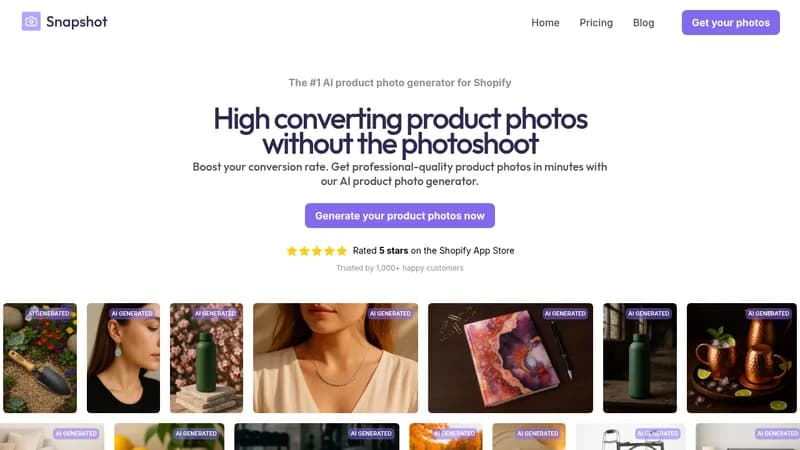
Generate high-converting product photos for Shopify stores

Monthly Visits: 2.7K
Freemium
Free Version
Visit Website
Snapshot

What is Snapshot?

Snapshot is an AI tool that creates professional product photos for your Shopify store without needing a physical photoshoot. You can generate images in minutes using pre-made themes or custom descriptions, saving you time and money. This helps boost your sales by making your products look more appealing to customers.

Key Features of Snapshot

  1. 1

    One-Click Themes

    Save time with pre-configured themes for quick image generation

  2. 2

    Custom Prompts

    Type any description to generate custom environments for your products

  3. 3

    Shopify Integration

    Seamlessly attach images to product listings from within Shopify

  4. 4

    Bulk Generation

    Generate multiple images at once to speed up your workflow

Snapshot AI Tool Use Cases

  • πŸ›οΈ
    Generate product photos for e-commerce
  • πŸ“Έ
    Create high-converting images without photoshoots
  • πŸ”„
    Bulk generate backgrounds for multiple products
  • 🎨
    Customize photo environments with text prompts

Pros & Cons of Snapshot

Pros (4)

  • Saves time by generating photos in minutes
  • Cost-effective compared to physical photoshoots
  • High-quality, professional-looking images
  • Deep integration with Shopify dashboard

Cons (3)

  • Limited to Shopify platform
  • Requires credits for generations
  • May not replace all professional photography needs

Snapshot's Pricing Plans

5 Credits

one-time
Free

Features

  • 5 credits
  • Full access to theme library
  • Custom prompts

15 Credits

one-time
$10

Features

  • 15 credits
  • $0.67/credit
  • Full access to theme library
  • Custom prompts

100 Credits

one-time
$50

Features

  • 100 credits
  • $0.50/credit
  • Full access to theme library
  • Custom prompts

500 Credits

one-time
$225

Features

  • 500 credits
  • $0.45/credit
  • Full access to theme library
  • Custom prompts
For the latest pricing info, pleaseΒ visit the official website

More Info About Snapshot

Who is using snapshot?

This tool is best for:

  1. Shopify Store Owners
  2. E-commerce Entrepreneurs
  3. Small Business Owners

Snapshot's Tags

Explore more niche AI tool websites by clicking on a tag* (works only if it has enough tools).

#Ecommerce #ShopifyApps #ProductPhotography#SnapshotAI#AIProductPhotos

Integrate Snapshot With This App

Snapshot can be integrated with this app or service:

  • Shopify

Website Analytics of Snapshot

Snapshot Website Traffic & SEO Analysis:

Recent data shows that Snapshot has 2.7K monthly visits (26.8% increase from the previous month), 37.0% bounce rate, and average 2.22 pages per visit.
Traffic is primarily driven by 6 different sources, with users from 2 countries worldwide, led by United States contributing 69% of total traffic. SEO performance is shown by 5 tracked keywords, with "how to use gpt to write into shopify translated text" being the top-performing keyword with 110 monthly searches. See below for more info.

Monthly Visits

2.7K

(+26.8%)

Pages per Visit

2.22

Bounce Rate

37.0%

Average Time on Site

47s

Traffic Trend(Jul 2025 - Oct 2025)

Loading chart...

Top Keywords

SEO KeywordVolumeCPC
how to use gpt to write into shopify translated text
110-
snapshot: ai image generator
80-
snapshot app io contatc
40-
snapshot ai free
30-
candle photoshoot diy
590-

Traffic Sources Distribution

Traffic Share by Source

Loading chart...

Source Breakdown Details

SourceTraffic Share
Direct
41%
Search
35%
Social
8%
Referrals
13%
Paid Referrals
2%

Global Traffic Distribution

Traffic Share by Country

Loading chart...

Geographic Breakdown Details of top 2 countries

Country NameTraffic Share
United States69%
India31%
Analytics data is estimated (from third-party analytics providers) and for reference only.

πŸš€ Snapshot Launch Badge

Promote your Toolbit Launch by using the badge on your website. It can be inserted on your home page or footer easily.

How to use: Simply copy and paste the embed code into your homepage or footer HTML to display it instantly and build community support.

ToolBit badge

Reviews for Snapshot