Audio TranscriptionSpeech to TextVoice Typing

Speechnotes

Transcribe audio and video recordings with AI-powered accuracy

Monthly Visits: 1.4M
Freemium
Free Version
API Available
Visit Website
Speechnotes

What is Speechnotes?

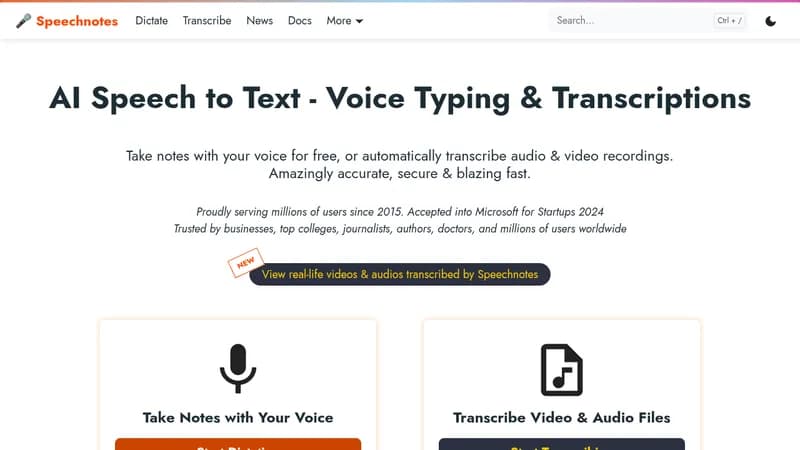
Speechnotes lets you dictate your notes instead of typing, making it faster and easier to capture ideas. It also automatically transcribes audio and video files, saving you hours of manual work. This tool is perfect for anyone who needs to convert speech to text efficiently and privately.

Key Features of Speechnotes

  1. 1

    Voice Commands

    Control punctuation and formatting using your voice for hands-free editing

  2. 2

    Auto Capitalization

    Automatically capitalizes sentences to improve text readability

  3. 3

    Speaker Diarization

    Identifies and tags different speakers in audio recordings

  4. 4

    Timestamping

    Adds timestamps to transcriptions for easy navigation and reference

  5. 5

    AI Summaries

    Generates concise summaries of transcribed content to save time

Speechnotes AI Tool Use Cases

  • ๐ŸŽค
    Dictate notes and documents
  • ๐Ÿ“
    Transcribe audio and video files
  • ๐Ÿฅ
    Fill out medical forms with voice
  • ๐Ÿ“š
    Students for lecture notes
  • ๐ŸŽ™๏ธ
    Journalists for interview transcriptions

Pros & Cons of Speechnotes

Pros (4)

  • Highly accurate speech recognition powered by Google and Microsoft AI
  • Lightweight and fast, works online without installation
  • Super private and secure with no human handling of data
  • Saves time and money compared to manual transcription

Cons (3)

  • Free version includes advertisements
  • Transcription service incurs a cost per minute
  • Requires internet connection and specific browsers like Chrome

Speechnotes's Pricing Plans

Dictation Free

ongoing
Free

Features

  • Unlimited dictation
  • Online notepad
  • Voice typing extension
  • Ads supported

Dictation Premium

monthly
$1.9

Features

  • No ads
  • Extra security
  • Support from development team

Transcription

pay-as-you-go
$0.1/minute

Features

  • Audio & video recordings
  • Speaker diarization
  • Timestamps
  • API access
For the latest pricing info, pleaseย visit the official website

More Info About Speechnotes

Who is using speechnotes?

This tool is best for:

  1. Journalists
  2. Authors
  3. Doctors
  4. Students

Speechnotes's Tags

Explore more niche AI tool websites by clicking on a tag* (works only if it has enough tools).

#SpeechToText #NoteTaking #AudioTranscription#VoiceTyping#Dictation

Integrate Speechnotes With This App

Speechnotes can be integrated with this app or service:

  • Zapier

Platforms & Device Support

Use Speechnotes on your favorite device - available across multiple platforms for flexibility.

Mobile App

Android Phones
Get App

Website Analytics of Speechnotes

Speechnotes Website Traffic & SEO Analysis:

Recent data shows that Speechnotes has 1.4M monthly visits (10.3% increase from the previous month), 52.0% bounce rate, and average 2.16 pages per visit.
Traffic is primarily driven by 6 different sources, with users from 5 countries worldwide, led by United States contributing 19% of total traffic. SEO performance is shown by 5 tracked keywords, with "speech to text" being the top-performing keyword with 198.2K monthly searches. See below for more info.

Monthly Visits

1.4M

(+10.3%)

Pages per Visit

2.16

Bounce Rate

52.0%

Average Time on Site

1m 6s

Traffic Trend(Jul 2025 - Oct 2025)

Loading chart...

Top Keywords

SEO KeywordVolumeCPC
speech to text
198.2K$1.75
voice to text
117.0K$0.80
speechnotes
25.9K$0.54
speech to text online
10.0K$0.86
speech to text free
11.6K$1.50

Traffic Sources Distribution

Traffic Share by Source

Loading chart...

Source Breakdown Details

SourceTraffic Share
Direct
51%
Search
44%
Social
1%
Referrals
4%

Global Traffic Distribution

Traffic Share by Country

Loading chart...

Geographic Breakdown Details of top 5 countries

Country NameTraffic Share
United States19%
India12%
Hong Kong6%
Mexico6%
United Kingdom4%
Analytics data is estimated (from third-party analytics providers) and for reference only.

๐Ÿš€ Speechnotes Launch Badge

Promote your Toolbit Launch by using the badge on your website. It can be inserted on your home page or footer easily.

How to use: Simply copy and paste the embed code into your homepage or footer HTML to display it instantly and build community support.

ToolBit badge

Reviews for Speechnotes