
In this guide
-
Jasper - marketing teams that need brand-consistent content at scale
-
Sudowrite - the only major tool built specifically for fiction
-
Notion AI - writing inside your team's existing workspace
-
Lex - a distraction-free editor for essayists and journalists
-
Copy.ai - copy as one piece of a full GTM automation platform
Now let's go through each one in detail.
1.Jasper: built for marketing teams, not solo writers
Jasper is the one tool on this list that has fully committed to a single customer: marketing departments that need to produce a lot of on-brand content without a compliance headache.
What it's for
Jasper is not trying to be a general chatbot. It is a governed content system built around three pillars:
- Jasper IQ - manages brand voice and company knowledge so every piece of content sounds like it came from the same brand
- Content Pipelines - runs full campaigns at scale instead of one-off documents
- AI Agents - execute repeatable tasks like drafting, formatting, and distributing content without a human triggering each step
If your team already manages 2 to 5 brand voices and needs every writer to sound consistent, this is the whole reason Jasper exists. It also integrates with Surfer SEO for teams that need content optimized for search, and includes a Chrome extension for writing directly inside other web tools.
What it costs
Jasper dropped its old Boss Mode plan and now runs two tiers:
| Plan | Price | What's included |
|---|---|---|
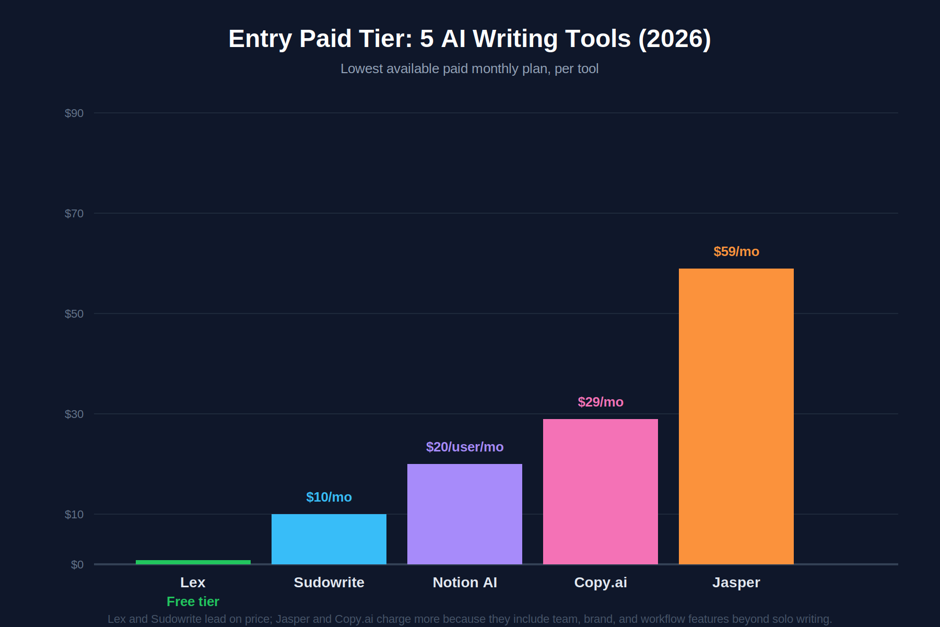
| Pro | $59/mo per seat (annual), $69/mo billed monthly | Canvas editor, 2-3 Brand Voices, Knowledge assets, Essential Agents, Chrome extension |
| Business | Custom, typically $900-$6,000+/mo | Unlimited Brand Voices, AI App Builder, API access, enterprise support |
There is no permanent free plan, only a 7-day trial on the Pro tier, and it requires a credit card to start.
Who it's actually good for
- Marketing agencies juggling multiple client brand voices at once
- In-house teams producing high volumes of on-brand content (blogs, ads, emails) every week
- Companies that need audit trails and governance over what AI is allowed to publish
2.Sudowrite: the only major tool built specifically for fiction
Everything else on this list is aimed at business writing or knowledge work. Sudowrite is different. It was built from day one by novelists, for novelists.
The origin story that shapes the product
Its founders, Amit Gupta and James Yu, trained a proprietary model called Muse specifically on narrative fiction, not marketing copy or blog posts. The result is prose that reads like a novel instead of a corporate memo, which is the exact failure mode most general AI tools hit when asked to write fiction. The tool has since earned a public endorsement from bestselling author Hugh Howey, and its investor list includes founders from Twitter, Medium, and WordPress.
The toolset
| Feature | What it does |
|---|---|
| Story Bible | Organizes characters, settings, lore, and plot threads so a 300-page manuscript stays consistent |
| Story Engine / First Draft | Turns a story concept or scene notes into a chapter-by-chapter beat sheet, then drafts each chapter |
| Describe | Generates sensory setting details from a handful of words |
| Show Don't Tell | Rewrites flat, telling sentences into vivid, showing ones |
| Twist | Brainstorms unexpected plot directions when you're stuck |
| Shrink Ray | Tightens bloated prose without losing meaning |
Pricing
Sudowrite runs on a credit system across three tiers, and every tier unlocks the same features. Only the credit allowance changes:
| Tier | Annual billing | Monthly billing | Credits/month |
|---|---|---|---|
| Hobby & Student | $10/mo | $19/mo | 225,000 words |
| Professional | $22/mo | $29/mo | 1,000,000 words |
| Max | $44/mo | $59/mo | 2,000,000 words, priority processing |
There's a free trial with 10,000 credits and no time limit, so you can genuinely test the prose quality before paying anything.
Good to know
Sudowrite includes toggleable "Safety Rails." Writers working on mature themes can disable them for scenes involving violence or adult content, a flexibility most general chatbots restrict by default.
3.Notion AI: the writing tool that lives inside your team's workspace
Notion AI is the odd one out here because it is not really sold as a writing tool at all anymore. It is what happens when an AI gets folded into the productivity software your whole team already runs on.
How it got here
Notion AI used to be a simple $10-a-month add-on bolted onto any plan. That changed in September 2025 with Notion 3.0, which rebuilt the AI layer from scratch as autonomous Agents rather than a writing assistant. A rapid string of releases followed: Notion 3.2 in January 2026 added mobile AI Notes and a refreshed model picker, 3.3 in February opened Custom Agents in beta, and by May 2026 the standalone AI add-on was retired entirely for new customers.
What that means for your wallet
Full Notion AI, meaning unlimited AI writing, Ask Notion chat, meeting notes, and workspace search, now requires the Business plan at $20 per user per month billed annually, or $24 monthly. The Free and Plus tiers ($10/user/month) only include a limited trial of AI features. So the real "Notion AI price" for most teams is $20 a seat, not the $10 people remember from a year ago.
What the Agent can actually do
By mid-2026 Notion's AI is less "writing assistant" and more "workspace teammate":
- Handles multi-step actions lasting over 20 minutes, with memory stored as Notion pages and databases
- Pulls context from connected tools like Slack, Google Drive, Gmail, and GitHub, always within your existing permissions
- Lets you pick between models like Claude, GPT, and Gemini, or use "Auto" to let Notion choose the best one per task
- Supports Custom Agents, billed separately at $10 per 1,000 Notion credits since May 2026
Full plan breakdown
| Plan | Price | AI access |
|---|---|---|
| Free | $0 | Limited trial only |
| Plus | $10/user/mo (annual) | Limited trial only |
| Business | $20/user/mo (annual), $24 monthly | Full AI Agents, Ask Notion, meeting notes |
| Enterprise | Custom | Full AI plus zero-retention API, SOC 2 and ISO 27001 compliance |
Where it falls short
Image generation is capped even on paid plans (10 generations or edits per 24 hours, 30 per 30 days), and Custom Agent credits add a third line item on top of your seat cost if you lean on automation heavily. Notion AI is also the wrong fit for teams whose main need is structured task management or real-time operational data rather than documents and knowledge work.
4. Lex: for writers who want an editor, not a content factory
Lex has a philosophy, and it says so directly: AI should help a writer think better, not replace their thinking with generated text.
The interface is deliberately bare. No sidebar full of templates, no content score, no dashboard. You write in a clean document, and when you're stuck, you type ++ to summon the AI for a continuation that matches your voice, or open "Ask Lex" for direct feedback on what you've already written. Reviewers consistently note that Lex's feedback is more critical and less flattering than asking ChatGPT or Claude to review your own writing, which is exactly the point for essayists, journalists, and academics who don't want a yes-man.
A quick pros and cons, since that's really how people decide on Lex:
Good for: long-form essays, newsletters, journalism, and academic writing where voice matters more than volume. Built-in one-click publishing removes the friction of copying a finished piece into a separate CMS.
Not for: marketing teams needing templates, SEO tools, or brand voice management. Lex has no multi-cursor real-time collaboration and no approval workflows for editorial teams.
Price: a free tier caps you at roughly 15 to 30 AI uses a month, enough to test the philosophy before paying. Paid pricing is reported inconsistently across sources, generally landing somewhere between $15 and $25 a month depending on the billing cycle, so check Lex's own pricing page before you commit, since the number has moved more than once in the past year.
Collaboration features
- Real-time multi-user editing with visible cursors, similar to Google Docs
- Comments on specific text selections
- Shareable document links for editor or collaborator review
- Version history (on paid tiers)
What it doesn't have: suggestion mode (the Google Docs style track-changes-and-approve flow), multi-cursor conflict resolution at scale, or approval chains. For a writer working with a single editor, that's plenty. For a content team managing formal editorial workflows, it's too simple.
5.Copy.ai: it stopped being a writing tool a while ago, and that's the point
Copy.ai started in 2020 as one of the first simple AI copywriting generators, the kind of tool you'd use to spit out 20 headline variations. By 2026 it has repositioned into something else entirely: a "Go-To-Market AI Platform" that writes copy as one small piece of a much bigger job.
The shift in one line: Copy.ai now automates entire sales and marketing workflows, not just paragraphs. Its Workflows feature can research a sales prospect, draft a personalized outreach sequence, enrich a CRM record, and coach a rep based on a call transcript, all as one automated chain rather than five separate prompts.
Here's what that actually looks like tier by tier:
| Plan | Price | What it unlocks |
|---|---|---|
| Chat | ~$29/mo ($24 annual) | Unlimited chat, 5 seats, latest LLMs |
| Agents | From $249/mo | Workflow credits, automation agents |
| Growth / Expansion / Scale | Roughly $1,000 to $3,000+/mo | Full GTM workflow automation across sales, marketing, and RevOps |
| Enterprise | Custom | API access, guided implementation, bulk workflows |
The platform is model-agnostic, drawing on OpenAI, Anthropic, and Google models depending on the task, and connects to Salesforce, HubSpot, and over 2,000 apps through Zapier.
The core building blocks
- Workflows - visual, multi-step automations that chain research, drafting, and distribution together instead of requiring a separate prompt for each step
- Prospecting Cockpit - researches accounts and contacts before drafting personalized outreach
- Infobase - a shared company knowledge base the AI pulls from for accuracy and consistency
- Brand Voice - analyzes existing company content and applies the learned tone automatically to new output
Scale and integrations
Copy.ai now serves over 17 million users, from solo creators to enterprise names like Lenovo, ServiceNow, Siemens, Thermo Fisher Scientific, and Rubrik. It's SOC 2 Type II certified, which matters if prospect or customer data is flowing through the platform. Integration-wise, it connects directly to Salesforce and HubSpot and reaches over 2,000 additional apps through Zapier, plus it can expose Workflows as callable API endpoints for engineering teams that want to build on top of it.
Picking one
Match the tool to what you're actually stuck on, not the one with the most features:
- Marketing team needing consistent, on-brand content at volume: Jasper
- Writing a novel or short fiction: Sudowrite
- Your team already lives in Notion and wants AI in the same place: Notion AI
- You want a serious, distraction-free place to draft essays or long-form writing: Lex
- Your real bottleneck is the sales or marketing workflow around the writing, not the writing itself: Copy.ai
Who should just stick with ChatGPT
Specialized tools aren't automatically better. Skip this whole list and stay with ChatGPT (or Claude, or Gemini) if:
- You write occasionally, across many different formats, and don't want to manage a second subscription
- You need one flexible tool for emails, code, research, and writing, not five tools for five jobs
- Your budget is tight and $20/month for a single general-purpose assistant already covers most of what you need
- You haven't hit a specific wall yet, like inconsistent brand voice, flat fiction prose, or workflow sprawl, that a specialized tool actually solves
Specialized tools earn their keep once you know exactly what's broken. If nothing feels broken yet, a generalist is still the right call.
Final verdict
None of these five tools are trying to beat ChatGPT at being a general-purpose chatbot, and that's exactly why they work. Each one bet that a writer's actual problem is narrower and weirder than "generate text," then built one tool that solves that specific problem well instead of a dozen tools solving it adequately.
Here's the short version, if you only remember one line per tool:
| Tool | Pick it if... | Skip it if... |
|---|---|---|
| Jasper | You manage brand voice across a marketing team | You're a solo writer without SEO or brand needs |
| Sudowrite | You're drafting fiction and need prose that sounds human | You need non-fiction, exports, or a publishing pipeline |
| Notion AI | Your team already works inside Notion daily | You just want a standalone writing tool |
| Lex | You write long-form and want honest, critical feedback | You need templates, SEO tools, or team workflows |
| Copy.ai | Your bottleneck is the sales/marketing workflow, not the copy | You just need clean writing without automation |
The best move isn't picking the tool with the longest feature list. It's being honest about which specific wall you keep hitting, then picking the one tool built to knock it down. For most writers, that means trying the free tier of whichever tool above matches your actual bottleneck before committing to a subscription.
Pricing and feature details above reflect publicly available information as of mid-to-late 2026 and can change without notice. Some figures (particularly Lex's paid tier) vary across sources, so confirm current pricing directly with each vendor before budgeting.