You record a five minute screen walkthrough: here is the new checkout flow, here is the bug, here is what I need from you. You send the link. And then the quiet failure of async video happens: nobody watches it. Or worse, three people watch it, each takes their own notes, and the action items scatter into Slack replies that no one ever reads again. The recording was supposed to replace a meeting, but without a structured afterlife it just becomes a meeting only the sender had to attend.
That afterlife is the interesting part now. Since Atlassian bought Loom in late 2023 and rebuilt it as part of its cloud suite, the product has steadily grown a layer that goes beyond recording: automatic titles, summaries, chapters, extracted tasks, and, most notably, AI workflows that push a recording's content into the places work actually happens, like documents, Jira tickets, and follow-up messages. Grain and homemade pipelines attack the same problem from the meeting side. This is what automatic summarizing and action routing genuinely deliver in September 2026, where they hold up, and where a recording is still just a recording.
What Loom AI actually produces from a recording
Hit stop on a Loom and, if you're on a plan with Loom AI, processing starts. According to Atlassian's Loom AI page, every video with the AI suite gets an auto-generated title, a summary, chapters, tasks, and an embedded CTA link, plus two cleanup passes: filler word removal and silence removal. None of that exists on videos recorded without the AI tier.
The tasks piece is the quiet headline. Loom doesn't just summarize what you said, it extracts the to-dos implied by it, the "can you check the tax calculation" and "we should update the docs before launch" moments that usually evaporate. Chapters make a twenty minute recording navigable, which matters more than it sounds: a summary tells someone what's in the video, but chapters let them jump straight to the ninety seconds they care about.
Two things are worth knowing about the edges. Auto-enhancement, the titles, summaries, chapters, and cleanup, works in more than 50 languages. But the document generation in AI workflows, the part that writes finished artifacts, currently only supports English. And the whole suite needs speech: a silent screen capture of a design file or a slide deck gets nothing, because everything downstream is built on the transcript.
The routing layer: turning a recording into a Jira ticket
Summaries are table stakes now. The differentiator is what happens next, and this is where Loom's AI workflows get genuinely useful rather than a gimmick. There are three routes out of a recording:
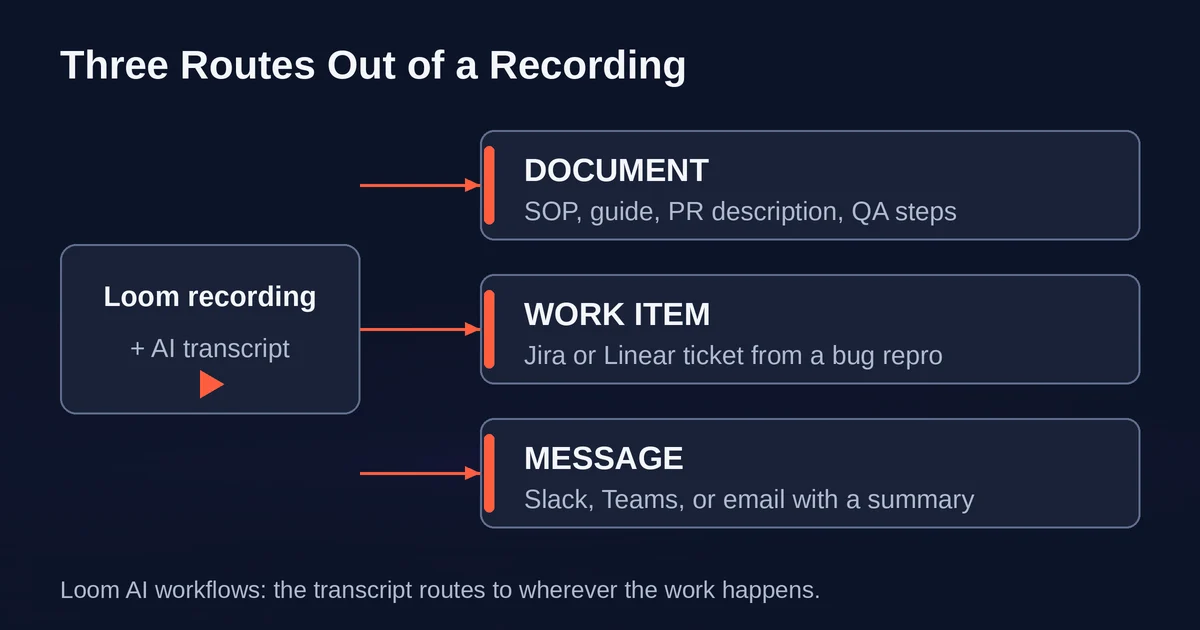
Into a document. Loom turns the transcript into a text document using templates: SOP, step-by-step guide, PR description, QA steps, and code docs. It also pulls screenshots from your recording into the relevant steps automatically, which is the part that makes the output feel like real documentation instead of a wall of prose. One catch: if you trimmed or stitched the video, the screenshots drop out, so record deliberately if you want the illustrated version. You can edit the result in Loom's editor before copying it out.
Into a work item. This is the bug reporter's dream feature. After recording a repro, Loom AI generates a report with a short description, steps to reproduce, and a link back to the video, then submits it directly to Jira or Linear. The Jira path has a first-party and a third-party variant: the first-party integration requires your Loom account to be linked to an Atlassian account, on a Business + AI or Enterprise plan with AI enabled, with a Jira site on the same email, and it's the only one that populates custom fields. The third-party path works more broadly but fills in project, type, and priority and leaves it there. Linear gets a similar flow: link the workspace, review the generated fields, create the ticket.
Into a message. Loom writes a summarizing message to accompany your video link, with tone presets for Slack & Teams or email. This sounds trivial, but "here's a video, no context" is exactly why async video messages go unwatched. A two line summary in the message body is the difference between a click and a scroll-past.
Notice what all three share: the video stops being the deliverable and becomes the evidence attached to it. The ticket carries the steps to reproduce; the video shows them happening. That combination is unusually hard to fake and unusually fast to verify, which is why bug workflows are where this pattern has real teeth.
Rolling your own routing when the built-in path stops
Native workflows are convenient but bounded: Loom writes to Jira, Linear, and documents. The moment your destination is Asana, Notion, Monday, or a checklist in a support macro, you're in do-it-yourself territory, and the raw material is the transcript. Loom transcribes, but the more interesting transcript export in 2026 comes from the meeting side of this category. Grain's AI Transcript Actions package a recording as an enriched Markdown file: the full speaker-labeled transcript plus participant roles, links to your three most recent meetings with each person, outstanding action items from those meetings, and your private notes. One click sends it to Claude or ChatGPT with a prefilled prompt, or copies it to your clipboard for any other model.
That enriched transcript is a blueprint for serious action routing. Paste it into an LLM with a prompt like "extract every commitment and open question, output as a table with owner and deadline," and you have a follow-up checklist that is arguably better than what most meeting tools generate natively, because the model sees not just this conversation but the last three. Connect that step to an automation platform like Zapier, Make, or n8n and the checklist can become tickets automatically. If you're weighing that path, our comparison of Zapier, Make, and n8n for AI workflows covers which one fits AI-heavy routing.
Two warnings from hard experience. First, auto-created tickets that nobody triages are worse than no tickets: they rot the board and teach everyone to ignore the source. Second, transcription errors propagate. A name misheard becomes a ticket assigned to nobody; a number misheard becomes a wrong deadline. Routing helps you move information, not verify it. The checklist for avoiding that trap looks a lot like the general mistakes teams make with AI automations: keep a human review step on anything that creates commitments for other people.
Where async video beats meetings, and where it just adds work
The honest case for async video, minus the hype:
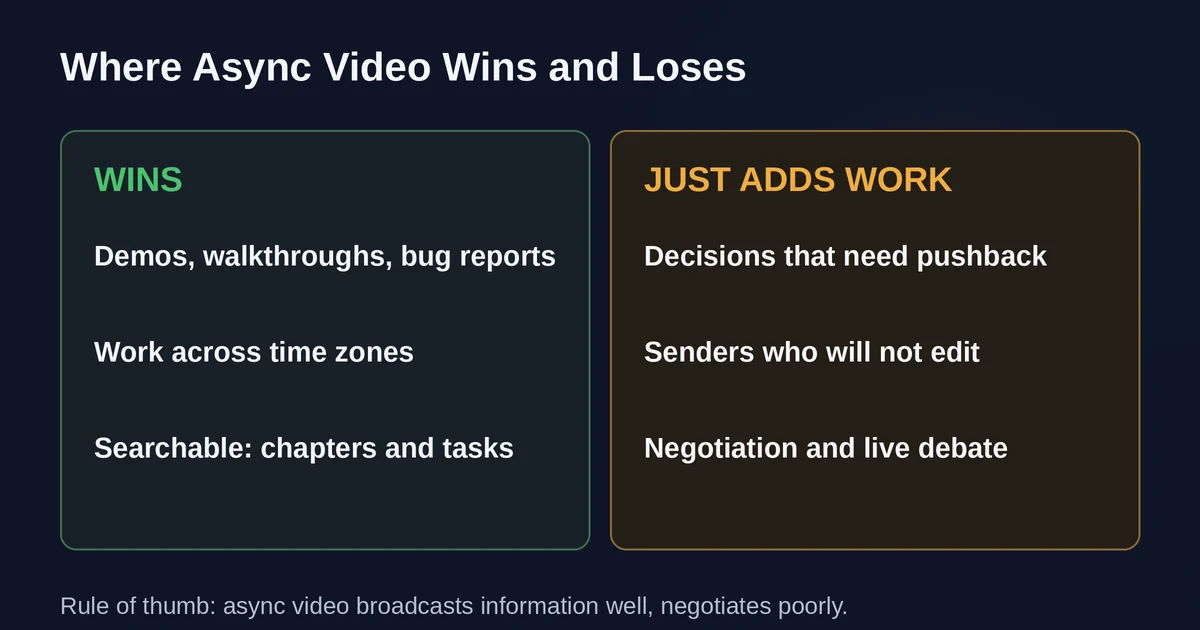
It genuinely wins for demos, walkthroughs, and bug reports. Anything where the value is "watch what I show you" compresses beautifully. A thirty minute meeting becomes a six minute video watched at 1.5x, with chapters so the reviewer skips what they already know. Recording also forces the sender to think through their explanation once, which meetings let you improvise.
It wins across time zones. The recording waits. Nobody schedules a 7am call to accommodate a colleague in another hemisphere.
The summary-and-routing layer is what makes it searchable. A recording nobody can skim is a black box; a recording with chapters, a summary, and extracted tasks is a document you can find again in three months.
It loses for decisions that need pushback. If the right response to your video is "I disagree, and here's why," you have serialized a discussion that needed to be live. Now you're trading meeting latency for video ping-pong.
It loses when the sender won't edit. A rambly twenty minute capture that should be four minutes is not saved by AI cleanup; filler removal can't restructure a thought. Async video works when the sender invests ten minutes of preparation, and becomes make-work when they don't.
The pattern: async video with routing is excellent for broadcasting information and capturing implicit to-dos, and poor for negotiation. Teams that split their communication accordingly get the benefit; teams that try to replace every meeting usually end up with both the meetings and the videos.
The September 2026 tool landscape
Loom is the category default and, post-acquisition, the most integrated: the AI suite plus native routing to Jira, Linear, and (on the roadmap) Confluence makes it the obvious pick for Atlassian shops. The costs of that position are real though: AI features sit on the higher tiers, and the free plan's caps push active teams onto paid plans quickly.
The alternatives split by job. Grain is the meeting-first counterpart: it records calls, extracts notes and action items, and its enriched transcripts are built for handing off to other AI tools, a smart bet for custom routing. Vidyard dominates the sales lane with per-viewer analytics and CRM triggers; it's overkill for internal updates. Tella competes on polish for customer-facing recordings. Bubbles bridges meeting notes and async clips, and tl;dv still holds space in meeting-transcription comparisons. The market has clearly specialized: pick by what happens after the recording, not by recording quality, which is roughly equal everywhere now.
The verdict
The summarizing part of async video AI is solved and unremarkable: every serious tool generates titles, summaries, and chapters, and they're all fine. The action-routing part is the actual product category now, and it's earlier and more interesting. Loom's video-to-Jira-ticket and video-to-SOP flows are worth using today if you're in the Atlassian ecosystem, with real caveats (English-only docs, no mobile workflows, screenshot loss after trims, and plan gating). Outside that ecosystem, the winning move is treating the transcript as the product: Grain-style enriched exports into an LLM, then routing to wherever your work lives, gives you the same outcome with more control and more knobs to get wrong.
Either way, the discipline that matters hasn't changed: record short, know your one point per video, and route the outputs somewhere with an owner and a review step. The tools now write the follow-up checklist for you. Deciding whether the items on it deserve to exist is still your job.
Pricing and plan details are as published by the vendor around September 2026 and can change. Confirm on the official site.
FAQ
Does Loom AI work on the free plan? No. AI features, including summaries, filler removal, and AI workflows, require a paid plan with Loom AI. The free plan caps how many videos you can keep, so teams evaluating it should check the current plan page.
Can Loom create tickets automatically without me reviewing them? No. Loom AI pre-fills the work item, but you confirm and click Create in Jira or Linear yourself. Fully hands-off ticket creation is something you'd build yourself with the transcript and an automation platform, and it's exactly the kind of pipeline that needs a triage step before it earns trust.
Pricing and plan details are as published by the vendor around September 2026 and can change - confirm on the official site.