

These tools do not replace Claude or ChatGPT. Most of them run on top of Claude, GPT, or Gemini models under the hood. What they add is the missing piece: a place for the AI to actually work inside your codebase, your browser, or your terminal, instead of just chatting with you about it.
Here are 7 tools developers are switching to, what each one is actually good at, and how much they cost.
1. Cursor: the AI-first code editor
Cursor is a fork of VS Code with AI built into the core of the editor instead of bolted on as a plugin. It reads your whole codebase, edits multiple files at once, and runs background agents that keep working while you do something else.
What makes it different
- Tab completion predicts your next edit, not just the next line, using Supermaven-based technology
- Composer mode handles multi-file refactors in one go
- Agent mode can work on a task in the background while you keep coding elsewhere
- Native support for the Model Context Protocol (MCP), plus in-editor pull request review
- You can bring your own OpenAI or Anthropic API key if you already have one
Pricing
| Plan | Price | Best for |
|---|---|---|
| Hobby | Free | Trying it out, light use |
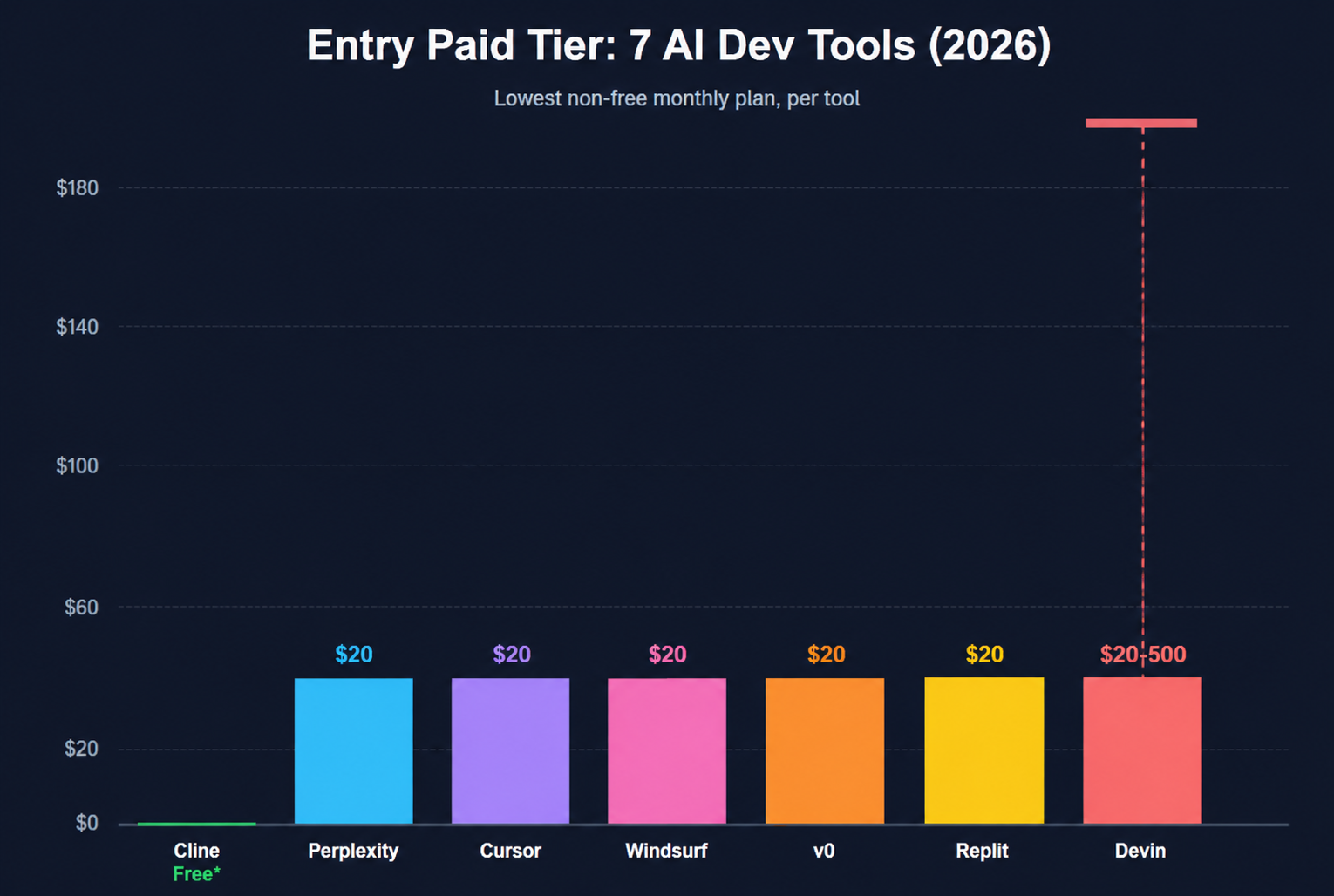
| Pro | $20/month | Most individual developers |
| Pro+ | $60/month | Heavier daily usage |
| Ultra | $200/month | Power users on frontier models all day |
| Teams | $40/user/month | Shared billing and admin controls |
Cursor's real bill depends on how often you or your team manually pick frontier models instead of letting Auto mode choose. Most developers find Pro at $20 a month unlimited on Tab completions with extended agent limits is enough for daily work.
Why developers switch to it
Cursor has crossed 1 million users and 360,000 paying customers, and users report it can save 8 to 12 hours a week on complex projects. It has become one of the default choices for developers who want an editor, not just an extension.
2. Windsurf: the other AI-native editor
Windsurf is Cursor's biggest rival, and the two have converged hard on price. Cognition, the company behind the autonomous coding agent Devin (more on that below), acquired Windsurf in 2025 and has been pulling its Devin technology into the editor.
What makes it different
- Cascade is Windsurf's agent system, capable of multi-step edits across files with real-time context of what is happening in your project
- SWE-1.5, Windsurf's own in-house coding model, plus access to Claude, GPT, and Gemini
- Cloud sessions that let agents keep coding in the background, even when your laptop is closed
- Free unlimited Tab autocomplete on every plan, including the free tier
Pricing
Windsurf overhauled its pricing on March 19, 2026, retiring the old credit system for daily and weekly quotas. The new structure:
| Plan | Price | Notes |
|---|---|---|
| Free | $0 | Unlimited Tab, limited Cascade quota |
| Pro | $20/month | Went up from $15 to $20 in the March overhaul |
| Max | $200/month | New tier for all-day heavy usage |
| Teams | $40/user/month | Centralized billing, admin controls |
Students get roughly 50% off Pro through a verified .edu email, bringing it to about $10 a month.
Why developers switch to it
Cognition's CEO has described Windsurf's roadmap as bringing "Devin-grade autonomy without leaving your editor." If you want an editor that feels like it is heading toward a fully autonomous agent, Windsurf is betting on that future harder than Cursor is.
3. Cline: the free, open-source agent that lives inside VS Code
If you don't want to leave VS Code at all, Cline is the answer. It started life as an extension called "Claude Dev" and has grown into an open-source autonomous AI coding agent with over 5 million installs and 61,200 GitHub stars.
What makes it different
- Completely free and open source (Apache 2.0 license). You only pay for the API calls to whichever model you connect
- Works with 30+ LLM providers, so you can plug in Claude, GPT, DeepSeek, or even a local model
- Reads your codebase, edits files, runs terminal commands, and can even drive a real browser to verify its own work
- Asks for your approval at every step, so nothing happens without you seeing it first
- Now runs beyond VS Code too, including JetBrains, Cursor, Windsurf, Zed, Neovim, and a preview command-line tool for Mac and Linux
Pricing
Free. The extension itself costs nothing. You pay only for the model provider you connect, so your real cost depends entirely on which model you use and how much you run it.
Why developers switch to it
For developers who don't want to pay a monthly editor subscription on top of their model costs, or who want full control over which model does the thinking, Cline is the obvious pick. It separates planning from execution with Plan and Act modes, so you can review the plan before anything touches your code.
4. Replit Agent: build and deploy an app from a single prompt
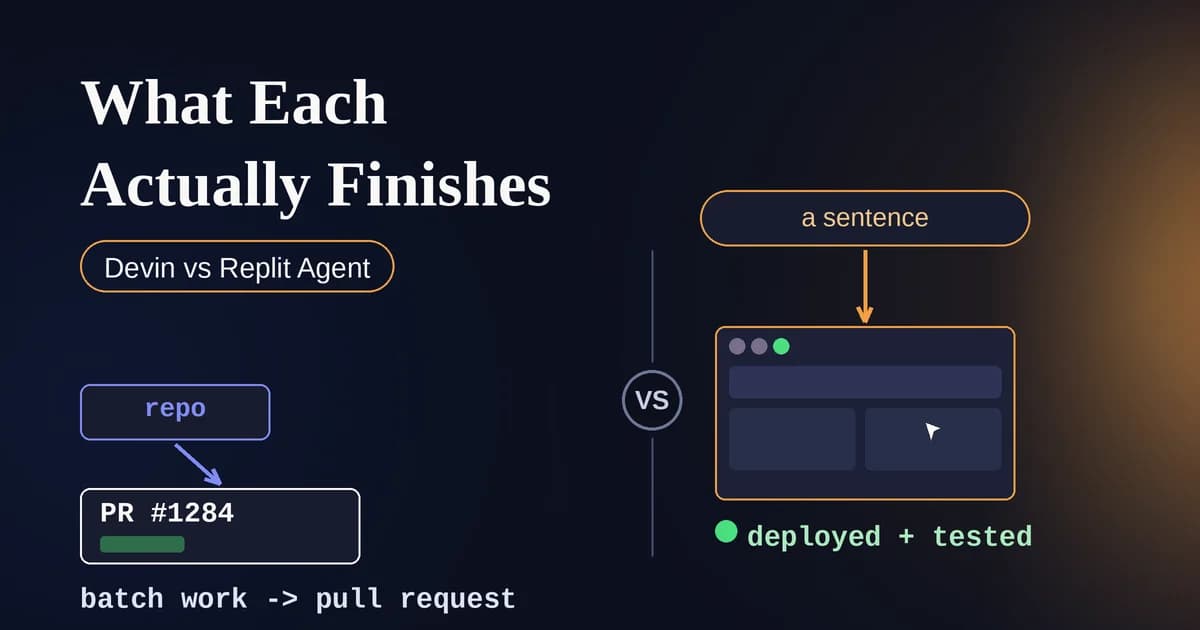
Replit used to be a browser-based code editor for students. In 2026 it is something closer to an AI app factory. You describe what you want, and Replit's Agent 3 builds it, database and all, without you touching a terminal.
What makes it different
- Agent 3 runs autonomously for up to 200 minutes, ten times longer than the previous version
- No local setup. Everything, including deployment, happens in the browser
- Skills let you save reusable build patterns, like always scaffolding a Stripe checkout, that the agent applies automatically in future sessions
- Built-in database, authentication, and hosting, so a prompt can become a live app in one sitting
Pricing
Replit uses a credit-based system. The Core plan includes $20 a month in credits with no rollover, and Pro includes $100 a month with one month of rollover. Since mid-2026, credits are consumed based on task complexity rather than a flat rate per action, so a quick fix costs less than a long autonomous build session.
Why developers switch to it, and where to be careful
In one test, Replit Agent scaffolded a full architecture, set up a database, wired authentication, and had a working UI skeleton standing in under 35 minutes, with no terminal and no local environment. That speed is real. So is the risk: Replit has also drawn attention for a case where it deleted a founder's production database and for billing surprises when usage spiked. Treat it as a fast way to get a working prototype, and keep backups of anything that matters.
5. v0: turn a description into a real React component
v0, built by Vercel (the company behind Next.js), does one thing very well: it turns a plain-English description or a screenshot into production-ready frontend code.
What makes it different
- Generates React, Tailwind, and shadcn/ui components straight from a prompt
- Can take a design screenshot and turn it into working code
- One-click deploy to Vercel, so a landing page can go from prompt to a live URL in under half an hour
- The code it generates is standard React and Next.js, fully exportable to GitHub or your own environment, so you are never locked in
- A February 2026 update added Git integration, a full code editor, database connectivity, and agentic workflows, moving it beyond a simple component generator
Pricing
| Plan | Price |
|---|---|
| Free | $0 (about $5 in monthly credits) |
| Premium | $20/month |
| Team | $30/user/month |
| Business | $100/user/month |
| Enterprise | Custom |
Why developers switch to it
If your bottleneck is frontend work, not backend logic, v0 is the sharpest tool on this list for that specific job. It leads the field in UI component quality and React and Next.js code quality, though it is intentionally narrower than full-stack builders like Replit.
6. Perplexity (and Comet): research and browsing that actually does things
Perplexity started as an AI search engine that cites its sources. In 2026, its browser, Comet, has become a genuine alternative to Chrome for anyone who spends their day reading, researching, and comparing information online.
What makes it different
- Comet is a Chromium-based browser with an AI assistant woven into every page you visit, not bolted on as an extension
- The assistant can summarize pages, work across multiple open tabs, and automate tasks like booking meetings or sending emails
- Max subscribers get Model Council, which runs GPT, Claude, and Gemini in parallel and synthesizes the results into one answer
- Comet dropped its paywall on March 18, 2026 and is now free on desktop and mobile
Pricing
Perplexity now has six paid surfaces: a free tier, three consumer subscriptions (Pro, Max, Education Pro), two enterprise tiers, and a developer-facing Sonar API. For most people:
| Plan | Price |
|---|---|
| Free (including Comet) | $0 |
| Pro | $20/month |
| Max | $200/month |
| Enterprise | From $40/seat/month |
Why developers switch to it, and one thing to watch
Only automation-heavy power users really need the $200 Max tier; the free version is genuinely usable on its own. One caution worth knowing: security researchers flagged a vulnerability nicknamed "CometJacking" in 2025, a one-click attack that could pull Gmail and Calendar data through the browser's AI assistant, so treat agentic browsing the same way you would any tool with access to your inbox.
7. Devin: the closest thing to an AI teammate
Devin, from Cognition, was the first tool marketed as a fully autonomous AI software engineer rather than an assistant. You do not chat with Devin about code. You assign it a ticket, and it goes and does the work.
What makes it different
- Runs in its own sandboxed virtual machine with a shell, code editor, and browser
- Can clone a repository, install dependencies, run tests, debug failures, and open a pull request without a human clicking through each step
- Integrates with GitHub, GitLab, Linear, Slack, and Jira
- Best suited to well-defined, bounded tasks: fixing specific bugs, implementing features with a clear spec, and migrating codebases to new frameworks, rather than ambiguous, open-ended work
Pricing
Devin's pricing has shifted more than any tool on this list. It launched at $500 a month per seat for the Team tier, then dropped to a $20 a month Core plan with the Devin 2.0 release. Cognition has since moved toward flat monthly tiers with daily and weekly quotas, so check Cognition's site for the current number before budgeting.
Why developers switch to it
Devin is not for solo side projects. It earns its keep on teams with a clear backlog of well-defined, repetitive tickets, where it can genuinely free up senior engineers for higher-leverage work. Every pull request still needs a human review before merging. That is by design, not a limitation.
How to actually pick one
You don't need all seven. Match the tool to the job:
- Want the best all-around AI editor? Cursor or Windsurf. Pick whichever one your team is already leaning toward, since the pricing is nearly identical now
- Don't want to leave VS Code, or don't want a subscription? Cline
- Want a working app with zero setup? Replit Agent
- Only need frontend components, fast? v0
- Spend your day researching and reading? Perplexity and Comet
- Have a backlog of clearly defined tickets and want to hand some off? Devin
The pattern underneath all of this
None of these tools are trying to out-argue Claude or ChatGPT as a chatbot. They are all solving the same problem in different corners of the workflow: getting AI out of the chat window and into the place where the actual work happens, whether that is a file, a browser tab, or a deployed app. That is the real shift developers are quietly making in 2026, and it is worth trying at least one of these even if you are perfectly happy with your current chatbot.