Developers use several AI coding tools because no single tool covers completions, repo-wide agent work and code review well. A common setup is one tool per layer, with two paid plans.
Short answer: An AI coding stack is a set of tools where each one owns a single job: inline completions, multi-file agent work, or review before merge. It matters because the layers are priced and metered differently, so the right mix is cheaper than one top-tier plan.
How many AI coding tools do developers use?
No survey gives a tools-per-developer count, but the per-tool numbers overlap. JetBrains' January 2026 AI Pulse polled over 10,000 professional developers. It found 74% had adopted specialized AI coding tools.
At work, usage splits across vendors:
- GitHub Copilot: 29% use it at work, and 76% have heard of it.
- Cursor: 18% use it at work.
- Claude Code: 18% use it at work, up 6x from roughly 3% in April to June 2025. JetBrains reports a CSAT of 91% and an NPS of 54.
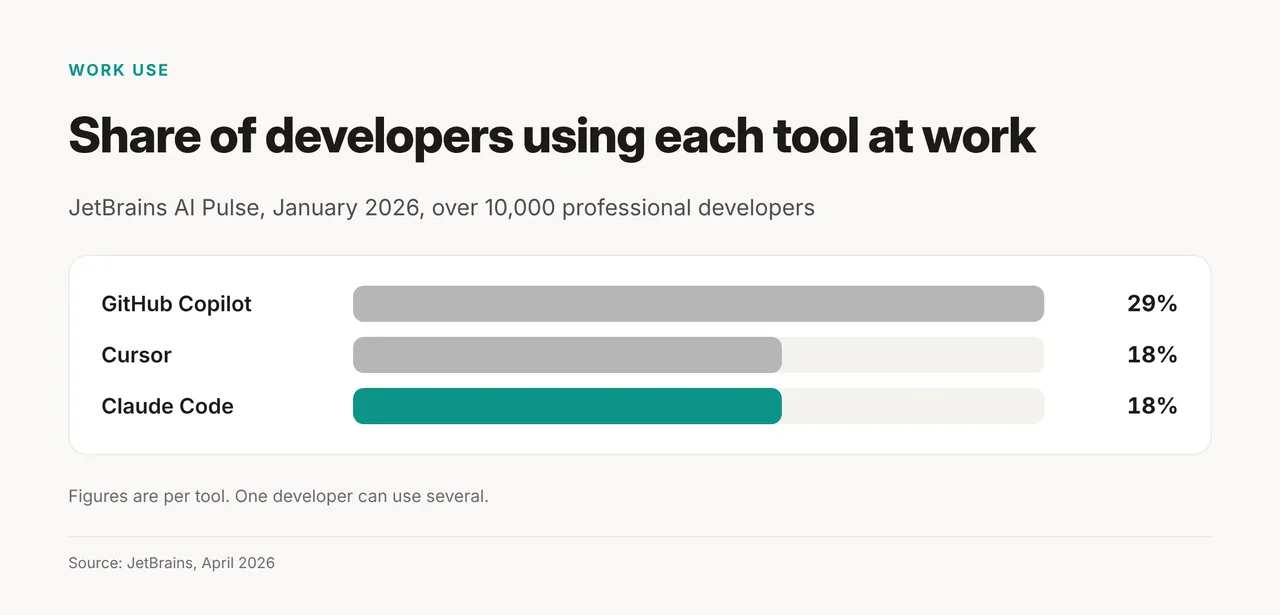
Copilot leads work use at 29%, while Cursor and Claude Code tie at 18%. The Stack Overflow 2026 Developer Survey measures something else: coding agents. There, Claude Code (66%) and GitHub Copilot (59%) lead. It also found 73% of respondents use coding assistants and agents daily. The two surveys ask different groups different questions, so read them side by side, not as one ranking.
How a three-layer AI coding stack works
Each layer has a different job, speed and billing meter. That is why one tool rarely wins all three.
| Layer | Job | Typical tools |
|---|---|---|
| Editor completions | Inline suggestions while you type | GitHub Copilot, JetBrains AI Assistant |
| Repo-level agent | Multi-file changes, debugging across the codebase | Claude Code, Cursor |
| Review | Catch problems before AI-written code merges | CodeRabbit, Qodo |
- Completions run all day. On Copilot, code completions and next edit suggestions don't use AI Credits.
- Agents run per task. Copilot's agent mode, chat and CLI spend credits at $0.01 each. Cursor meters agent usage on an allowance that refreshes weekly.
- Review runs per pull request. Our AI code review tools comparison covers which reviewers catch real bugs.
What does an AI coding stack cost in October 2026?
An entry-tier two-tool stack costs $20 to $30 a month per developer at list prices. Each vendor's plans, checked October 21, 2026:
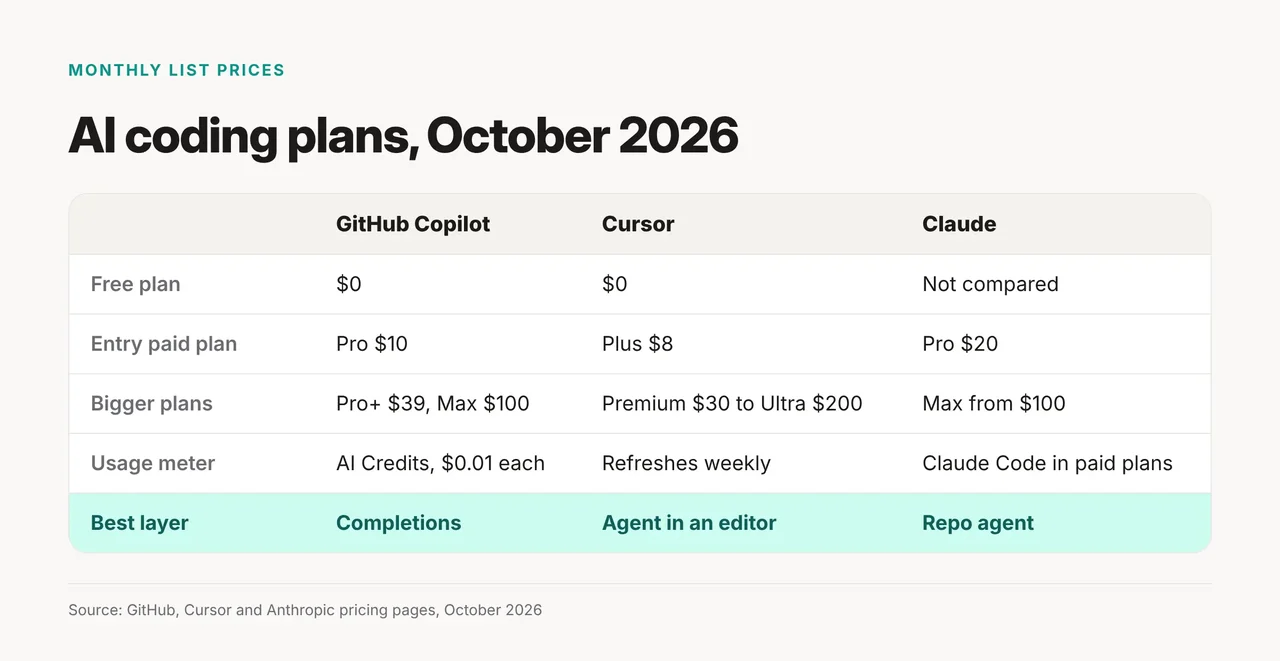
- GitHub Copilot: Free $0 (2,000 completions, 50 chat requests), Pro $10, Pro+ $39, Max $100 a month.
- Cursor: Free $0, Plus $8, Premium $30, Super $100, Ultra $200. Teams is $30+/user/month.
- Claude: Pro is $20 billed monthly or $17 a month billed yearly. Max starts at $100 a month. Claude Code is included in all paid plans.
Example stacks: Copilot Pro plus Claude Pro is $30 a month. Cursor Plus plus Claude Pro is $28. Copilot Free plus Claude Pro is $20. Cursor's plan names differ from its older Pro tiers, so confirm the tier before you buy.
Try it yourself: pick one tool per layer
Use this rule: one tool per layer, and add a second only when the first can't do the job.
- Completions: start with Copilot Free. Upgrade to Pro only if you hit the 2,000-completion cap.
- Agent: pick Claude Code or Cursor, not both. Claude Code comes with any paid Claude plan. Cursor puts the agent inside its editor. Our Cursor vs Windsurf test covers agentic IDEs in more depth.
- Review: add a reviewer once agents write most of a pull request.
- Check after a month: if two tools do the same job, cancel one.
Don't confuse more tools with more speed
More tools add cost and context switching, not guaranteed speed. Three risks to plan for:
| Risk | What the evidence shows |
|---|---|
| Trust | Stack Overflow: 48% trust AI when they can easily validate answers; only 16% extend trust to most tasks. |
| Measured speed | METR: 16 experienced developers took 19% longer with early-2025 AI tools, yet believed AI sped them up by 20%. |
| Ownership | Cursor is now part of SpaceX, a deal that closed August 14, 2026. Windsurf, another agentic IDE, now redirects to Devin Desktop. |
METR's study used early-2025 tools on familiar codebases, so treat it as a warning, not a verdict on 2026 tools. Measure your own task times before and after adding a tool.