
Google AI Mode can now read your Google Wallet accounts through Personal Intelligence, but only if you opt in, and it can't move your money. Wallet started rolling out on November 23, 2026, and Google's announcement says Drive and the Gemini app follow "in the coming weeks", with no firm date. To stop it, open Search Personalization in AI Mode, select Connected Apps and switch off any app you've connected.
The bigger privacy details sit in Google's help pages. Connecting Gmail, Calendar or Photos opens them to every Search service, not just AI Mode, and what Google infers from those apps may be used to show you ads. Switching an app off also doesn't delete your Search Services History, which you manage separately at activity.google.com.
Below is an app-by-app checklist built only from Google's own pages, plus the switches to flip.
What is Personal Intelligence in Google Search?
Personal Intelligence is Google's opt-in feature that lets AI Mode in Search use your own Google apps to tailor its answers. As of November 2026, you can connect Gmail, Google Calendar and Google Photos, with Google Wallet rolling out now and Google Drive due next.
Think of it as handing a well-read assistant the keys to a few of your filing cabinets. Ask for a dinner plan and the answer can lean on what it has picked up about you. If it gets you wrong, Google's own example is to reply in the thread with "I'm no longer a vegetarian" and let it adjust.
Google says AI Overviews (the AI-written summaries in regular search results) and AI Mode will also start tailoring answers to your recent searches.
One yes reaches past AI Mode
Google's help page says connecting your apps gives access to all Search services: Google Search (including AI Mode and Discover), Maps (including Ask Maps), Shopping, Flights, Hotel, Translate and News. The consent works like a building pass, not a key to one room.
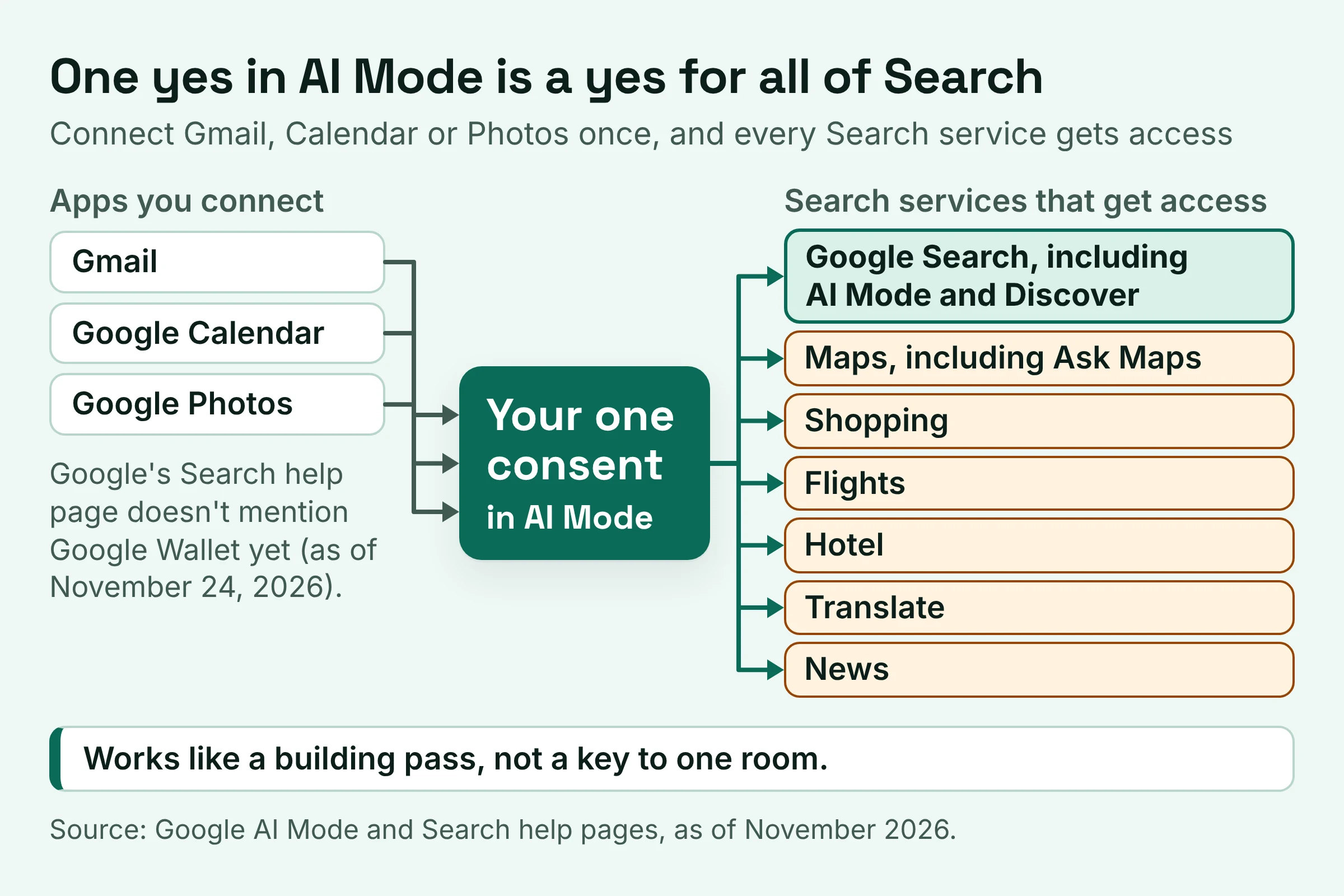
Google's AI Mode help page puts it plainly: "Consenting to this experience means that all Search services will be permitted to access Workspace and Google Photos". So a yes in AI Mode is a yes for Maps and Shopping too.
What can Google AI Mode see in your Drive and Wallet?
As of November 2026, Google AI Mode can read your Google Wallet accounts once you connect them, and only read them. Google Drive isn't connectable in AI Mode yet, and Google hasn't said exactly which files or file types AI Mode will read from it.
On Wallet, Google is explicit: "AI Mode can only read information from your accounts; it can't move, manage, or invest your money".
Google Wallet: read-only money context
Google pitches the Wallet connection for two jobs: mapping out your financial milestones and finding ways to trim everyday spending. It also says you can get more from credit card benefits, such as cash-back categories, travel perks and reward points, based on the cards linked in Wallet.
In practice, that means questions like Which of my cards earns the most on groceries? or Where did my takeout money go last month? (our examples, not Google's).
Google hasn't published exactly which Wallet data AI Mode reads. The closest guide is the Gemini app's connected apps help page. It says the Gemini app's Wallet connection (US only) covers:
- your payment methods;
- receipts;
- data from Google services saved in Wallet;
- financial account info linked through services such as Plaid, which Wallet uses to link your bank and credit card accounts.
In the Gemini app, Google says that data lets Gemini find recurring charges across your linked accounts, flag price increases and suggest a budget from your last year of transactions. Whether AI Mode gets the same set of data, Google hasn't said.
Google Drive: announced, not live
Google says Drive support arrives in AI Mode in the coming weeks, with no firm date. Its example is a personalized preparation plan ahead of tax season that draws on the context in your files.
Picture a Drive folder with last year's return, a few pay stubs and a receipt for a new laptop. A prompt like Make me a checklist for filing my taxes this year is the kind of job Google describes. Google's help page says Search may reference summaries, excerpts and inferences from connected apps, but it hasn't said how that works for Drive files.
What does each connected app share, and how does Google use it?
As of November 2026, Google's help pages give Gmail and Google Photos the clearest written limits on AI training and ads, while the new Wallet connection isn't covered on the Search help page yet. Here is the app-by-app checklist.
| App | Status in AI Mode (Nov 2026) | Who can connect | Trained on directly? | Ads based directly on it? | Best for |
|---|---|---|---|---|---|
| Gmail | Live; first offered January 2026 to Google AI Pro and AI Ultra subscribers | 18+, personal account, listed countries | No, Google says | No; advertisers can't access your inbox | Questions your email can answer |
| Google Calendar | Live | US, in English only | No, Google says | No exception listed | Questions about your schedule |
| Google Photos | Live; first offered January 2026 | Not available in all regions | Not on your imagery or audio, Google says | No; advertisers can't access your library | Questions your pictures can answer |
| Google Wallet | Rolling out from November 23, 2026; opt-in | No countries named (Gemini app version: US only) | Not covered on the Search help page yet | Not covered yet | Spending and card-perk questions, read-only |
| Google Drive | Coming weeks; no date | Not stated yet | No, Google says (Drive is named) | No exception listed | Paperwork, such as a tax-season prep plan |
No exception listed means Google's ad promise names only Gmail and Photos, so the general rules below apply to those apps.
The rules on Google's Search help page
These cover connected apps in general. As of November 24, 2026, the page doesn't mention Wallet at all.
- Opt-in, app by app. Nothing connects unless you choose it, and you can turn each connection on or off at any time.
- One yes covers all Search services. Connected data can be used across AI Mode, Discover, Maps, Shopping, Flights, Hotel, Translate and News.
- Inferences can shape ads. Summaries, excerpts and inferences (conclusions drawn from your data) help personalize results, and that same info may be used to show you ads.
- Your chats can train models. Google trains models on your questions and its answers, after steps to reduce personal information.
- Humans may read some of it. A subset of connected-app data processed by AI Mode and Ask Maps goes to human reviewers, including trained service providers, to debug, protect and improve the services. Google says they don't view media from your Photos library, except for abuse and harm cases or when you submit feedback.
- Disconnecting isn't deleting. Turning an app off doesn't remove anything from your Search Services History, and that history can still be used to train models.
- Mistakes happen. Google warns that Personal Intelligence might not always get personalization right.
Does Google AI Mode use your Gmail to train AI or pick your ads?
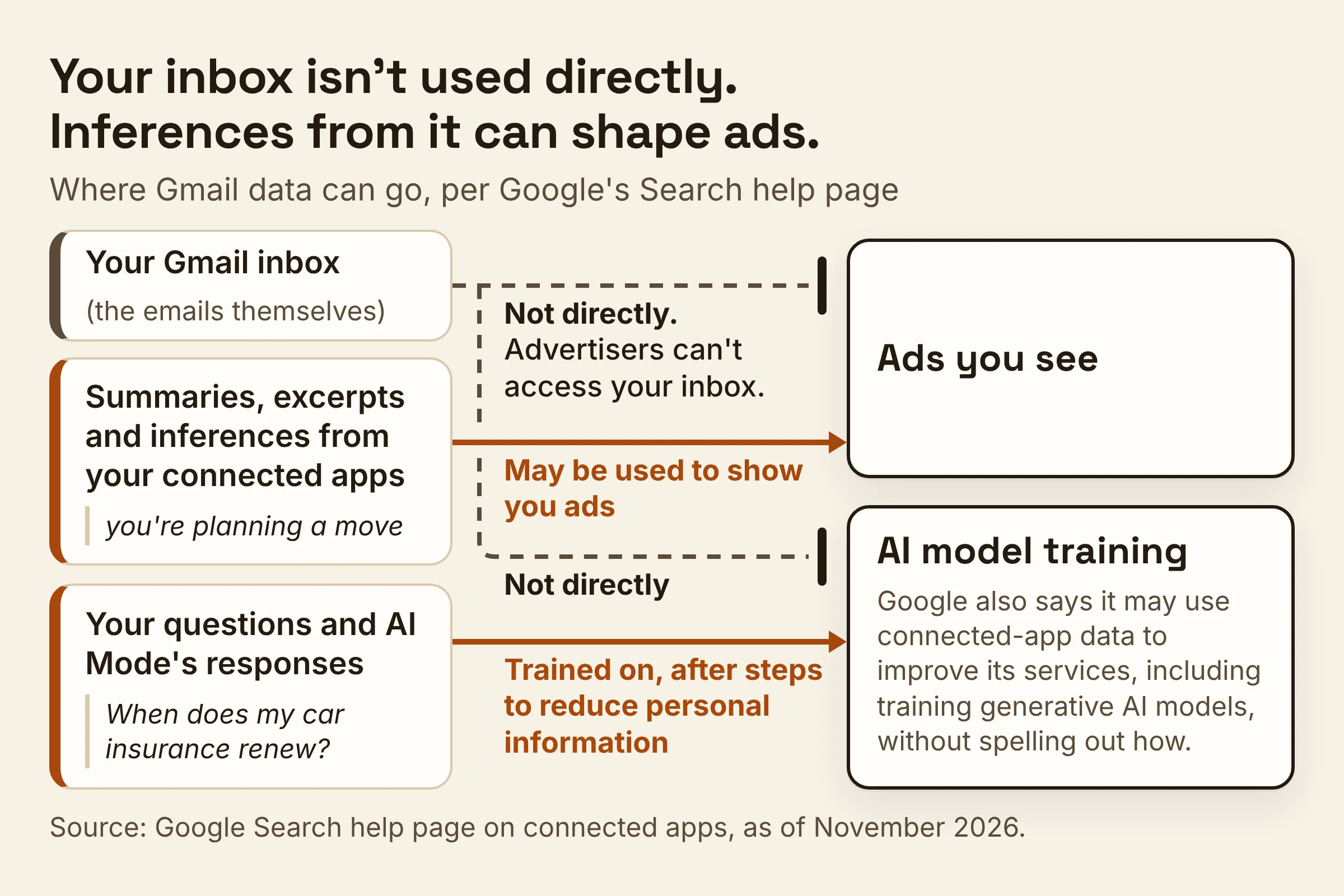
Not directly, according to Google's Search help page as of November 2026: Search services don't train generative AI models directly on your Gmail inbox, and ads aren't based directly on it. Google does train on your questions, AI Mode's responses and how its models produced them. And inferences from your connected apps may be used to show you ads.
Training: the inbox is out, your questions are in
The same no-direct-training rule covers Drive, Calendar, other Workspace apps and the imagery or audio in Google Photos.
Say you ask AI Mode When does my car insurance renew? and it finds the date in an email from your insurer. Your inbox isn't fed directly into training. That question and answer, though, are the kind of interaction Google says it trains on, after it takes steps to reduce personal information (unless it's dealing with abuse or harm).
Google's help page on connecting apps to Search also says it may use connected-app data "to improve Google services for everyone, including by training generative AI models". So the promise is narrower than it first sounds. The raw inbox isn't trained on directly, and Google doesn't spell out what the indirect route looks like.
Ads: no advertiser access, but inferences count
Ads won't be based directly on your Gmail inbox or Photos library, and advertisers don't get access to either. The catch is another line on the same help page: summaries, excerpts and inferences from your connected apps may be used to show you ads.
So if your connected apps make it obvious you're planning a move, Google's help page leaves room for that inference to shape your ads, even though no advertiser sees the email. If you're weighing other AI features that read your inbox, browse our Gmail articles.
How do you turn off Personal Intelligence or disconnect Gmail?
As of November 2026, you can switch off Gmail, Wallet or any other connected app at any time, from Search Personalization in AI Mode or from the Search Services Personalization page in your Google Account. To turn personalization off completely, use Search Settings. Then clear your Search Services History at activity.google.com, because disconnecting doesn't delete it.
| What you want | Where to go | What it does |
|---|---|---|
| Stop one app, such as Gmail | Connected Apps (steps below) | Ends that connection; your Search Services History stays |
| Stop all personalization | Search Settings, or your personalized recommendations setting | Opts you out of AI Mode personalization |
| Remove what's already stored | activity.google.com | Lets you delete Search Services History, which can otherwise still be used for training |
| Fix one wrong guess | Reply in the AI Mode thread | Corrects or clarifies, with nothing disconnected |
Step by step: disconnect one app
- In AI Mode, open Search Personalization. On a computer, you can instead open your Google Account and go to Search Services Personalization.
- Select Connected Apps. That's the label in Google's announcement; the Google Account page may word it differently, since Google says its settings pages are being updated.
- Switch off Gmail, Wallet, Photos or any app you no longer want shared.
- Go to activity.google.com and delete the Search Services History you don't want kept. Google says that data can otherwise still be used for product improvement, including training generative AI models.
For example, if you connected Gmail months ago and asked AI Mode about your bookings, turning Gmail off leaves those past chats in your history until you delete them.
Google also says a Personalization icon below tailored responses will soon show the context AI Mode used. Once it arrives, you'll be able to see where a wrong guess came from before reaching for the off switch.
Who can use Personal Intelligence in AI Mode, and is it free?
As of November 2026, Personal Intelligence in AI Mode is for people 18 and older with a personal Google account and with history and personalized recommendations turned on. Google's AI Mode personalization help page says it's available in the US, in English, and Google's latest posts name no paid plan for it.
There's a wrinkle: Google's connect-apps help page lists a longer set of countries, territories and languages for users 18 and over. On that same page, Calendar is US only in English, and Photos isn't available in all regions. Google's November 23 post names no countries for Wallet or Drive.
The practical test is simple: open Search Personalization and see whether Connected Apps shows up for you. Wallet is only starting to roll out in AI Mode, so a missing Wallet option today may appear later.
Work and school accounts are out. Google says these connected experiences are for personal Google accounts, not Workspace business accounts. The Gemini app's connected apps don't work on work, school or supervised accounts either.
On cost, Personal Intelligence launched in AI Mode in January 2026 as an opt-in for Google AI Pro and AI Ultra subscribers. Neither the March 2026 post making it available in the US nor the November 23 announcement names a plan for AI Mode. Check your settings before assuming you need to upgrade.
When will Drive and the Gemini app connect to AI Mode?
Google hasn't given a date: as of November 24, 2026, it says Drive and the Gemini app connection come to AI Mode in the coming weeks, after Wallet. Here is how the pieces line up so far.
- January 2026: Personal Intelligence comes to AI Mode for Google AI Pro and AI Ultra subscribers, connecting Gmail and Google Photos.
- March 2026: Google says Personal Intelligence is available in the US for AI Mode in Search.
- November 13, 2026: Google Wallet starts rolling out to the Gemini app for all Gemini app users in the US.
- November 23, 2026: Google Wallet starts rolling out to Personal Intelligence in AI Mode, opt-in.
- Coming weeks, no date: Google Drive in AI Mode, plus shared context between the Gemini app and AI Mode.
- Soon, no date: the Personalization icon that shows which context AI Mode used.
Shared context deserves a second look. Google says that if you explore an idea in the Gemini app, AI Mode "will have that foundation to build on, and vice versa". Plan a holiday budget in Gemini and your next AI Mode search could pick it up, so what you tell one assistant may shape the other.
Should you connect Wallet and Drive to AI Mode?
As of November 2026, connect Google Wallet to AI Mode if you want help with spending and card perks and can accept that Google's Search help page doesn't yet say how its ad and training rules apply to Wallet. Wait on Drive until it shows up in your Connected Apps list.
- Connect Wallet if you juggle several cards and want answers about cash-back categories, reward points or trimming everyday spending, knowing AI Mode can only read, not move money.
- Hold off on Wallet if you'd rather see Google's Search help page spell out Wallet's training and ad rules first. As of November 24, 2026, it doesn't.
- Connect Drive when it arrives if your Drive is mostly your own paperwork, like tax documents, and a prep plan built from it would save you an evening.
- Skip Drive if it holds files you'd never want summarized, such as client contracts or a relative's medical records.
- Keep Gmail and Photos connected if their written limits work for you: no direct training on your inbox or photo imagery, no ads based directly on them, and no advertiser access.
- Disconnect Gmail if the thought of inferences from your inbox shaping your ads outweighs the convenience.
Do this next:
- Open Search Services Personalization in your Google Account and check what's already connected; you may have said yes to Gmail or Photos months ago.
- Use the checklist above to keep, add or drop each app.
- If you drop anything, visit activity.google.com and delete the Search Services History you don't want kept.
Eligibility, rollout dates and setting names were checked against Google's own pages in November 2026. Google is still updating them, so expect a label or two to move.