
The Gemini usage limit is not a fixed number of prompts. Google measures how much computing work your requests take, refreshes your allowance every 5 hours, and stops those refreshes once you reach a weekly limit.
Google publishes no absolute numbers for either limit, so what you ask, which model you use and which plan you pay for decide how fast you run out. When you do run out, Gemini's notification tells you when your limit will refresh, and that time is your best clue to which limit you hit.
When does the Gemini usage limit reset?
As of November 2026, Google says your Gemini usage limit refreshes every 5 hours until you reach your weekly limit, and after that you wait for the weekly limit to refresh. Google publishes no reset day or clock time, so the notification Gemini shows when you hit the limit is where you find your exact refresh time.
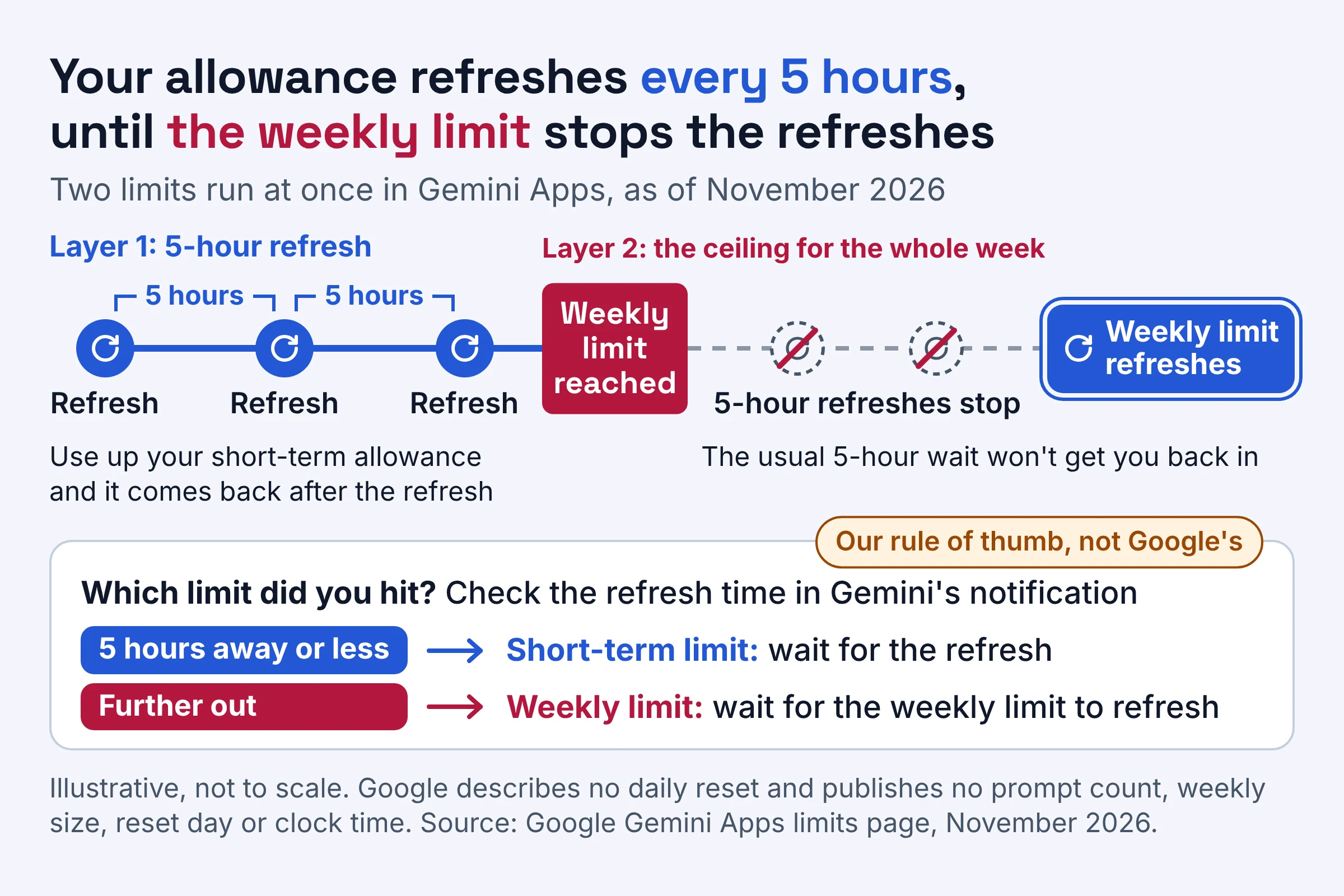
Google's Gemini Apps limits page puts it in one line: "Your limit refreshes every 5 hours until you reach your weekly limit." So two layers work at once:
- The 5-hour refresh is your short-term allowance. Use it up, and as long as you're under the weekly limit, it comes back after the refresh.
- The weekly limit is the ceiling for the whole week. Reach it, and the 5-hour refreshes stop until the weekly limit itself refreshes.
Picture a cafe that refills your cup on a timer but caps your refills per week. Waiting for the timer works right up to the weekly cap; after that, hovering by the counter changes nothing until the cap refreshes.
Does it reset daily? Not in Google's description: the intervals it gives are the 5-hour refresh and the weekly limit. A night's sleep helps only because more than 5 hours have passed, and only if you're still under the weekly limit.
Which limit did you hit? Here's a rule of thumb (ours, not Google's): if the refresh time in the notification is 5 hours away or less, treat it as the short-term limit. If it's further out, you've hit the weekly limit, and the usual 5-hour wait won't get you back in.
How does the Gemini usage limit work?
Gemini Apps use compute-based limits as of November 2026: each request uses up part of your allowance according to how much thinking power it needs. According to Google, the limit factors in the complexity of your prompt, the models and features you use, and the length of your chat.
So two people sending the same number of messages can run out at very different times. Your allowance pays for the effort, not the message.
Google's limits page rates everyday requests like this:
| What you ask Gemini to do | How much it uses, per Google | Why | Everyday example |
|---|---|---|---|
| A simple chat prompt | Very low | Short prompts without follow-up questions need little thinking power | Rewrite this email so it sounds friendlier |
| An ongoing conversation | Medium, rising as the chat gets longer | Gemini re-reads the earlier conversation to keep context | A long back-and-forth polishing one sales pitch |
| Large file analysis | Medium | Gemini reads large blocks of data from long documents, codebases or spreadsheets | Asking for trends across a big sales spreadsheet |
| Deep Research | High | It runs multiple multi-step searches and several rounds of reasoning | A briefing on every competitor in your market |
| Images, music and video | A lot, with video generally using the most | Multimedia requests need a lot of thinking power from Gemini | A short promo clip for social media |
Two settings change the cost of the very same question:
- Effort level. Google's change page says that for each available model, you can choose low, medium or high effort. Higher effort gives more thorough answers but uses more of your limit, so running a subject-line request on high effort is like hiring a lawyer to proofread your grocery list.
- Premium models and features. Google says these use more and can make you reach your limit faster, and it lists Extended thinking and Deep Think among them.
Google's limits page covers Gemini Apps on a personal Google Account, so work and school accounts aren't covered there, and each Google product has its own AI usage limits. Building on the API instead? Our guide to Gemini Decisions API cost and limits walks through that API's rate tiers.
What is the Gemini free usage limit?
As of November 2026, Gemini users without an AI plan get what Google calls standard limits, the baseline that Google AI Plus and Google AI Pro are measured against. Google publishes no prompt count or weekly size for them.
Free accounts also get a 32k-token context window. Per Google's change page, they default to Auto, which sends most prompts to Flash-Lite, Google's fastest model.
Here's what that means day to day:
- Price. Google's plans page lists the free plan at $0 a month with a Google Account.
- Context window. This is how much of your chat and files Gemini can keep in view at once, measured in tokens (small chunks of text). Free accounts get 32k tokens, compared with 128k on Google AI Plus and 1 million on Google AI Pro and Google AI Ultra.
- Auto model selection. Most prompts go to Flash-Lite, and prompts that need deeper reasoning may go to Flash or Pro. Turn smart model selection off, and every response comes from Flash-Lite.
- Heavy features at busy times. For users without a Google AI plan, compute-heavy features like Deep Research may be unavailable during periods of high demand.
The free plan goes furthest on the very-low-cost jobs in the table above, like quick questions and email rewrites.
Does Gemini Pro have usage limits?
Yes. As of November 2026, the Google AI Pro plan has usage limits 4x higher than standard, and it still runs on the same 5-hour refresh and weekly limit. Google publishes the differences in usage limits between plans only as multipliers, never as prompt counts.
Here's how the plans line up on Google's plans page and its limits page. Plus and Pro prices are on that plans page too, so check them there before you buy.
| Plan | Usage limit, as Google words it | Context window | Can buy AI credits | Best for |
|---|---|---|---|---|
| No AI plan ($0 a month) | Standard limits | 32k tokens | No | Quick questions and occasional help |
| Google AI Plus | 2x higher than standard | 128k tokens | Not stated | Regular users who keep hitting the free limit |
| Google AI Pro | 4x higher than standard | 1 million tokens | Yes | Daily work with long files and Deep Research |
| Google AI Ultra ($99.99 a month tier) | 5x higher than AI Pro | 1 million tokens | Yes | Heavy users who run out on AI Pro most weeks |
| Google AI Ultra ($199.99 a month tier) | 20x higher than AI Pro | 1 million tokens | Yes | Video makers and all-week Deep Research users |
What the table can't tell you:
- What 4x actually buys. Four times a number Google doesn't publish is still a number Google doesn't publish. The ratio tells you how much more room you get, not how many prompts.
- How Ultra compares with free. Google states both Ultra multipliers relative to AI Pro, not to standard limits. Read each one that way rather than multiplying them into an Ultra-versus-free figure of your own.
If you meant the Pro model rather than the plan, it counts toward your limit like everything else: Google says the models you use are one of the factors in how fast your limit goes. Plans also decide which features you get, not just how much; our guide to which plan qualifies for Gemini computer use on Mac is a good example.
Why did Gemini's usage limits change?
As of November 2026, the short answer is that Google moved Gemini Apps to compute-based limits that refresh every 5 hours until you reach a weekly limit, so heavy requests cost more of your allowance than light ones. Google's change page dates the changes in waves through 2026, starting on May 17, 2026 for users over 18.
Here's the timeline from Google's change page:
- May 17, 2026: changes to usage limits and model availability started for users over 18.
- July 24, 2026: the same changes took effect for users under 18.
- October 2026: the page says changes to model availability on personal accounts start in October 2026, taking effect for users without an AI subscription on October 9th. AI Plus subscribers should get an email explaining when the changes apply to them.
Google also adds a caveat worth keeping in mind: "Limits may change without notice, including due to capacity constraints." Treat every rule here as Google's current setup, not a promise.
How do you check your Gemini usage?
As of November 2026, you can view your Gemini usage limits at gemini.google.com by selecting Settings at the bottom left, then Usage Limits. Gemini Apps also warn you when you're close to your limit, based on your plan's level, and tell you when your limit will refresh once you reach it.
- Open
gemini.google.com. - Select Settings at the bottom left.
- Select Usage Limits.
Treat the close-to-limit warning as your cue to finish what matters before starting anything heavy. Once you hit the limit, note the refresh time the notification gives you. If you've bought AI credits on Google AI Pro or Google AI Ultra, your remaining balance sits on the AI credits activity page.
If you're tidying up Gemini's settings anyway, our guide to what Google keeps when Gemini Apps Activity is off covers the privacy side.
How can you increase your Gemini usage limit?
As of November 2026, Google gives you three ways to get more Gemini usage: wait for your limit to refresh, upgrade to a plan with a higher multiplier, or buy AI credits if you're on Google AI Pro or Google AI Ultra. Subscribers who reach their limit can also keep going on Flash-Lite, and anyone can make the existing allowance last longer.
Stretch the allowance you already have
Copy this checklist into your notes:
- Start a new chat for each new topic. It's Google's own tip: "Start a new chat when you move to a new topic." A fresh chat means Gemini isn't re-reading a morning's worth of unrelated history.
- Match effort to the job. Use low effort for rewrites and quick facts, and save high effort for problems that need real reasoning.
- Keep premium features for hard problems. Extended thinking and Deep Think use more of your limit, so a quick definition doesn't need them.
- Scope Deep Research tightly. It's rated high usage, so one well-defined request beats several vague ones.
- Treat video as the expensive option. Google says video generally uses the most, so draft the script in text first and generate once.
- Share only the part of the file you need. Large files cost medium usage, so paste the relevant section of a long report instead of the whole thing when you can.
- Get the first prompt right. Fewer follow-ups means fewer costly rounds, and our guide on how to prompt ChatGPT, Claude and Gemini differently helps you get there.
Buy AI credits (Google AI Pro and Ultra)
Google's plans page says you can extend your limits by purchasing AI credits, and the AI credits help page adds the fine print:
- Google AI Pro and Google AI Ultra members who reach their plan's limit can buy AI credits for extra usage in Gemini.
- Members subscribed through a third party, Pixel Pass or Apple billing can't buy them.
- Credits work in countries or regions where Gemini Apps are available, except Japan.
- Credits may expire after a period that's set out when you get them.
- Different features and models use different amounts of credits.
Google's credits page doesn't list credit prices, pack sizes or how many credits each plan includes, so check the price at checkout before you commit.
Upgrade if the weekly limit is a weekly event
Credits suit a one-off crunch, like a deadline week. If you hit the weekly limit most weeks, a higher plan from the comparison table above is the fix that keeps working.
Gemini usage limit reached: which fix fits your situation?
As of November 2026, when Gemini says you've reached your limit, Google's options are to wait for the refresh, continue on Flash-Lite if you subscribe, buy AI credits on Google AI Pro or Google AI Ultra, or upgrade. Which one fits depends on the limit you hit and your plan, so this table gives one move per situation.
| Situation | Your plan | Best move | Based on |
|---|---|---|---|
| Close-to-limit warning | Any plan | Finish the task that matters, then switch to low effort for the rest | Long chats and higher effort use more of your limit |
| Limit reached, refresh 5 hours away or less | No AI plan | Wait for the refresh and save heavy jobs for after it | Google says you can wait or upgrade |
| Limit reached, refresh more than 5 hours away | No AI plan | Wait, or upgrade if this keeps happening | Google says you can wait or upgrade |
| Limit reached, any refresh time | AI Plus, AI Pro or AI Ultra | Keep going on Flash-Lite for lighter work | Google says subscribers can continue with Flash-Lite |
| Limit reached, refresh more than 5 hours away, task can't wait | AI Pro or AI Ultra | Buy AI credits | Credits give AI Pro and AI Ultra members extra usage |
| Weekly limit reached most weeks | Any plan | Move up a plan | Higher plans have higher multipliers |
Whatever the exact wording of the message, look at the refresh time first: it tells you which row you're in.
Do this next
The simplest way to live with the Gemini usage limit is to check your standing before heavy jobs, spend your allowance on the work that needs it, and pick your fix by how often you run out.
- Check your standing before big jobs. Open Settings, then Usage Limits, before you start Deep Research, a long file or a video.
- Run tasks in cost order. Do heavy work while you have room, and keep quick rewrites on low effort for when you're running low.
- Decide by pattern, not panic. A bad afternoon calls for waiting, or Flash-Lite if you subscribe. A deadline week calls for AI credits on Google AI Pro or Ultra, and hitting the weekly limit most weeks calls for a bigger plan.
Plan multipliers, Ultra prices and limits here come from Google's help and plans pages as checked in November 2026. Google says limits can change without notice, so recheck before you pay for anything.