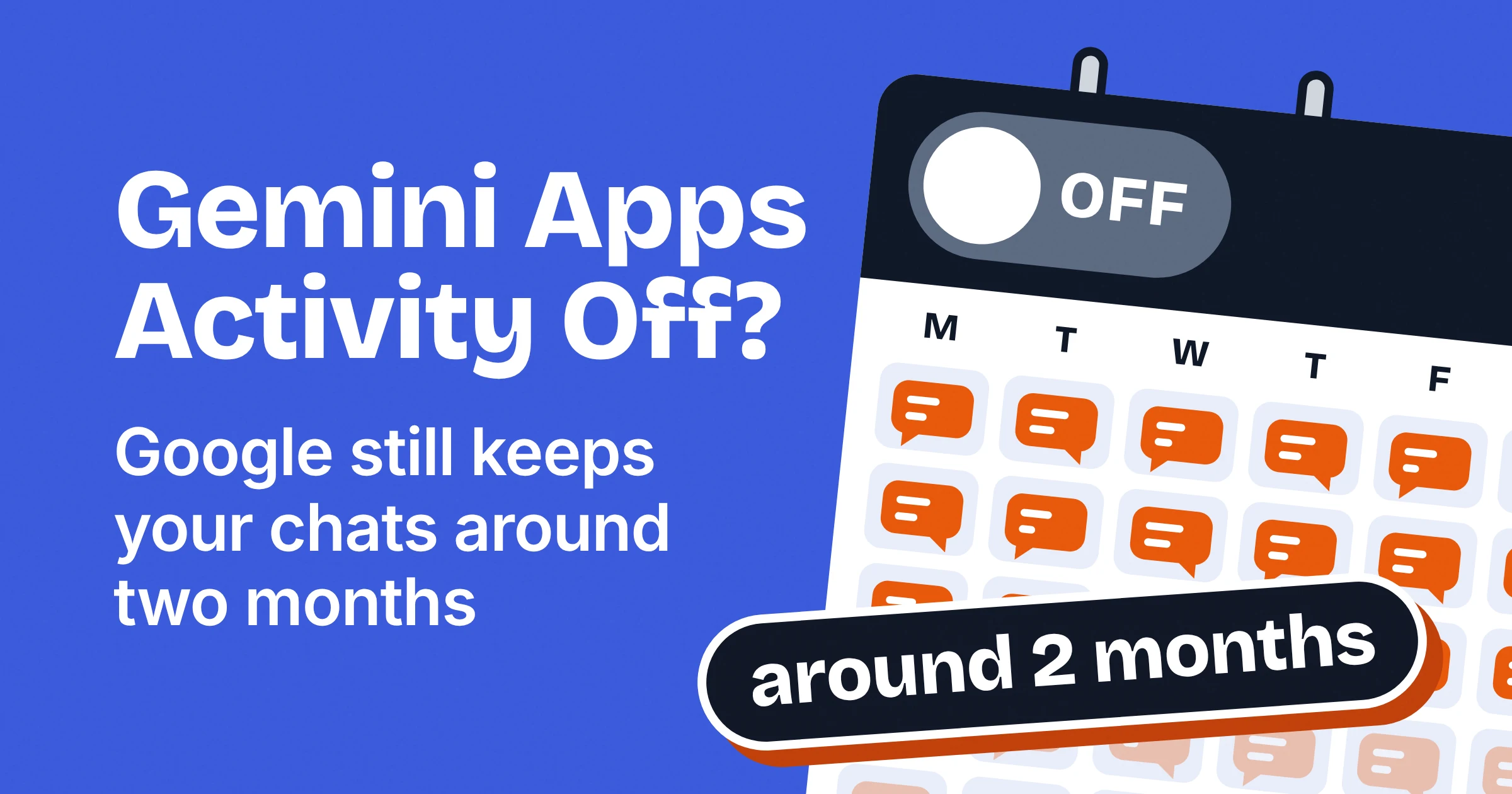
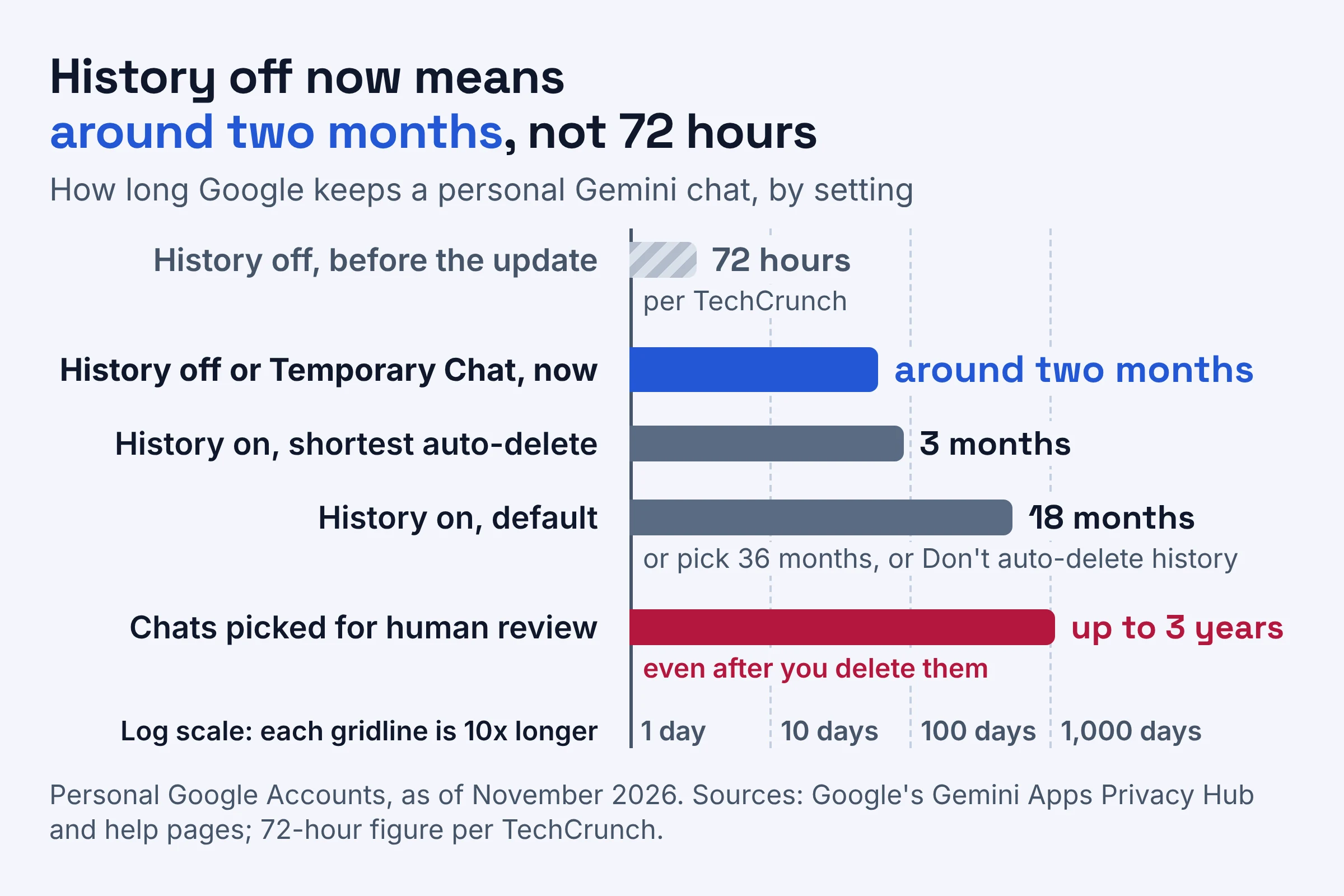
When Gemini Apps Activity is off (the switch Google now calls History), Google still saves your future Gemini chats with your account for around two months. It uses them to answer you, process any feedback you send and protect Google, its users and the public, but it does not train its generative AI models on them unless you send feedback.
That two-month window is the surprise. TechCrunch reports it replaces a 72-hour retention period, so turning History off for privacy now leaves your chats with Google far longer than before. If your real goal is to stop AI training, Google is rolling out a new checkbox, starting in the coming weeks, that lets you keep your history and opt out of training separately.
What happens when Gemini Apps Activity is off now?
As of November 2026, a chat you have with Gemini's History setting off (once called Gemini Apps Activity, then Keep Activity) stays with your account for around two months. It does not train Google's generative AI models unless you submit feedback. According to Google's Gemini Apps Privacy Hub, here is what still happens in that window:
- Gemini keeps a short memory. It uses the last 24 hours of your chat as context to respond to you.
- Google keeps a safety copy. It stores the chats for around two months so they are available "in case of a potential system failure".
- Reviewers may see them. Google says it uses these chats to protect Google, its users and the public "with help from human reviewers".
- Feedback opens a door. If you send feedback on a response, Google collects context to understand it, including the last 24 hours of your chats.
- Connected Apps switch off. Connected Apps (Gemini's links to other services, such as Google Workspace) are unavailable while History is off.
- The training checkboxes lock. Google's help page adds that History must be on before you can turn either training checkbox on.
Picture it: in late November, with History off, you ask Gemini to soften a tense email to your landlord. That chat won't train Google's models unless you send feedback, but it stays with your account until around late January.
Does Gemini keep your chat history? Every setting compared
Yes. As of November 2026, chats you have with History off or in a Temporary Chat stay with your account for around two months, and with History on Google keeps them for 18 months by default.
Once the update reaches you, think of your settings as two dials. History decides how long your chats sit on the shelf. The chat content checkbox decides whether Google can use them as study material for its models.
Here is every combination, built only from Google's own pages:
| Setting | How long chats are kept | Used to train Google's AI models? | Can people review chats? | Best for |
|---|---|---|---|---|
| History on, chat content on (the default for adults) | 18 months by default; you can pick 3, 18 or 36 months, or no auto-delete | Yes, including Gemini Live transcripts and attachments | Yes; reviewed chats are kept for up to 3 years | People happy to help train Gemini with chats they'd show a stranger |
| History on, chat content off | Your auto-delete choice, 18 months by default | No, unless you send feedback | Yes; Google says future chats will still be reviewed | Most people: you keep old chats and skip model training |
| History off | Around two months | No, unless you send feedback | Yes, Google says "with help from human reviewers" | People who never reopen old chats and don't use Connected Apps |
| Temporary Chat | Around two months | No | Not for training, but under any setting chats can be reviewed to help protect Google, its users and the public | A one-off chat kept out of training, minus anything you wouldn't show a reviewer |
| Work or school account, Gemini as a core service | 18 months by default; only your admin can turn History off | No | No | Everyday work drafts within your organization's rules |
| Work or school account, Gemini as an additional service | Set by your Workspace admin | May be used to improve Google's machine-learning technologies | May be | Nothing internal until your admin confirms the terms |
Why can't you find Gemini Apps Activity anymore?
Gemini Apps Activity no longer goes by that name. Google said in August 2025 it would rename it Keep Activity, and as of November 2026 it is splitting Keep Activity into a History setting and separate AI training checkboxes. Google says the split starts rolling out globally "in the Gemini app in the coming weeks", so your account may still show the old single switch.
| What changed | Before the update | After the update |
|---|---|---|
| The controls | One Keep Activity switch covered both history and training | A History setting plus separate training checkboxes |
| Chats with History off | Kept for 72 hours, per TechCrunch | Kept for around two months, per Google |
| Temporary Chats | Kept for up to 72 hours, per Google in August 2025 | Kept for around two months, per Google's Privacy Hub |
| Your starting point | Whatever your Keep Activity switch said | If you had Keep Activity off, both new settings start off, per Google via TechCrunch |
So if you remember Temporary Chats being cleared after 72 hours, that rule no longer applies.
What Google hasn't said yet
- Whether the two-month window also covers chats you had before the change.
- Why it made the change. TechCrunch reports Google did not answer questions about what prompted it.
- What the defaults are for teens. The pages used here only describe defaults for people 18 or over.
Can you keep Gemini chat history but stop AI training?
Yes. As of November 2026, once Google's update reaches your account, you can keep History on and untick the chat content checkbox under Settings, then History, to opt out of generative AI model training. Google's announcement says you can still change how long history is saved and review or delete it manually at any time.
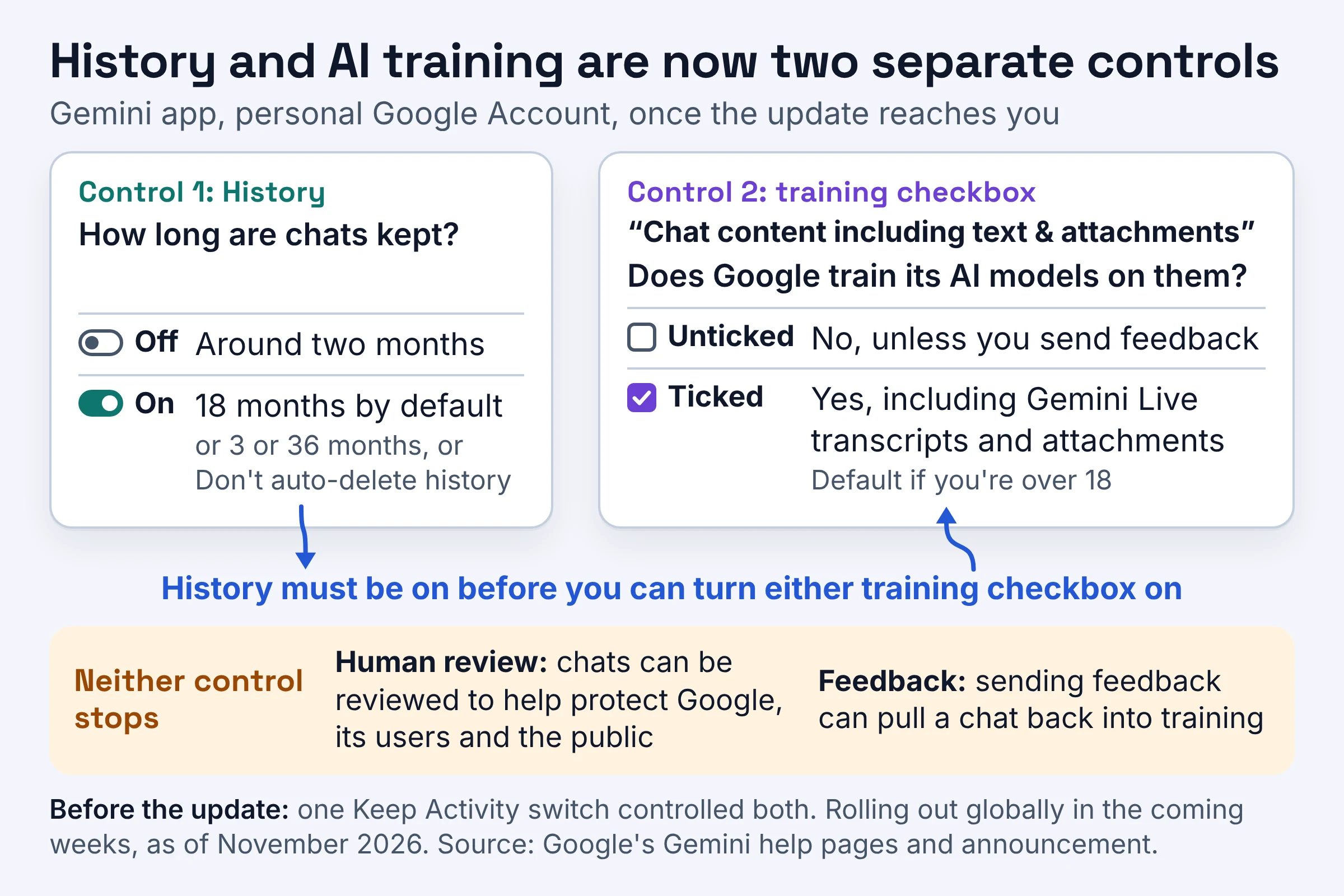
Google's help page lists two training checkboxes:
| Checkbox | Default | What it covers |
|---|---|---|
| "Chat content including text & attachments" | On if you're over 18 | What you type and the files you share |
| "Audio and Gemini Live videos & screenshares" | Off | Your audio, plus Gemini Live videos and screen shares |
Unticking chat content does less than you might hope, in three ways:
- Review continues. With chat content off, Google says "Future chats will be reviewed and used to improve Google services in other ways".
- Feedback still counts. Your future chats won't train Google's models unless you provide feedback, so one feedback note can pull a chat back in.
- The audio box is not an opt-out. If chat content is on, Google still trains its models on Gemini Live transcripts and the attachments you share, even with the audio checkbox off.
Say you keep History on so you can reopen this week's meal plan next month, and untick chat content. The meal plan stays in your history, but it isn't used to train Google's models unless you send feedback on it.
Which Gemini setting should you pick?
For most personal accounts, once the November 2026 update reaches yours, the best fit is History on with the "Chat content including text & attachments" checkbox unticked. You keep your old chats, and Google does not train on your future chats unless you send feedback. For everything else, use this rule:
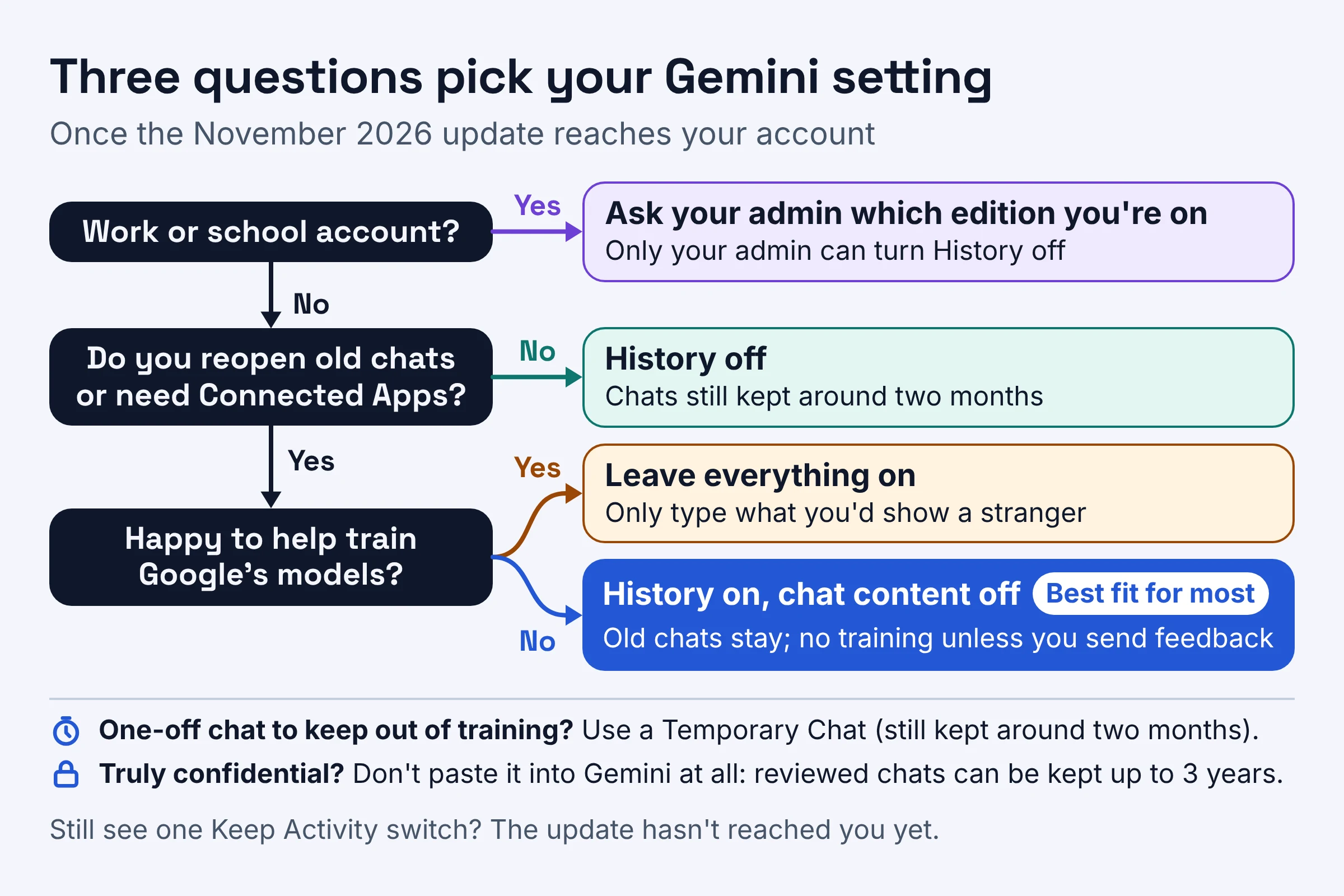
- Pick History on, chat content off if you reuse old chats, like going back to a cover letter draft or last month's trip plan.
- Pick History off if you never reopen old chats and don't need Connected Apps. Your chats still stay with your account for around two months.
- Use a Temporary Chat if History is on but you want one chat kept out of training, like planning a surprise party. It is still kept for around two months, and under any setting chats can be reviewed by people, so leave out anything you wouldn't want a reviewer to see.
- Leave everything on if you're happy to help train Google's models and only type things you'd show a stranger.
- On a work or school account, skip the toggles and ask your admin which edition you're on, since only the admin can turn History off.
- For anything truly confidential, don't paste it into Gemini at all. Even History-off chats and Temporary Chats stay with your account for around two months, and reviewed chats can be kept for up to 3 years even after you delete them.
How do you turn Gemini history off?
To turn off Gemini history on a computer as of November 2026, go to gemini.google.com, open Settings, then History, click On near the top, and choose Turn off or Turn off and delete history. These are the steps from Google's Gemini help page:
- Go to gemini.google.com.
- Open Settings, then History.
- Near the top, click On.
- Choose Turn off to stop saving history, or Turn off and delete history to also delete what is already saved.
Want to keep history but stop training instead? Stay on the same History page and untick the chat content checkbox. Google's help page labels it with attachments in one place and uploads in its click steps, so look for either word.
See only a single Keep Activity switch? The update has not reached your account yet. Until it does, history and training stay tied to that one switch.
Already had Keep Activity off? According to TechCrunch's report, Google says both new settings will start off for you. Training stays off without you lifting a finger, but your future history-off chats will be kept for around two months instead of the 72 hours TechCrunch says applied before.
How do you delete Gemini Apps Activity, and what stays behind?
As of November 2026, you can clear Gemini activity three ways: choose Turn off and delete history, shorten auto-delete to 3 months, or review and delete history manually at any time. None of them reaches everything.
- Turn off and delete history. Use step 4 above when you want a clean slate and no new history.
- Shorten auto-delete. By default, Gemini history older than 18 months is auto-deleted, and you can pick 3, 18 or 36 months, or Don't auto-delete history. At 3 months, a chat about January's budget is gone by around April.
- Delete by hand. Google says you can review or delete history manually at any time.
Two things can outlast your clean-up. Reviewed chats are kept for up to 3 years even after you delete them. Other Google settings, such as Search Services History or Timeline, may keep saving data about your use of other Google services.
For the same clean-up in other assistants, see our guide on how to delete what ChatGPT, Claude and Gemini remember.
Is Gemini Apps Activity safe to leave on?
Gemini Apps Activity, now called History, is fine to leave on for everyday chats, but as of November 2026 adults get AI training switched on by default and some chats can be reviewed. Google's own advice is blunt: "Don't enter confidential information that you wouldn't want a reviewer to see".
Two things work in your favour, per Google. Chats are disconnected from your account before they are sent to service providers, and you can now opt out of AI model training while keeping your history. The big thing against you: reviewed chats can be kept for up to 3 years, even after you delete them.
A simple test before you paste: picture a stranger reading it three years from now. If that makes you wince, it doesn't belong in a consumer chat. Our list of what not to paste into ChatGPT, Claude or Gemini covers the usual suspects.
What changes on a work or school Google account?
On a work or school Google Account, your Google Workspace administrator controls Gemini's History setting, not you, and as of November 2026 the training rules depend on your organization's Workspace edition. Google's help page for work accounts says History is on by default, only your administrator can turn it off, and conversation history is saved for 18 months by default. You must be 18 or over to use Gemini Apps with a work account.
The edition (the Workspace plan your organization uses) decides the rest:
- Gemini as a core service: your chats and uploaded files are not reviewed by human reviewers or used to improve generative AI models.
- Gemini as an additional service: chats may be reviewed by human reviewers and used to improve Google's products, services and machine-learning technologies.
So the new personal toggles mostly don't apply to you. If you're not sure which edition your company uses, ask IT before you paste a client contract into Gemini.
Do this next
Fixing your Gemini privacy takes one visit to Settings, then History. Do it in this order:
- Check your version today. Open Gemini's Settings and look for either a single Keep Activity switch, or History plus training checkboxes.
- On the new version, keep History on, untick chat content and leave the audio checkbox off. Choose History off only if you can live without Connected Apps and old chats.
- Set auto-delete to the shortest period you can live with, such as 3 months, and use a Temporary Chat for one-offs, leaving out anything you wouldn't want a reviewer to see.
Use ChatGPT too? Our explainer on what ChatGPT remembers and how to turn it off walks through its switches the same way.
We checked these retention periods and defaults against Google's Gemini pages and TechCrunch's report in November 2026. The rollout is still moving, so look at your own settings again in a few weeks.