It usually happens mid-sentence. You ask ChatGPT for restaurant ideas and the answer opens with "Since you mentioned your divorce..." or "Based on your recent job hunting..." and your stomach drops. You never told it to remember that. You barely remember typing it. But it was two weeks ago, in a different chat, at midnight, and now it's here, wearing a bow tie, asking if you'd like more restaurant recommendations.
That's memory doing its job, technically. But nobody hands you the manual when it turns on, and the result is that most people meet the feature at the exact moment they want it gone. So here's the short version before anything else: you can see everything ChatGPT has decided to remember about you, delete any or all of it, and switch the whole system off. The setting lives under your profile picture, then Settings, then Personalization, then Memory. Everything else in this article is detail, but that part you can do in about thirty seconds.
Three different things people call "memory"
The confusion around ChatGPT's memory starts with the name. There are three separate systems, and they behave nothing alike.
Saved memories are the ones you asked for. "Remember that I'm vegetarian," "remember I prefer TypeScript." ChatGPT has had these since April 2024, and they work like a notepad stored separately from your chats. Ask "What do you remember about me?" and you'll see the list. On paid plans you can now search it, sort it by newest, mark items as top of mind, and even roll back a memory to an earlier version, controls OpenAI added as the list grew long enough to need them.
Chat history reference is the one that surprises people. When this setting is on, ChatGPT doesn't just rely on the explicit notepad. It goes back through your past conversations and pulls out whatever seems useful: your job, your city, the project you mentioned once, the health question you'd rather not have surface over dinner. In June 2026 OpenAI upgraded this to a background process it calls dreaming, which continuously synthesizes what it learns across all your chats into an editable summary page, rather than waiting for you to say "remember this." The company's own framing is blunt: the old system felt like talking to someone who took a few notes but forgot everything that wasn't written down. Dreaming forgets much less, which is either the point or the problem, depending on what's in there.
Project memory is the third kind, and it's a scoping rule more than a storage system. Chats inside a project can see each other: your Florida Keys trip project's chats share context, so the itinerary chat knows what the restaurant chat discussed. The question is what else they can see, and that's controlled by a per-project setting we'll get to shortly.
The interaction between the first two matters: in your settings, turning off "Reference saved memories" also turns off "Reference chat history." Turning off chat history alone, while saved memories stay on, is its own toggle. OpenAI treats the saved-memories side as the master switch.
What actually leaks across chats
Here's the mental model that resolves most of the anxiety. Your chats and your memories are stored separately, and deleting one does not clean the other.
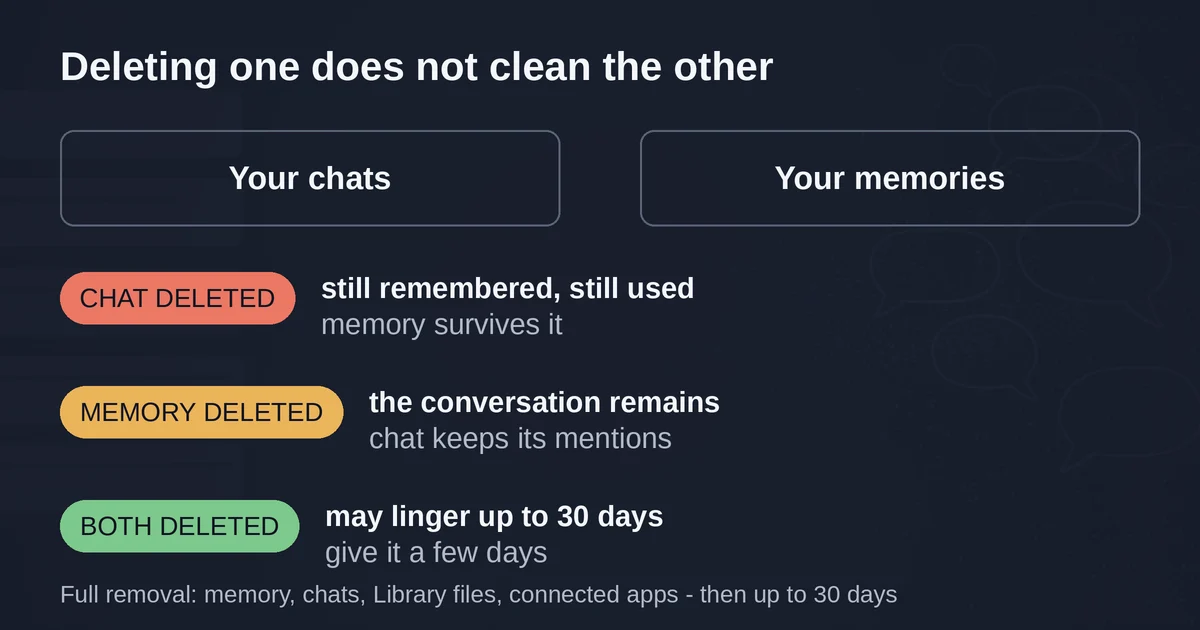
Say you had a conversation about a health scare three months ago and you've since deleted the chat. Good. But if ChatGPT saved "User is managing a thyroid condition" as a memory during that chat, it's still there, still being quietly folded into answers about meal plans and energy levels. The chat is gone; the memory outlived it. The reverse is equally true: deleting a memory stops ChatGPT using it going forward, but the original conversation, with its mentions, still sits in your history unless you delete that too.
OpenAI's full-removal checklist is longer than most people expect. To actually erase something, you need to remove it from every place it exists: the saved memory itself, the chat where you shared it (archived chats count), any files in your Library that mention it, and any connected apps, since ChatGPT can now draw on connected Gmail and files for personalization on paid plans. The company also says deletions can take a few days to fully propagate, and that it may keep logs of deleted memories for up to 30 days for safety and debugging.
Two more things worth knowing. First, memory now feeds more than responses: with memory on, ChatGPT may rewrite your search queries using remembered details, so "restaurants near me" quietly becomes "good vegan restaurants in San Francisco" if that's what it knows about you. Second, there's a transparency feature called Sources: when an answer was personalized, chips appear under it showing which past chat, memory, file, or email contributed, and you can correct or delete from right there. If you ever wonder why an answer seemed to know too much, look at the chips before you look at the sky.
And the one thing that doesn't leak: temporary chats. A temporary chat doesn't use existing memories and doesn't create new ones, doesn't appear in your history, and before you start one you can even choose "Unpersonalized" so it ignores custom instructions and connected apps too. It's the closest thing ChatGPT has to incognito mode, and it's the right tool for the conversation you never want referenced again. One catch: if you save a temporary chat, it converts to a regular chat and joins the fold.
The off switch, with current labels (September 2026)
Settings move around, so here are the labels as they exist this month. The path is your profile picture, then Settings, then Personalization, then Memory. What you see from there depends slightly on your plan, but the core controls are these:
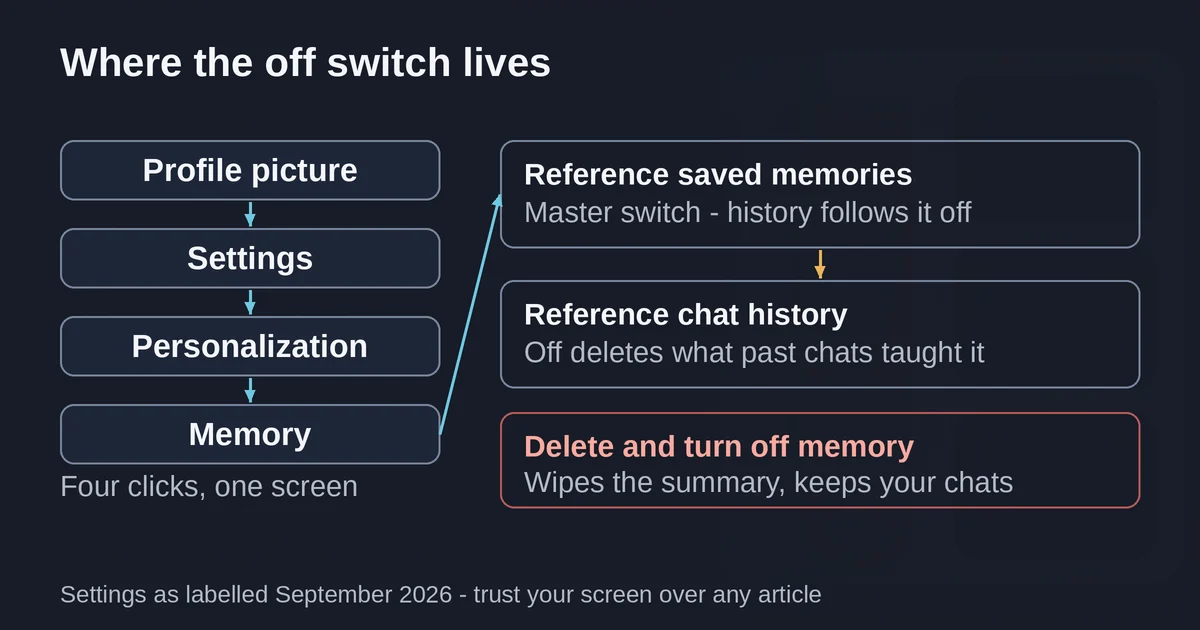
- Reference saved memories: toggle off. Note the interlock: this also switches off chat history reference.
- Reference chat history: if you want to keep explicit memories but stop the model mining your past chats, toggle just this one off. This one has a side effect worth knowing: turning it off deletes the information ChatGPT remembered from past chats, gone from OpenAI's systems within 30 days.
- Memory summary: the dreaming-era control surface. You can type corrections into the text field, highlight a passage and correct it, or hit "Don't mention this again" to stop a topic surfacing without deleting the underlying data. The ••• menu holds the nuclear option: Delete and turn off memory, which wipes what's in the summary and switches Memory off in one move. It does not delete your chats.
- Saved memories: a link that drops you back to the legacy list experience, for those who preferred the explicit notepad over the synthesized summary. "Try improved memory" brings you back.
If you're on the legacy list, the same screen lets you delete individual memories (the ⋯ next to each one), delete everything (⋯ next to the search bar, "Delete all"), and ask ChatGPT in-chat to "forget that" whenever something specific surfaces.
One honest caveat: turning memory off does not reach backward. Your past chats still exist, and if you turn memory back on later, ChatGPT may build new memories from those older conversations. Off means "stop now," not "amnesia."
Project memory: the fence you actually want
Projects are where memory gets genuinely useful, because they add a boundary the main chat lacks. Inside a project, chats share context with each other, which is why your trip-planning project works at all. But by default, project chats also see your general ChatGPT memory, the same saved memories and synthesized context everything else uses.
When you create or open a project, hit More options and you'll find a Memory setting with two choices: Default and Project-only. Choose Project-only and the project becomes an island. Chats inside it can reference each other, but nothing gets in from outside, and nothing gets out: your general chats can't see into the project either. Your kayaking-trip restaurant notes stop leaking into work chats, and the client project you're building stops being informed by your personal medical history.
The rules OpenAI publishes make the isolation explicit. With Project-only set, ChatGPT's general memory is simply unavailable inside the project; with Default, it's available. Either way, chats outside projects can never reference conversations inside them, so the inward fence is always up. There's also a wrinkle worth knowing: chats inside a project don't use your global custom instructions, only the project's own instructions. If your custom instructions feel ignored inside a project, that's why.
Project-only memory matters most in regulated settings: OpenAI ships it as the containment option for Enterprise workspaces with compliance requirements. But it's just as valuable for the freelancer who wants a hard line between client work and everything else, or anyone who uses one project for something they'd rather keep quarantined. Our guide to ChatGPT Projects walks through building one properly, instructions, files, and all, if you want the full setup.
On a shared computer: assume it remembers, because it does
Everything above assumes the account is yours. The shared-computer situation is different and worse, because memory is per-account, not per-person.
If your family shares one ChatGPT login, there is one memory. Your teenager's homework questions, your spouse's job complaints, your late-night health searches: all of it feeds the same synthesized profile, and any of it can surface in anyone's chat. The model doesn't distinguish speakers. Project-only memory helps here too, as a way to at least section off one topic area, but the honest fix is separate accounts, which are free.
On a work computer, remember that workspace admins can see more than you'd guess. Enterprise workspace owners can turn memory on or off for the whole organization, and when a Business workspace owner switches memory off, OpenAI deletes members' existing saved memories. Your memory is a workplace artifact as much as a personal one.
And a broader habit that prevents most of this: the things people regret ChatGPT remembering are usually things they shouldn't have pasted in the first place. We've written a full guide on what not to paste into an AI chat, and its rules about credentials, ID numbers, medical details, and employer documents apply doubly once memory is on.
Claude and Gemini, briefly, because their switches are different
The same anxiety exists in every assistant now, but the controls are not portable knowledge. Claude's memory lives in Settings > Memory: memories are stored as short, editable topic files, and the "Generate memory from chats" toggle offers two flavors of off, Pause (keeps existing memory, stops new) and Reset (permanent deletion, including project memories). Claude also excludes sensitive topics like health and beliefs from memory by default, with an explicit opt-in if you want them included. Gemini's equivalent is "Saved info," editable at gemini.google.com/saved-info, but its real retention control is Gemini Apps Activity, where you can turn off Keep Activity, set auto-delete (18 months by default), or wipe everything. Note the gap: even with Keep Activity off, Google says conversations are retained up to 72 hours for service and feedback processing.
Two questions people actually ask
Does ChatGPT memory see my other chats?
Not verbatim, and not everything. With "Reference chat history" on, the model searches your past conversations for relevant context when it judges that context would improve the answer, and dreaming continuously distills what it learns into the summary. It doesn't replay every chat you've ever had, but any detail you've shared is a candidate for recall. If that's too much, that toggle exists for exactly this.
Is ChatGPT memory private?
It's private from other users, and it isn't training data by default if you're on a business plan or have "Improve the model for everyone" switched off in Data Controls. But "private" is doing a lot of work in that sentence: it's visible to you, stored on OpenAI's systems, used to personalize future answers, and on personal accounts it can feed model improvement unless you opt out. The better question is whether you'd be comfortable with any detail being resurfaced in any future chat. If the answer is no, don't put it in a regular chat, memory on or off.
Memory is a good feature that behaves like a bad roommate: helpful, attentive, occasionally repeating things you'd rather it kept to itself. The controls are real and they work, which is more than could be said a year ago. The settings above are current as of September 2026, and they will move, because OpenAI has restructured memory roughly once a year since 2024. If something in your settings doesn't match what you see here, trust your screen over this article, and know that the fundamental rules, separate storage, project fences, and the off switch, have stayed stable even as the labels change.