Most people speak at 150 words a minute and type at 40. That gap is the entire pitch of AI dictation, and in 2026 it finally works well enough to take seriously. The tools in this space have moved past the "dragon naturally speaking but cloud" era: they now clean up your ums, fix your half-finished sentences, and format the result so it reads like writing instead of a voicemail transcript.
Two names dominate the serious end of this category right now: Wispr Flow and Superwhisper. One is a polished cloud service that edits as you speak. One is a privacy-first app that runs AI models on your own machine. And beneath both sits a baseline that has quietly gotten better: the dictation already built into your Mac or PC. This guide walks through what each one actually does, where your audio goes, and which type of user each one suits.
Dictation is not transcription
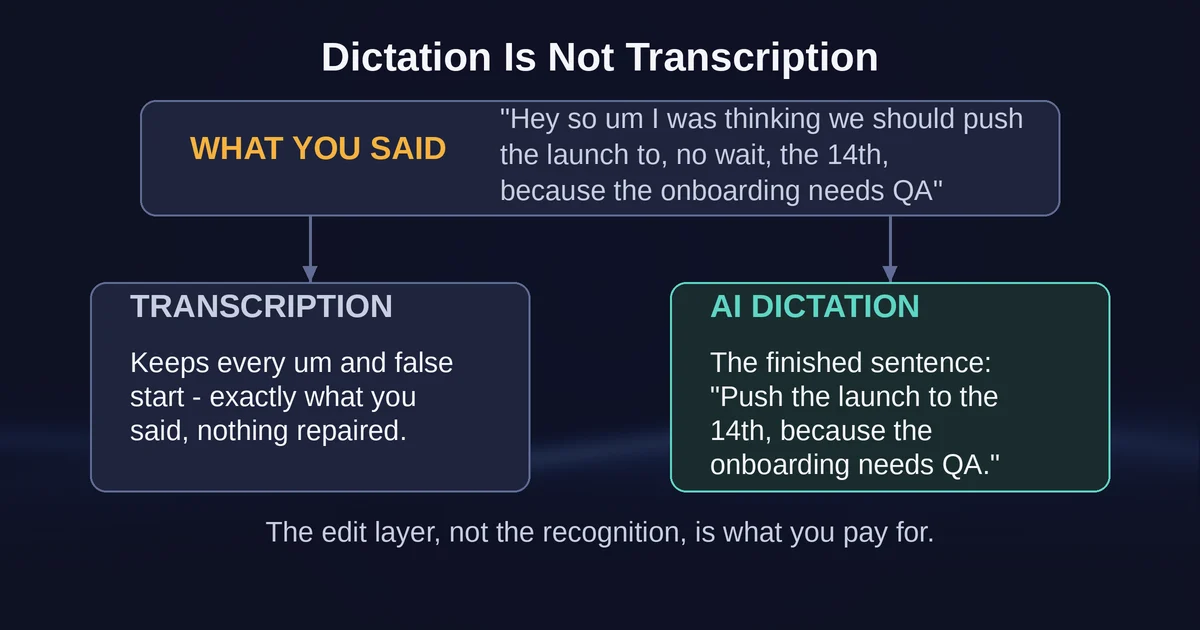
Start with the distinction most comparisons skip. Transcription is a record of what you said. Dictation is what you meant.
If you press Win+H on Windows and say "hey so um I was thinking we should probably push the launch to, no wait, the 14th, because the onboarding flow still needs QA", a transcriber will faithfully type exactly that, ums and false starts included. A modern AI dictation tool returns something closer to: "I think we should push the launch to the 14th, because the onboarding flow still needs QA." Same intent, a fraction of the cleanup.
Wispr Flow publishes examples of this behavior in its own documentation: "Let's meet at 6pm, actually let's do 7" becomes "Let's meet at 7pm", and "Search for, um, what's it called, my flight tickets" becomes "Search for my flight tickets". That edit layer, not the speech recognition itself, is what you are paying for. Both Wispr Flow and Superwhisper can transcribe; both also rewrite. The built-in tools on macOS and Windows mostly just transcribe.
Why does this matter for choosing? Because if the mess is the point, if you are capturing a raw stream of consciousness for later review, aggressive cleanup can be a bug. Dictation tools assume you want finished text. Sometimes you want evidence of how you actually think.
The test: one messy brain-dump, three tools
The fairest way to judge any of these is a controlled experiment you can run yourself in about ten minutes. Here is the protocol.
Take a real task, not a test sentence. Two work well: a 150-word email reply you have been putting off, and a genuine brain-dump, the kind of rambling note-to-self you would normally type into a scratch file. Dictate both into each tool, changing nothing about how you speak. Then score three things: how many filler words survived, how much editing the output needed before you could hit send, and whether the formatting matched the app you were in (an email should look like an email, not a paragraph of prose).
When I ran this comparison pattern against the vendor-documented cleanup behavior, the differences fell into a clear pattern. Wispr Flow's output needed the least manual editing on the email: the greeting, sign-off, and paragraph breaks appeared without being asked for, which is its app-aware formatting doing its job. Superwhisper, in its default dictation mode, produced accurate raw text that was clean but structurally plain; switching it to its "Email" mode closed most of that gap. The built-in tools produced accurate words and rough punctuation, and needed the most editing, because everything you said, including the detours, is what you got.
That ranking, best cleanup to most cleanup: Wispr Flow, then Superwhisper with an AI mode enabled, then the operating system. Now the details behind it.
Wispr Flow: cleanup quality as the product
Wispr Flow is the tool most people picture when they hear "AI dictation" in 2026. It runs on Mac, Windows, iPhone, and Android, drops text wherever your cursor is, and does its rewriting in real time as you speak. The company claims the result lands roughly four times faster than typing (that figure is vendor-reported, from its own marketing, so treat it as directional rather than measured).
Three things define the experience.
First, the auto-edit layer. Fillers vanish, self-corrections get folded into a single clean sentence, and names it has learned land correctly, which matters more than it sounds once your calendar is full of people named Tanay rather than Tony. The app keeps a personal dictionary for exactly this.
Second, app-awareness. Flow adapts formatting to the application receiving the text, so a Slack message and a formal email come out with different tone and structure. This is the feature that makes dictation feel like writing rather than transcribing, and neither the OS tools nor most competitors match it.
Third, Command Mode, a paid feature: hold a shortcut, speak an instruction like "make this shorter" or "translate this to Spanish", release, and the selected text gets rewritten. Wispr's help center notes it lives under Settings, then Experimental, and requires a paid plan. It is genuinely useful for the last-mile editing that dictation always needs, though you still have to select the text yourself, it cannot read your screen.
Pricing as of September 2026: Free ($0, capped at 2,000 words a week on desktop and 1,000 on mobile, which is roughly one long email a day), Pro at $15 a month or $12 a month billed annually, and team tiers above that with SSO and HIPAA enforcement. Students get 50% off. New accounts start with a 14-day Pro trial. The free tier is enough to run the brain-dump test above and know whether this way of working suits you.
The cost you pay for the polish is architectural, and we will come back to it: Flow's dictation is always processed in the cloud. If you want to read the source material on choosing AI tools by role before committing to one, Toolbit's guide to the best AI tools for every job role covers where dictation fits in a broader stack.
Superwhisper: the private, configurable one
Superwhisper takes the opposite bet on architecture. By default it runs speech models locally, on your Mac, and it works fully offline. On Apple Silicon it runs open-source Whisper-family models entirely on-device; the company is blunt that on Intel Macs you should use cloud models, because local models only run really well on Apple Silicon.
What you lose in automation you gain in control. Superwhisper's central concept is modes: combinations of a voice model and an optional AI post-processing step, each tuned for a task. A Message mode for chat, an Email mode for structure, a Super mode that adapts to your screen, and fully custom modes you can build yourself, down to choosing the language model (GPT-5, Claude Haiku 4.5, Llama 4, Grok 4.1, and others are on its model list) and which apps the mode activates in. Pro users can also bring their own API keys, so the AI cleanup runs against your own provider account.
The free tier is generous for evaluation: dictation in any app, 100+ languages, and a 3,000-word trial of Pro features, after which the free features remain yours forever. Pro costs $8.49 a month, $84.99 a year, or $249.99 once for a lifetime license, and a single license covers Mac, Windows, iPhone, and iPad, with Android now on its download list too. There is a 30-day no-questions refund on all plans. At every tier that is roughly half of Wispr Flow's price.
The trade-offs are the flip side of the control. Setup is steeper: you choose models and modes rather than just pressing a shortcut. AI post-processing modes that use cloud models require an internet connection and send your text (and for voice models, your audio) to that provider for the request. And the polished, app-aware default experience is something you assemble yourself rather than something that works that way out of the box.
When your built-in dictation is enough
Before you pay anyone $144 a year, check what your operating system already gives you, because the baseline improved a lot.
On the Mac, enable Dictation under System Settings, then Keyboard, then Dictation. In supported languages it now inserts commas, periods, and question marks automatically as you speak, which was the single biggest complaint about dictation for a decade. Apple's own documentation notes that whether your voice input is processed on-device or sent to Siri servers depends on your language and hardware, and that you can check which applies in Keyboard settings. It transcribes your literal words: no filler removal, no restructuring, and you still speak some commands. Voice Control, a separate accessibility feature, adds hands-free control of the whole system.
On Windows, press Win+H with your cursor in a text box. Two settings are worth changing immediately: turn on automatic punctuation (it is off by default, and the unpunctuated default is why most people try voice typing once and quit) and consider the voice typing launcher. Know that Win+H voice typing is powered by Azure Speech services and needs an internet connection. For fully offline dictation, Windows 11 22H2 and later also ships Voice Access, which runs on-device, supports an "add to vocabulary" feature, and can control your entire PC by voice.
So when is the free baseline enough? When you mostly dictate short, structured snippets: URLs you would have typed anyway, quick replies, search boxes, todo items. When you can compose the sentence in your head before speaking, transcription is all you need, and the cleanup layer goes unused. The paid tier earns its money only when you want to dump a messy thought and receive finished text.
The privacy line: where your audio actually goes
This is the axis the two products genuinely split on, and it deserves the final word before any verdict.
Wispr Flow processes all dictation in the cloud, by design. Its data controls page says it plainly: "Transcription always occurs on the cloud." What you control is what happens around that. Privacy Mode, when enabled, means your audio, transcripts, and edits are never used to train or improve AI models, by Wispr or any third party. Private Cloud Sync controls whether transcripts are stored on Wispr's servers; disable it and your data is processed in real time and discarded after each request. Both together amount to zero data retention, and Wispr says its third-party AI providers are under zero-data-retention agreements regardless of your settings. The company is SOC 2 Type II and ISO 27001 certified, and data is processed in the United States. That is a strong cloud story, but the audio does leave your device, every time. If your work involves lawyer-client material, unreleased financials, or patient data, that is the line you are deciding on.
Superwhisper in local mode keeps your audio on your machine. On Apple Silicon, transcription runs on-device and works with no internet connection at all, something you can verify by dictating in airplane mode. Choose a cloud model, though, and audio goes to that provider for that request, so the privacy posture depends on which mode is active. One practical check: reviews note Superwhisper may save recordings to your iCloud Documents folder by default, so if iCloud Drive is on, those files sync to your other devices. Worth a look in settings before you dictate anything sensitive.
The baselines: macOS Dictation may process on-device or via Siri servers depending on language and hardware. Windows Win+H is always cloud; Voice Access is always on-device.
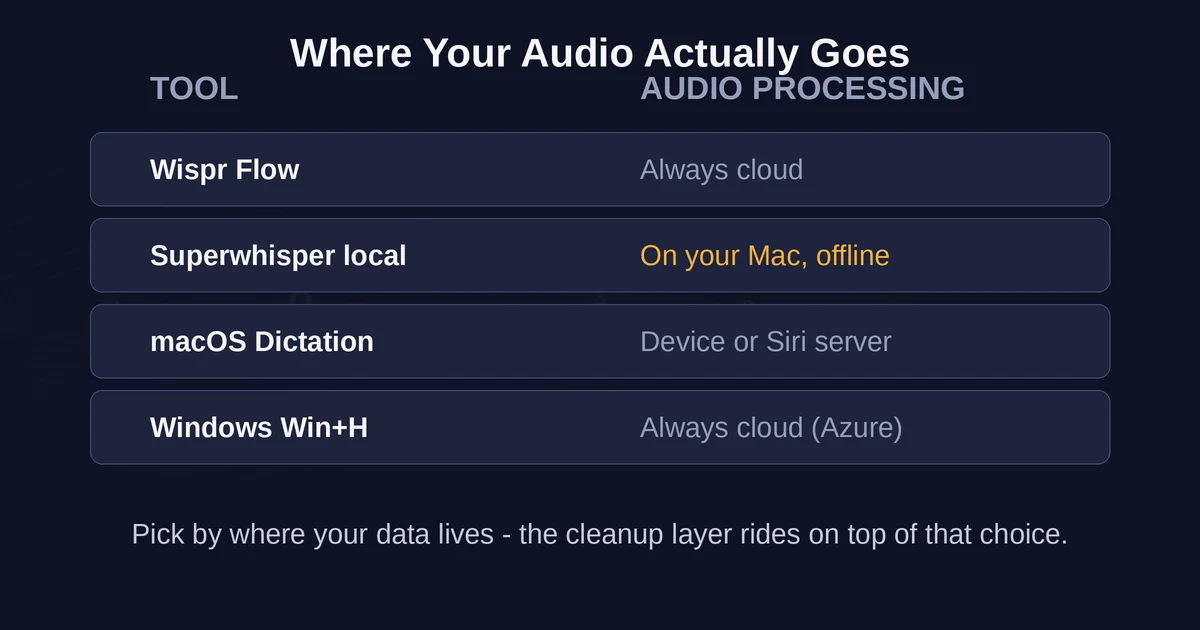
The honest summary of the whole category: every option here has a defensible privacy story, but they defend it in different places. Flow keeps nothing after processing but must hear everything first. Superwhisper can keep everything local but gives you the rope to send text to whichever AI provider you configure. Your OS tool is free but the most opaque about the details.
Which one fits you
- The founder or exec who lives in email and Slack: Wispr Flow. The cleanup and app-aware formatting are the product, the weekly word cap disappears on Pro, and Command Mode handles the last edit by voice. $12 to $15 a month is cheap against the typing time it replaces.
- The privacy-constrained professional (legal, medical, finance) or the offline worker: Superwhisper with a local model. On-device processing is the entire point, and no competitor in this class offers it with this much configurability. The lifetime license is the only way in this comparison to stop paying annually.
- The tinkerer who wants to control the AI cleanup itself: Superwhisper Pro with your own API keys. You choose the model, the prompt, the mode per app. It is the opposite philosophy from Flow's "it just works".
- The person who dictates occasionally, in short bursts, in a quiet room: stay with the built-in. Turn on auto punctuation, learn the handful of voice commands, and check whether your Mac processes dictation on-device. If the cleanup layer never gets used, the subscription never gets used either.
- Anyone unsure: run the brain-dump test from earlier through both free tiers and your OS tool. Wispr Flow's free plan gives you 2,000 words a week and a 14-day Pro trial; Superwhisper gives you a permanent free tier plus 3,000 words of Pro. One hour of real dictation will tell you more than any review.
A note on scope: Wispr also sells a Notetaker product for meeting recording, which is a transcription tool with its own pricing, its own storage behavior, and an MCP integration that pipes meeting notes into Claude or ChatGPT. It keeps coming up in coverage of Flow, but it is a different job. If what you want is notes from meetings you sat through, read about the MCP protocol that makes that integration work instead of a dictation tool. Dictation is for text you are composing now; a notetaker is for conversations that already happened. For a wider look at how to weigh tools like these against each other, the same decision framework that works for comparing Zapier, Make, and n8n applies: pick by where your data lives and who controls the workflow, not by feature count.
FAQ
Does Wispr Flow work offline? No. Flow's dictation is always processed in the cloud, which is how it delivers its cleanup speed and accuracy. If you need dictation with no internet connection, Superwhisper running a local model on an Apple Silicon Mac is the option in this comparison that works in airplane mode, as does Voice Access on Windows 11.
Is Superwhisper really free? The free tier is free forever and includes dictation in any app, 100+ languages, and basic transcription. The AI-powered modes, local large models, custom vocabulary, and speaker separation require Pro ($8.49 a month, $84.99 a year, or $249.99 lifetime), which you can evaluate for 3,000 words before paying anything.
Pricing and plan details are as published by the vendors around September 2026 and can change, so confirm on the official sites before subscribing.