Every few months a new app promises to be your "second brain." It will remember everything, connect everything, surface the right idea at the right moment. You sign up, dump in 40 notes, and three weeks later you cannot remember a single thing you saved, and neither can the app. The problem is almost never the model. It is the plumbing: where your notes, PDFs, bookmarks, and voice memos actually live determines what an AI can do with them.
So instead of another list of twenty apps, this guide works backwards from a test. You take one small mixed corpus of real material, feed it to each candidate system, wait a week, and ask five questions. What comes back tells you more than any feature page. Here is how to run that test, what the current generation of tools actually does as of September 2026, and where each one breaks.
The design question nobody asks first: where does the stuff live?
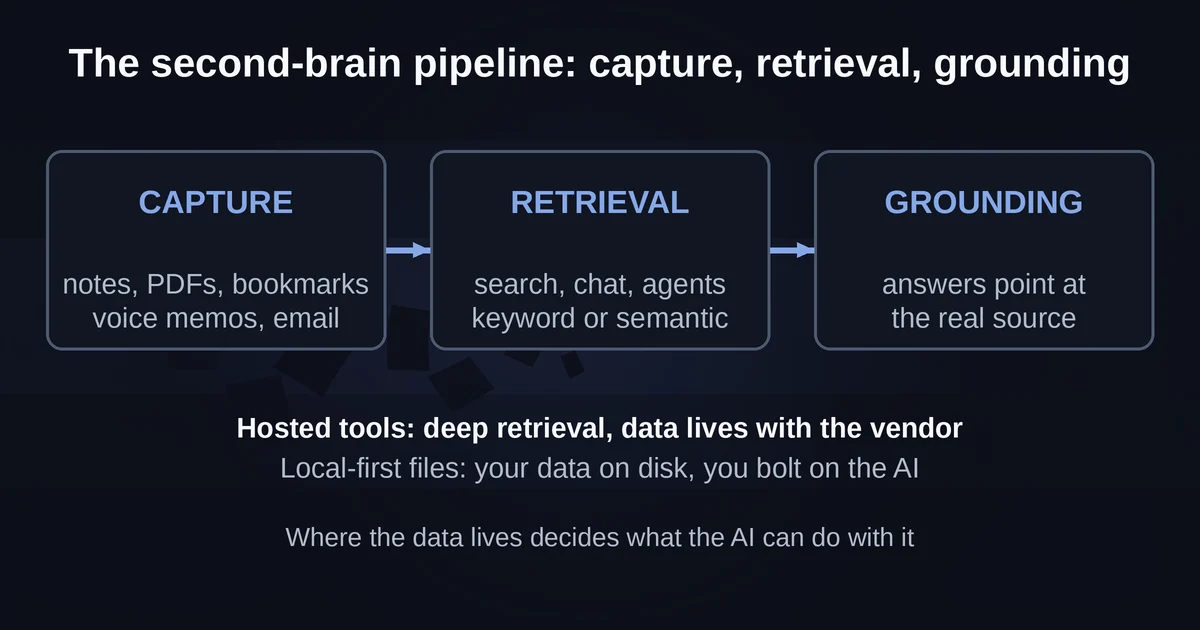
An AI second brain is not one product. It is a pipeline with three parts, and every tool on the market makes a different trade-off across them.
Capture is how material gets in: typing, web clipping, PDF imports, forwarded email, voice memos, meeting recordings. Retrieval is how it comes back out: keyword search, semantic search, a chat layer, an agent that proactively surfaces things. Grounding is the contract between them: when the AI answers, does it point at the actual note or PDF the answer came from, or does it improvise something plausible?
The trade-off is brutal. Tools that own your data end to end (Notion, Mem, Fabric, Capacities) can offer deep retrieval, because everything sits in their index. Tools that only read files on your disk (Obsidian plus AI plugins) can never take your data hostage, but the AI layer is something you bolt on yourself. And tools that are built strictly around grounding, like Google's Gemini Notebook, refuse to answer from the open web at all, which makes them excellent research benches and poor everyday capture pipelines.
Decide which of those failure modes you can live with before you compare a single feature list.
The same-corpus recall test
Here is the setup I use, and it takes about an hour of preparation.
Build a corpus that resembles your actual life, not a tidy demo. Mine was: ten short written notes (meeting fragments, ideas, a couple of half-formed paragraphs), three PDFs (one long industry report, one slide deck export, one messy real-world document with scanned pages), five saved bookmarks, and two voice memos of two to three minutes each, recorded while walking.
The seeding step matters most. Bury a handful of verbatim, unambiguous facts in different places: a specific number in the middle of a PDF's page 30, a decision recorded only in a voice memo, a name mentioned once in a bookmarked article. Write the facts down and seal the list in a drawer.
Wait a full week. The delay is the point. Fresh imports are easy to recall because they sit at the top of every index. A week later, the corpus is as cold as your real notes will ever be.
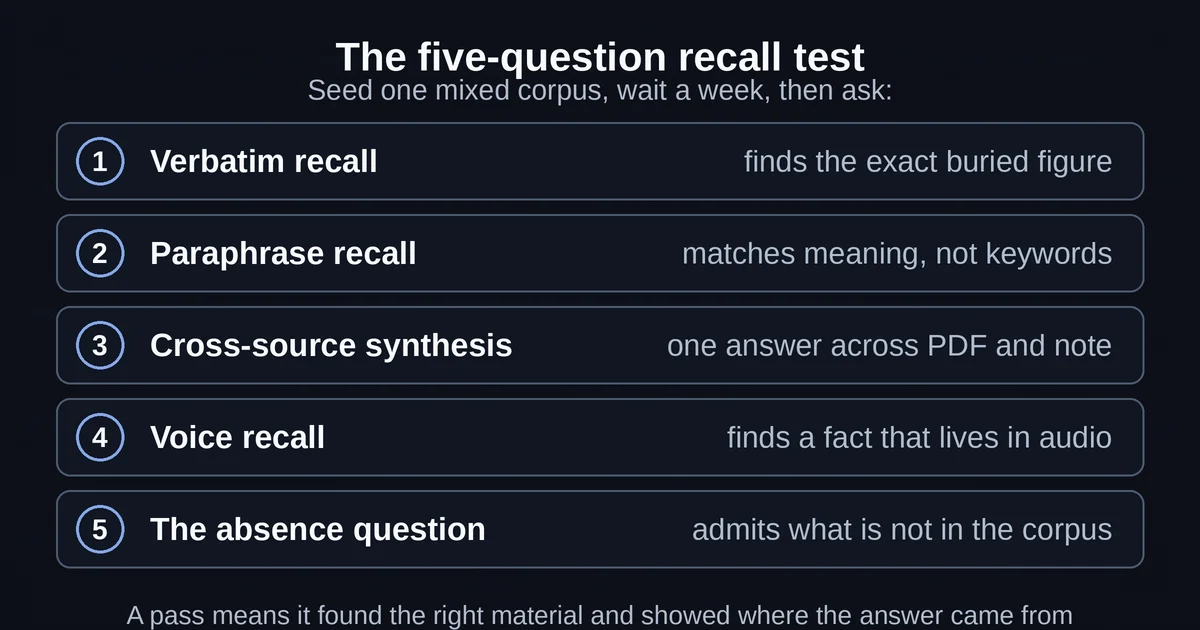
Then ask five questions:
- Verbatim recall. "What was the number on the second vendor option in the report?" It must find the exact figure.
- Paraphrase recall. Ask about something using none of the original words. This is where semantic search earns its keep and keyword search dies.
- Cross-source synthesis. "Compare what the report said about pricing with what we decided in the meeting." This requires retrieval across a PDF and a note in one answer.
- Voice recall. Something that exists only in an audio memo. If a tool cannot ingest audio at all, it fails before the question is asked.
- The absence question. Ask about something you deliberately never put in. This is the trap. A system that confidently invents an answer here will confidently invent answers everywhere, and you will not always know when.
Pass means two things: it found the right material, and it showed you where the answer came from. Finding without citing is half a pass. Citing without finding is worse.
What each system did with the corpus
I ran the test against the five approaches most people are choosing between in 2026. Your results will vary with your corpus; the failure patterns are the transferable part.
Notion AI: the connected-everything approach
Notion's pricing structure has settled into a simple story: full Notion AI, meaning the Notion Agent, AI Meeting Notes, Enterprise Search, and Research Mode, is bundled with the Business plan at $20 per user per month and Enterprise above it. Free and Plus workspaces get a limited trial amount.
For a second brain, the interesting piece is Enterprise Search. It indexes your Notion workspace plus connected apps: Slack, Google Drive, GitHub, Jira, Teams, SharePoint, and OneDrive, and it searches uploaded PDFs across those locations too. In the test, this is the only system that could answer the cross-source synthesis question across an app boundary, because the corpus did not have to live inside Notion at all. Answers arrive with citations and respect existing permissions.
The catch: capture is still Notion-shaped. Voice memos are not a first-class input, the free plan caps file uploads at 5MB, and if your brain lives mostly outside Notion, you are paying for a very good federated search engine rather than a place to think.
Mem: the voice-first agent
Mem spent roughly three years quiet after its 2021-2022 hype cycle, shipped a rebuilt Mem 2.0 in October 2025, and has since repositioned itself around "Mem Agent." The current pricing page reads like an allowance sheet: the free plan includes 25 messages to Mem and 25 new notes per month, 3 hours of Voice Mode, and tracking for up to 15 open tasks. Plus is $9 a month, Pro is $29, and the plans scale by quota rather than by feature.
Voice Mode is the standout for this test. Turn it on inside any note, talk for a while, and Mem produces a structured transcript it organizes into notes. It was the only system in my run where the voice recall question felt native rather than bolted on, and the transcript made the buried voice fact findable as text.
The catches are real. Quotas meter how much you can even put in, which is a strange fit for a "capture everything" philosophy. Mem is not end-to-end encrypted because its AI processes your notes server-side. And export is one-click Markdown, which is fine, but the test's absence question exposed the deeper issue: when the corpus grows past a few hundred notes, you are trusting Mem's own retrieval to be your memory's only door.
Fabric: the capture-heavy canvas
Fabric, at fabric.so/pricing-and-plans, now has a genuinely usable free tier: 250MB of storage and 100 "thinking credits" a month with the AI search and assistant included, forever. Plus is $4.67 a month billed yearly with voice and meeting recording plus audio and video transcription, and Pro is $12.50 a month yearly with 2TB and data connections to Drive, Dropbox, and Notion.
Capture is Fabric's religion. The browser extension, the mobile quick-save, the voice notes, the meeting recorder: everything is one tap and everything lands in the same searchable space. It swallowed the mixed corpus whole with the least friction of any tool here.
Retrieval was the weaker half in my test. Fabric's search is good at "find the thing I saved," and vendor materials claim search inside PDFs to the page and video to the timestamp, but cross-source synthesis answers were thinner than Notion's, and the citation trail was less consistent. Public app store reviews echo this: the AI assistant is the part users report as uneven. Fabric is the right choice when capture volume is your bottleneck and retrieval is mostly "me finding my own stuff," which, honestly, covers a lot of people.
Capacities: the structured object graph
Capacities takes the opposite bet from Mem: structure first. Everything is a typed object: a Book, a Person, a Project, a Meeting, or custom types you define, each with properties, linking into a graph. The free plan is unusually generous (unlimited objects and sync, 5GB media), and Pro at $9.99 a month adds the AI assistant, weblink and image analysis, Smart Search, and API access, with an optional Plus AI power-up at $8.33 a month billed annually for heavier AI use.
Capacities has been shipping fast in 2026: model-provider choice for its AI, Explore AI as a home for chat history, weblink analysis with annotations, and MCP connectors so external AI tools like ChatGPT or Claude can read and write your objects. The assistant proposes creates and updates that you approve before they land, which is a thoughtful middle ground between passive chat and full autonomy.
In the test, the paraphrase recall question was where Capacities shone, because semantic search over a structured graph is exactly the right tool for "I described the idea, not the words." The voice question was the weak one: audio is an analyzed media type rather than a native capture mode. And the object model has a learning tax. If you do not enjoy deciding whether something is a Project or a Note, Capacities will feel like filing with extra steps.
Obsidian plus AI plugins: the local-first hedge
Obsidian is plain Markdown files in a folder on your disk. No vendor owns it, nothing is in a cloud unless you put it there, and export is a file copy. That permanence is why the idea of an "AI second brain on your own files" keeps circling back to it.
The 2026 plugin story is genuinely mature. Copilot for Obsidian brands itself as the knowledge work agent for your second brain, and the free plugin runs on your existing ChatGPT or Claude subscription or your own API keys, with support for OpenAI, Anthropic, Google, LM Studio, Ollama, and any OpenAI-compatible endpoint. Its local index embeds your notes alongside outside PDFs and EPUBs, so connections surface before you go looking, and its agent mode can fold a week of captured reading into evergreen wiki notes. Smart Connections takes the even more private path: a local embedding model by default, offline, working on mobile.
The test results split cleanly. Recall and linking were excellent, and the export question is the one Obsidian wins outright, because export is the file system. Voice memos require a transcription step or a plugin you wire up yourself, and the whole stack demands an afternoon of configuration that the hosted tools demand none of. If privacy or permanence is your top requirement, this is the trade: your data is yours, and the plumbing is too.
Gemini Notebook: the grounded research bench
Google renamed NotebookLM to Gemini Notebook on July 16, 2026, and the rename post is worth reading precisely because it describes the product's center of gravity: it remains a standalone research tool, now with a secure cloud computer in every notebook that can write and execute code for analysis grounded in your uploaded sources.
As a second brain, Gemini Notebook fails the capture test by design: you feed it curated sources per project, not your stream of daily life. But it passes the citation test better than anything else here. Answers are grounded in your uploaded material with inline citations, and the absence question produced an honest "I don't see that in your sources" instead of an invention. For deep research projects it belongs in your stack next to whatever capture tool you pick; we cover that workflow in our Gemini Notebook research guide.
The citation behavior is the whole ballgame
Run the absence question enough times and you develop a feel for the single most important difference between these systems: what the AI does when it does not know.
The grounded tools (Gemini Notebook, Notion's Enterprise Search, Capacities' assistant with its "grounded in your notes" design goal) decline, or answer with visible hedging, or cite something adjacent and let you judge. The confident tools give you a fluent paragraph that cites nothing or cites the wrong note. If you want to understand why this happens and how to spot it in the wild, our piece on why AI hallucinates, with real examples, breaks down the mechanism: the model's next-token fluency does not switch off when retrieval comes up empty.
The practical rule: never trust a second brain answer without a citation you can click. If the tool shows its sources, you have a memory system. If it does not, you have a chatbot with access to your notes, which is a different and more dangerous thing.
A second test most people skip: the exit
Before you commit a year of notes anywhere, export something. Notion exports HTML, Markdown, and CSV. Mem does one-click Markdown. Fabric publishes and shares but your raw exit path is worth testing during the trial. Capacities promises full import and export on every plan, including free. Obsidian never needed an exit because there is nothing to exit from.
Then check the AI layer's exit. Capacities' MCP connectors and the Model Context Protocol ecosystem mean your notes can outlive any single assistant: if the connector spec is open, your next AI can plug into the same data. Our explainer on the MCP protocol covers why this matters for knowledge bases specifically. A second brain you cannot leave is not a brain; it is a hostage.
The honest verdict: most people need less than they think
After running this test across all six approaches, the uncomfortable finding is that the winning system is rarely the most powerful one. It is the one whose capture friction is low enough that you actually feed it, because an empty second brain with a brilliant retrieval layer is worth nothing.
Three honest profiles:
- If your material mostly arrives as documents and meetings for work, Notion AI's connected search is the least amount of glue, provided you are on a Business-tier team anyway.
- If you are a heavy voice thinker or capture on the move, Mem's Voice Mode is the most native path, and Fabric is the close second with a better free tier.
- If permanence, privacy, or plain files are non-negotiable, Obsidian plus Copilot or Smart Connections is no longer the enthusiast workaround it was in 2023; it is a mainstream option that just costs you a setup afternoon.
And a fourth profile that is larger than all the others: if you are starting from zero, one folder of Markdown plus a general AI assistant, or a single well-fed tool like Gemini Notebook for the few projects that genuinely need it, will beat every elaborate system you abandon in March. Most people's second brain problem is not retrieval. It is that they never capture in the first place, because the system was too heavy on day one.
Start with the corpus test before you start with the app. It costs an afternoon, and it is the only product review that runs on your actual life. If you also want the AI to go find things beyond your own notes when research requires it, our roundup of the best AI search engines and research assistants covers the other half of the stack.
Pricing and plan details are as published by the vendors around September 2026 and can change; confirm on the official sites.
FAQ
Do I need end-to-end encryption for an AI second brain? If the AI answers questions about your notes, some server somewhere is processing them. Obsidian with local plugins is the main path to keeping AI processing entirely on your machine. Hosted tools like Mem are explicit that they encrypt in transit and at rest but not end to end, because the AI needs to read what you wrote.
Is a local setup like Obsidian actually competitive with hosted AI in 2026? For recall and linking, yes. The gap in 2026 is convenience: voice capture, automatic transcription, and zero-config search still work better in hosted tools. Obsidian closes the intelligence gap but not the plumbing gap.