Quick Answer
- Effort mode controls how much internal reasoning a model does before answering, not which model you're using
- Higher effort means better results on hard tasks, but also more cost and more wait time
- The biggest mistake people make: leaving it on one setting for everything, instead of matching it to the actual task
- Claude Opus 5 uses five levels: low, medium, high, xhigh, and max, with high as the default. GPT-5.6 Sol adds a none option below that
What Effort Mode Actually Does
This isn't a quality slider in the way "HD vs standard" is on a video. It controls test-time compute, how many internal reasoning steps the model runs before producing a visible answer. Same model, same knowledge, different amount of thinking applied per response.
The effect is real and measurable. In one widely cited study, a small 3-billion-parameter model given enough test-time compute outperformed a model over 20 times its size that answered instantly. Effort mode is that same idea, packaged as a setting you control directly.
Where You'll Actually Find It
- Claude Opus 5: five levels, low, medium, high, xhigh, and max, with high as the default, released alongside the model in July 2026
- GPT-5.6 Sol: an even wider range, none, low, medium, high, xhigh, and max, controlled through a reasoning.effort setting in the API and exposed more simply inside ChatGPT
- Both work the same underlying way: a higher setting means more internal reasoning tokens spent before you see an answer, and a real increase in cost and latency to match
The Practical Rules for Choosing a Level
- Follow the provider's own starting point, not a generic middle setting. Anthropic's actual guidance for its Opus line is to start at xhigh for coding and agentic work, high for other demanding tasks, and step down to medium or low only once you've measured that quality holds at the lower level, the opposite of assuming a safe middle ground first
- Drop to low or none for anything simple and bounded. Quick edits, short factual questions, and routine formatting don't benefit from extra reasoning, they just cost more and take longer for no real gain
- Reserve high, xhigh, or max for genuinely hard, multi-step problems. Complex debugging, architectural decisions, or anything where a wrong step early on compounds into a bigger mistake later
- Higher is not automatically better, test before you assume it. Anthropic's own system card for Opus 5 acknowledges the model can overthink at higher effort levels, making unnecessary edits or refactors outside the scope it was actually given. One coding benchmark showed scores peaking at xhigh and actually declining at max
- Watch the response time as your signal. If a task is taking noticeably longer at a high setting with no visible improvement in quality, that's a sign the task didn't need the extra reasoning in the first place
It's Not Just Claude and GPT
Effort-style controls are becoming an industry-wide pattern, not a one-off feature from two companies:
- Google Gemini: its 2.5 and 3 generations introduced a dynamic "thinking mode" that automatically adjusts reasoning effort based on task complexity, split across a fast Flash variant and a deeper-reasoning Pro variant
- DeepSeek: the DeepThink toggle sits right above the input box, off by default for quick answers, and switched on for math, debugging, and multi-step planning where it noticeably improves results
- Kimi K3: ships with an always-on reasoning mode adjustable between low, high, and max effort
The naming and exact levels differ everywhere, but the underlying idea is now standard across every major lab: let the person asking control how much the model thinks, instead of applying the same fixed amount of reasoning to every request.
A Real Example of Why This Matters
Picture a simple task, "summarize this email," and a hard one, "find the bug causing this intermittent crash across five files."
Run both at the same fixed high effort setting, and the summary task pays for reasoning depth it never needed, more tokens, more wait time, no better output than a quick pass would have given. Run both at low effort, and the debugging task gets a shallow, likely wrong first guess on a problem that actually required tracing logic across multiple files.
Matched correctly, the summary finishes almost instantly at low effort, and the debugging task gets the deeper reasoning pass it actually needs at high effort. Same two models, same two requests, a meaningfully different outcome just from matching effort to task.
Common Mistakes People Make With It
- Leaving it on high for everything "just in case." This is the single most common way people quietly overpay, most daily tasks genuinely don't need it
- Leaving it on the lowest setting because it feels faster. Fine for quick questions, a real problem the moment the task involves real reasoning, math, planning, or anything with multiple dependent steps
- Assuming a higher setting fixes a badly specified question. Effort mode makes the model think harder, it doesn't make up for missing context or an unclear request, that's still on you to provide
- Not checking which setting a tool defaults to. Anthropic's own API defaults Opus 5 to high, not medium or low, worth confirming your actual default before assuming you're on the cheapest setting
- Treating effort mode like a one-time setup instead of a per-task choice. The whole point is that it's adjustable, setting it once and forgetting about it defeats the purpose
Why This Changes How You Should Think About Pricing
Before effort controls existed, the main cost lever was which model tier you picked, a cheaper model or a more expensive one, fixed for the whole conversation. Now cost is a second, more precise dial you control per request, inside the same model.
That's a genuinely useful shift for anyone watching AI spend closely. Instead of choosing between "the cheap model" and "the expensive model" for an entire project, you can run the same capable model across every task, and only pay the premium on the specific requests that actually justify it.

A Quick Reference
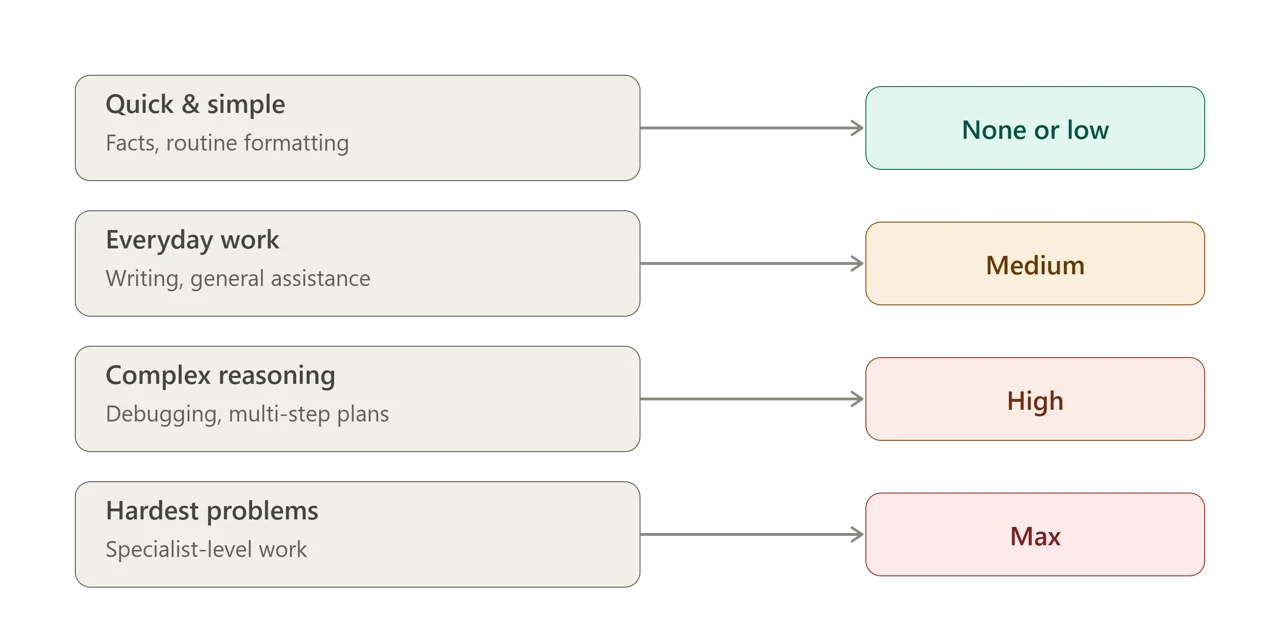
| Task type | Recommended effort |
|---|---|
| Quick factual question, routine formatting | None or low |
| Everyday writing, general assistance | Medium |
| Debugging, multi-step planning, complex analysis | High |
| Long-running coding or agentic work | Xhigh (where available) |
| The hardest problems you'd otherwise hand to a specialist | Max, only after testing xhigh first |
Sources & References
- Anthropic, official Effort documentation: platform.claude.com/docs/en/build-with-claude/effort
- Anthropic, official Claude Opus 5 announcement: anthropic.com/news/claude-opus-5
- Ernie's Leisure Code, on how effort settings work in GPT-5.6 Sol: ernie55ernie.github.io
- Taskade, on reasoning models and test-time compute: taskade.com
- Zylos Research, on Gemini's thinking mode and industry-wide reasoning trends: zylos.ai
Feature details reflect Anthropic's and OpenAI's own documentation as of August 2026. Effort levels and controls vary by tool and continue to evolve, check the provider's current documentation before relying on a specific setting.