
Every major AI assistant you've used lives on someone else's server. You type, it travels to the cloud, an answer comes back. On August 10, Meta released a model that skips that trip entirely: download it once, and it runs completely on your own laptop or PC from then on.
Quick Glossary First
A few words this whole post leans on, translated into plain English:
- Parameters - roughly, how much the model has learned and can reason with. More isn't automatically better, but it's the standard way models get sized
- Open-weight - the actual trained model file is downloadable and yours to run, not locked behind someone else's API
- Quantization - compressing a model so it fits on normal hardware, with a small, carefully measured trade-off in precision
- Context window - how much text or conversation the model can "hold in mind" at once before it starts forgetting the beginning
What Muse Glimmer Actually Is
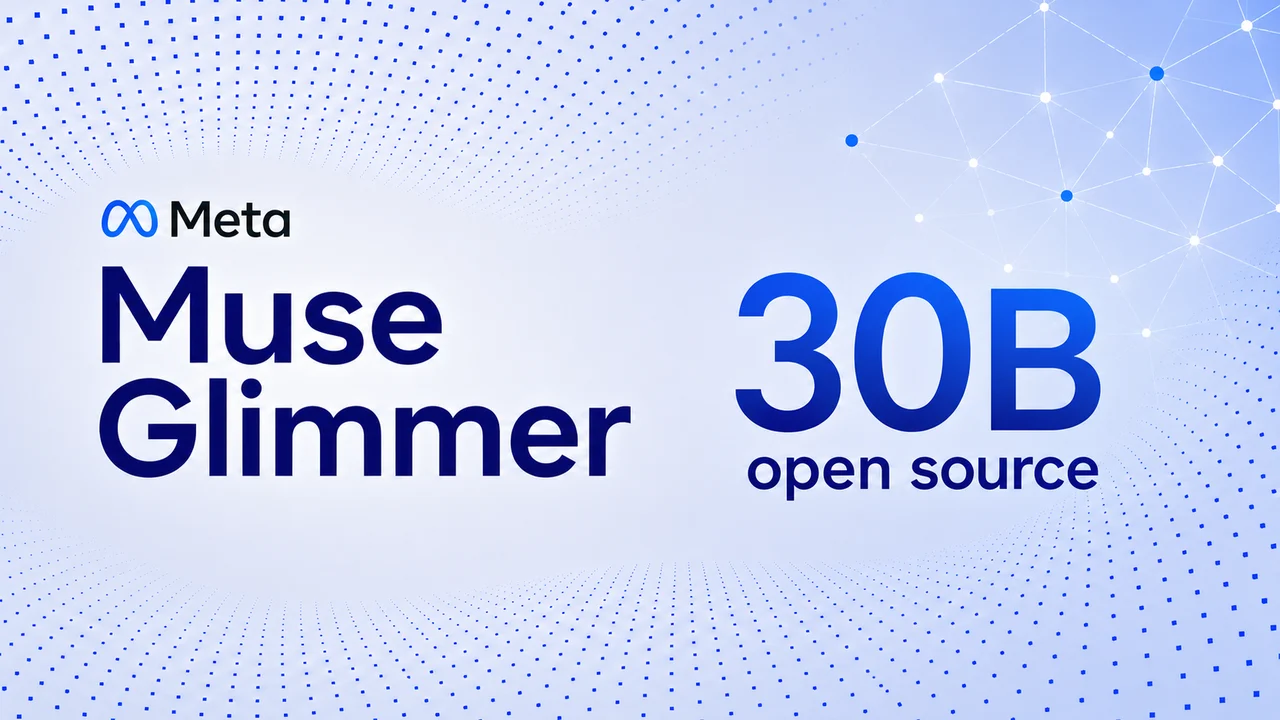
Muse Glimmer is a 30-billion-parameter model from Meta Superintelligence Labs, released under the Apache 2.0 license, one of the most permissive open-source licenses that exists. In plain terms: you can download it, run it, modify it, and even build a paid product on top of it, for free, with fewer restrictions than Meta placed on its own earlier Llama models.
It's built specifically for agents, AI that doesn't just chat but actually does things: managing a schedule, drafting messages, organizing files, calling other tools, and working through multi-step tasks on its own.
Where it came from: Glimmer wasn't trained from scratch. Meta built it by distilling knowledge from Muse Spark, its larger, more powerful closed model, essentially teaching a smaller, laptop-friendly model to reason the way its bigger sibling does, then fine-tuning it specifically for agentic tasks.
Key Features
- 30 billion parameters, dense architecture (every parameter activates on every request, unlike "mixture of experts" models that route selectively)
- Apache 2.0 license, free to use, modify, and build commercial products on
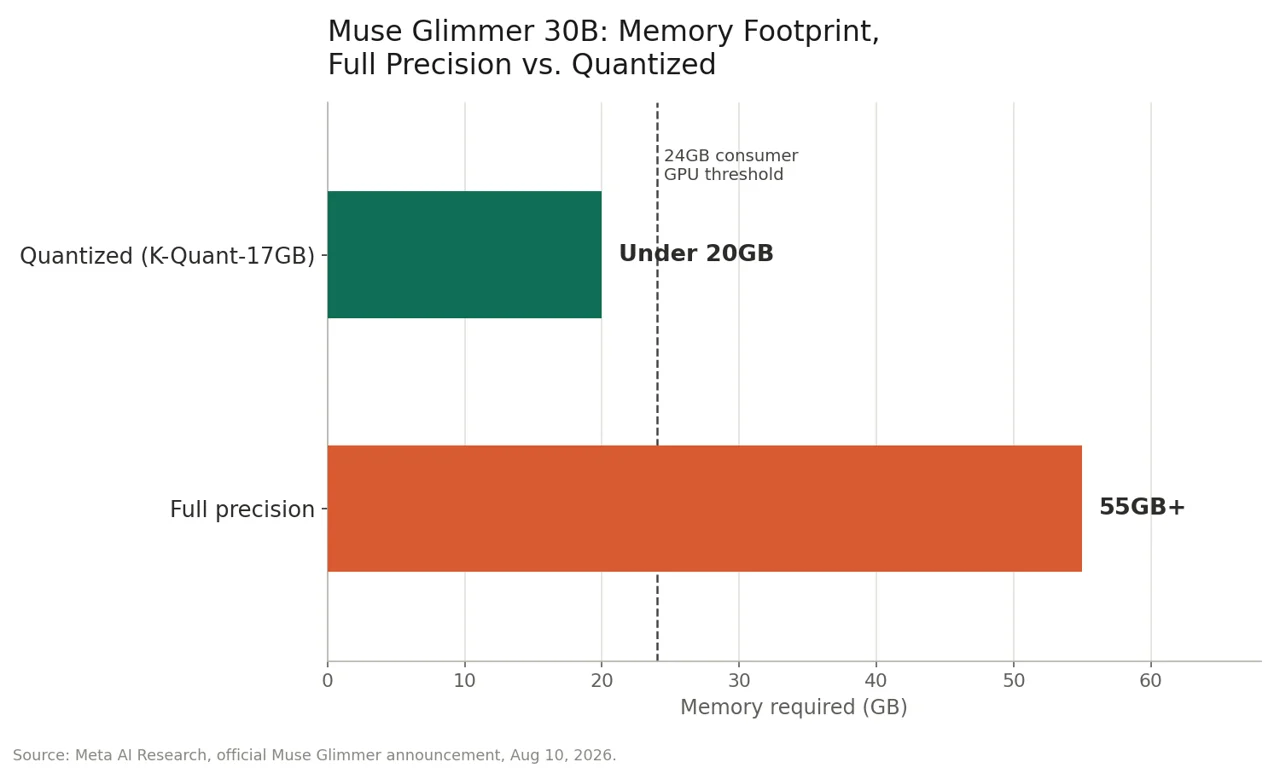
- 4-bit quantization, compressing the model from 55GB+ down to under 20GB with minimal accuracy loss
- DFlash speculative decoding, a companion model that drafts full blocks of text at once for a real, measured speed boost
- Built-in perception encoder, reads images and screenshots alongside text, not a bolted-on add-on
- Adjustable reasoning strength, set directly in the system prompt to trade speed for depth per task
- 131K token context window, enough to hold a genuinely long document or conversation
- Trained on 100+ languages
Why "Runs on Your Laptop" Actually Matters
This isn't a small technical detail, it changes what the AI can actually be trusted with:
- Privacy. Your data never leaves your device. Nothing gets sent to Meta's servers, which matters enormously if you're working with sensitive documents, client data, or anything you'd rather not hand to an outside company
- No per-token bill. A cloud AI subscription keeps charging every month, forever. Once you've downloaded Glimmer, running it costs nothing beyond the electricity for your own computer
- Works with zero internet. On a flight, in a basement server room, anywhere connectivity drops out, the model keeps working exactly the same
Can Your Computer Actually Run It?
This is the part most coverage of AI launches skips, and it's the one that actually matters if you want to try this yourself.
At full precision, a 30-billion-parameter model needs over 55GB of memory, far more than any consumer computer has. Meta solved this by compressing Glimmer down to roughly 4-bit precision, shrinking it to under 20GB, small enough to fit on real consumer hardware alongside its working memory and image-reading component. The core quantized file itself is precisely 16.76GB, worth checking against your free disk space before you start.
What you actually need:
| Requirement | Minimum |
|---|---|
| GPU (Nvidia) | One consumer GPU with 24GB+ VRAM (e.g., RTX 5090) |
| GPU (AMD) | Ryzen AI Max+ processor or a Radeon AI PRO R9700 (32GB), both officially supported |
| Mac | M4 Max or M5 Max chip |
| Lowest confirmed RAM/VRAM | 18GB, per Unsloth's own testing, on lighter quantized versions |
| Storage | The core model file is 16.76GB, plus framework tools |
| Internet | Only needed once, to download it |
On AMD hardware specifically, early testing shows 24 tokens per second on a Ryzen AI Max+ 395 processor, and up to 53 tokens per second on a Radeon AI PRO R9700 GPU with speculative decoding enabled, so this isn't an Nvidia-or-Mac-only situation.
The easiest tools to actually run it, no coding required:
- LM Studio - the friendliest option for total beginners, a simple app with a chat interface. Confirmed launch-day support, the model is already downloadable inside the app today
- Ollama - command-line but very well documented, popular with developers
- Unsloth - also confirmed day-zero support, with its own optimized quantized versions for maximum performance on smaller setups
- llama.cpp / MLX - the underlying engines that power the easier tools above, for anyone who wants more control
If your hardware doesn't meet the minimum, quick-access partners like Together AI, Fireworks AI, and OpenRouter let you try the model hosted, without buying new hardware first.
Use Cases: What You Can Actually Do With It
Meta trained and evaluated Glimmer specifically across these real agent capabilities:
- A coding assistant that works offline. Writes and debugs code with zero internet connection required
- A desktop agent that reads your screen. Takes in screenshots and documents, then acts on what it sees, thanks to a built-in image-understanding component
- Document and chart understanding. Feed it a PDF or a chart screenshot, get a plain-language answer back
- Multi-step task completion. Chains together several steps toward a goal, and if one step fails, it's trained to diagnose the problem and retry rather than simply stopping
- LLM-as-a-judge. Can be used to automatically evaluate the output of other AI models
- Multilingual work. Trained across more than 100 languages
- Adjustable effort. You can dial reasoning strength up for harder problems or down for faster, lighter answers, your choice per task
- Works with existing agent frameworks. Compatible with OpenClaw and other agentic orchestration patterns, so it can slot into tools you may already use
How Fast Is It, Really?
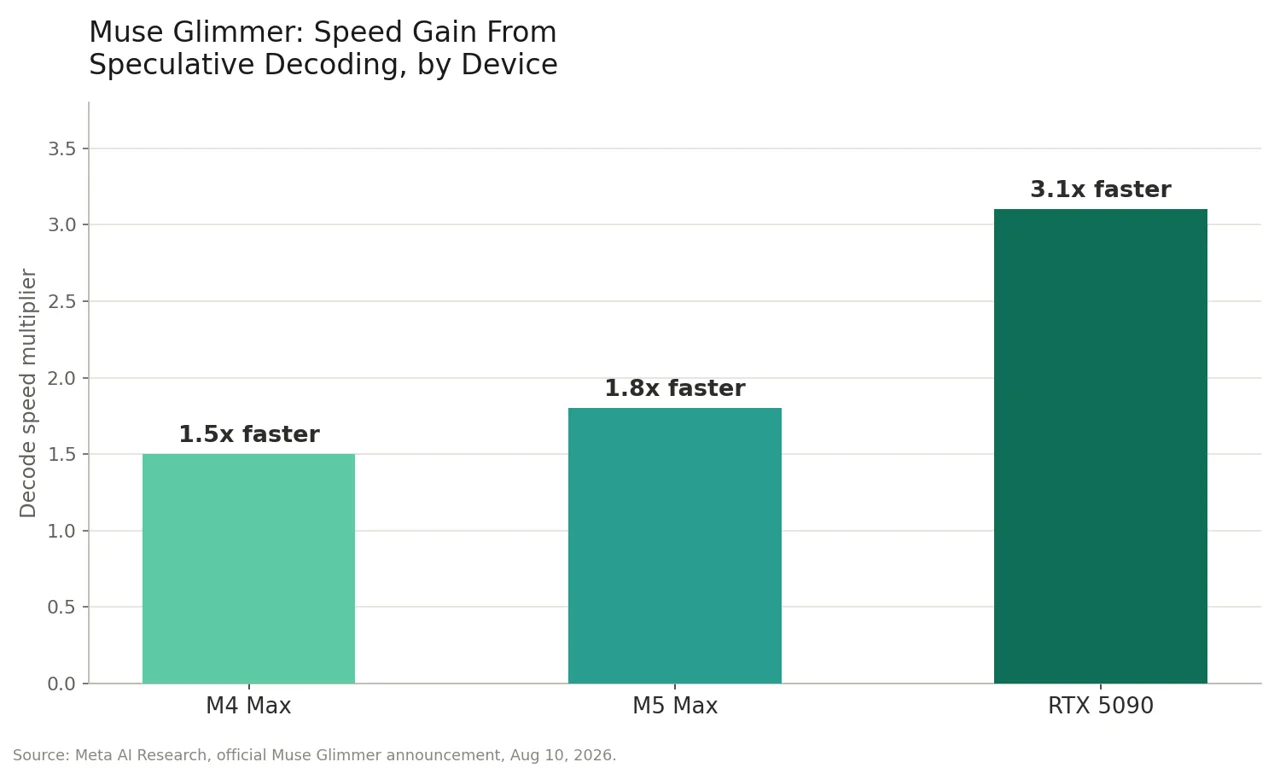
Speed is what makes a local agent actually usable instead of just a technical demo. Meta paired Glimmer with a smaller companion model, built on a technique called DFlash, that predicts entire blocks of text at once instead of one word at a time, then has the main model verify them in parallel.
The measured result, run directly by Meta on real consumer hardware:
The Bigger Story: Why Meta Is Doing This Now
This release doesn't happen in a vacuum. By May 2026, Chinese open-weight models, DeepSeek, Alibaba's Qwen, Moonshot's Kimi, and others, accounted for roughly 61% of all tokens used on OpenRouter, with four of the five most-used open models coming from Chinese labs. Meta's own Llama, once the leading open-weight model, had fallen off the rankings entirely.
Glimmer is Meta's answer, its first fully open release since Llama, and licensed even more permissively than Llama ever was. It's a direct bid to put a US-made model back at the center of the open-source AI conversation.
Who Should Actually Care About This
- Developers and technical hobbyists - a genuinely capable, free model to build local agents and tools with
- Privacy-conscious users - anyone who wants real AI help without sending personal data to a cloud company
- Regulated industries (healthcare, legal, financial services) - where data residency rules or offline requirements rule out a cloud-based AI entirely
- Casual users happy with ChatGPT or Claude - probably don't need this. Cloud models remain easier to set up and, on the hardest tasks, more capable
Independent Benchmarks: What Artificial Analysis Found
Meta's own benchmark numbers are worth reading alongside an outside source, since a company grading its own model always has some home-field advantage. Artificial Analysis, an independent AI benchmarking group, ran its own evaluation and the picture is more mixed than Meta's launch post alone suggests:
| Metric | Muse Glimmer 30B | Qwen3.6 27B | Gemma 4 31B |
|---|---|---|---|
| Artificial Analysis Intelligence Index | 35 | 38 | 22 |
| Openness Index | 44 | 39 | 39 |
| GDPval-AA v2 (Elo, agentic quality) | 953 | 1,141 | 811 |
| Terminal-Bench v2.1 | 51.7% | 60.7% | 43.4% |
| Tau3-Banking (tool use) | 23.5% | 16.7% | 14.8% |
| AA-Omniscience (hallucination rate, lower is better) | 82% | 49% | 85% |
The honest read: Glimmer beats Gemma 4 31B on overall intelligence and clearly leads on agentic tool use (Tau3-Banking), a real strength for the "personal agent" use case Meta built it for. But it trails Qwen3.6 27B, a similarly-sized open competitor, on general intelligence, agentic task quality, and terminal tasks, and its hallucination rate on Artificial Analysis's own test came in notably higher than either comparison model. One bright spot worth calling out: at 30 billion parameters, Glimmer scores within one point of Kimi K2.5, a model with roughly 33 times more parameters, genuinely efficient for its size, even where it doesn't lead outright.
Muse Glimmer vs. Gemma 4 vs. Qwen3.6: Which Should You Actually Pick?
The benchmarks above only matter if they translate into a real decision. Here's the practical version:
| Muse Glimmer 30B | Gemma 4 31B | Qwen3.6 27B | |
|---|---|---|---|
| Best at | Agentic tool use, efficiency per parameter | Safety, resisting jailbreak attempts | Overall intelligence, terminal tasks |
| Weakest at | Hallucination rate (highest of the three) | Tool use and agentic tasks | most consistent across the board |
| License | Apache 2.0 | Gemma license (usage restrictions apply) | Apache 2.0 |
| Best for | Building local agents that call tools and take action | Safety-sensitive deployments, public-facing bots | Raw reasoning quality, coding-heavy work |
Pick Muse Glimmer if you're building a personal agent that needs to actually do things, call APIs, use tools, complete multi-step tasks, since that's the specific area it was trained and benchmarked hardest for.
Pick Gemma 4 if safety and resistance to manipulation matters more than raw capability, it posted the lowest jailbreak-attack success rate of the three in independent testing.
Pick Qwen3.6 if you want the strongest general-purpose model of the three and don't need Glimmer's specific agentic tool-use edge, it leads on the Artificial Analysis Intelligence Index and on terminal-based tasks.
One honest caveat worth keeping in mind: this comparison is a snapshot. A larger Qwen 3.8-27B release was reportedly expected imminently as of this Glimmer launch, which could shift these numbers again within weeks. In a market moving this fast, treat any single comparison, including this one, as a snapshot rather than a permanent ranking.
Limitations
- No built-in safety guardrails out of the box. Coverage of the release notes that Meta advises developers add their own system-level guardrails rather than deploying the raw model directly, it isn't pre-moderated the way a consumer chat app is
- Storage adds up. Beyond GPU memory, the model file, quantized versions, and framework tools take real disk space
- It won't out-think a frontier cloud model. Meta explicitly benchmarks Glimmer against similarly-sized open models like Gemma4-31B and Qwen3.6-27B, not against GPT-5.6 or Claude Opus 5, using agentic tests like DeepSearch QA, MCP-Atlas, τ-Bench, and SWE-Bench. It's built for fast, private, agentic work, not maximum reasoning power
How to Try It Yourself
The single easiest path if you've never touched a local AI model before:
-
Download LM Studio (free, available for Mac, Windows, and Linux)
-
Search for Muse Glimmer 30B inside the app once model support lands
-
Let it download the model automatically, no manual file handling required
-
Open the chat window and start talking to it, entirely offline, from that point on
This article is based directly on Meta AI Research's official Muse Glimmer announcement, published August 10, 2026, independent third-party benchmarks from Artificial Analysis, and additional reporting from Bloomberg, CNBC, TechCrunch, VentureBeat, and MarkTechPost. Feature availability (Ollama, LM Studio, and Unsloth support) was described by Meta as rolling out in the days following launch, check Meta's AI Developer Center for current status before downloading.