

Article Rewriter Tool

Rewrite text with AI-powered modes for plagiarism-free content

Monthly Visits: 28.4K
Free
Free Version
Visit Website
Article Rewriter Tool

What is Article Rewriter Tool?

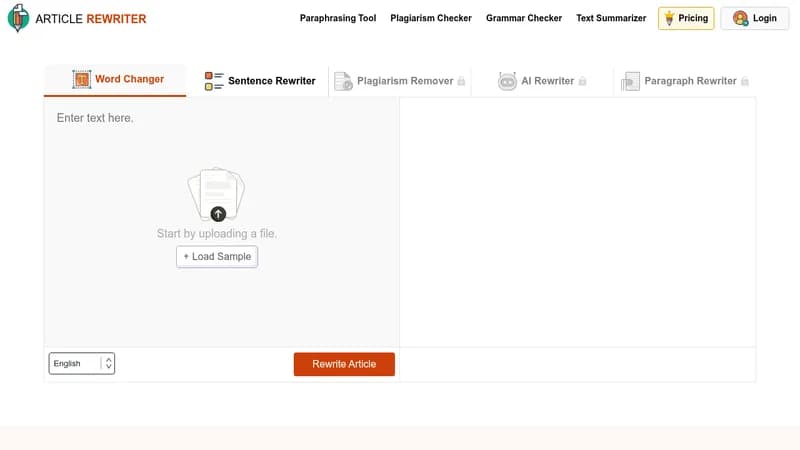
This tool uses AI to rewrite articles, essays, and other texts, making them unique and free of plagiarism. It's super easy to use with no registration required, saving you time on editing and improving readability. You can choose from different modes like Word Changer or AI Rewriter to get the results you need quickly.

Key Features of Article Rewriter Tool

  1. 1

    AI Rewriting

    Uses advanced AI to rewrite sentences and paragraphs automatically

  2. 2

    Multiple Modes

    Offers 5 different rewriting modes for various text needs

  3. 3

    Grammar Check

    Eliminates grammatical errors and spelling mistakes in output

  4. 4

    Time Saving

    Generates unique content within seconds with one click

  5. 5

    Easy to Use

    No registration needed, simple interface for quick rewriting

Article Rewriter Tool AI Tool Use Cases

  • ✍️
    Rewrite essays for students
  • 🔍
    Remove plagiarism from research papers
  • 📝
    Update blog content for SEO
  • 📚
    Rewrite assignments and notes

FAQs from Article Rewriter Tool

Which is the best article rewriter?

The article rewriter by Articlerewriter.net is the best due to its results, speed, word count limit, different modes, and ease of use, and it's 100% free.

Is article rewriting legal?

Yes, it is legal for changing words and helping in research, but it's advised to cite the source if borrowing content.

How much can you copy without infringing copyright?

The tool makes content 100% plagiarism-free, so the new content is yours, but cite sources if copying directly.

What is the importance of rewriting?

It helps avoid plagiarism, improve content quality, and re-create existing ideas.

Pros & Cons of Article Rewriter Tool

Pros (4)

  • Free to use with no daily limits
  • Multiple AI rewriting modes for flexibility
  • Grammatically perfect and plagiarism-free results
  • No registration required for immediate use

Cons (2)

  • Web-only access with no offline functionality
  • Limited to 10 languages, may not cover all needs

More Info About Article Rewriter Tool

Who is using article rewriter tool?

This tool is best for:

  1. Students
  2. Researchers
  3. Writers
  4. Bloggers
  5. SEO Experts

Article Rewriter Tool's Tags

Explore more niche AI tool websites by clicking on a tag* (works only if it has enough tools).

#SEOContent #PlagiarismFree #AIWritingTool #ContentRewriting#ArticleRewriter

Website Analytics of Article Rewriter Tool

Article Rewriter Tool Website Traffic & SEO Analysis:

Recent data shows that Article Rewriter Tool has 28.4K monthly visits (-50.1% decrease from the previous month), 45.0% bounce rate, and average 1.56 pages per visit.
Traffic is primarily driven by 6 different sources, with users from 5 countries worldwide, led by Spain contributing 11% of total traffic. SEO performance is shown by 5 tracked keywords, with "content rewriter" being the top-performing keyword with 4.9K monthly searches. See below for more info.

Monthly Visits

28.4K

(-50.1%)

Pages per Visit

1.56

Bounce Rate

45.0%

Average Time on Site

34s

Traffic Trend(Jul 2025 - Oct 2025)

Loading chart...

Top Keywords

SEO KeywordVolumeCPC
content rewriter
4.9K$0.48
article rewriter
6.3K$0.63
riscrivi testo
2.5K$0.59
article rewriter tool
2.8K$0.57
rewrite article
1.7K$0.13

Traffic Sources Distribution

Traffic Share by Source

Loading chart...

Source Breakdown Details

SourceTraffic Share
Direct
27%
Search
62%
Social
2%
Referrals
8%
Paid Referrals
1%

Global Traffic Distribution

Traffic Share by Country

Loading chart...

Geographic Breakdown Details of top 5 countries

Country NameTraffic Share
Spain11%
Italy11%
Colombia9%
Mexico7%
India6%
Analytics data is estimated (from third-party analytics providers) and for reference only.

🚀 Article Rewriter Tool Launch Badge

Promote your Toolbit Launch by using the badge on your website. It can be inserted on your home page or footer easily.

How to use: Simply copy and paste the embed code into your homepage or footer HTML to display it instantly and build community support.

ToolBit badge

Reviews for Article Rewriter Tool

Article Rewriter Tool: Reviews, Features, Pros & Cons, Alternatives