Start with the OpenAI Agents SDK for the fastest first day. Pick CrewAI if your job maps to a team of roles. Pick LangGraph if you need to control and inspect every step.
Quick verdict: All three are MIT-licensed Python libraries, so this is a design choice, not a contract. The Agents SDK has the fewest primitives. CrewAI gives you crews of agents fast. LangGraph gives you the most control for the most wiring.
| Axis | LangGraph | CrewAI | OpenAI Agents SDK | Winner |
|---|---|---|---|---|
| Control over the loop | Low-level graph you wire | Agents, tasks, crews, Flows | Few primitives | LangGraph |
| Multi-agent teams | You route it | Crews are the core idea | Handoffs | CrewAI |
| First-day speed | Docs point beginners elsewhere | Fast to start, many settings | Four-line hello agent | Agents SDK |
| Model freedom | No LangChain needed | Native SDKs plus LiteLLM | Other models via beta adapters | CrewAI |
How we compared the three frameworks
We read each framework's official docs, GitHub repo, PyPI page and pricing page on October 21, 2026. We compared control, memory, tracing, model support, license and cost. We did not run benchmarks, and none of the docs publish any.
Raw API loops break at state, oversight and tracing
A raw API agent works until the job gets long. Then you need state that survives between steps, crash recovery, a way for a human to step in, and a trace of what the model did.
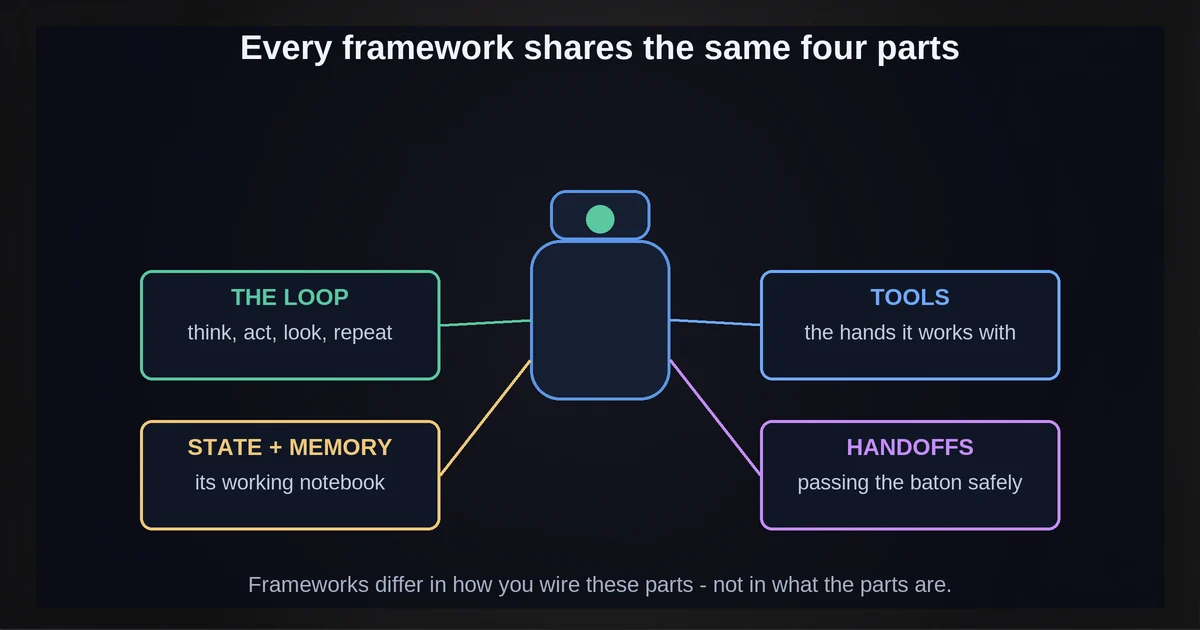
Every framework here wraps the same four parts:
- The loop. The model picks an action, calls a tool, reads the result and repeats. CrewAI caps an agent's iterations with
max_iter: "Default is 20." - Tools. Your Python functions, described to the model and dispatched back to your code.
- State and memory. LangGraph has short-term working memory and long-term memory "across sessions." The Agents SDK has Sessions. CrewAI crews store short-term, long-term and entity memory.
- Handoffs. One agent passes work to another. The Agents SDK calls them handoffs. CrewAI uses crews. LangGraph routes through graph edges you draw.
A framework does not pick your model. That is a separate call: see how to pick the right AI model for each job.
LangGraph wins on control, with the slowest start
LangGraph is "a low-level orchestration framework and runtime for building, managing, and deploying long-running, stateful agents." You define state, nodes and edges yourself.
- Control. You can inspect and modify agent state "at any point," which makes human review steps straightforward.
- Memory. Short-term working memory plus long-term memory across sessions.
- Durable execution. The docs describe agents that "persist through failures and can run for extended periods, resuming from where they left off."
- Tracing. LangSmith traces requests, debugs behavior and evaluates outputs. It is optional.
- No LangChain lock. The docs say "you don't need to use LangChain to use LangGraph."
The limit is the learning curve. LangGraph's own docs say beginners should start with LangChain's agents instead. Install with pip install -U langgraph.
# Minimal LangGraph agent shape: you draw the loop as a graph
from langgraph.graph import StateGraph, MessagesState, START, END
from langgraph.prebuilt import ToolNode

tools = [...]            # your Python functions as tools
model_with_tools = ...   # a chat model with tools bound

def llm_call(state: MessagesState):
    return {"messages": [model_with_tools.invoke(state["messages"])]}

def should_continue(state: MessagesState):
    return "tool_node" if state["messages"][-1].tool_calls else END

builder = StateGraph(MessagesState)
builder.add_node("llm_call", llm_call)
builder.add_node("tool_node", ToolNode(tools))
builder.add_edge(START, "llm_call")
builder.add_conditional_edges("llm_call", should_continue, ["tool_node", END])
builder.add_edge("tool_node", "llm_call")
agent = builder.compile()
CrewAI wins for role-based teams, with Flows for production
CrewAI "is a standalone Python framework with its own primitives for agents, tasks, crews, flows, tools, and orchestration." It does not sit on LangChain. Use it when the job reads like a team: a researcher, a writer, a reviewer.
- Production path. The CrewAI docs say: "For any production-ready application, start with a Flow." The quickstart configures crews in
crew.jsonc, not YAML. - Processes. Run tasks sequentially, or hierarchically with a manager (
manager_llmormanager_agent). Agents can delegate to others whenallow_delegationis on (default False). - Models. Native SDK integrations cover OpenAI, Anthropic, Google, Azure, AWS Bedrock and Snowflake Cortex. "All other providers are powered by LiteLLM."
- Memory and tracing. Crews store short-term, long-term and entity memory, and a crew attribute "controls tracing for the crew."
The limit is surface area. The agent attributes table lists 28 attributes, and Flows add structure on top. CrewAI AMP, the hosted platform, adds a Visual Agent Builder (vendor claim).
# Classic in-code crew; the docs now steer production apps to Flows + crew.jsonc
from crewai import Agent, Crew, Task

researcher = Agent(role="Senior Researcher", goal="Find accurate facts on the topic",
                   backstory="Checks every claim against a source")
writer = Agent(role="Report Writer", goal="Turn the research into one short page",
               backstory="Writes short, plain reports")

crew = Crew(agents=[researcher, writer],
            tasks=[Task(description="Write a one-page report on AI agents",
                        expected_output="A short markdown report", agent=writer)])
result = crew.kickoff()
If you are unsure a team of agents is worth it at all, read when to build multi-agent systems first.
The OpenAI Agents SDK wins on day one, and traces go to OpenAI
The OpenAI Agents SDK is "a lightweight, easy-to-use package with very few abstractions." OpenAI calls it "a production-ready upgrade" of its earlier agent experiments. Its stated principle: "Enough features to be worth using, but few enough primitives to make it quick to learn."
- Built in. Handoffs, guardrails, Sessions ("a persistent memory layer") and tracing.
- Models. OpenAI says it supports "100+ other LLMs." Any-LLM and LiteLLM are "best-effort, beta adapter integrations."
- Tracing default. "Tracing is enabled by default," and traces export to "the OpenAI backend in batches." Set
OPENAI_AGENTS_DISABLE_TRACING=1to turn it off.
That last point matters if your prompts carry customer data. Check it before you ship. Install with pip install openai-agents. This is the docs' hello agent:
from agents import Agent, Runner

agent = Agent(name="Assistant", instructi)
result = Runner.run_sync(agent, "Write a haiku about recursion in programming.")
print(result.final_output)
Side by side: license, memory, tracing, models and pricing
All three libraries are free and MIT-licensed. You pay your model provider, plus any hosted tracing or platform tier you choose. Details as of October 2026; the 0.x SDKs change often.
| LangGraph | CrewAI | OpenAI Agents SDK | |
|---|---|---|---|
| License | MIT | MIT | MIT |
| Abstraction | Low-level graph | Agents, tasks, crews, Flows | Very few abstractions |
| Memory | Short- and long-term | Short-term, long-term, entity | Sessions |
| Tracing | LangSmith (optional) | Crew tracing attribute; AMP | On by default, sent to OpenAI |
| Models | Any model client you choose; LangChain optional | Native SDKs plus LiteLLM | OpenAI; others via beta adapters |
| Paid tier | LangSmith Developer $0/seat, 5k base traces/mo; Plus $39/seat, 10k base traces/mo | AMP Basic free, 50 workflow executions/month; Enterprise custom | None listed; you pay OpenAI for model use |
LangSmith keeps base traces for 14 days. Other options worth a look:
- Claude Agent SDK. Gives you "the same tools, agent loop, and context management that power Claude Code," in Python and TypeScript. PyPI lists MIT, but the docs say use "is governed by Anthropic's Commercial Terms of Service." Auth is an API key.
- AG2. "AG2 (formerly AutoGen)," Apache-2.0.
- LlamaIndex. MIT, with
FunctionAgentfor tool calling andAgentWorkflowfor multiple agents. - AutoGen. Archived. Microsoft names Microsoft Agent Framework as "the enterprise-ready successor to AutoGen."
Which should you pick? Ask three questions
First, check the section below: if one agent and one loop still do the job, stay raw. Otherwise ask these in order and stop at the first yes.
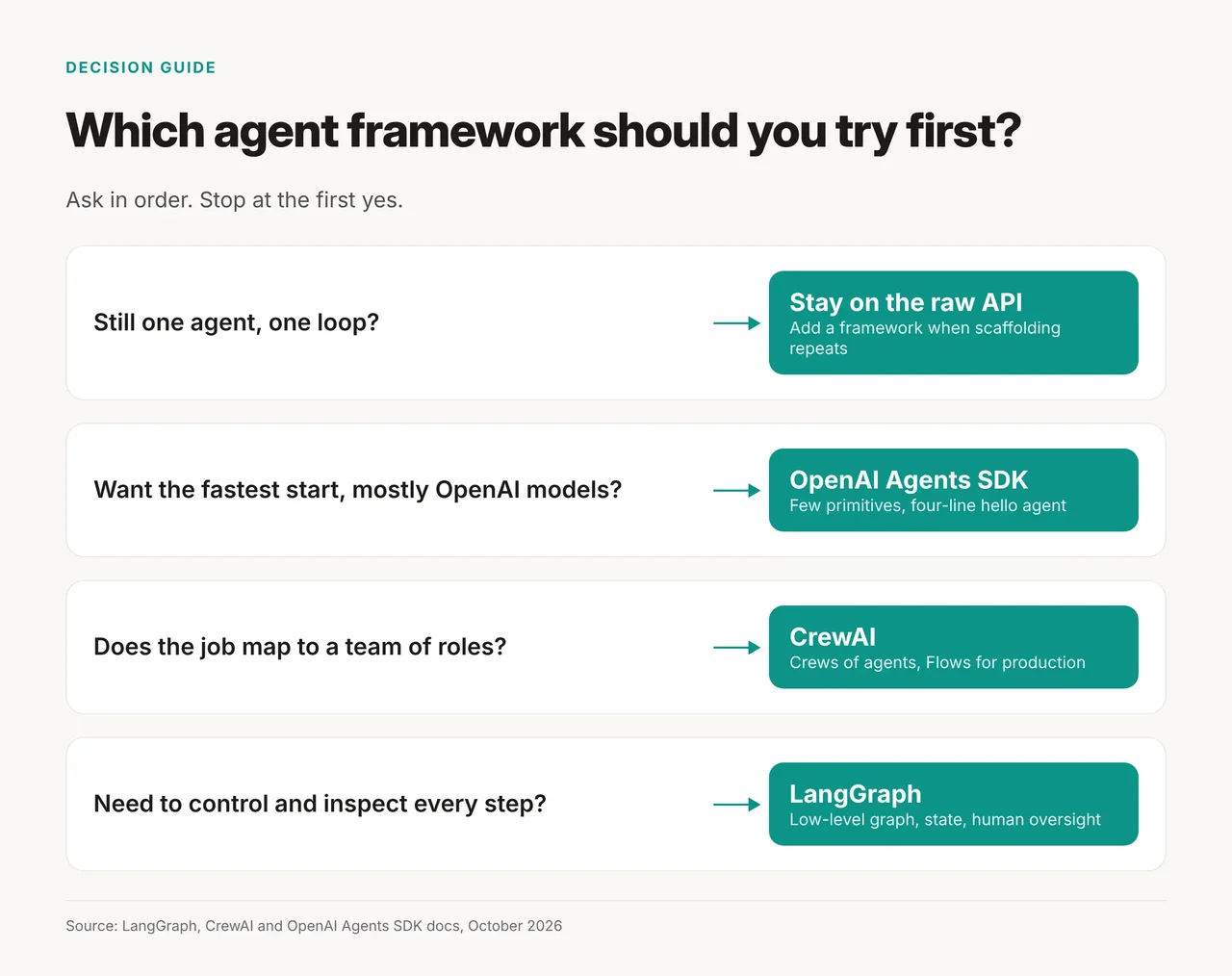
- Do you want the fastest start, mostly on OpenAI models? Use the Agents SDK.
- Does the job map to a team of roles? Use CrewAI, and start production work with a Flow.
- Do you need to control and inspect every step? Use LangGraph.
Rule: pick the framework whose core idea matches how you already describe the job.
Pick none of them until you rebuild the scaffolding twice
Stay on the raw API while one agent and one loop do the job. Add a framework when you catch yourself rebuilding state, handoffs or tracing for the second time. If you have never shipped an agent, build your first AI automation without a framework, so you know what one replaces.