You already know how this goes wrong. You paste your call notes into ChatGPT with a prompt like "write a winning freelance proposal for this project" and it hands back something that begins: "In today's competitive digital landscape, delivering cutting-edge solutions is more important than ever."
Every noun is a placeholder. The deliverables are "high-quality" and the timeline is "efficient". The scope says you will "ensure alignment with business objectives", which commits you to precisely nothing and, somehow, to everything. A client can read that paragraph and later claim it covers the extra landing page they want for free, because nothing in it says it doesn't.
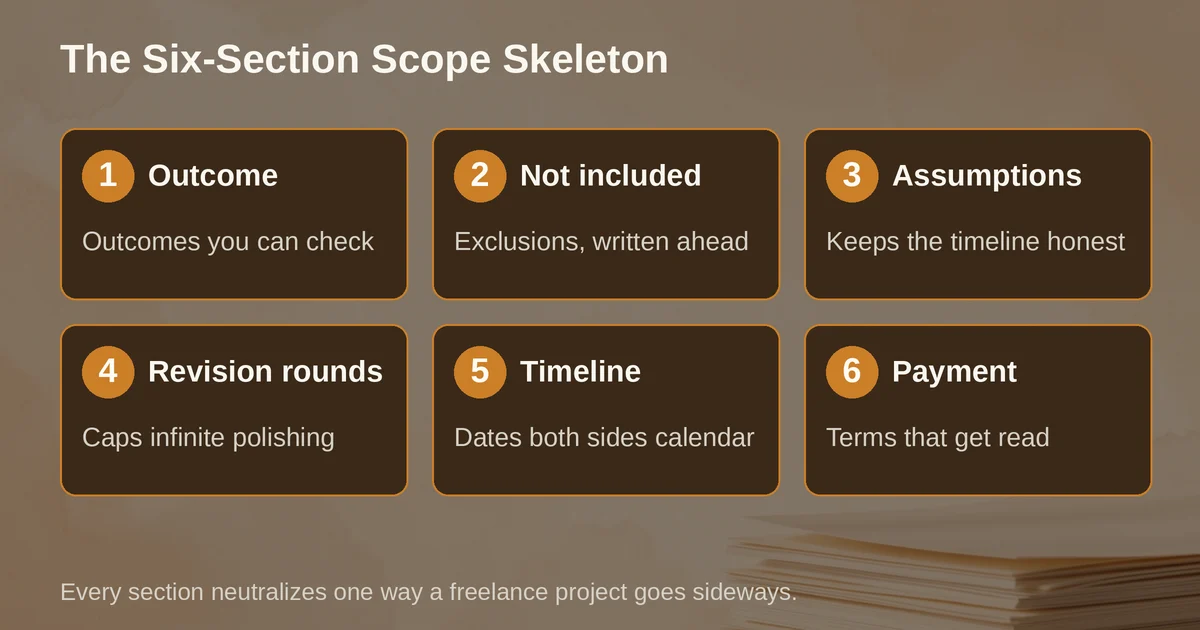
The problem is not the model. The problem is that you asked it for prose when what you needed was a contract-shaped skeleton with your facts poured into it. The fix is to stop prompting for "a proposal" and start prompting against a structure: outcome, exclusions, assumptions, revision rounds, timeline, payment. That skeleton is the actual product of this whole exercise. AI just fills it, fast, from your call notes. You still read it, fix it, and hit send yourself.
Here is the skeleton, what each section actually protects you from, and how to make a model fill it without inventing anything.
What the proposal is for
A proposal is not a sales letter. A sales letter persuades. A proposal prevents arguments.
The client will one day forget what you agreed. You will one day be tempted to say yes to "just one small extra thing". The written proposal is the piece of paper (or page, or PDF) both of you point to when that happens. Which means the useful test of any section is not "does this sound impressive" but "if we disagree in three months, does this line settle it".
That is also the test for what AI is allowed to do here. AI is genuinely good at the mechanical part: taking messy call notes and slotting facts into the right sections, reusing your phrasing from past proposals, keeping the structure consistent every time. It is bad at the judgment part: deciding what you meant, guessing a price, or smoothing over a contradiction in what the client told you.
One boundary to state plainly: this is a scope-of-work proposal, not a lawyer-reviewed contract. It is enforceable-looking structure that prevents most disputes, and for many freelance engagements that is enough, but it is not legal advice and does not replace a contract or a professional review when the stakes are high. Retainer agreements, non-competes, liability caps: get a human lawyer for those.
The skeleton, section by section
Six sections. Every one earns its place by neutralizing a specific way freelance projects go sideways.
1. Outcome
What the client has at the end, stated as a thing you can check.
Deliverable: a redesigned pricing page (desktop and mobile), delivered as a Figma file with components, ready for handoff to the client's development team.
What it protects against: "I thought you were also doing the development." The failure mode here is describing activities instead of outcomes. "I will work closely with you to elevate your brand" is an activity. "A 40-page brand guidelines document in PDF" is an outcome. Vague AI proposals are almost entirely activities, which is why they read as fluff: activities can't be checked, so they can't be argued about, so they protect nobody.
2. Not included
The exclusions list. This is the section nobody writes and everybody needs. If the client's dev team implements your Figma file badly, is that your bug to fix? Say no here, in writing, in advance.
What it protects against: scope creep, the quiet killer. "Just one more page", "can you also export it as HTML", "while you're in there". An explicit not-included list turns each of those from an awkward negotiation at hour 40 into a simple "happy to, here's a quote for the addition".
The exclusions list is also where AI does some of its most valuable work, because it will generate candidate exclusions you would never think to write. Ask it: "based on this outcome, list what a client might reasonably assume is included but is not." Then keep the ones that are true. The model is well-read on every way projects have exploded; let it enumerate the ways yours might.
3. Assumptions
What you are relying on to hit the timeline and price. Client provides brand assets by Friday. The current site's analytics tag stays intact. Copy will not change after final approval.
What it protects against: the blame game when an assumption breaks. If the assets arrive two weeks late and you had the assumption in writing, the slipped deadline is not your slipped deadline. Assumptions are the mechanism that keeps the timeline honest: your dates hold only while the assumptions hold, and now everyone can see which one broke.
4. Revision rounds
How many times the client can come back, and what a "revision" is versus a "new request".
The fee includes two revision rounds on the delivered design. A round is consolidated feedback on the current version. A new round begins when feedback arrives. Feedback arriving in pieces across multiple days counts as separate rounds.
What it protects against: infinite polishing. Every freelancer who has lived through a seventh revision of the same hero section knows this one. The magic is in defining the word "round" precisely, because an undefined revision policy degrades into "whenever the client feels like it".
5. Timeline
Dates, not durations. "First draft by October 14, feedback window of five business days, final delivery by October 28."
What it protects against: your own optimism. "Two weeks" is a vibe; "October 14" is a commitment both parties can calendar. And put the client's deadlines in there too. A timeline with no client obligations is just your deadline with extra steps.
6. Payment
The number, the schedule, the trigger for each installment, and what happens if payment is late. Deposit to start, remainder on delivery, or 30-day terms: whatever your policy is, it goes in the same document the client signs, not a separate email nobody can find later.
What it protects against: the invoice that sits unpaid because nobody agreed on when it was due. Payment terms that live in the proposal get read; payment terms that live in your accounting software do not.
The fill prompt
The prompt is not "write my proposal". It is a set of instructions that give the model the skeleton and take away its creative license. The version below works in Claude or ChatGPT; adjust the voice line to yours.
You are helping me draft a client proposal. Use only the facts in the call notes and attached files. If a fact is missing, insert [BRACKETED NOTE] instead of inventing anything. Do not add flattery, adjectives, or marketing language.
Structure: (1) Outcome, (2) Not included, (3) Assumptions, (4) Revision rounds, (5) Timeline, (6) Payment.
Rules per section:
- Outcome: one paragraph, concrete deliverables only, checkable.
- Not included: generate 6 to 10 candidate exclusions from the outcome; mark ones you inferred with [CONFIRM].
- Assumptions: only things the client does or provides.
- Revision rounds: state the count and define "round".
- Timeline: specific dates. Today's date is [date]; working days only.
- Payment: use my rates from the attached rate card. Do not compute totals from guessed hours.
Tone: plain, confident, no superlatives. Read the sections on how to prompt ChatGPT and Claude differently if the output drifts; the models respond differently to the same instructions.
The two lines doing the heavy lifting are the bracketed-note rule and the [CONFIRM] marker. They convert the model from a generator into a form-filler that flags its own gaps. Your first draft then becomes an editing job: fill brackets, delete the exclusions that are wrong, confirm the inferred ones. That takes ten minutes. Writing the whole thing took you ninety and you still forgot the exclusions list.
A worked example: call notes in, proposal text out
Call notes, exactly as you might type them after hanging up:
Client: marketing director, mid-size B2B software co. Wants a "landing page refresh". Existing page converts at 1.8%, thinks it's ugly. Their dev will implement. Copy mostly stays but she'll "tweak some headlines". Needs launch before their Nov 3 webinar. Budget question dodged twice. She mentioned wanting a second page for a new product "eventually".
Feeding that into the fill prompt, plus your rate card, produces something like:
Outcome. Redesign of the existing landing page (desktop and mobile), delivered as a Figma file with documented components, ready for implementation by your development team. Success is measured against the current 1.8% conversion rate, to be re-measured two weeks after launch.
Not included. Implementation or development work. Copywriting beyond headline tweaks to existing copy. [CONFIRM: a second page for the new product was mentioned as a future need; not quoted here.] Analytics instrumentation. Post-launch conversion optimization.
Assumptions. Existing page copy is provided and final, except for headlines, by [date]. Your development team implements the delivered designs without design-side changes. The current analytics setup remains in place for before/after measurement.
Revision rounds. Two rounds of consolidated feedback included.
Timeline. First design by October 14. Feedback window: five working days per round. Final files by October 24, ahead of the November 3 webinar.
Payment. [X] as quoted from the attached rate card: 50% to begin, 50% on delivery of final files. Invoices due within 14 days.
Compare that to what the generic prompt produced from the same notes: "I will craft a stunning, high-converting landing page experience that captivates your audience and drives exceptional results." Note what the scoped version did with the awkward bits. The dodged budget question became a placeholder your rate card fills. The "eventually" second page got captured as an explicit exclusion with a confirm flag instead of being silently dropped or silently included, the two ways that detail becomes a fight. The webinar deadline turned into dates with a client feedback window attached, so a late client response can't quietly eat your buffer.
The "tweak some headlines" line, which sounded harmless on the call, is pinned down in assumptions: copy is final except headlines. If the tweaks become a rewrite in week two, you have a document that says what was agreed, and a polite way to say the rewrite is a new scope.
The conflict test: make it choose between your documents
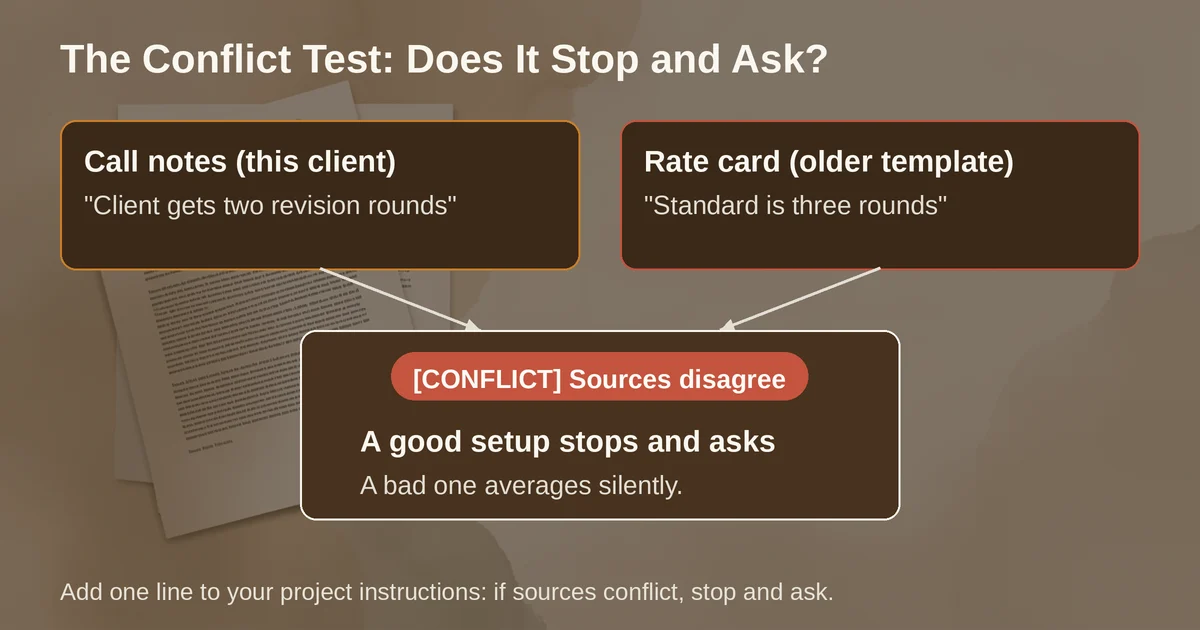
Here is the adversarial check worth running before you trust your setup. Put your rate card and your call notes in the same project, and deliberately let them disagree. Say the notes say the client gets two revision rounds; the rate card, written months ago, promises three.
A well-instructed model flags it:
[CONFLICT]: call notes say two revision rounds, rate card says three. Which applies to this client?
A badly-instructed model picks one silently, usually the one in the notes because it was the most recent text, and you find out at the client's third round of feedback, which you are now doing for free. The difference is one line in your project instructions: "If sources conflict, stop and ask me; never resolve it yourself."
The same test catches the subtler failure: the model that resolves conflicts by inventing a compromise. "Two to three revision rounds depending on complexity" is not a compromise, it is a dispute with a delay fuse. If your fill prompt passes the conflict test, your setup is solid; if it doesn't, tighten the instructions before the next real proposal. If you want a deeper treatment of why models invent compromise instead of admitting uncertainty, the failure is the same one behind worked examples of AI hallucination.
Setting up the workspace: Claude Projects or ChatGPT Projects
You do not need a special tool for any of this. What you need is a persistent home for three things: your skeleton and fill prompt, your rate card and standard terms, and two or three past proposals as style references. Both major assistants have exactly this feature now, and both made it free.
ChatGPT Projects are available to all free and paid plans. Create a project, upload your rate card and past proposals as files, and paste the fill prompt into project instructions. One behavior matters here: project instructions apply only inside that project and override your global custom instructions, so tune them for proposal work without worrying about the rest of your account. File limits depend on your plan, and the project remembers its chats and files, so each new proposal starts with your template already loaded rather than from a blank prompt. Project-only memory keeps client details from bleeding into your other conversations, which is a reasonable instinct for client work.
Claude Projects work the same way: a self-contained workspace with its own knowledge base and instructions, available to every user including free accounts (free plans cap you at five projects). On paid plans, project knowledge scales automatically with retrieval when it grows past what fits in context, so a project that accumulates a year of proposals keeps working. The pitch Anthropic has used since launching Projects is exactly this use case: ground the model's outputs in your internal knowledge, whether style guides or past work.
Which to pick? For this job they are interchangeable, and the honest answer is the one you already pay for; we break down the real differences in Claude versus ChatGPT elsewhere. If you live in Claude generally, our complete guide to Claude covers project setup in depth.
When a hosted proposal tool earns its subscription
Everything above produces text. If you send three proposals a year as a PDF, you are done; do not buy anything.
Hosted tools earn their keep when the sending is the work: interactive pricing tables the client can configure, e-signature, payment collection at the moment of signing, analytics showing which sections the client lingered on. Two current examples:
Better Proposals starts at $13 per user per month billed annually (the monthly price is $19) with legally binding digital signatures on every plan, payment integrations, and a content library for reusable sections. That Starter tier allows 10 sends a month for one user, which covers most solo freelancers. The Premium plan, $21 per user per month annually, lifts the cap to 50 sends and adds CRM integrations.
Qwilr turns proposals into interactive pages and now runs three plans: Starter at $35 per user per month billed annually ($49 monthly) with e-sign, analytics, and payment collection (a 0.09% fee on Starter-tier transactions), Growth at $275 per month including five users, and Scale at $750 per month including ten users. The AI features are the notable gap for solo buyers: Qwilr's Smart Proposal Engine and AI Prefill sit on the Scale plan, so the automation is pitched at sales teams, not freelancers. For a freelancer, Qwilr's Starter is a design-and-tracking upgrade, not an AI upgrade.
The decision rule: if your close rate problem is that the proposal looks like everyone else's, a hosted tool helps. If your close rate problem is that the proposal is vague, no tool fixes that; the skeleton does.
Pricing and plan details are as published by the vendors around September 2026 and can change; confirm on the official sites.
What AI must never do in a proposal
Three hard rules, from all of the above:
Never let it invent a number. Prices come from your rate card, dates from your calendar, round counts from your policy. The bracket-and-confirm pattern exists so nothing reaches the client unverified. A fabricated "most freelancers charge $95 per hour for this" is a hallucination you send on your own letterhead.
Never let it resolve a conflict. Conflicting sources get flagged, not averaged. Run the conflict test once when you set up the project and again whenever you add a document.
Never let it sign off. You send it, after reading it as if the client's lawyer will, because one day one might. The model drafts, the human commits. That division of labor is not a limitation of current AI; it is the correct division of labor, the same way a good paralegal drafts and the attorney signs.
Two questions people actually ask
Is an AI-drafted proposal legally binding once signed?
The binding part comes from the signature and the clarity of the terms, not from who typed the first draft. A signed document with concrete deliverables, exclusions, and payment terms is enforceable in the ordinary way documents are. But an AI-drafted proposal is not a reviewed contract: it hasn't been seen by a lawyer, and for high-stakes engagements you should have one look at your template once, which then protects every future proposal built on it.
Do I need to tell clients I used AI?
There is no obligation in most freelance contexts to disclose drafting tools, any more than you'd disclose a template or Grammarly. The line worth holding: the client should believe the commitments came from you, and they did, because you verified every bracket and flag before sending. If your gut says a particular client-relationship or industry has disclosure norms, honor them; disclosure is cheap, trust is not.
The workflow, compressed: build the skeleton once, put it with your rate card and past proposals in a Claude or ChatGPT project, fill from call notes with the bracket-and-confirm prompt, run the conflict test, edit for ten minutes, send it yourself. The first setup takes an hour. Every proposal after that takes fifteen minutes and contains no "cutting-edge solutions" whatsoever, which is precisely the point.