Every "chat with PDF" comparison you have read probably ranks the tools. This one does something more useful: it tells you which tool is the wrong one to open. Because by September 2026, NotebookLM (renamed Gemini Notebook by Google in July), Claude, ChatPDF, and Humata are all good at reading your file. The differences that matter are about shape, not intelligence. One of them is a research notebook, one is a general assistant that happens to read PDFs brilliantly, and two are dedicated PDF chat products built around one thing: whether you can click the citation and land on the right page.
Here is the short version of the whole article. If you have one PDF and three quick questions, the wrong tool to open is Gemini Notebook, because standing up a notebook for a throwaway file is overhead with no payoff. If you are building a research library of 40 papers, the wrong tool is ChatPDF, because it was built for one document at a time and still charges by the day for uploads. And if you are reviewing a contract, where the citation is the entire deliverable, the wrong tool is Claude on its own, because it will read the contract better than anything on this list and then fail to hand you a page-linked trail you can show anyone else.
The 5-Minute Test: How to Expose a PDF Chat Tool
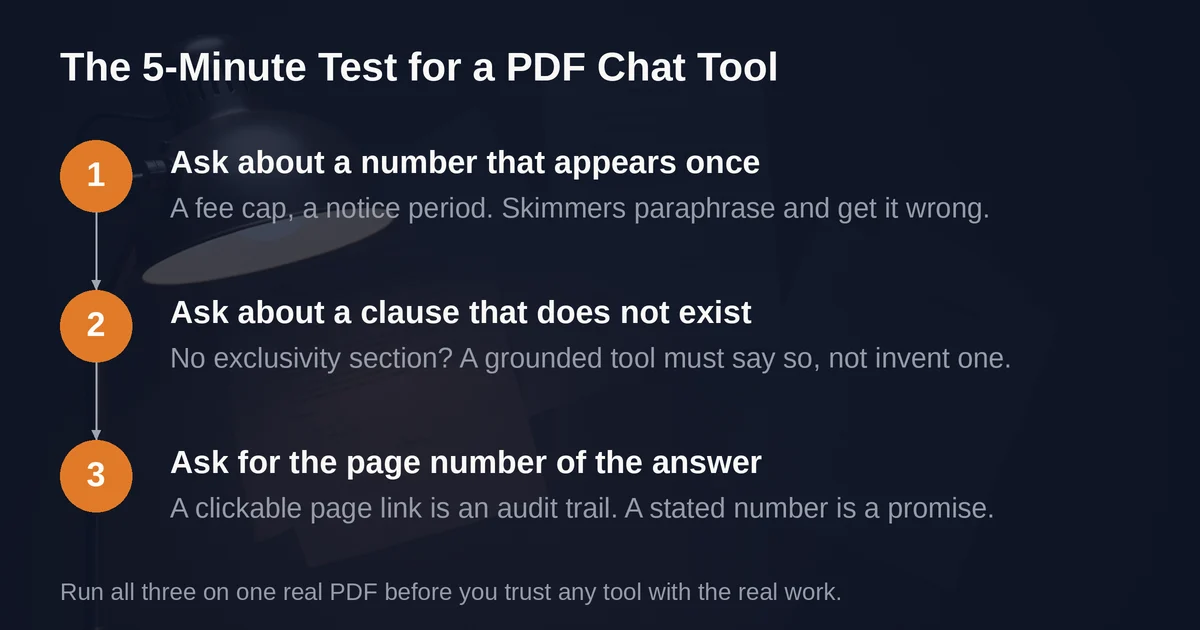
Before the tool-by-tool breakdown, a test you can run yourself in five minutes. Take one real PDF, ideally a contract or a dense report, and ask three questions.
Question 1: a number that appears exactly once. A termination notice period. A fee cap. A single-mention threshold buried on page 9. This tests retrieval precision. A tool that skims rather than indexes will paraphrase the document and hand you a plausible number that is not the one in the file.
Question 2: a claim that is not in the file. Ask about a clause that does not exist. "What does the exclusivity section say?" on a contract with no exclusivity section. This is the acid test, and it is where general-purpose chatbots are structurally weaker than grounded retrievers. A model trained to be helpful will often fill the gap with fluent, confident, invented text, the same failure mode that once produced fake case citations in a federal court filing. A tool engineered to answer only from your sources is designed to say "this is not covered in your document" instead. Design intent is not a guarantee, but it is a strong prior.
Question 3: "give me the page number for that." This tests the difference between a citation you can verify and a citation you have to trust. Clickable page references that jump to the passage are an audit trail. A sentence like "as stated in section 4.2" with no link is the model paraphrasing itself. When the stakes are real, only the first kind counts.
Keep score on those three questions and the right tool for your job usually becomes obvious. Now, the four tools.
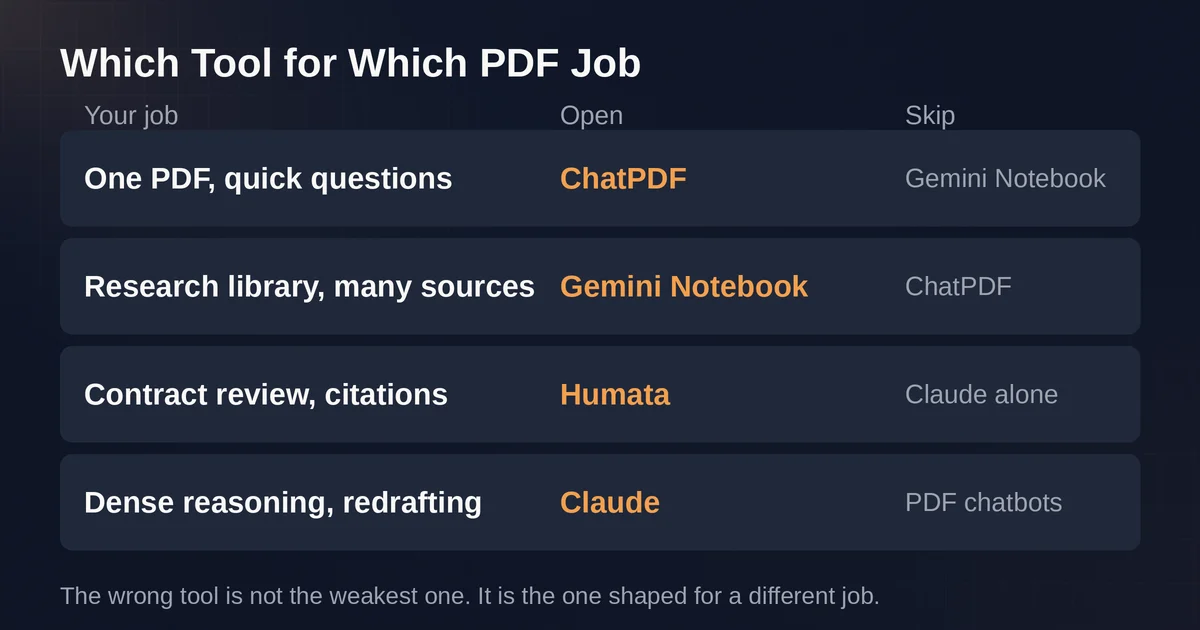
Which Tool for Which PDF Job
| Your job | Right tool | Wrong tool, and why |
|---|---|---|
| One PDF, a few quick questions | ChatPDF (2 free docs/day, clickable page refs) | Gemini Notebook: notebook setup is overhead for a throwaway file |
| Research library, many sources, synthesis | Gemini Notebook (up to 50 sources/notebook free, inline citations) | ChatPDF: built for one document at a time, tight daily limits |
| Contract or due diligence, citation is the deliverable | Humata (page-linked citations, team roles) or Gemini Notebook | Claude alone: reads brilliantly, but no clickable page trail to show a colleague |
| Dense reasoning, tables, redrafting language | Claude (reads text and layout, 100 pages visually) | Any narrow PDF chatbot: none of them reason or rewrite like Claude |
Gemini Notebook (Formerly NotebookLM): When It Wins, and When It Is a Distraction
Google renamed NotebookLM to Gemini Notebook on July 16, 2026. Same product, same limits, new name and logo, and the old address redirects. The rename matters for one reason: the 2026 tutorials you find under either name are describing the same thing, including our own research guide, which walks through sources, grounded queries, and study outputs in detail. This article is not that tutorial. This is about when to open something else.
What Gemini Notebook is, structurally, is a notebook. You add sources: PDFs up to 500,000 words or 200MB each, websites, YouTube videos, audio, Google Docs and Slides. The AI then answers only from those sources, with inline citations attached to essentially every claim, and each citation opens the exact passage in the source. Google describes this as chat "based on your sources with clear in-line citations for accuracy, transparency, and trust." The free tier is generous: 100 notebooks, 50 sources per notebook, and 50 chat questions a day, which is more sustained reading than most people do in a week.
The citation behavior is the best of the four tools for research because it is the most granular. Ask "what do these three papers say about retention effects" and you get an answer stitched from your sources with a numbered citation on each sentence, clickable, in context. Then ask it for something that is not there, and it will typically tell you the notebook does not cover it rather than filling the gap. For a literature review, a competitive landscape, a semester of course material, this is the correct shape of tool. The synthesis is the point, and synthesis needs many sources, which is exactly what a notebook holds.
Where it loses: the first five minutes. If you have one PDF and one question, Gemini Notebook makes you create a notebook, import the source, wait for indexing, and then chat inside a container that will outlive your question. It also will not go beyond the file. Ask Notebook a question that requires outside knowledge and it will either refuse or answer only from your sources. That is a feature for a research notebook and a limitation for a one-off question. And under the hood you are locked to Google's Gemini models. If you are curious how that positions Google's assistant against the others in general, the Claude vs ChatGPT comparison covers the model-level differences; here, the model is not the story, the grounding is.
Pricing is the quiet strength: the free tier is genuinely usable long-term, not a trial. Higher limits arrive only bundled inside Google's AI subscriptions (AI Plus at $4.99 a month, Pro at $19.99, Ultra from $99.99), since there is no standalone NotebookLM subscription. Most people doing PDF research never need to pay.
Open Gemini Notebook when: the unit of work is a collection of sources, you will come back to them repeatedly, and you want every claim traceable to a passage you can open. Open something else when: the unit of work is a single file you will never think about again.
Claude: The Best Reader in the Group, and the Worst Audit Trail
Claude is not a PDF tool. That is both its superpower and its structural weakness in this comparison. Upload a PDF to Claude's chat and you get a genuinely capable model reading your document, not a retrieval pipeline bolted onto a chat window. Per Anthropic's help center, chat uploads accept files up to 500MB and up to 20 files per conversation, with PDFs capped at 1000 pages. For PDFs of 100 pages or fewer, Claude analyzes both text and visual elements: charts, tables, images, layout. From page 101 to 1000, it falls back to text-only extraction, and anything over 1000 pages is rejected at upload.
The practical consequence for citations: Claude reads the contract the deepest and cites it the worst. Ask it for the termination clause and you will get the sharpest reading of that clause of any tool here, including what it implies for the surrounding sections. Ask "what page is that on" and you will get a stated page number that is usually right, because you were told to reference PDF page numbers. But there is no clickable link. No highlighted passage. No artifact a colleague can open. The claude.com chat gives you fluent text and your own responsibility to verify it. The structured citations feature in Anthropic's platform documentation, which returns page-number ranges for each cited passage, is an API capability for developers building on Claude, not something you get in the chat you use at your desk.
That distinction is exactly why Claude alone is the wrong tool for a contract review, even though it is arguably the best tool for understanding a contract. In due diligence, legal review, or compliance, the answer is not the deliverable. The deliverable is "page 14, section 8.3, highlighted." Claude can get you the right answer and cannot hand you that artifact.
Where Claude wins outright: reasoning over the document. "Redraft this clause to cap liability at two times fees." "Here is the vendor's data processing addendum, and here is our policy: list every conflict." "This table on page 6: what does the trend imply for Q4?" Those are not retrieval questions, and the dedicated PDF chatbots do them poorly. Claude's 200k-token context window holds a few hundred pages of extracted text comfortably, and the Pro plan at $20 a month (or Max at $100 and $200 for heavy use) is the same subscription you would be paying for anyway.
And the answer to the middle ground is obvious once stated: many serious workflows use both. Run the file through a citation-first tool to build the page trail, then hand the same PDF to Claude for the reasoning. Two tools, one document, five extra seconds.
Open Claude when: the question is about what the document means, not where a fact lives. Open something else when: the output needs to be a verifiable location in the file, or the file is over 1000 pages, or you only have the free tier's usage window and a long document to chew.
ChatPDF: The Right Shape for the Wrong Unit of Work
ChatPDF is the original category product, launched in 2023 around a single interaction: drag a PDF in, ask questions, get answers with clickable page references. In 2026 it has expanded well past that core: the official site now bundles multi-file folders, AI research search, flashcards, slide generation, an AI writer, and desktop and mobile apps. But the spine is still the same: one document, page-linked citations, side-by-side view of the PDF and the conversation.
For the single-PDF scenario, it is the correct opening move, and the free tier is the reason: two documents per day, no registration needed to start, per the official FAQ. The page references are clickable and land on the right page in the side-by-side view, which passes the third test question cleanly. Asking a question about a section that does not exist typically returns "this is not covered in the document" behavior, because like the other dedicated tools here it is built to answer from the file.
The limits are where the 2026 reality bites. The free tier is tight on pages: independent testing in August 2026 found around 120 pages and 10MB per file on the free plan, with paid Plus ceilings around 2,000 pages per file. The Plus pricing is genuinely messy to quote: credible sources in 2026 report different web prices, and the US App Store listing anchors at $14.99 a month or $89.99 a year, so treat any single number you read, including in this paragraph's neighborhood, as checkout-dependent and confirm in the app.
Where ChatPDF loses: sustained work. Two uploads a day is fine for "I need to understand this lease before I sign it" and wrong for "I am reviewing twelve vendor contracts this afternoon." Its multi-file folders are a recent addition and a step behind a real notebook. It is a single-user product: no team roles, no shared libraries. And while it answers from the file, the reasoning ceiling is lower than Claude's. Ask ChatPDF to compare two indemnification structures and negotiate the difference, and you will get a competent summary, not a negotiation.
Open ChatPDF when: one file, a handful of questions, you want page links, and you do not want to create anything that persists. Open something else when: the work spans many files, many days, or many people.
Humata: The Citation-First Tool Built for Teams and Thick Document Sets
Humata was the wildcard heading into this comparison, because the citation-first PDF tool space has churned hard since 2023, and tools have pivoted or stagnated. Humata has not: as of September 2026 it is active (now under Tilda Technologies) and still marketing exactly what it marketed at the start, "cited links into your source files," with highlighted passages you can click through to inside the original document. It supports PDF, Word, PowerPoint, and Excel files, and it processes OCR for scans on the Team plan.
What separates Humata from ChatPDF is the unit of work it assumes. ChatPDF assumes an individual with one document. Humata assumes a team with a stack of them. The Team plan at $49 per user per month includes department and folder-level permissions, role-based access, and encrypted shared file rooms, with 5,000 pages included and metered per-page pricing after that ($0.01 per page on Team, $0.02 on the $9.99 Expert plan). That per-page structure tells you who Humata is for: due diligence teams feeding tens of thousands of pages through a pipeline, where a page-linked citation is the difference between an answer and an answer a partner will sign off on.
The free tier is the narrowest of the four: 60 pages and 10 answers per month. That is a product tour, not a working tool, which is a deliberate signal. Humata is not competing for the "two free PDFs a day" user; it is competing for the analyst who needs to ask 400 questions across 60 SEC filings and export the citations.
Where Humata loses: individuals and light work. The free tier will not carry a student through a week. The interface is more enterprise-flat than delightful. And it is still a retrieval product: it will find the clause and link the page, but hand the reasoning to Claude, and the synthesis across many sources to Gemini Notebook.
Open Humata when: the document set is large, multiple people need the same citations, and page-linked references are the deliverable. Open something else when: you are one person with one file, or you need reasoning more than retrieval.
What to Do When the Tool Gets It Wrong
Run the three-question test and sometimes you will find a miss: a page citation that lands wrong, a number paraphrased from the wrong section, or, on the general assistants, an answer about a clause that does not exist. What then?
First, treat the citation as the claim. An answer with no clickable page reference is a lead, not a fact. Go find the passage yourself before acting on it. This is not cynicism about the tools; even the best grounding cannot save you from a scanned page where the OCR mangled the number, which is a real failure mode for every tool in this comparison that handles scans.
Second, re-ask with the citation in the prompt. "Quote the exact sentence, then give the page number." Forcing the quote out loud makes paraphrase errors visible immediately, because the quote either matches the file or it does not.
Third, when a tool invents content for a claim that is not in the file, that is a signal about the tool's design more than the tool's quality. Grounded tools are built to refuse; general chat assistants are built to be helpful, and helpfulness under uncertainty is precisely where hallucination comes from. Route the document accordingly, and if the stakes are contractual or legal, the last step of the workflow is always the same and no AI does it for you: a human reads the page.
FAQ
Which AI PDF reader actually cites the page number? Gemini Notebook, ChatPDF, and Humata all produce clickable citations that link to the specific page or passage in your file. Claude states page references in text but does not link them in the consumer chat, though Anthropic's API offers structured page-range citations for developers.
Is there a genuinely free tool to chat with a PDF? Yes. Gemini Notebook's free tier (100 notebooks, 50 sources each, 50 questions a day) is the most generous for ongoing use. ChatPDF's free tier (2 documents per day, no sign-up required) is the fastest for a one-off file. Humata's free tier (60 pages, 10 answers) is a trial, not a working plan.
Pricing and plan details are as published by the vendor around September 2026 and can change. Confirm current numbers on the official site before you subscribe, especially for ChatPDF, whose Plus price varies by checkout channel and region.
Pricing and plan details are as published by the vendor around September 2026 and can change - confirm on the official site.