Here is the uncomfortable truth about AI presentation tools in 2026: the one everybody searches for is often the wrong one to buy. Gamma dominates the "AI presentation maker" conversation, and it genuinely makes the best-looking first draft in the category. But if your client, your boss, or your sales team lives in Google Slides or PowerPoint, and the deliverable is a file someone else has to open and edit, Gamma is the wrong tool and Plus AI is the right one. It runs as an add-in inside Slides and PowerPoint, so the deck is born in the file you already share. There is no export step, no font substitution, no "the deck fell apart in PowerPoint" phone call.
Beautiful.ai sits in a third place entirely: it is the tool for people who want the design system to do the enforcing, not the AI. Its Smart Slides auto-arrange content so nothing overflows and nothing looks off-grid, which is exactly what some teams need and exactly the constraint others will hate.
That is the whole decision, really. Not "which tool has the best AI," but "where does the finished deck have to live, and who enforces the design rules after the AI is done." Everything else in this comparison flows from those two questions.
The split that decides everything: where does the deck live?
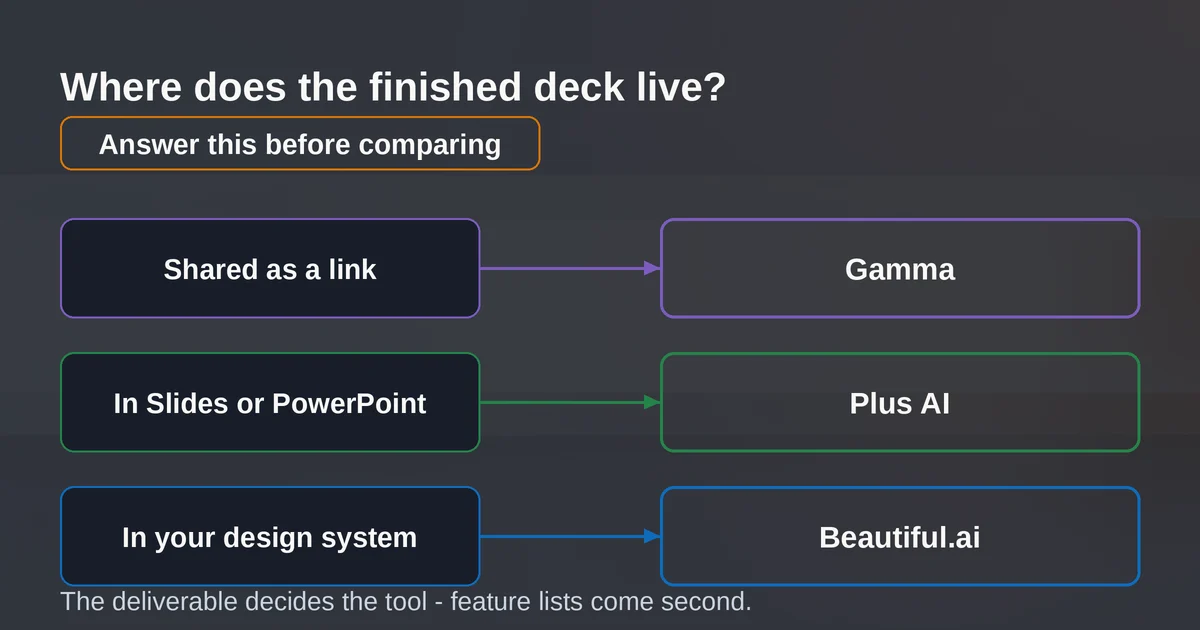
Before you compare feature lists or credit allowances, answer one question: when this deck is finished, what happens to it?
There are three honest answers, and each one points to a different tool.
"It lives as a link." The deck gets shared as a URL, presented from a browser, maybe embedded on a site. Nobody needs to open it in PowerPoint. If that is you, Gamma is excellent, arguably the best in class. Its decks are responsive web cards that reflow on any screen, and in 2026 Gamma ships a genuinely complete package: AI images with consistent styles across a whole deck, a chat agent that can see and edit your entire canvas, native iOS and Android apps, and Studio Mode for full-image cinematic slides on Pro and above. Its pricing starts lower than the others too: the free plan gives you 400 one-time credits to evaluate, and paid plans start at $9 per seat per month.
"It lives in Google Slides or PowerPoint." The file is the deliverable. A client expects a .pptx they can annotate, a team maintains a corporate template, or the deck goes into a review cycle where everyone comments in the same file. Now the calculus flips completely. Every standalone AI deck tool, Gamma included, has to export. And export is where standalone tools lose their magic. Plus AI sidesteps the problem by never leaving: it installs as an add-on in Google Slides and PowerPoint, and every slide it generates is a native slide in the deck you already have open. The AI does the drafting; the file stays a file.
"It lives in our design system." The deck must obey brand rules, stay consistent across dozens of presenters, and stay consistent six months from now when the deck is edited by someone you have never met. Beautiful.ai's pitch is that its layout engine, not its text generator, is the product. Smart Slides rearrange themselves as content changes, so the 200th deck still looks like the 1st.
The three tools at a glance (September 2026)
| Gamma | Plus AI | Beautiful.ai | |
|---|---|---|---|
| What it is | Standalone web generator (decks, docs, sites) | Add-in inside Google Slides and PowerPoint | Standalone editor with a rule-based layout engine |
| Where the deck lives | On Gamma, shared as a link; export to PDF/PPTX/PNG | In Slides or PowerPoint, natively, from the first draft | In Beautiful.ai; editable PPTX and Google Slides export on paid plans |
| Cheapest paid plan | $9/seat/mo billed annually | $10/user/mo billed annually | $14.50/mo billed annually (Pro) |
| Free way in | 400 one-time credits, no card | 7-day trial, 1,000 credits, card required | 14-day trial, card required |
| Custom branding | Pro ($18/seat/mo) and up | Team ($30/user/mo) and up; your actual slide masters on Enterprise | Custom theme builder on Pro; brand guardrails on Team |
| Best at | Visual first drafts, web sharing, speed | Native files, template fidelity, editing existing decks | Enforced consistency, auto-layout, team brand control |
| Weakest at | Surviving the export to PowerPoint or Slides | Visual wow-factor (ceiling is your template's) | Flexibility; the layout engine fights unconventional designs |
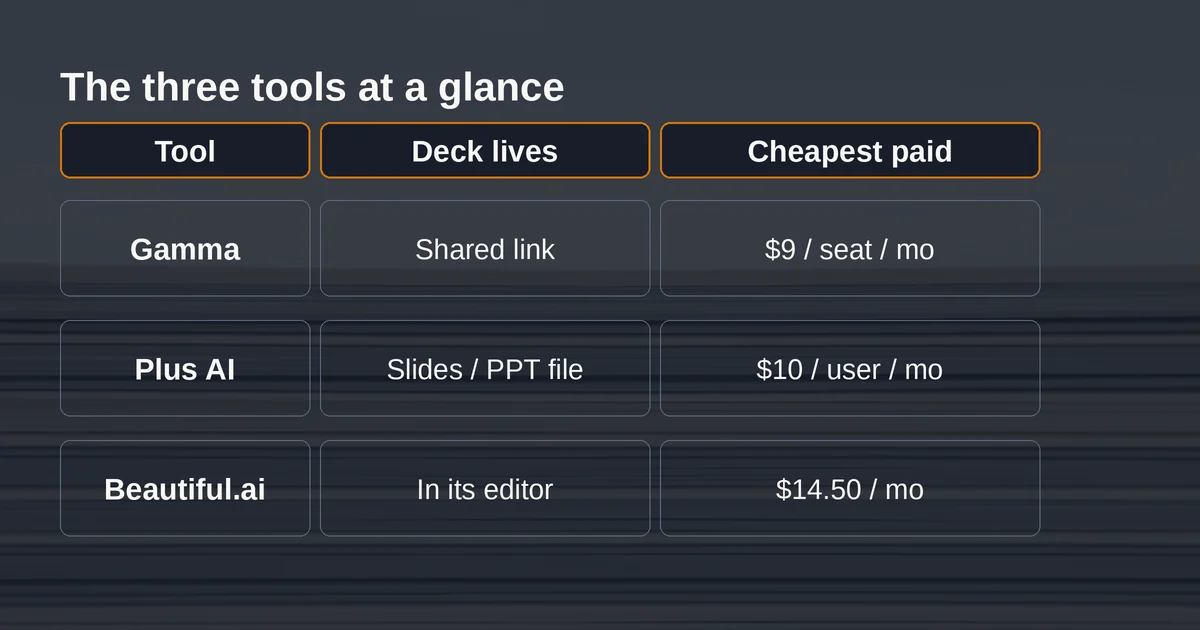
A note on those prices: they are the published rates checked on the vendors' own pricing pages in September 2026, and all three bill annually by default. Gamma and Beautiful.ai both charge more month-to-month. If you want the single-presentation option, Beautiful.ai also sells a $45 one-off monthly plan for one-off projects.
Now the three tools, one at a time, with opinions attached.
Gamma: the best wrong answer for a lot of people
Start with what Gamma does well, because it is a lot. You give it a prompt, an outline, a pasted document, or an imported file, and it returns a designed deck with real editorial titles, coherent structure, and (since its May 2026 update) images in a consistent style across every slide. The free plan alone is generous enough to judge the output properly: 400 credits at signup, up to 10 cards per generation, imports from PDF and PPTX. Paid plans scale the generation limits from 20 cards per prompt on Plus ($9/seat/mo) to 60 on Pro ($18/seat/mo) and 75 on Ultra ($90/seat/mo), and Pro is where custom branding, custom fonts, and API access start.
The 2026 releases show where Gamma is investing. Native mobile apps shipped in August 2026. The chat-based editing agent can see your whole canvas and rework it conversationally. Studio Mode, powered by Nano Banana Pro HD on Pro plans and above, generates full-image slides for a cinematic look. This is a company building toward being a web-native content platform, not a PowerPoint competitor.
And that is precisely the problem for the Slides-and-PowerPoint crowd. A Gamma deck is not a slide deck. It is a stack of responsive web cards that can be taller than a screen and reflow like a page. PowerPoint slides are fixed 16:9 canvases with absolutely positioned boxes. When Gamma exports to PPTX, it is translating between two incompatible geometries, and translations lose things:
- Cards taller than a slide get scaled down or split, so text that was comfortable in the browser arrives compressed. Gamma itself warns you when slides will overflow before export, which is honest, but the warning usually lists about half the deck.
- Charts typically arrive as static pictures, not chart objects. You cannot update a number without going back to Gamma.
- Some styled blocks come across as images. They look right until you try to edit the words inside and find there are no words, only pixels.
- There is no direct Google Slides export. Gamma's own documentation describes the Slides route as "via PPTX upload," meaning two conversions, not one. Gamma embeds fonts in the PPTX, which works in PowerPoint. Google Slides ignores embedded fonts entirely and substitutes its own, which shifts line breaks and moves everything under them. Gamma documents this too, and correctly calls it a Google Slides limitation. True, and still your problem.
So the verdict on Gamma, in September 2026: if the deck's final home is a link, Gamma is the best answer in this comparison and it is not close. If the deliverable is a file someone else edits, use it as a drafting tool at most, and budget real time for rebuilding in PowerPoint. Gamma's pricing is on its pricing page, and its export caveats are documented honestly in its help center.
Plus AI: the tool that wins when the file is non-negotiable
Plus AI's entire product decision is the thing its rivals treat as an edge case. It has no editor of its own. You install it from the Google Workspace Marketplace or the Microsoft add-in store, open the deck you are actually working in (ideally your company template), and generate into it. Prompts, uploaded documents, PDFs, URLs: all of it becomes native Slides or PowerPoint slides, laid out on your template, editable by anyone on the team with the tools they already know.
That solves the problem that quietly kills most AI deck workflows. The output is not "a beautiful deck that becomes a mediocre file on export." It is a normal file from the first second, born inside your corporate template. For consultants, sales teams, and anyone whose company mandates a Slides master with the logo in the corner and the approved fonts, this is not a nice-to-have. It is the entire purchase reason.
The 2026 version of Plus AI is more than a generator, too. A Presentation Agent plans, writes, formats, and iteratively revises decks conversationally from inside the editor. Rewrite tightens a slide's copy; Remix changes a single slide's layout; a single-slide insert drops one new slide into an existing deck without regenerating anything. Editing existing decks is something most AI slide tools either do badly or not at all, and it is where Plus AI earns its keep on a weekly deck-churn workload. There is an API that generates native PPTX files, Zapier support, and an MCP server, which makes it the most automation-friendly of the three if your decks feed into pipelines.
Pricing runs from $10 per user per month (Basic, billed annually) through $20 Pro and $30 Team to $200 Max for daily agent users, with a 7-day, 1,000-credit trial that requires a card, and no permanent free plan. Pro is where document uploads and AI image generation start; Team is where shared branding and preset libraries live; Enterprise converts your organization's actual slide masters into the generation template. Credits meter the AI work, roughly 40 to 170 per task depending on complexity, so Basic's 1,500 monthly credits cover perhaps 9 or 10 complex generations. Manual editing is always free, which matters more than it sounds: the credit meter only runs when the AI runs.
Two honest weaknesses. First, the design ceiling is your template's. Plus AI will produce a competent version of your existing decks, not something a designer made. If you want visual wow, Gamma and Beautiful.ai both out-design it. Second, the gaps are specific and worth knowing before you buy: no waterfall, Mekko, or Gantt chart support, and document-to-deck conversion pulls text only, not the embedded charts and images from your source file. Details are on Plus AI's pricing page.
If you are choosing between Plus AI and Gamma and nothing else, the tiebreaker is one sentence: does the person receiving this deck need to edit it in Slides or PowerPoint? Yes: Plus AI, no contest. No: Gamma, and enjoy the better-looking deck.
Beautiful.ai: when the design rules matter more than the generator
Beautiful.ai is the oldest of the three and the one most misunderstood. People file it under "AI presentation tool" because it has a prompt box, but the AI writing is the least interesting part. The product is Smart Slides: over 300 layout rules baked into slide types that auto-adapt as content changes. Paste a 200-character paragraph into a bullet slide and the layout re-balances, shrinks the type, or adds a column rather than overflowing. The design system does what a human designer would do, instantly, on every edit, forever.
Its big 2026 release, the Create with AI Workflow, shows the company reacting to the same fatigue everyone in this category now feels. Instead of one prompt producing one finished deck, generation is now staged: outline first, with a chat layer for reordering, splitting dense slides, and fixing tone before anything is designed; then theme, image style, and language choices; then designed slides, with a slide-level AI panel that lets you regenerate one slide with an editable prompt instead of restarting the deck. It is a workflow built around steering rather than slot-machine generation, and it is genuinely a better way to make decks than the 2023-vintage "prompt, pray, present" loop.
Where Beautiful.ai wins: teams producing many decks that must stay on brand without a designer in the loop. The Team plan ($40 per user per month billed annually, for 2 to 20 seats) adds shared themes, a centralized slide and template library, asset libraries, engagement analytics, and brand guardrails. Enterprise adds SSO, SCIM provisioning, and configurable guardrails, including the ability to restrict exports entirely so decks circulate as tracked viewer links instead of loose files. For a sales enablement or brand-ops team, that combination is hard to find elsewhere.
Where it loses: the export seam and the rigidity. On export, Beautiful.ai's own support docs are admirably direct: transitions and animations do not survive, audio does not transfer, and editable PowerPoint and Google Slides export is a paid-plan feature only. The editable PPTX is real and usable, but once the deck leaves the editor, the Smart Slide engine stops enforcing anything, which means the layout discipline you paid for evaporates exactly when someone else starts editing. The company's own framing is that exporting "is a good solution in a pinch" and presenting from Beautiful.ai is the intended path. And the flip side of enforced design is that unconventional, asymmetric, editorial layouts are hard to build. The engine optimizes for clean and corporate. If your deck needs to look like a magazine spread, the engine will fight you.
Pricing: Pro is $14.50 per month billed annually (the price moved up during 2026; earlier in the year it listed at $12), a 14-day trial requires a card, and there is a $45 one-off monthly option for a single presentation. Current plans are on Beautiful.ai's pricing page, and the export limitations are documented in its support center.
The brand-color test: how hard is it to make the deck actually yours?
Here is a five-minute test worth running before any of these tools sees your credit card. Take one real 8-slide outline, one brand color, and one data table, and run it through whichever tool you are evaluating. Judge three things: export fidelity, chart editability, and how much work the brand color takes. The differences are stark.
Gamma: the brand color is easy in the theme editor, but true custom fonts and branding sit behind Pro ($18/seat/mo). Charts export as pictures, so "editable charts" fails on the way out, and the free plan stamps a "Made with Gamma" badge on everything. Beautiful deck, wrong file format.
Plus AI: open your actual company template first, generate into it, and the brand question barely exists, because the deck inherits the master's colors, fonts, and logo position from slide one. Charts are native Slides/PowerPoint objects, so the data table becomes a chart you can edit cell by cell. This is the test Plus AI was built to pass.
Beautiful.ai: set colors, fonts, and logos once in the custom theme builder and every slide follows, which is the strongest in-editor brand enforcement of the three. The catch is what happens after export: fonts need to be installed on the receiving machine (Beautiful.ai offers a font download to mitigate this), and the auto-layout magic does not travel.
The pattern across all three: brand control inside the tool is a solved problem in 2026. Brand control after the file leaves the tool is where vendors quietly stop making promises.
What still looks generated (and how to fix it)
Whichever tool you pick, the tells that a deck was made by AI have not changed much, and clients notice them:
- Bullet-heavy sameness. Every slide the same title-plus-four-bullets rhythm. Fix: delete a third of the generated slides and vary the rhythm manually. Eight varied slides beat sixteen uniform ones.
- Confident nonsense. AI-written slide copy still invents facts with a straight face. Any number, date, or attribution a generator produced needs to be checked against your source material before the deck meets a client. If you want to understand why this happens and how often, our piece on real hallucination examples covers the failure patterns.
- Generic stock imagery. Gamma's consistent image styles and Beautiful.ai's AI image generation have narrowed the gap, but the fastest upgrade is still your own screenshots, product photos, and charts.
- Structure that ignores the audience. The AI does not know your client's name, your deal stage, or what the CFO cares about. The outline stage (Beautiful.ai now forces it, Plus AI and Gamma both offer it) is where a human should spend their first ten minutes. A well-shaped outline does more for a deck than any amount of theme polish, and if you are prompting anyway, the techniques in these prompt patterns transfer directly to deck generation.
The tools that produce the least "AI-looking" output are the ones where you stay in the loop longest. That is not a coincidence; it is the entire design philosophy separating the staged workflows that shipped across this category in 2026 from the one-shot generators of two years ago. If you are assembling a broader stack, our guide to the best AI tools for every job role puts these three in context.
FAQ
Can Gamma export to Google Slides? Not directly. Gamma's own documentation describes the route as "via PPTX upload": export a PowerPoint file, upload it to Drive, open it in Slides. That is two conversions, and Google Slides ignores the fonts Gamma embeds in the PPTX, so expect substitution and shifted layouts. If the deck must live in Slides, generate in Slides (Plus AI) instead.
Plus AI vs Gamma: which should I pick? If the finished deck has to be an editable Google Slides or PowerPoint file, Plus AI. If the deck lives as a shared link and visual polish matters most, Gamma. Plus AI starts at $10/user/mo billed annually, Gamma at $9/seat/mo, so price is nearly a wash; the file format is the real decider.
Can these tools use my company's actual slide template? Plus AI: yes, that is its core strength, and Enterprise builds generation on your real slide masters. Beautiful.ai: you rebuild your brand as a Beautiful.ai theme (colors, fonts, logos), and Team adds shared templates. Gamma: custom branding and fonts start on Pro.
Pricing and plan details are as published by the vendor around September 2026 and can change, and in Beautiful.ai's case changed during 2026, so confirm on the official site before buying.