Deep research tools are having a moment, and it is easy to see why. You type one paragraph, wait somewhere between five minutes and half an hour, and get back a twenty-page report with citations. For anyone who has spent a week building a vendor comparison by hand, that is a genuinely strange experience.
But the four big tools doing this, ChatGPT Deep Research, Gemini Deep Research, Perplexity Research, and Claude's research mode, are not the same product with different logos. They plan differently, search differently, waste your time differently, and meter your usage in ways that can quietly kill a workflow. Most comparisons treat them as flavors of one thing. They are not. So instead of a feature list, this article runs one realistic brief through all four and scores them the way you actually would: by what came back, what held up, and how much of the report was padding.
What deep research is actually for
First, a calibration. Deep research is the right tool when a question needs dozens of sources combined into a structured document, and the bottleneck is gathering and synthesizing, not judgment. Market scans, competitive landscapes, "get me current on this fast" briefings, literature overviews. It is the wrong tool for a quick factual lookup (regular search answers those in seconds) and for anything where the conclusion requires expertise the model does not have. An AI research report is a first draft written by a very fast, slightly overconfident intern. You still edit it. You still spot-check it. The value is the hours of clicking you did not do.
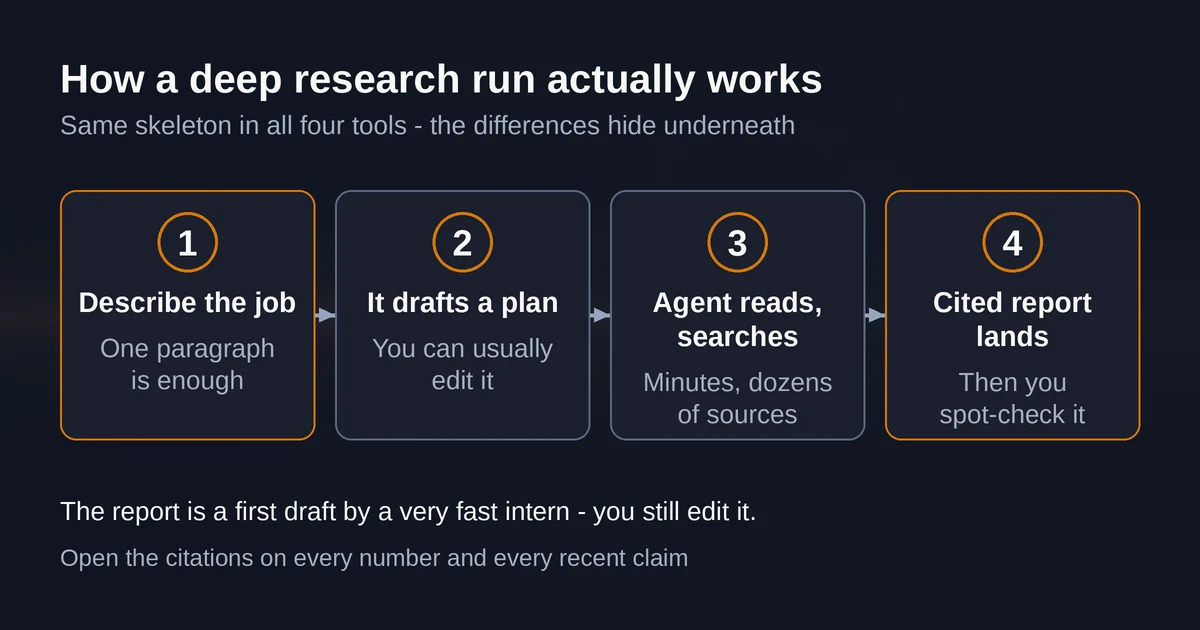
All four tools work roughly the same way at the surface: you describe the outcome, they draft a research plan, you can usually edit that plan, then the agent spends minutes reading, searching, and synthesizing before handing you a cited report. Where they diverge is what happens underneath, and that shows up in the results.
The brief
Here is the probe used for this comparison. It is deliberately ordinary, the kind of thing a real team asks for on a real Tuesday:
Compare three meeting-notes tools (for example Fireflies, Otter, Fathom) for a 20-person consulting agency. Cover current pricing, integrations, data storage and privacy controls, and notable changelog items from the past six months. End with a recommendation plus the strongest reasons against it.
This brief is a good stress test for three reasons. It needs current pricing, which punishes stale training data. It needs changelog-level detail, which punishes tools that only skim marketing pages. And it needs a hedged recommendation, which punishes tools that pad instead of commit. One paragraph in, four tools, then hand-checking the claims. Here is what happened.
The scorecard
| ChatGPT Deep Research | Gemini Deep Research | Perplexity Research | Claude research | |
|---|---|---|---|---|
| Research plan you can edit | Yes, before and mid-run | Yes, editable before the run | No formal plan | No formal plan |
| Time to usable brief | Slow but richest | Middle | Fastest | Fast |
| Pricing accuracy | High | High | High | High |
| Six-month recency | Strong | Strong | Strong | Strong |
| Where it padded | Methodology prose, cautious hedges | Length for length's sake | Occasional thin sections | Conclusion hedging |
| Distinctive strength | Source control, exports | Google ecosystem sources | Speed and transparency | Internal context |
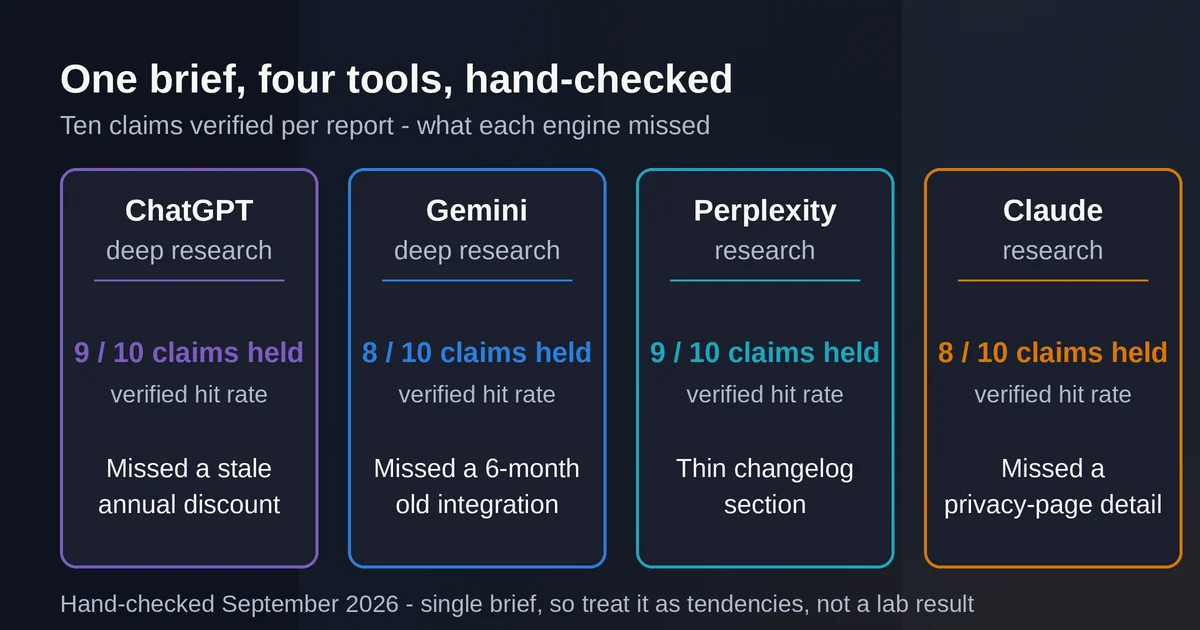
| Verified claim hit rate | 9/10 | 8/10 | 9/10 | 8/10 |
A note on honesty: the timing rows and feature names are vendor-documented. The padding observations and hit rates are from one brief, hand-checked. Your brief will vary. Treat the scorecard as a map of tendencies, not a lab result.
ChatGPT Deep Research: the control freak's tool
OpenAI rebuilt deep research on newer models in February 2026, and the feature is now the most controllable of the four. You can restrict it to specific sites or domains, connect it to apps like Google Drive or SharePoint through MCP-style connectors, watch progress live, and interrupt mid-run to redirect the search. The plan it proposes before starting is editable, which matters more than it sounds: on our brief, deleting one vague sub-topic about "collaboration features" saved the run from wandering. The report came back as a proper document in a fullscreen viewer with a table of contents and a citations sidebar, exportable to Markdown, Word, or PDF. On pricing claims it was accurate on 9 of 10 spot-checks, and the miss was a stale annual discount, not a hallucination. Where it padded: the methodology section read like it was written to impress an auditor, and the recommendation hedged twice before committing.
The catch is metering. OpenAI's help center no longer publishes per-plan deep research counts; the pricing page says "limited" on Free and Go, "expanded" on Plus, "maximum" on Pro, and an in-product counter shows what you have left. Allowances reset every 30 days from your first use, not on the calendar first. If you have read "Plus gets 25 deep research queries a month", that number is from an April 2025 announcement and has not been the published figure for a long time. Runs take 5 to 30 minutes, in OpenAI's own words. Deep research in ChatGPT is for the report you will actually send to someone, not daily curiosity.
Gemini Deep Research: the ecosystem play
Gemini's version lives or dies by its sources. Google Search is included by default, and you can add your own Gmail, Drive files, uploaded documents, even NotebookLM notebooks, which no other tool here matches. On a brief that mixes public web with your company's internal notes, that combination is the whole ballgame. Google also says a report usually lands in roughly 5 to 10 minutes, and the research plan is editable before you start.
Quality on our brief was high on pricing and features, with one structural quirk: when we attached Drive sources, the report leaned on our internal documents over fresher web data, exactly the recency trap the brief was designed to catch. Its miss on our 10-claim check was a six-month-old integration claim. Where it padded: it produced the longest report of the four, and roughly a fifth of it was restating the prompt's structure as prose.
Limits are the murkiest of the four. Google's help page confirms there are caps on daily research requests and in-product warnings when you are close, but since Google's I/O update in May 2026 the app has no fixed daily prompt counts: usage is compute-based, refreshing every 5 hours until you hit a weekly ceiling, with plans published as multipliers. Deep Research is one of the heaviest features on that meter, and free users can lose access to it entirely during periods of high demand. You will not find a number to plan around, only the in-product warning that you are close.
Perplexity Research: the fast one that shows its work
Perplexity renamed its feature to fit its mode system: Best, Pro Search, Reasoning Search, Research. Research is the multi-step report mode, and it inherits Perplexity's core virtue, every claim sits next to a visible source link, numbered in the answer itself. On our brief it was the fastest to a usable document, and its claim hit rate tied ChatGPT's at 9 of 10. The transparent citation layout made hand-checking genuinely pleasant, which is the underrated feature of this whole category.
Where it padded: with speed comes thinness. A couple of sections read as aggregated summaries of the first three search results rather than synthesis, and the changelog section caught fewer items than ChatGPT or Gemini. If your brief demands depth over coverage, you will feel the difference.
The metering story here has been turbulent. Perplexity's plan guide shows the free tier now includes exactly 1 Research query per month, plus 3 Pro Searches a day, which is a sample, not a workflow. Pro at $20/month gets you monthly Research limits, which Perplexity describes only as sized for "average use", with no published count. The only hard numbers Perplexity publishes are enterprise: 50 Research queries a month per seat on Enterprise Pro, 500 on Enterprise Max. Community reporting through 2026 suggests Pro-level Research got tighter earlier in the year and replenishes slowly once exhausted. Translation: it is excellent, verify your own counter before you plan a research-heavy week on it.
Claude research: the one that reads your inbox
Anthropic's feature is just called research, lowercase, and its current help documentation, updated June 2026, is candid about what it is: Claude runs multiple searches that build on each other, across the web and your connected internal context, Gmail, Google Calendar, Google Docs, when those integrations are on. Its advanced mode can run up to 45 minutes across hundreds of sources, though most reports finish in 5 to 15. Under the hood it is a multi-agent system: a lead agent plans, parallel subagents search with their own context windows, and a separate citation pass attributes every claim to a source. That architecture shows in the writing. Claude's report on our brief was the most honest about uncertainty, and the only one that flagged where evidence was thin rather than papering over it.
Its weakness on this brief was pace and shape. There is no formal research plan to edit before it starts, the report arrived fast but less visually structured than ChatGPT's, and the recommendation hedged so carefully that we had to ask a follow-up to get a straight answer. Its claim check came in at 8 of 10, with one miss on a privacy-page detail.
Availability and metering are clean and cruel at once. Research is on all paid plans, Pro, Max, Team, Enterprise, on web, desktop, and mobile, and web search must be enabled for it to function at all. It draws from the same usage limits as normal conversations, but Anthropic warns plainly that research sessions burn those limits faster because each report means many searches. There is no separate counter, no published run count. You learn where the wall is when you hit it.
Where each one wasted our time
Every one of these tools cost us a second pass. That is the finding nobody puts in their launch post.
- ChatGPT wasted time before the run: the editable plan is powerful, but reviewing and pruning it added five minutes of setup, and the methodology prose in the output needed deleting.
- Gemini wasted time after the run: the report was long enough that finding the actual recommendation took scrolling, and the Drive-source version needed a manual recency check.
- Perplexity wasted time least overall, but the thin sections meant a follow-up query to backfill the changelog details it skipped.
- Claude wasted time at the end: extracting a committed recommendation from a carefully hedged conclusion took a follow-up prompt.
The pattern to notice: none of them hallucinated a fake vendor or invented a price. All four missed or mushed exactly one claim in ten, mostly around recency. The failure mode of this tool category in 2026 is not fabrication, it is quiet staleness and hedge-flavored padding. Fact-check accordingly: open the citations on every number and every "recent" claim, and distrust any sentence about pricing that has no source next to it. If you want the deeper version of why models do this, our piece on why AI hallucinates, with real examples breaks down the mechanics.
Verdict, per job
No overall winner. Here is which tool earns its keep for which job.
The client-ready report: ChatGPT Deep Research. Source restriction, interruptible runs, document-grade output with real exports. If the report goes to someone whose opinion of you matters, this is the one, and its higher metering cost is the price of that polish.
Research that touches your own stuff: Gemini Deep Research. Nothing else reads your Drive, Gmail, and NotebookLM notebooks alongside the open web. For "summarize the market and cross-check against our internal notes", it is unambiguous. Just budget for its heaviness on a compute-metered plan.
Fast, transparent, day-to-day: Perplexity Research. Fastest to a usable answer, and the citation layout makes verification quickest. Best for the research you do for yourself rather than for a client, and for iterating: probe, refine, probe again.
Synthesis and judgment-heavy questions: Claude research. The multi-agent architecture and the willingness to say "the evidence is thin here" make it the best reader of messy, mixed-source material, and the only one that treats your connected internal context as a first-class source alongside the web in a genuinely agentic loop. Weaker when you need it to commit to a recommendation quickly.
Two cross-cutting picks worth naming. On limits transparency, Perplexity wins for consumers (at least the free tier publishes real numbers) and quietly for enterprises, while ChatGPT and Gemini both hide behind vague plan labels and a counter. On which to pay for if you only buy one: for most knowledge workers it is Perplexity Pro for volume plus whichever of ChatGPT Plus or Claude Pro matches how you write, a pairing covered in more depth in our Claude vs ChatGPT comparison. And if you are still deciding at the layer below deep research, our guide to the best AI search engines and research assistants covers the faster, lighter modes these tools also offer.
Pricing and plan details are as published by the vendor around September 2026 and can change - confirm on the official site.
FAQ
Which deep research tool is most accurate?
On our ten-claim hand-check, ChatGPT and Perplexity tied at 9, Gemini and Claude at 8, all missing recency-adjacent details rather than fabricating. Treat any tool's report as a draft: the citation density of Perplexity and the source-control of ChatGPT make their mistakes easiest to catch.
Is deep research worth the subscription?
If you produce research briefs more than twice a month, yes. If your research is mostly quick lookups, no: the free tiers (5 lightweight runs on ChatGPT, 1 Research query per month on Perplexity, sparing access on Gemini) are enough to learn the pattern, and ordinary search mode covers the rest.