Somewhere on your computer right now there is a screenshot of an error message you needed, a receipt you meant to file, and a chart someone sent you three weeks ago. They are all named something like Screenshot 2026-09-14 at 11.42.17.png, and you will never find any of them again. You will retake the screenshot, re-ask the person for the chart, and pay the late fee.
This used to be a punchline about personal organization. Then it became a product category. And in the last two years that category has been through a genuinely dramatic shakeout: the startup that invented the space is dead, Microsoft's entry into it became a running privacy scandal, the leading open alternative quietly became a paid product, and the phone in your pocket probably does a version of this already. If you set out in 2026 to "search your screen history by meaning," what you actually need depends on which of those outcomes you inherited.
Here is what happened, what the surviving tools can actually retrieve, and the privacy trade that comes with all of them.
The 2026 shakeout: who died, who pivoted, who shipped
If you read about this space even a year ago, most of what you read is now wrong.
Rewind.ai is gone. The startup that essentially invented modern screen-history search, the one whose "searchable memory of everything you see" pitch launched a thousand thinkpieces, rebranded to Limitless, pivoted to a meeting-capture wearable called the Pendant, got acquired by Meta, and then disabled all screen and audio capture in the Rewind app on December 19, 2025. The company confirmed it on its own site: existing customers keep access to previously recorded meetings through 2026, the Pendant is no longer sold to new buyers, and the screen-recording app that started it all is sunset. Any listicle still recommending Rewind as your screenshot memory tool in 2026 was written by someone who has not checked.
Microsoft Recall shipped, after everything. Recall's history deserves its own documentary: announced May 2024 as an opt-out feature storing everything in an unencrypted local database, torn apart publicly by security researchers within weeks, pulled from preview, rebuilt with encryption, Windows Hello authentication, and an opt-in default, then rolled out from April 2025. As of September 2026 it is live, still labeled a preview, still exclusive to Copilot+ PCs with a 40 TOPS neural processor, and expanded to Europe as of mid-2025. Microsoft's own support docs are unambiguous about the current deal: snapshots are processed and stored locally, you opt in, you authenticate with Windows Hello to view anything, you can pause, filter apps and sites, and delete everything. It is the most-scrutinized version of this idea that exists.
Screenpipe became the indie standard, then changed its license. The open-source continuous screen recorder, now a Y Combinator company with over 21,000 GitHub stars, captures screen and audio locally and exposes the whole history to AI agents through MCP. In June 2026 it moved from MIT to a commercial source-available license: personal use stays free, but business use now requires a subscription. Current pricing runs from a free tier with capture and recent search, to $21/month for full personal history, to $42/seat/month for teams with cross-device sync. The code is still inspectable, which matters more than usual in this category.
Google quietly moved Pixel Screenshots off its pure-local promise. Pixel Screenshots, which launched with the Pixel 9 as fully on-device AI screenshot search, shipped an update in June 2026 that changed its settings description from "Search your screenshots with on-device AI" to simply "Search your screenshots with AI," with processing happening "on your device or in the cloud." Google frames the cloud part as running inside its Private AI Compute enclaves, which the company says it cannot access. On-device search still works offline. But the wording change is the story: the "everything stays on your phone" guarantee was the product's original pitch, and the shift mirrors what AI search tools generally went through as vendors hit the limits of on-device models.
Apple shipped the opposite of what you'd expect. iOS 26's Visual Intelligence works on what's on your screen at capture time: take a screenshot, then search it, ask ChatGPT about it, or add a detected event to your calendar, all described on Apple's iOS 26 newsroom page. What Apple has not shipped, as of September 2026, is semantic search across your existing screenshot library. Your iPhone recognizes objects and scenes in Photos, and Spotlight can find text Live Text has already OCR'd, but there is no "find that receipt from the coffee shop" over thousands of old screenshots built in. That gap is why a small ecosystem of Mac apps, things like ScreenSorts and Cairn, still exists: offline semantic search over your screenshot folder, with embeddings running on the Neural Engine and nothing leaving the machine.
So the category that "died" in the headlines is actually three categories now: continuous capture (Recall, Screenpipe), platform screenshot search (Pixel Screenshots), and local library organizers (the Mac niche). They get conflated constantly. They should not be.
What semantic screenshot search actually delivers
The mechanism is the same everywhere, and it is worth understanding because it explains exactly when this technology will and will not find your stuff. At capture time, each screenshot (or screen frame) gets OCR'd, the text and visual content get turned into embeddings, and everything lands in a searchable index. Recall does this on a local NPU; Screenpipe pairs screenshots with the OS accessibility tree first and falls back to OCR; Pixel Screenshots uses Tensor or Google's cloud models; the Mac apps use Apple Vision plus local embedding models.
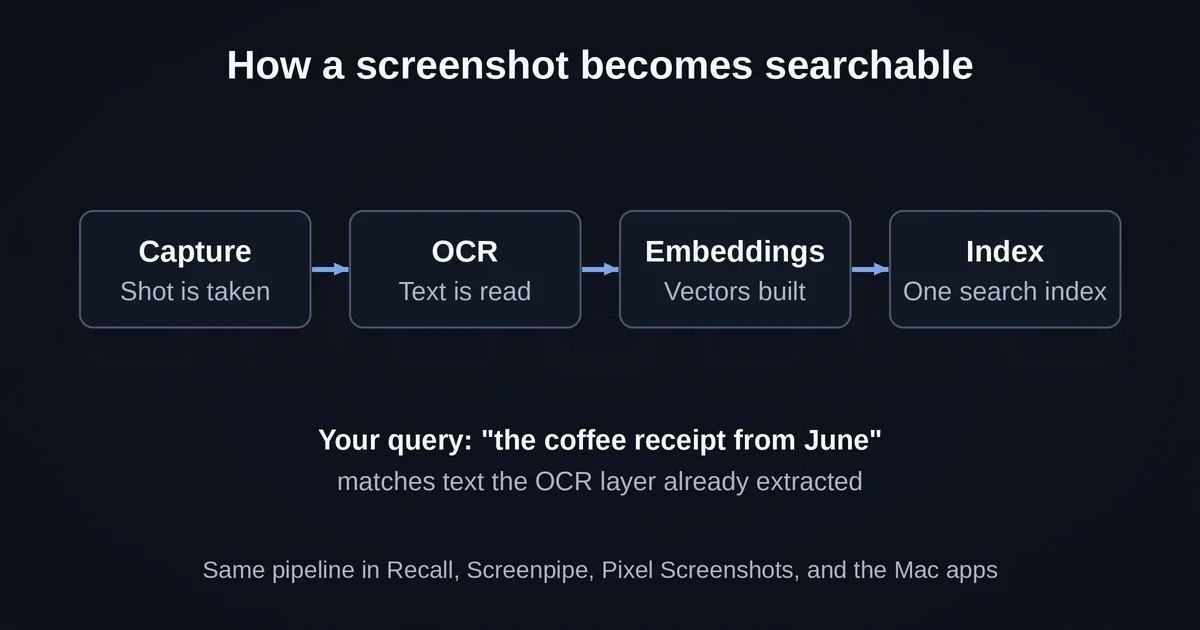
The retrieval test that matters is the one from the brief behind this article: take hundreds of mixed screenshots, spanning receipts, code snippets, product pages, error messages, and notes, then query them the way you would actually remember things. Not IMG_4471 but "the coffee receipt from June" or "that error about the missing environment variable." Here is what you should expect from that test, based on how every tool in this space actually works:
Queries that hit text work beautifully. "Invoice from Acme," "the ESP32 pinout diagram," "password reset email" all resolve fast, because OCR picked up those strings and the index has them. This is the majority of real-world screenshot content, which is why the category feels magical at first. A receipt, a confirmation number, an error message, a terminal output, a chat conversation: all text-dense, all retrievable.
Queries that depend on pure visual meaning work less well. "The chart with the blue line going up" is harder, because embeddings capture semantics but chart details are often below the grain of what gets indexed. "The screenshot that was mostly dark green" will likely fail everywhere. Object-level queries ("the photo of the wood desk") sit in between: Photos-style recognition catches obvious objects, but a screenshot of a product page is not really a photo of a product.
Vague time queries are the hidden failure mode. "That thing from last Tuesday" works only when the tool knows both the date filters and your fuzzy phrasing. Every tool here handles explicit dates well; few handle "around when I was doing the taxes" reliably. If you cannot remember roughly when you took something and it had little text, you are often back to scrolling.
The continuous-capture tools change the question itself. Recall and Screenpipe are not searching your screenshot folder, they are searching everything you ever saw. With Recall, the query "the spreadsheet with Q3 projections I had open" can succeed even though you never deliberately captured anything. That is a categorically bigger promise than library search, and it is also exactly why the privacy conversation around these tools is so much louder.
One honest limitation across all of them: the underlying retrieval quality is still fundamentally OCR-plus-embeddings, not a model that truly "understands" your screen. Marketing copy says "search by meaning." What ships is closer to "search by text, plus meaning-shaped fuzzy matching over text." That is genuinely useful. It is not memory.
The privacy trade, stated plainly
Every tool in this space sells a version of the same reassurance, and it is worth dissecting because the reassurance changed shape in 2026.
Local storage protects you from the cloud, not from your computer. This is the lesson of Recall's whole saga, and it applies to any AI automation tool that watches your work. The current architecture, encrypted local storage inside a virtualization-based enclave, unlocked only by Windows Hello, is a genuinely serious design; even the researcher who broke the original version calls the enclave itself "rock solid." But in April 2026 that same researcher, Alexander Hagenah, released TotalRecall Reloaded, a tool that waits for you to authenticate with Windows Hello and then rides along, extracting the decrypted screenshots, OCR text, and metadata as they flow to the process that renders the Recall timeline. No admin rights, no kernel exploit, no broken crypto. His summary: "The vault door is titanium. The wall next to it is drywall." Microsoft reviewed it and classified it as not a vulnerability, saying the access patterns are consistent with intended protections.
You can argue about whether that stance is defensible (the tool does require you to authenticate first, and malware on your PC can screenshot your screen anyway). But the practical takeaway for anyone choosing a tool in this category is unavoidable: local processing means your data is not sitting on a vendor's server waiting to be breached or subpoenaed. It does not mean a compromised machine cannot read it. If your threat model includes malware on your own device, no local screen-history tool protects you. Some, like Screenpipe with its optional encryption-at-rest and PII-filtering model, chip at the edges, but the exposure is structural.
Hybrid cloud is now the direction of travel. The most under-reported fact of 2026 in this category is that Google, the company whose Pixel Screenshots pitch was originally "it never leaves your phone," now processes screenshot search "on your device or in the cloud," as 9to5Google documented when the settings text changed. The mitigation is enclave processing, hardware-isolated environments Google says it cannot inspect, and you can frame that as either a genuine cryptographic advance or as a trust-me with extra steps. Both readings are defensible. What is not defensible is pretending the original local-only promise still holds. If you pick a tool in this space, read its current settings page, not its launch announcement.
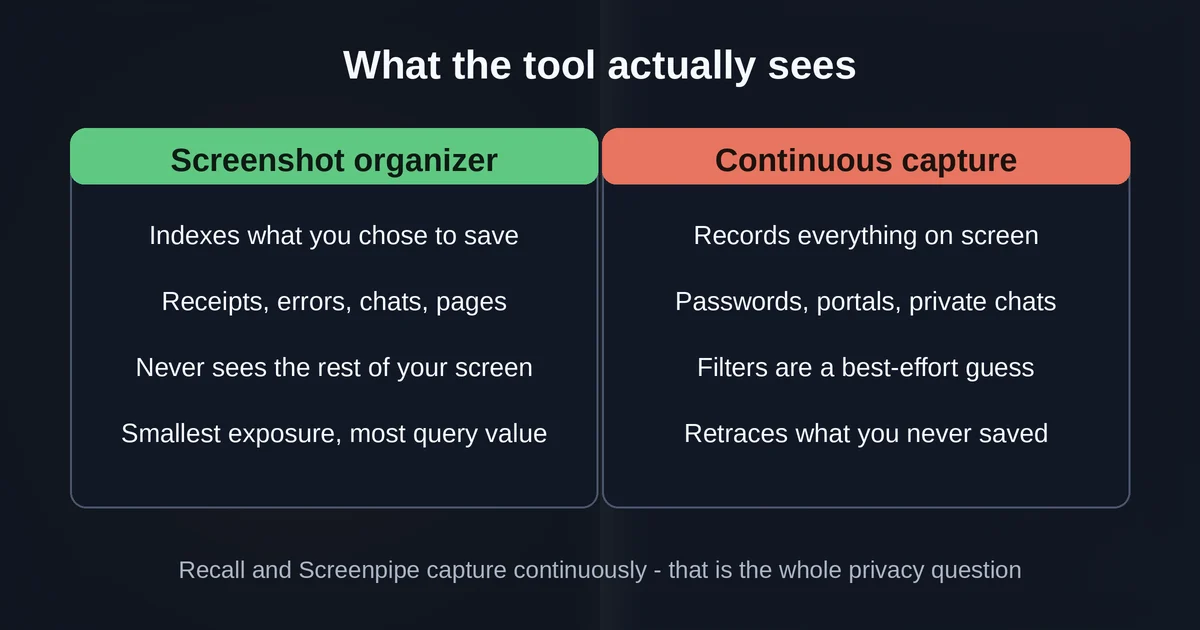
Continuous capture records things you never chose to save. This is the distinction the whole category hinges on. A screenshot organizer indexes what you deliberately captured: your coffee receipt, your error message, your brother's flight details. Recall and Screenpipe record your screen continuously, which means they also capture the password manager you had open for four seconds, the medical portal you visited, and the private message someone sent you. Recall's sensitive-information filter tries to skip passwords and card numbers, but Microsoft's own docs describe it as heuristic pattern-matching, and reviewers have watched it miss. Screenpipe's answer is a local PII-detection model and fine-grained exclusion filters. Both are better than nothing, and neither changes the structural fact that the tool saw everything and the filter is a best-effort guess about what to forget.
Storage and battery are part of the cost too. Recall allocates between 10 and 150 GB of disk depending on your setting, and deletes the oldest snapshots when it hits the cap. Screenpipe's vendor estimates around 30 GB per month of continuous recording and 600 MB to 4 GB of RAM. This is not free, and on a small drive the retention math gets uncomfortable fast.
There is a workable middle path, and it is worth naming: screenshot-library tools give you most of the retrieval value (the queries you actually run are about things you deliberately captured) with a fraction of the exposure, because the tool never sees anything you did not choose to save. If the privacy trade feels bad, the library-first apps are the exit ramp that does not require giving up the search.
Who actually needs this, and who should not bother
After the shakeout, the decision is cleaner than it used to be.
Get a screenshot organizer (the library-first kind) if you are a heavy capturer. Developers, designers, researchers, and shoppers who take twenty-plus screenshots a day and lose them in a flat folder. On a Pixel, this is built in, and the cloud shift should inform but probably not kill your decision. On a Mac, the offline organizers like ScreenSorts or Cairn fill the exact gap that Apple has not shipped: semantic search over your pile, fully local. On Windows without Copilot+ hardware, this is genuinely your only option in the Microsoft ecosystem right now, because Recall is still gated to NPU-equipped machines.
Turn on Recall only if retracing beats searching. The point of Recall is not finding the receipt, it is answering "what was I working on last Tuesday afternoon" when you never captured anything deliberately. If your work involves bouncing between browser tabs, documents, and chats and you constantly lose the thread of your own day, that capability is real and Microsoft has earned some benefit of the doubt on the redesign. Read the current controls, exclude anything sensitive, and set the disk allocation before you leave it running. If your machine handles regulated, privileged, or genuinely sensitive data, Recall's own architecture concedes the threat model is not fully closed, so the honest advice is to leave it off, the same calculus that applies to any AI agent with deep access to your work.
Use Screenpipe if you want the capture and the ecosystem, and accept that it is now a paid commercial product. For developers who want their AI coding assistant to actually know what they were working on, screen history as MCP context is the killer feature no platform vendor has matched. The free personal tier on Screenpipe's pricing page makes trying it cheap, and the GitHub repo remains auditable in a way nothing else in the category is. But go in knowing the license changed in June 2026 and business use means a subscription.
Skip the whole category if your problem is notes, not screenshots. If you already keep a disciplined research archive, or your screenshot volume is a handful a week, an organizer is a second brain for a problem you do not have, and a continuous recorder is a privacy question with no matching benefit. The tooling is good now. It is not obligatory.
Two questions come up constantly when people evaluate this category:
Is my screen history being uploaded somewhere? Depends entirely on the tool, as of September 2026. Recall: no, local processing and storage by design. Screenpipe: no by default, though its paid tiers add optional cloud features. Pixel Screenshots: now device or cloud, with Google saying cloud processing happens in enclaves it cannot access. Any tool's answer can change with an update, so check before assuming the launch-day promise still holds.
Can I trust local-only tools completely? More than cloud, less than the marketing implies. Local storage removes the vendor, the breach, and the data request from the threat model. It does not remove malware running on your machine, as TotalRecall Reloaded demonstrated against Recall's hardened design. Use screen-history tools on machines you keep clean, and think of "local" as a big risk reduction, not a guarantee.
If there is one sentence to carry out of the whole shakeout it is this: the technology works, the privacy architectures are better than the 2024 headlines suggest, and the real decision is not whether to search your screen history but whether continuous capture is a feature or a liability for the specific machine you use. Screenshots you meant to take: organize away, the tools are good now. Everything you ever saw: make that choice deliberately.
Pricing and plan details are as published by the vendor around September 2026 and can change - confirm on the official site.