Every study-tool ad makes the same implicit promise: paste in a lecture, a PDF, a YouTube link, and out come flashcards, quizzes, and a tidy study guide. By September 2026 that promise is technically real. Quizlet, Knowt, StudyFetch, Gemini Notebook, and half a dozen smaller apps will all convert your course material into practice questions in under a minute. The generation part, the part that used to cost you an evening with a highlighter and a stack of index cards, is solved.
What almost none of the ads mention is the part that decides whether you actually learn anything: whether the questions that come out accurately represent the material that went in. A deck of 60 beautiful flashcards that tests the easy definitions while ignoring the conditions, exceptions, and worked logic your professor actually exams you on is worse than no deck, because you will drill it with diligence and walk into the exam confidently wrong. So this article is organized around a different question than most roundups. Not "which AI study tool is best" but "which AI study tool produces questions worth answering" and "how do you check, in about ten minutes, before you trust any of them with your semester."
What active recall actually needs from a study tool
The entire premise of AI study tools rests on two findings from cognitive psychology that are worth understanding before you pick one, because they tell you exactly which features matter and which are decoration.
The first is the testing effect. In the canonical 2006 experiments by Henry Roediger and Jeffrey Karpicke, students who read a passage and then took recall tests remembered substantially more a week later than students who spent the same total time re-reading. On an immediate test, the re-readers looked better and felt more confident. Two days and one week out, the testers won decisively. Retrieval is not a measurement of learning; it is the learning event itself. A follow-up study in 2007 found that repeatedly recalling items you already recalled once enhanced retention by more than 100% compared to dropping them from testing, while re-studying those same items added nothing.
The second is the spacing effect, and it comes with a trap. A 2009 study by Robert Kornell, run on realistic flashcard studying, found that spacing practice across days beat cramming for 90% of participants, with total study time held constant. The trap: after the first session, 72% of participants believed massing had worked better. Students systematically misjudge which study method is working, which means the "feel" of a study tool is close to worthless as evidence. Re-reading a glossy AI summary feels productive. It is the testing effect's exact opposite.
Put those two findings together and you get a checklist that any study tool must satisfy before it earns a place in your workflow:
- It must force retrieval. Quiz modes, flashcards with the answer hidden, prompts that demand you produce the answer before revealing it. A tool that only generates summaries and outlines gives you the condition the 2006 re-readers were in, and they remembered 40% a week later.
- It must schedule. Spaced repetition, where cards you know sink to the background and cards you miss come back sooner, across days. A one-shot generated deck with no scheduling is a cramming tool with better typography.
- Its questions must be faithful to the source. This is the one no vendor can solve for you, because it depends on your specific material, and it is the entire subject of the next section.
AI has genuinely solved the first bottleneck of studying, which was authorship. Writing 60 cards by hand took an hour, so most students never did it, so they never got the testing effect at all. Generation is now free. Quality control and scheduling are where the tools diverge, and where your judgment still has to do work.
The ten-minute question-accuracy test
Here is the test the headline promises, and it is a protocol you run, not a verdict I hand you. Tool reviews age badly; a vendor can swap its generation model in a quiet Tuesday update and every comparison table written last month becomes fiction. What survives is a test you can re-run on any tool, on your actual course material, in ten minutes.
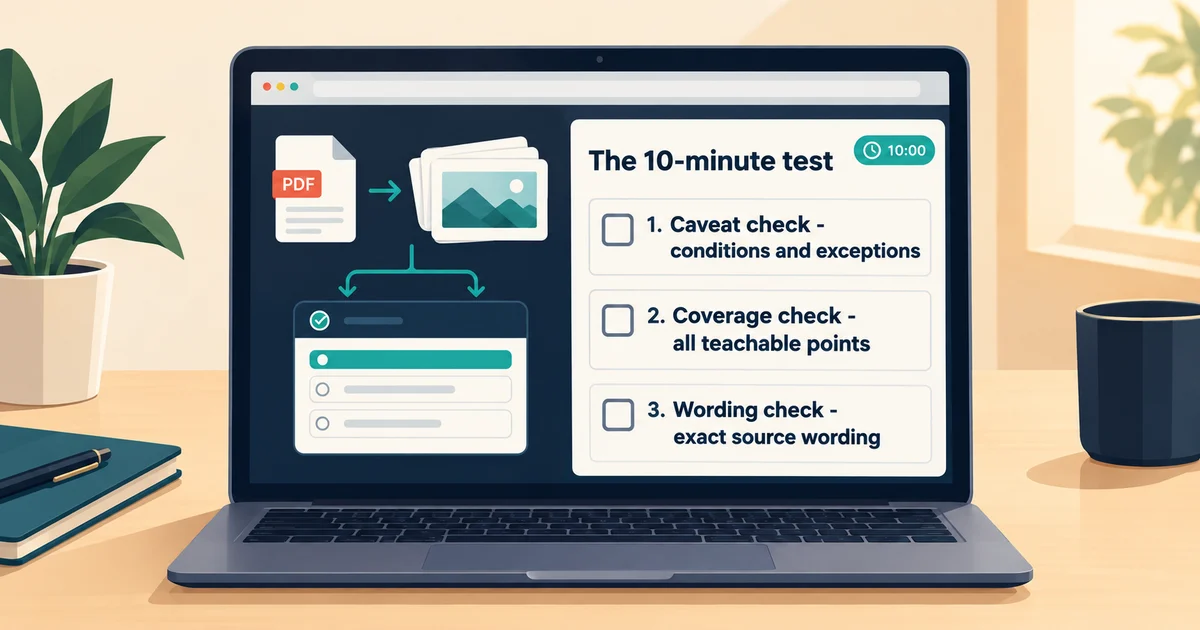
Pick one chapter, lecture, or paper you know cold, something where you would notice a lie. Run it through the study tool of your choice and generate a full deck plus a quiz. Then check three things.
The caveat check. Find one claim in the source that comes with a condition: an "only when," an "except," a "this breaks down if." The professor's favorite exam question lives exactly there. Now search the generated deck for that condition. In practice, generators are reliable about the definition and unreliable about the qualifier, because a definition is a topic sentence and a qualifier is a subordinate clause. Question generation inherits the same failure mode as summarization: compression deletes the exceptions first, because exceptions are stated once, briefly, and never repeated. A deck that teaches the central limit theorem but not its sample-size condition is accurate and misleading at the same time. That is the most dangerous kind of study material, because nothing in it looks wrong.
The coverage check. Before generating, count the distinct teachable points in one section of the source. A good rule of thumb is that a well-made deck for a dense section has one to two cards per teachable point. Now compare. Generators love the first sentence of each paragraph and are lukewarm about worked examples, edge cases, and anything in a table. If your section had eight teachable ideas and the deck covers five, and the missing three are the subtle ones, you have learned what the tool prunes. That pruning pattern will be identical on the chapters you do not know well, which is exactly where you cannot compensate for it.
The wording check. Read five cards slowly and ask the meanest question in studying: is this what the source said, or what the source would plausibly say? On definitional courses, law, medicine, pharmacology, any field where a single word carries weight, a card that paraphrases the textbook into something the textbook never claimed will be drilled into your memory with the full force of the testing effect. You will not be memorizing the course. You will be memorizing the generator's misreading of the course, with perfect retention.
A tool that passes all three on your material has earned one semester of conditional trust, per course. Re-test when you change subject type; a tool that is faithful on narrative lecture transcripts can be sloppy on equation-heavy slides. And if a tool fails the caveat check twice on different material, the failure is structural, not bad luck. Find a different tool or fall back to writing cards from the generated ones, using the output as raw material rather than truth.
One asymmetry worth internalizing: false answers are rare, because the model is working from your actual text. What you are really hunting is omission and drift, the accurate-but-incomplete deck, the card that drifted one adjective away from the source. Those do not announce themselves. That is the same quiet failure mode behind why AI hallucinates in every other domain, and it is why the test exists.
The September 2026 landscape, tool by tool
All of the below was verified against vendor pages and official announcements in September 2026. Prices and features move fast in this category, so treat this section as a snapshot with a short shelf life, and the ten-minute test as the durable part of the article.
Gemini Notebook: the grounded option. Google's NotebookLM was renamed Gemini Notebook in July 2026, and this September it rolled out a batch of study features that make it the strongest starting point for the accuracy question. In the Studio panel you generate flashcards and quizzes directly from your sources, with a difficulty setting (easy, medium, hard), a custom prompt for what to focus on, and a count dial (fewer, standard, more). Per Google's help documentation, you can explain any card, mark cards Got it or Missed it, and export the deck as CSV. The mid-September Google announcement added an audio recorder in the mobile app for capturing live lectures, real-time voice conversations with your notebook that stay grounded in your sources, new quiz formats (short answer, multiple-select, fill in the blank), and, crucially, the ability to edit generated quizzes and flashcards, which is exactly what the accuracy test demands. The free tier is generous for coursework, and eligible US college students can currently get a year of Google AI Pro at no cost under Google's student offer. The structural advantage is that everything is generated from sources you selected, with citations you can open, so verification is one click instead of one scroll-back. For the full grounded-notebook setup, start with our Gemini Notebook research guide.
Quizlet: the library play, with a caution. Quizlet remains the biggest name in flashcards, hundreds of millions of user-made sets, and its AI generation runs through Magic Notes, which turns uploaded notes, PDFs, and lecture recordings into flashcards, outlines, and practice tests. The 2026 strategy is aggressive: Quizlet bought Coconote, a viral AI lecture note-taker that converts recordings into notes, quizzes, and flashcards, in February 2026, and in March it became a native app inside ChatGPT, so you can generate a Quizlet set from a PDF without leaving the chat window. Two cautions belong next to that momentum. First, pricing: the free tier caps Learn mode rounds and practice tests, with the caps lifted on paid plans (third-party checks in September 2026 put the annual paid tier around $36 a year, but confirm on the official site). Second, and more instructive: Q-Chat, the ChatGPT-powered AI tutor Quizlet heavily marketed from 2023, was discontinued in June 2025, with the retirement notice quietly added to the original announcement post. A headline AI feature of a major platform vanished inside two years. Any study workflow that depends on one vendor's one feature should be built to survive that feature dying. Quizlet's scheduling, for what it is worth, is session-level adaptive review rather than a true long-horizon spaced repetition algorithm, which matters if retention across a whole semester is the goal.
Knowt: the free-tier counterweight. Knowt built its audience the moment Quizlet moved Learn mode behind the paywall, and its live plans page still shows the pitch: flashcards, learn mode, practice tests, match, and spaced repetition are free, along with AI generation from notes, PDFs, slides, and videos, capped monthly. The paid Ultra tier ($12.49 a month billed annually, or $24.99 monthly) lifts the AI caps and adds unlimited Kai, its chat assistant grounded in your files. Its differentiator is the lecture recorder: record a class, get notes and cards back. For a student deciding where to spend zero dollars, Knowt gives you the most genuine study functionality per free account in the category, with the tradeoff that the free AI meter runs out and the deck it produced still needs the accuracy test like everyone else's.
Anki plus AI add-ons: the scheduler purists choose. Anki has no native AI generation, and that is fine, because Anki's value was never authorship. It is the retention engine: its FSRS scheduler, bundled since Anki 23.10 and described in Anki's own FAQ, models difficulty, stability, and retrievability from your personal review history and schedules each card accordingly. No consumer study app's scheduling is better documented or more adjustable. AI arrives through the add-on ecosystem: AnkiConnect for scripting your own generation pipeline, AnkiBrain for an in-app AI panel, and various community generators that push cards from a ChatGPT session into a deck. Practitioner reports put the usable fraction of auto-generated Anki cards around half to two-thirds, which is a polite way of saying the human triage step is not optional. The strongest current pipeline for a retention-focused student runs Gemini Notebook or Quizlet for generation, the accuracy test as the filter, CSV export into Anki, and FSRS for the next six months of scheduling. Clunkier than one app, better at the part that determines whether you still know this in March.
StudyFetch: the citation-forward newcomer. StudyFetch generates flashcards, quizzes, and practice tests from PDFs, slides, handwritten notes, and YouTube videos, with an AI tutor trained on your uploads. Its most interesting claim, per its own product pages, is that every generated flashcard and quiz item carries citations back to your original material, which, if it holds up in your ten-minute test, directly attacks the drift problem. Pricing is only visible after signup, with third-party listings around $20 a month for premium, and it also advertises a cram mode, which the spacing literature says should be your emergency break, not your engine.
Also real and worth knowing: the Gemini app itself now has a student hub with study notebooks on mobile, and generates practice quizzes, flashcards, and study guides from prompts or uploaded files, with hints and post-quiz explanations. It is less source-grounded than Gemini Notebook, so it belongs at the "explain this concept to me" stage of studying rather than the "test me on my actual syllabus" stage.
The workflow that survives contact with a semester
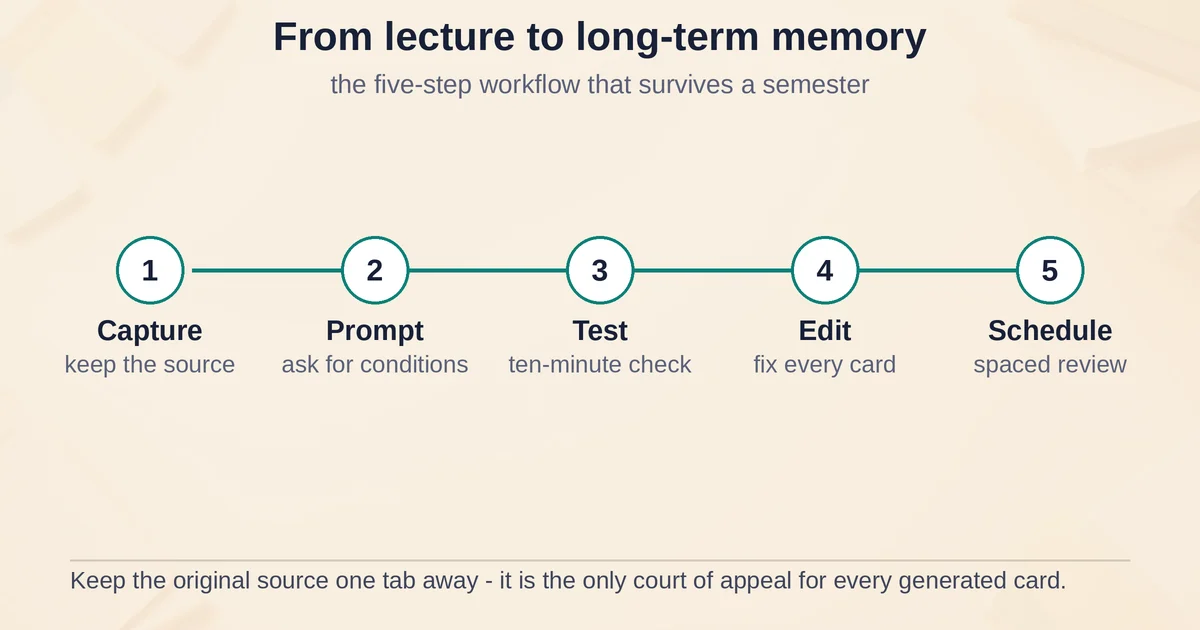
Tools change; the workflow does not. Here is the sequence that puts every finding above in order, from a lecture, PDF, or video to material you will still know in six weeks.
- Capture the source, not just the output. Whatever goes into the tool, keep the original one tab away: the transcript, the PDF, the recording. Every generated card is a claim about that document, and the document is the only court of appeal. For lectures and videos, the transcript-first discipline matters most, and our video-to-notes workflow guide covers why transcripts, not summaries, are the control layer.
- Generate with a prompt, not a click. The default "make flashcards" button optimizes for topic sentences. Ask instead for what your exam will contain: "generate questions on the conditions and exceptions, not just definitions," or "include one worked-example card per derivation." The difference in deck quality from a two-line custom prompt is larger than the difference between most tools. The same structural prompting discipline that improves every AI output improves study generation too.
- Run the ten-minute test before the deck earns your trust. Caveat check, coverage check, wording check, on one section you know well. Delete or fix every card that fails. If half the deck fails, the tool is the problem; if one in ten fails, editing is faster than switching.
- Edit ruthlessly, then hand off to a scheduler. Unedited AI decks are the false-confidence machine of this era of studying: they drill the generator's reading of the course into your memory with the full force of active recall. The editing pass is not overhead around the learning; combined with the accuracy check it is the learning, because deciding what a card should say is exactly the retrieval-and-judgment work that makes material stick.
- Schedule across days and trust the calendar over your feelings. Spaced review, whether that is Anki's FSRS, Knowt's spaced repetition mode, or Quizlet's Learn. Kornell's 72% number is the warning label: after a massed session you will feel like you learned more. The delayed test will disagree. On the days a spaced tool tells you that you know a card and it feels too easy, that is the system working, not a sign you should cram more.
What these tools are the wrong answer to
Two boundaries, stated plainly, because the marketing will not state them for you.
None of these tools is for faking engagement with assigned material. If the assignment is to watch the lecture, read the chapter, or sit the film, a generated deck of its contents does not satisfy it, and the questions instructors actually ask about assigned material are precisely the asides, reactions, and nuances that generators prune first. Use study tools to practice material you are genuinely engaging with, the way an index and a highlighter accompany a book without replacing the reading.
And none of the passive output formats verifies anything. AI podcast summaries, audio overviews, short video explainers, these are genuinely pleasant for commute review, and they are downstream of the same extracted text as your deck. If the caveat never made it into the notes, the cheerful generated podcast will discuss the topic without it, and omission starts to sound like consensus. Verify against the source, then review with audio, in that order.
FAQ
Which AI study tool is best for turning lectures into flashcards?
As of September 2026, Gemini Notebook is the strongest default for source-grounded generation with citations and editable quizzes and flashcards, Knowt is the strongest free tier for a full flashcard workflow, and Anki with a generation add-on remains the best long-term retention engine. But the honest answer is that per-tool rankings expire, and the ten-minute accuracy test in this article is the part that does not, because you can re-run it on any tool in the time a comparison table takes to load.
Are AI-generated flashcards accurate?
On the recall side, mostly yes: working from your actual text, these tools rarely invent facts outright. The failure modes are quieter. Decks prune conditions and exceptions in favor of definitions, cover fewer teachable points than the source contains, and occasionally drift a card's wording away from what the source precisely said. Those errors survive precisely because nothing looks wrong, which is why the caveat, coverage, and wording checks are worth ten minutes before you commit a semester to any tool.
Pricing and plan details are as published by the vendor around September 2026 and can change - confirm on the official site.