Search "Aider CLI vs GitHub Copilot Workspace" and you get an immediate problem: one of these tools no longer exists. GitHub sunset Copilot Workspace's technical preview on May 30, 2025. The other still exists, but its development has visibly stalled, with no new tagged release since August 2025 and no commits to the main branch since May 2026.
That makes this comparison more interesting than a dead product page suggests. Copilot Workspace's core idea, handing a machine a task in natural language and getting back a reviewable pull request, did not die. It graduated into the Copilot coding agent, which went generally available in September 2025. Aider's core idea, tight interactive pair programming in your terminal, also survives, but the project maintaining it is running cold.
So the real question in September 2026 is not "which tool should I install?" It is: which workflow design fits how you actually write software? Because these two tools, one retired, one stalled, represent the two honest answers to agentic coding.
Two opposite bets about where coding happens
Aider, created by Paul Gauthier in 2023, makes a terminal-native bet. It assumes you are already sitting in your codebase, in a terminal, inside a git repository, and you want an LLM as a fast, conversational partner. You type a change request, Aider edits the files, lints and tests the result, and commits. You watch every step. It is pair programming in the most literal sense: you are the driver or the navigator depending on the moment, and nothing happens without you in the loop.
Copilot Workspace made the opposite bet. Launched as a technical preview in April 2024 by GitHub Next, it was a browser-based environment that assumed coding starts at the issue tracker. Feed it a GitHub Issue written in plain English and it would generate a specification, then a plan, then the code changes, running through stages you could inspect and edit before anything landed. You never opened a terminal. The unit of work was not the keystroke, it was the task.
The GitHub-ecosystem bet won the product argument but not in Workspace's form. Its sub-agent architecture and issue-to-PR flow were rebuilt as the Copilot coding agent, which now runs asynchronously on GitHub's infrastructure and produces draft pull requests for human review. Many teams now spread this work across several AI programming tools rather than betting on a single surface.
How Aider handles commits and branches
Aider's git integration is its most underrated feature and the reason it still has fans in 2026 despite the slow development. Every time Aider makes an edit, it automatically creates a git commit with a generated message describing what changed and why. You never write "fix typo" by hand again for AI-assisted work.
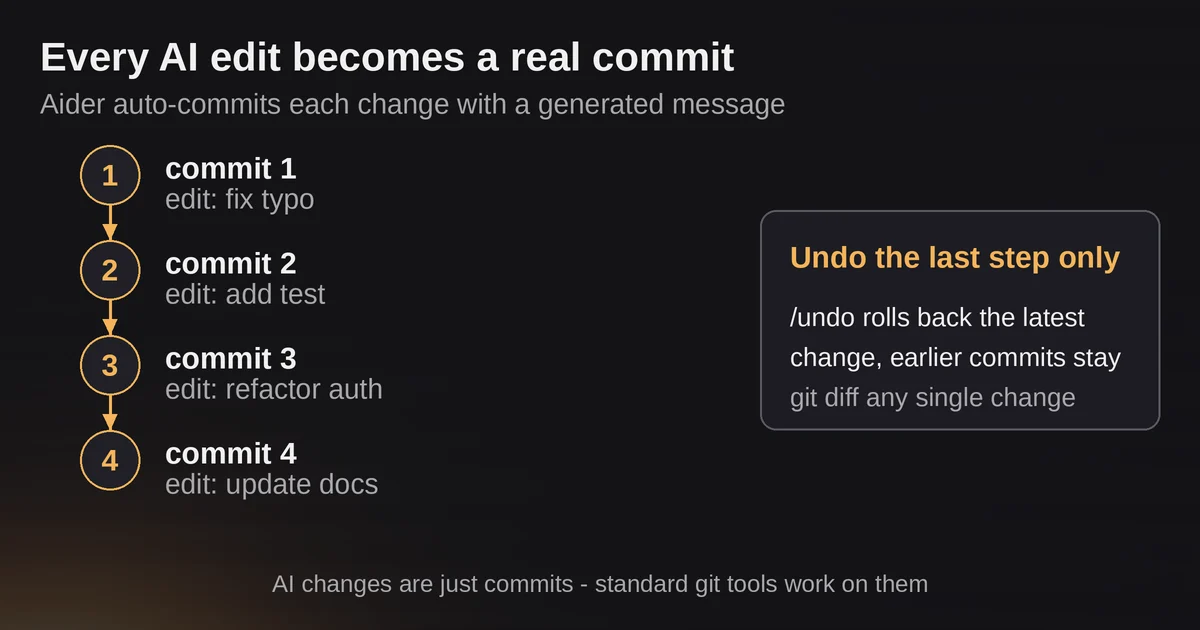
This changes the psychology of using an AI coding tool. Instead of one giant blob of AI-generated changes you have to review all at once, you get a granular history. If the third of five changes broke something, you can git diff the individual commits, or use Aider's /undo command to roll back the most recent change while keeping earlier ones. Standard git tooling, from git rebase to git bisect, works on AI changes exactly as it does on human ones, because they are just commits.
Branch management itself is left to you. Aider will happily work on whatever branch you are on, and its docs recommend you decide branch strategy as you normally would. That is the point: Aider does not try to own your workflow, it participates in it. Developers who live in the terminal and want the machine to respect their existing habits, not replace them, find this design genuinely respectful.
The trade-off is that Aider has no built-in notion of "produce a reviewable unit of work." If your team requires a clean PR with three logical commits, a description, and passing CI, you assemble that yourself after the session ends. Aider writes code and commits it; you synthesize the pull request.
How the Copilot lineage handles commits and PRs
The Copilot coding agent, Workspace's production successor, flips this entirely. You assign a GitHub Issue to Copilot, or start a task from the agents panel on any page on github.com. The agent spins up its own development environment powered by GitHub Actions, works in the background, and pushes commits to a draft pull request. When it finishes, it requests your review. If you want changes, you leave a comment on the PR and the agent reads it, adjusts, and continues, exactly as a remote teammate would.
PR synthesis is not a feature here, it is the output format. The agent's entire deliverable is a draft PR, with commits, a description, and session logs you can watch in real time. Each session costs one premium request plus GitHub Actions minutes, which makes it cheap to delegate the kind of low-to-medium-complexity work that fills a backlog: bug fixes, test coverage, documentation updates, small refactors.
The branch management, though, is invisible and non-negotiable. You do not choose how the agent structures its commits, and you cannot interactively steer it mid-edit the way you can with Aider. It is delegation, not collaboration. GitHub's own documentation frames the agent as handling tasks "like a peer developer," but a peer you manage entirely through PR comments.
For teams that already run on GitHub Issues, this is close to zero-friction adoption. For teams that want control over commit structure, or that need the agent to understand a task that is not well captured in an issue, it is a constraint.
Multi-file editing: repo maps vs task scoping
Both tools handle multi-file edits, but they reason about the codebase differently.
Aider builds a "repo map" of your entire project, a compressed representation of the classes, functions, and their relationships, so the model can find and modify the right files without you manually adding context for every change. On a large codebase this works surprisingly well, and it is a big part of why Aider earned its reputation for precise edits. You can also add files explicitly with /add, drop them with /drop, and include images or web pages for reference.
The coding agent, running in a fresh environment, takes the opposite approach: it scopes to the task. It clones what it needs, explores the repository, and confines its changes to what the issue requires. GitHub describes it as working in a sandboxed environment with restricted internet access and limited repository permissions, which is a security posture Aider, running locally with your credentials, does not attempt to match.
The practical difference shows up in long, exploratory work. Aider keeps the full session context in your terminal, so a conversation that drifted from "fix the login bug" into "actually, refactor the auth module" keeps working. The coding agent, with a 60-minute session cap and an issue-scoped mandate, wants bounded tasks. Give it a vague goal and it will produce a vague PR.
Where each one breaks
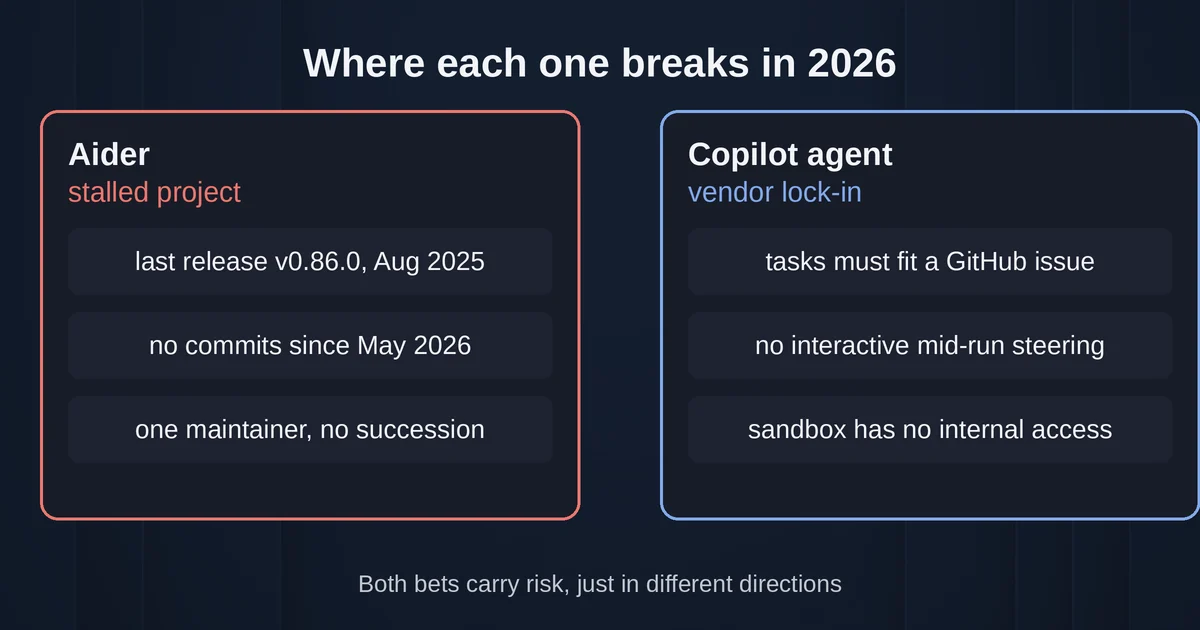
Aider's weakness in 2026 is maintenance risk. The last tagged release, v0.86.0, shipped in August 2025, with a final point release (0.86.2) on PyPI in February 2026. There have been no commits to the default branch since May 22, 2026, and the project's sole maintainer, Paul Gauthier, has been publicly absent enough that the community opened a "Where is Paul?" thread in October 2025 and asked about a succession plan, which was declined. The tool still works and community pull requests keep trickling in, but budget for dependency drift, slow support for new model releases, and no one fixing your edge-case bug. The homepage still recommends Claude 3.7 Sonnet-era models, which tells you how fresh the model guidance is.
The coding agent's weakness is the inverse: it is very much alive but opinionated about your workflow. If your task is not expressible as a GitHub issue, if you want interactive control, or if you need the agent to respect an unusual commit structure, it fights you. Its sandbox is also a real limit: agents that cannot reach internal services or use your local tools will make plausible-looking changes that fail against real infrastructure.
Verdict by developer profile
Choose Aider if you are a terminal-first developer who wants precision and control. Aider still delivers the best commit granularity of any tool in this space, every AI change becomes an inspectable commit you can undo, diff, or rebase, and the repo map plus lint/test hooks mean it catches many of its own mistakes before you see them. You accept a stalled project and supply your own model API keys. For individual developers and small teams comfortable with git and a bring-your-own-key setup, the price, free and open source under Apache 2.0, is unbeatable if the maintenance risk is acceptable.
Choose the Copilot coding agent if your team lives in GitHub. The successor to Copilot Workspace is the practical answer for issue-to-PR delegation: assign the work, review the draft PR, comment, iterate. For Business and Enterprise plans, administrators must enable it in the Policies page, so it comes with governance baked in, something Aider will never offer. The trade-off is the vendor's workflow opinions and premium-request costs.
If you were comparing these two because you want "agentic pair programming in production," notice what happened to the middle ground. The interactive-but-autonomous sweet spot both tools aimed at in 2024 is now served by faster-moving alternatives: agent mode inside VS Code and JetBrains for supervised local work, and the Copilot CLI for terminal users who want agentic capability with an actively maintained backer. Aider remains the tool for developers who value its specific virtues, auto-commit discipline, local control, model freedom, enough to accept its current stasis.
The uncomfortable lesson from this matchup is that picking an AI coding tool in 2026 is partly a bet on the organization behind it, the same bet you make when adopting any protocol-dependent tooling, as developers adopting MCP have learned. One of these products was switched off when its parent company found a better shape for the same idea. The other is open source and cannot be switched off, but its bus factor is one person who is currently not around. Both bets carry risk, just in different directions.
Pricing and plan details are as published by the vendor around September 2026 and can change, confirm on the official site.
FAQ
Is GitHub Copilot Workspace still available?
No. GitHub ended the technical preview on May 30, 2025. The workflow it pioneered lives on in the Copilot coding agent, generally available since September 25, 2025 for paid Copilot subscribers.
Is Aider still maintained in 2026?
The project is not abandoned, but development has stalled. The last tagged release is v0.86.0 from August 2025 (with a 0.86.2 point release on PyPI in February 2026), and the default branch has seen no commits since May 2026. Community contributions continue, but the sole maintainer has been inactive and no succession plan exists.