Sora is gone. OpenAI shut down the Sora app on April 26, 2026. The Sora API is set to shut down on September 24, 2026. You need a new tool.
The short answer for most people: Google Veo 3.1 is the best pick. It makes the most realistic clips, and it is the only mainstream model that makes top tier sound right inside the video. Kling 3.0 is the best cheap pick, and it has the most generous free tier. Runway Gen-4.5 is the best pick for pros, ads, and client work. We checked every price here on September 20, 2026. Prices in this market change often, so treat them as a snapshot.
One urgent thing first. If you have old videos in Sora, export them now at sora.chatgpt.com/sunset. OpenAI says it will delete all Sora data for good after the export window closes.
What happened to Sora
The timeline below is confirmed on OpenAI's own Help Center page.
- Sept 30, 2025: Sora 2 launched with an invite-only iOS app and a TikTok style feed.
- March 24, 2026: OpenAI announced the shutdown. The app had lived about six months.
- April 26, 2026: The Sora web and app shut down.
- Sept 24, 2026: The Sora API shuts down too.
Why did it end? OpenAI said it came down to focus and compute. A spokesperson said the Sora research team moves to world simulation research to advance robotics.
The money tells the rest of the story. Sora downloads spiked 4,400 percent one month after launch, to nearly 5 million, per Sensor Tower data reported by the LA Times. But monthly active users fell every month since the start of 2026. Since launch, Sora earned $1.4 million in global in-app revenue. Over the same period, the ChatGPT app earned $1.9 billion. Sora never had a free tier, and it was a tiny business that ate a lot of compute.
No successor is announced. Do not wait for a Sora 3.
The top three tools compared
Three tools now lead the pack: Veo 3.1, Runway Gen-4.5, and Kling 3.0. Here is how they stack up.
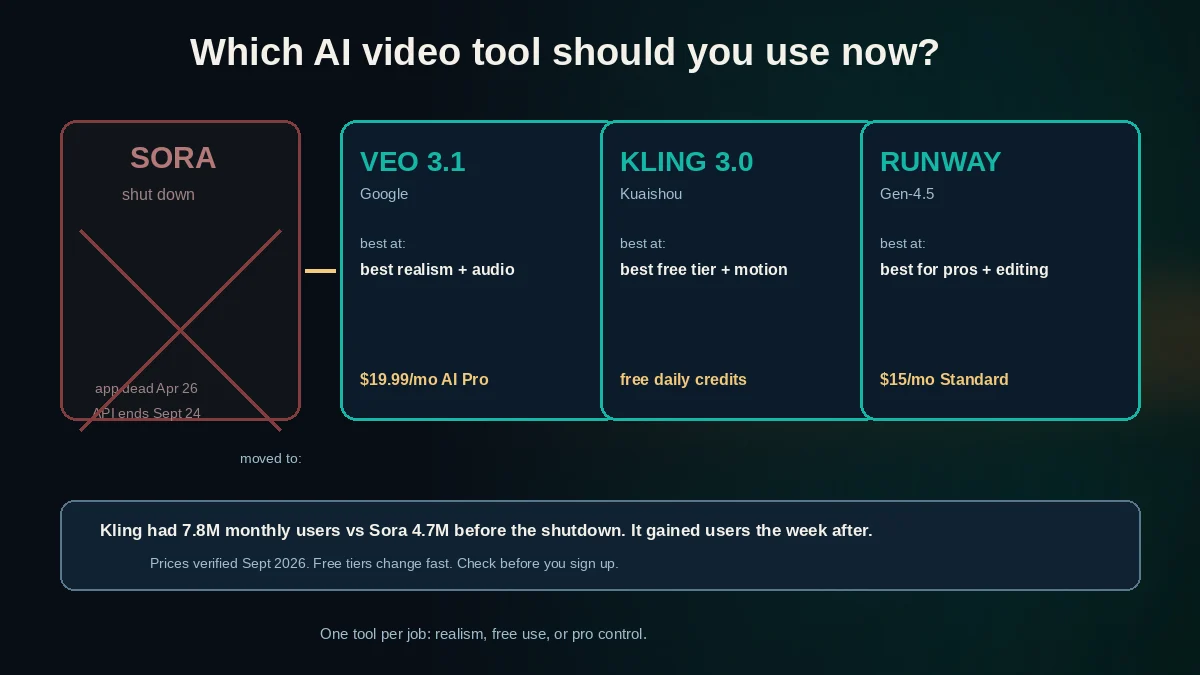
| Veo 3.1 (Google) | Runway Gen-4.5 | Kling 3.0 (Kuaishou) | |
|---|---|---|---|
| Best at | Realism plus native sound | Control and editing, client work | Value and human motion |
| Max clip length | 8 seconds native, up to about 148 seconds when chained in Flow | Based on credits, 12 credits per second | 15 seconds per clip, up to about 3 minutes with Extend |
| Native audio | Yes, its headline feature | Partial and limited | Yes at the 1080p tier |
| Free tier | Limited access in the Gemini app | 125 one-time credits | Daily login credits, about 66 a day |
| Paid entry | $7.99/mo (Google AI Plus) | $15/mo Standard | $6.99 first month, then about $9 to $10/mo |
Veo 3.1: the quality king
Veo 3.1 is the current Google model, confirmed on Google's own AI Studio page. You use it through the Gemini app or the Flow video tool with a Google AI plan. AI Plus costs $7.99 a month with limited access and 200 Flow credits. AI Pro costs $19.99 a month with 1,000 Flow credits. AI Ultra costs $249.99 a month with 10,000 credits. Trackers estimate AI Pro buys roughly 10 full quality clips a month, or about 50 on Fast.
Its big trick is native audio. Veo makes dialogue, ambient sound, and effects inside the clip, all in sync. Every fresh test agrees this is its headline feature. CNET calls it the best paid pick for cinematic video. If you want what Sora promised, people talking on camera, this is the closest live match.
Runway Gen-4.5: the pro toolkit
Runway Gen-4.5 is the flagship for text to video, confirmed on runway.com/pricing. Standard costs $15 a month for 625 credits, which is 52 seconds of Gen-4.5. Pro costs $35 a month for 2,250 credits, or 187 seconds. Max costs $95 a month for 9,500 credits, or 791 seconds. Annual billing is cheaper, credits do not roll over on Standard and Pro, and paid plans remove watermarks and add 4K upscaling.
Runway is not about sound. Its audio support is partial and limited next to Veo and Kling. Its strength is control: a camera control panel, Motion Brush, world consistency across shots, and a 30-plus tool suite. One nice trick: a Runway subscription also includes third party models in the same dashboard, such as Veo 3.1 and Kling 3.0.
Kling 3.0: the value pick
Kling 3.0 comes from Kuaishou and arrived around February to March 2026. Clips run up to 15 seconds per generation at up to native 4K. The Extend feature chains clips, with claims of up to 3 minutes total. You get multi-shot clips with up to 6 cuts, plus lip-sync in 5 languages.
It is the budget king. Standard costs $6.99 for the first month, then renews at about $8.80 to $10 a month, for 660 credits a month. Pro is about $26 intro, about $33 renewal, with 3,000 credits. One hands-on roundup scored an older version, Kling 2.1, at 7.5 out of 10, so treat that as understating Kling 3.0. Fresh tests call Kling 3.0 the best value, with the best character motion on a budget.
What it actually costs per video
Subscription prices hide the real question: what does one clip cost? Here are mid-2026 estimates for a 10-second clip. These are reported ranges, not official numbers. No vendor publishes one clean price.
- Kling at 720p: about $0.84 to $1.00
- Kling at 1080p with audio: about $1.40 to $1.70
- Veo 3.1 Fast: about $1.50
- Veo 3.1 standard: about $3.00
- Runway Gen-4.5: about $1.50 via API, or 120 credits in-app
You can sanity check this with each tool's credit math. Runway Gen-4.5 burns 12 credits per second, so a 10-second clip costs 120 credits. Kling charges $1 for 66 credits, and about 6 credits per second at 720p, so a 10-second 720p clip costs about 60 credits, or about $0.91.
One test of more than 1,800 clips found a finished 10-second clip ran from roughly $0.40 to over $2.00. Cost per second varies about 5x across models. That gap dominates tool choice at any real volume.
Free options that still exist
You can try AI video for $0. Here is what is out there.
- Kling free tier. Daily login credits, about 66 a day, reset daily with no rollover. That is about 2 short test clips a day. Catch: output is watermarked, 720p, capped at 5 seconds, and non-commercial only. One honesty note: the 66 a day figure comes from three independent trackers. Kling confirms free daily credits but does not publish the amount itself.
- Runway free tier. 125 one-time credits. This is a trial, not a steady free tier. Good for one taste test.
- Google Gemini. The free Gemini app has limited video generation access. Serious use needs a paid plan, starting at $7.99 a month. Do not call Veo free.
- Pika. Daily free credits, $8 a month paid.
- Luma Dream Machine. Limited free, $9.99 a month paid.
- Wan 2.2. Open source and free forever on your own GPU. For tinkerers only.
Where users went after the shutdown
No single tool won the Sora exodus. But Kling gained the most consumer momentum, per LA Times reporting of Sensor Tower data shared with Bloomberg.
One week after the shutdown announcement, Kling weekly active users jumped 4 percent to 2.6 million. Kling was already the consumer leader before that: 7.8 million monthly active users in March, versus 4.7 million for Sora. Kling's parent Kuaishou told analysts it expects Kling revenue to more than double this year. Kling made about $49.3 million in Q4 2025.
Runway and Shengshu, the maker of Vidu, both raised new funding in February 2026. The rough shape now: Kling holds the consumer crowd, Veo is the quality benchmark, Runway holds the pro market.
Which one should YOU pick
Here is the shortcut guide.
- Want what Sora promised, people talking on camera? Get Veo 3.1 via Google AI Pro at $19.99 a month. Its native audio is better than Sora's was.
- Want to pay nothing while learning? Use the Kling free tier. Upgrade to Standard, about $9 to $10 a month, when you need clean 1080p with no watermark.
- Making social clips on a budget? Kling Standard. It is cheapest per clip, does vertical formats, and lip-syncs in 5 languages.
- Want the best quality, cost no object? Veo 3.1. Step up to AI Ultra if volume matters.
- Doing pro or client work? Runway Gen-4.5. Standard at $15 a month to start, Pro at $35 a month for real volume. You get consistent characters and fine camera control.
- Just want to try AI video once? Runway's 125 free credits or Kling's daily free credits.
- Building on the Sora API? Migrate before September 24, 2026. Drop-in replacements: Veo 3.1 via the Gemini API or Vertex AI, the Kling API, or the Runway API.
FAQ
Is my Sora data gone? Not yet, but it will be. Export your videos at sora.chatgpt.com/sunset as soon as possible. OpenAI permanently deletes Sora data after the final export window closes. The app shut April 26, 2026. The API shuts September 24, 2026.
Is there a truly free AI video generator? Kling comes closest. It gives about 66 credits a day, every day, which is about 2 short clips. The clips are watermarked, 720p, and non-commercial. Runway's 125 credits are one-time only. Wan 2.2 is fully free but you must run it on your own computer.
Which tool makes clips with sound? Veo 3.1 is the clear leader. It makes dialogue, ambient sound, and effects inside the clip, in sync. Kling 3.0 also makes native audio at its 1080p tier. Runway's audio support is partial and limited.
What should a beginner pay for first? Kling Standard. It costs $6.99 the first month, then about $9 to $10, and it removes the watermark and unlocks 1080p. If budget is no issue, start with Google AI Pro for Veo 3.1.
Can I get 60-second clips from these tools? Not in one shot. Veo makes 8-second clips you can chain to about 148 seconds in Flow. Kling makes 15-second clips you can chain toward 3 minutes with Extend. Long videos are stitched from short pieces.
What to do next
Pick based on your wallet, not the hype. If you are brand new, start with Kling's daily free credits and learn the prompts. When you outgrow watermarks, pay for Kling Standard or Google AI Pro. If clients pay the bills, get Runway.
And export your Sora videos today. That window will not stay open forever.
Want help picking tools for a specific job? Toolbit reviews AI tools with no hype, so you can skip the marketing and get straight to what works.