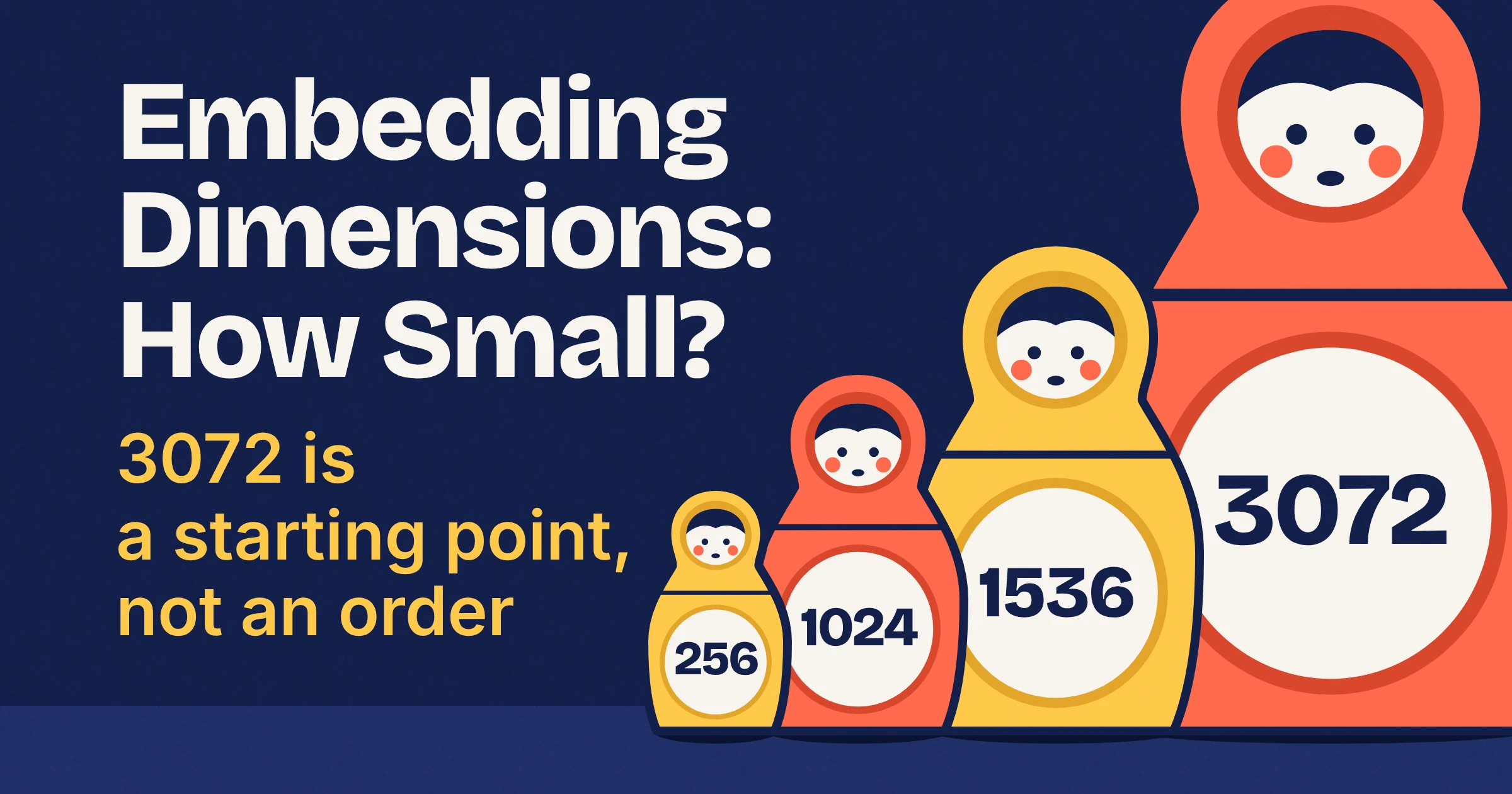
To choose embedding dimensions, pick the smallest size your model officially supports that still puts the right chunks at the top of your results on your own test questions. In practice, start at a size your vendor defaults to or recommends, usually 1024 or 1536, confirm it fits your vector index, and only go bigger if your recall test asks for it. OpenAI text-embedding-3, Google's Gemini embedding models, Cohere Embed v4 and Embed 5, Voyage AI's voyage-4 and voyage-3.5 models and Qwen3-Embedding all let you request a shorter vector, so a 3072-dimension default is a starting point, not an order.
What are embedding dimensions?
Embedding dimensions are how many numbers an embedding model returns for each piece of text. As of November 2026, OpenAI's embeddings guide lists 1536 by default for text-embedding-3-small and 3072 for text-embedding-3-large.
Picture each chunk of your docs as a row in a spreadsheet with 1536 columns. Your user's question becomes one more row, and search finds the rows that point in the same direction. OpenAI's guide does this with cosine similarity (a score for the angle between two vectors that ignores their length).
Two rules follow from that picture:
- Same size everywhere. The query and every stored chunk must have the same number of dimensions. Switch to a model with a different size without re-embedding, and you get the classic dimension mismatch error.
- Size is never free. OpenAI says larger embeddings generally cost more and consume more compute, memory and storage than smaller ones.
Which embedding dimensions do OpenAI, Gemini, Cohere, Voyage and Qwen3 support?
As of November 2026, every current model family below can return a smaller vector than its default, and defaults run from 1024 (Voyage AI, Qwen3-Embedding-0.6B) to 4096 (Qwen3-Embedding-8B). The two older 1536-dimension models are the exceptions: Voyage lists a single size for voyage-large-2, and the OpenAI pages checked describe shortening only for text-embedding-3, not text-embedding-ada-002.
| Model | Default or full size (dims) | Officially supported sizes (dims) | How you get a smaller vector | Best for |
|---|---|---|---|---|
| OpenAI text-embedding-3-small | 1536 | Shorter sizes via dimensions; no fixed menu in the docs checked | dimensions parameter | Text RAG where the default already fits a 2,000-dim index |
| OpenAI text-embedding-3-large | 3072 | Shorter sizes via dimensions; OpenAI's own examples use 1024 and 256 | dimensions parameter | Multilingual retrieval at full size; retest recall if you shorten it to fit your store |
| OpenAI text-embedding-ada-002 | 1536 | 1536; the pages checked describe shortening only for text-embedding-3 | Not described in the pages checked | Legacy indexes you have not migrated yet |
| Google gemini-embedding-001 | 3072 | Smaller sizes; Google recommends 3072, 1536 or 768 | Output dimensionality option, cut from the end | Text-only Gemini API projects with inputs up to 2048 tokens |
| Google Gemini Embedding 2 | 3072 | 128 to 3072; Google recommends 768, 1536 or 3072 | Output dimensionality option, cut from the end | Text, images, video, audio and documents in one search space |
| Cohere Embed v4 (embed-v4.0) | 1536 | 256, 512, 1024, 1536 | output_dimension (Amazon Bedrock) | Bedrock stacks that also want int8 or binary output |
| Cohere Embed 5 (embed-v5.0-pro, embed-v5.0-fast) | 2048 | 256, 512, 768, 1024, 1536, 2048 | Request one of the listed sizes | Long documents, with a 128k-token context |
| Voyage AI voyage-4-large, voyage-4, voyage-4-lite, voyage-3-large, voyage-3.5, voyage-3.5-lite, voyage-code-3 | 1024 | 256, 512, 1024, 2048 | output_dimension | A small default you can move up or down |
| Voyage AI voyage-large-2 | 1536 | 1536 only | None | Existing indexes only |
| Qwen3-Embedding-0.6B | 1024 | Any size from 32 to 1024 | Custom output dimension (MRL) | Picking an exact size, down to 32 |
| Qwen3-Embedding-4B | 2560 | Custom sizes (MRL support) | Custom output dimension (MRL) | A mid-size Qwen3 vector you can shorten |
| Qwen3-Embedding-8B | 4096 | Custom sizes (MRL support) | Custom output dimension (MRL) | The largest Qwen3 vector; shorten it before pgvector indexing |
OpenAI text-embedding-3 dimensions
OpenAI's text-embedding-3-small defaults to 1536 dimensions and text-embedding-3-large to 3072, and both accept a dimensions parameter that returns a shorter vector. In its launch post for the text-embedding-3 models, OpenAI says you can drop numbers from the end "without the embedding losing its concept-representing properties".
OpenAI gives a practical example: if your vector store only supports 1024 dimensions, set dimensions to 1024 and keep using text-embedding-3-large, trading some accuracy for a smaller vector.
In OpenAI's vendor-reported scores, the biggest gap between the three models is multilingual retrieval. The MTEB average is 61.0 for ada-002, 62.3 for 3-small and 64.6 for 3-large, while the MIRACL multilingual retrieval average jumps from 31.4 to 44.0 to 54.9. For more on OpenAI's API, see our OpenAI coverage.
Gemini embedding dimensions
Google's gemini-embedding-001 and Gemini Embedding 2 both default to 3072 dimensions and both use Matryoshka Representation Learning, so you can ask for fewer. Google's advice is the same for both: "We recommend using 3072, 1536, 768 dimensions for highest quality."
Gemini Embedding 2 lists a flexible range of 128 to 3072 and maps text, images, video, audio and documents into one space. Its input limit is 8,192 tokens, against 2048 tokens for gemini-embedding-001. Google launched Gemini Embedding 2 in public preview via the Gemini API and Vertex AI in March 2026, so check the Gemini Embedding 2 model page for the current model code before you hard-code it.
Qwen3 embedding dimensions
Qwen3-Embedding comes in three sizes with full dimensions of 1024 for Qwen3-Embedding-0.6B, 2560 for Qwen3-Embedding-4B and 4096 for Qwen3-Embedding-8B, and the model card marks all three as supporting custom output sizes. The Qwen3-Embedding-0.6B model card on Hugging Face gives that model a range of 32 to 1024.
Qwen says the 8B model ranked No.1 on the MTEB multilingual leaderboard as of June 5, 2025, with a score of 70.58, which is a vendor claim from a dated snapshot. One catch if you use pgvector: 4096 sits above the 4,000-dimension index limit even for halfvec, so shorten the 8B output before you build an HNSW index.
Cohere and Voyage AI dimensions
Cohere and Voyage AI give you fixed menus instead of a free range. Cohere Embed v4 offers 256, 512, 1024 or 1536 (default 1536), Cohere Embed 5 adds 768 and 2048 (default 2048), and the seven Voyage AI models in the table offer 256, 512, 1024 or 2048 with 1024 as the default.
Voyage's docs also warn that most of its models support only a single default dimension. The seven in the table are the ones Voyage's output_dimension note names, so check a model's listed dimensions before you assume it will shrink.
What is Matryoshka embedding, and is cutting vectors safe?
Matryoshka Representation Learning (MRL) is a training method that makes the first values of a vector work as a smaller embedding on their own, like nested Russian dolls. Cutting is safe on models whose vendor documents it, with two catches: you give up a little retrieval quality, and if you cut stored vectors yourself, OpenAI's guide says to normalize them afterwards.
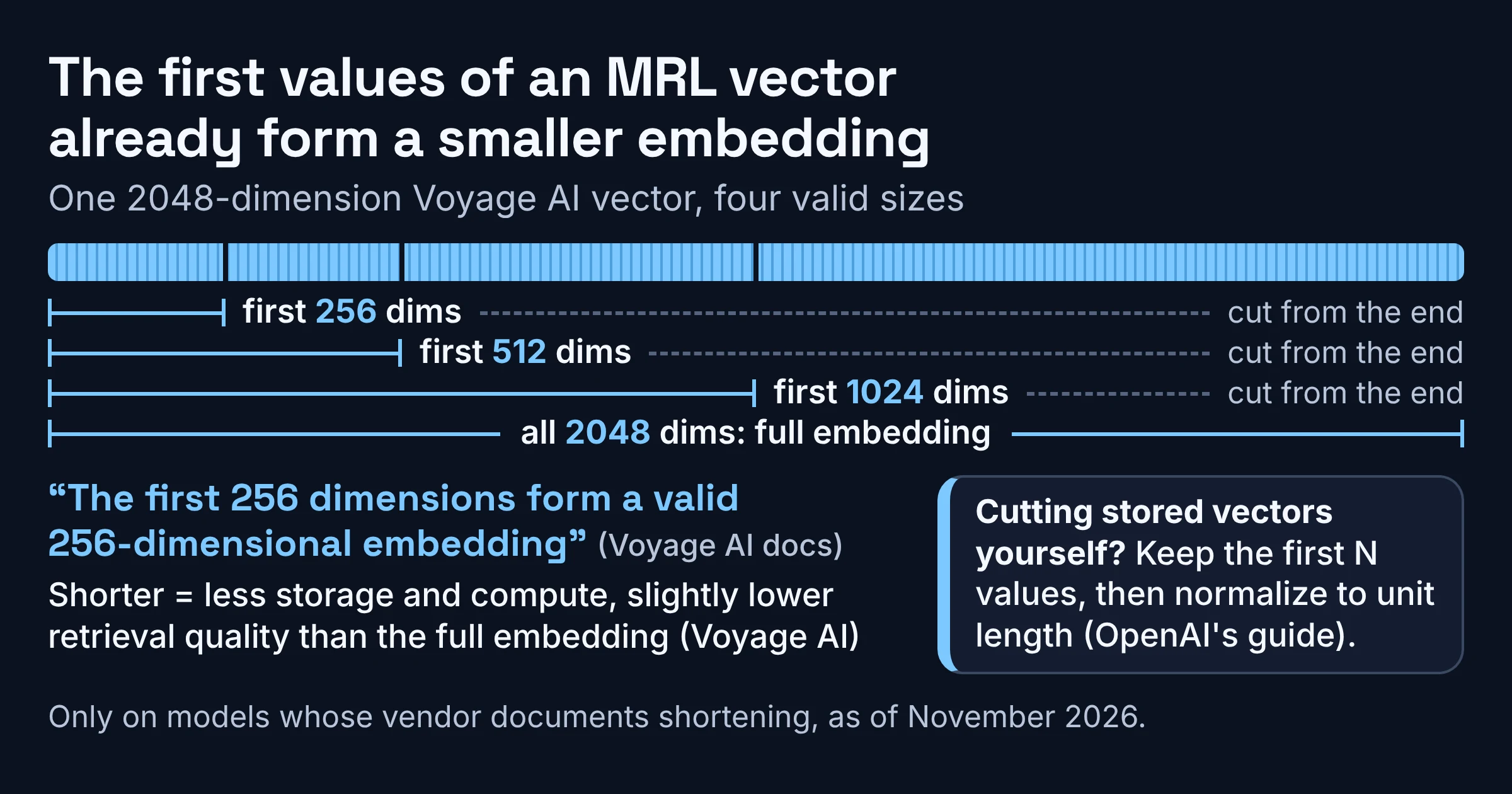
Voyage AI's docs put it plainly for a 2048-dimensional Voyage vector: "The first 256 dimensions form a valid 256-dimensional embedding". The fine print, also from Voyage, is that each shorter version gives slightly lower retrieval quality than the full embedding, in exchange for less storage and compute.
Google says both Gemini embedding models use MRL, and Qwen marks MRL support on all three Qwen3-Embedding sizes. OpenAI describes text-embedding-3 as trained with a technique that lets you trade performance against cost.
The original MRL paper by Kusupati et al. says the method encodes information at different granularities and adds no extra cost at inference or deployment. Its eye-catching result, up to 14x smaller embeddings at the same accuracy, comes from ImageNet-1K image classification, so read it as proof the idea works, not as a number for your text search.
Two safe ways to get a shorter vector
- Ask the API for it. OpenAI's guide calls the
dimensionsparameter the suggested approach, and Gemini, Cohere and Voyage AI have their own equivalents (see the table above). - Truncate vectors you already stored. Keep the first N values, then normalize to unit length. OpenAI's guide says that when you change the dimension manually, you need to normalize afterwards.
import numpy as np

def shorten(vec, dims):
    """Keep the first `dims` values of an MRL embedding, then re-normalize."""
    v = np.asarray(vec[:dims], dtype=np.float32)
    return v / np.linalg.norm(v)

small = shorten(full_vector, 1024)  # full_vector: a stored 3072-dim embedding
Why normalize? Cosine similarity ignores length, so skipping it won't change cosine rankings, but dot product only matches cosine when vectors have unit length. Google's Gemini API reference says reduced outputs are truncated from the end, and none of the Google pages checked say whether they come back normalized, so normalize Gemini vectors yourself if your index uses dot product.
Only truncate models that the table above lists as supporting smaller sizes.
How many embedding dimensions do you need for RAG?
There is no universal number for RAG: as of November 2026, none of the OpenAI, Google, Cohere, Voyage AI or Qwen pages checked here publish a quality-by-dimension table. The right size is the smallest one that passes your own recall test, meaning the right chunk still lands in your top results for real questions.
The clearest hint is OpenAI's: on the MTEB benchmark, text-embedding-3-large shortened to 256 dimensions still outperforms an unshortened text-embedding-ada-002 embedding at 1536. That result is vendor-reported and compares two different models, but the lesson travels: a newer model at a small size can beat an older model at a large one, so pick the model first and the size second.
Use this as your first size to test, not your final answer:
| Start at (dims) | Best for | Why this size |
|---|---|---|
| 1536 or less | pgvector with a plain vector column and an HNSW index | pgvector indexes vector only up to 2,000 dimensions |
| Up to 3072 | pgvector with a halfvec column or index | halfvec indexes up to 4,000 dimensions |
| 1024 | Any vector store capped at 1024 | OpenAI's own example for text-embedding-3-large |
| 1536 or 768 | Gemini embedding models | Google's recommended sizes below the 3072 default |
| 1024 | Voyage AI voyage-4 or voyage-3.5 models | Voyage's default size |
| 512 or 256 | Very large corpora with tight memory | Smallest sizes on the Cohere and Voyage menus; test recall first |
What do extra embedding dimensions cost in storage?
Storage grows in a straight line with dimensions: a float embedding uses 4 bytes per dimension, and pgvector stores each vector in 4 * dimensions + 8 bytes, so 1,000,000 chunks at 3072 dimensions need about 12.3 GB for the vectors alone versus about 4.1 GB at 1024. OpenAI's guide prices embedding usage per input token, so on OpenAI the size you request shows up in your database bill rather than your embedding bill.
Here is the math for 1,000,000 chunks in pgvector, where halfvec takes 2 * dimensions + 8 bytes:
| Dimensions | Bytes per vector | 1,000,000 as vector | 1,000,000 as halfvec | HNSW index in pgvector | Best for |
|---|---|---|---|---|---|
| 4096 | 16,392 | 16.4 GB | 8.2 GB | No, above 4,000 even as halfvec | Qwen3-Embedding-8B only after shortening |
| 3072 | 12,296 | 12.3 GB | 6.2 GB | halfvec only | Full-size OpenAI 3-large or Gemini when recall needs it |
| 2048 | 8,200 | 8.2 GB | 4.1 GB | halfvec only | Cohere Embed 5 default, Voyage maximum |
| 1536 | 6,152 | 6.2 GB | 3.1 GB | Yes | text-embedding-3-small and Cohere Embed v4 defaults |
| 1024 | 4,104 | 4.1 GB | 2.1 GB | Yes | Voyage default, OpenAI's 1024 example |
| 768 | 3,080 | 3.1 GB | 1.5 GB | Yes | Smallest Gemini size Google recommends |
| 512 | 2,056 | 2.1 GB | 1.0 GB | Yes | Second-smallest size on the Cohere and Voyage menus |
| 256 | 1,032 | 1.0 GB | 0.52 GB | Yes | Big corpora where your recall test shows little loss |
GB here means a billion bytes, and the figures cover the stored vectors only. The HNSW index and the rest of each row come on top.
Which sizes can pgvector index?
The index column is the one that bites. According to the pgvector README, pgvector can store vectors up to 16,000 dimensions, but its HNSW and IVFFlat indexes accept plain vector only up to 2,000, halfvec up to 4,000 and bit up to 64,000.
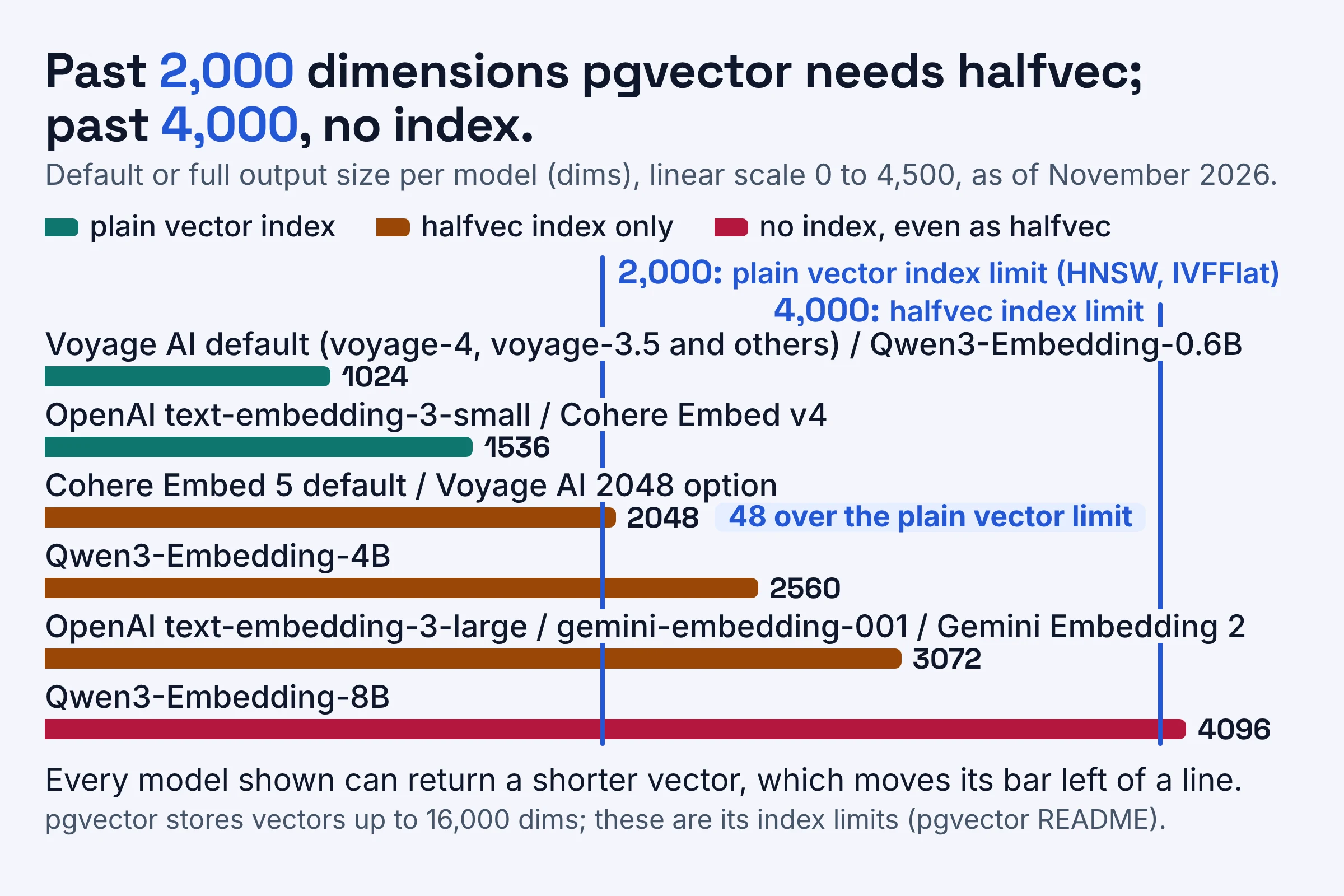
So Cohere Embed 5's default 2048 and Voyage's 2048 option miss the plain vector limit by just 48 dimensions. Full-size 3072 vectors need halfvec, a shorter output, or one of the README's own workarounds: index at half precision, or use an expression index on a subvector (the first N values), which suits MRL models nicely.
Quantization: the second lever
Quantization means storing each number in fewer bits. Voyage AI's docs say int8 (1 byte per dimension) cuts storage 4x and binary (1 bit per dimension) cuts it 32x compared with 4-byte floats, so a 1024-dimension vector drops from 4,096 bytes to 1,024 bytes as int8 and 128 bytes as binary. Cohere Embed 5, and Cohere Embed v4 on Amazon Bedrock, can return int8 and binary output directly.
How do you choose embedding dimensions, step by step?
To choose embedding dimensions, start from your vector index's hard limit, pick a model that shortens officially, test a few sizes on real questions, and keep the smallest one that passes. Here is the full routine.
- Find your ceiling. Write down the largest dimension your vector store can index. In pgvector that's 2,000 for
vectorand 4,000 forhalfvec; OpenAI's 1024 example is for stores that stop lower. - Pick a model that shortens officially. Choose from the model table above. If you might resize later, skip models without documented shortening, such as voyage-large-2 or text-embedding-ada-002.
- Build a small test set. Pull a few dozen real questions from support tickets, site search logs or team chat, and note which chunk should answer each one. Decide up front what counts as a pass, such as matching the full-size top-5 hit rate.
- Embed once at full size, then truncate. With an MRL model, cut those stored vectors to each candidate size (say 1536, 1024, 512 and 256), normalize, and check how often the right chunk lands in your top 5. One embedding run covers every size you test.
- Keep the smallest size that passes, then request it. In production, ask the API for that size directly, which OpenAI calls the suggested approach, and make sure every stored vector and every query vector use it.
- Squeeze further only if needed. Try
halfvecor int8 next, and rerun the same test after each change.
Worked example: 1,000,000 help-center chunks on pgvector
Say your support bot searches 1,000,000 chunks in Postgres with pgvector, embedded with text-embedding-3-large. At the 3072 default you'd store about 12.3 GB of vectors and couldn't HNSW-index the full vector as plain vector at all.
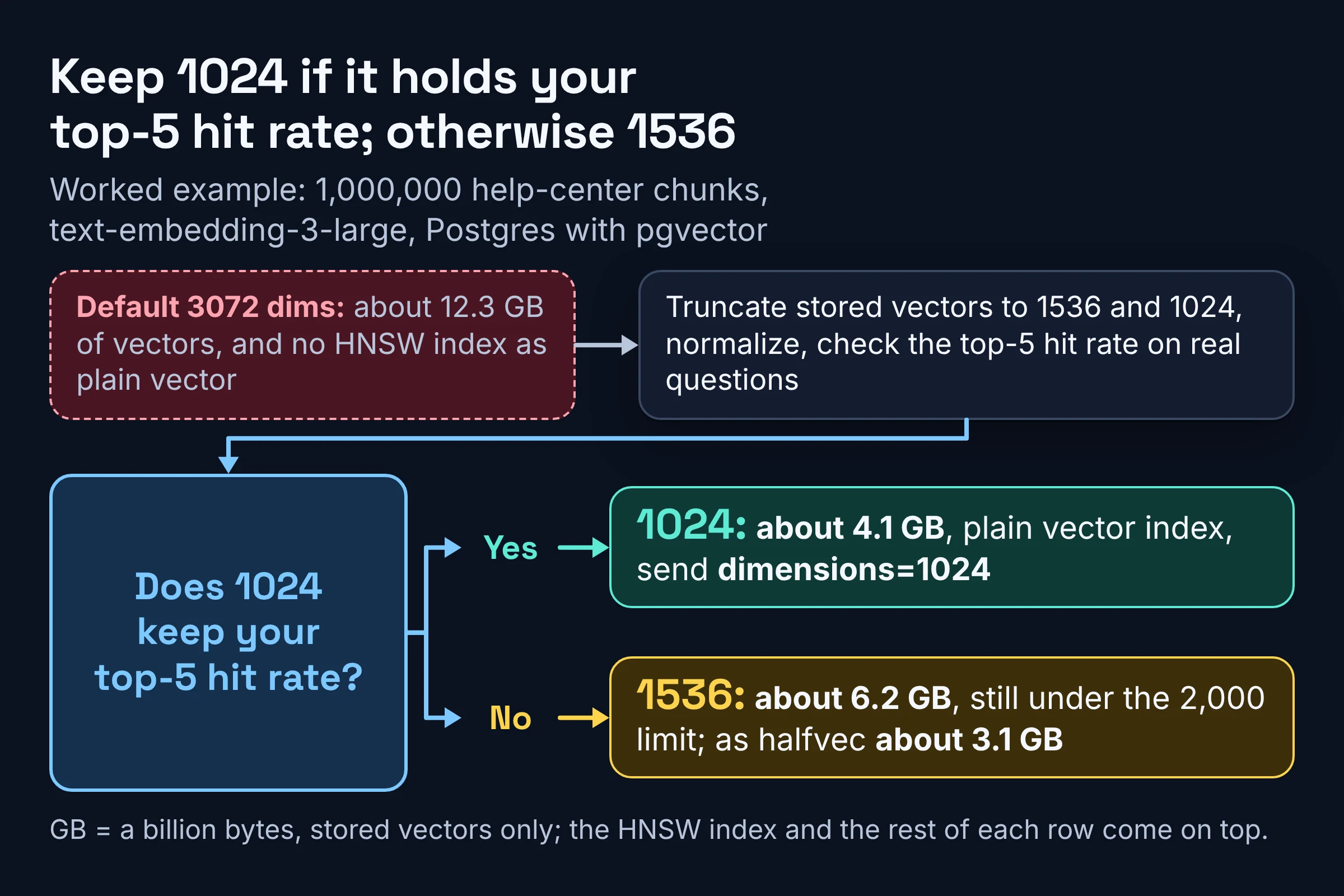
Run step 4 with 1536 and 1024. If 1024 keeps your top-5 hit rate, you store about 4.1 GB, index it as plain vector, and send dimensions=1024 from then on. If 1024 drops answers you care about, 1536 at about 6.2 GB still fits under the 2,000 limit, and halfvec brings it to about 3.1 GB.
What should you do next?
Your next move is a recall test on your own questions before you lock a size, because no vendor chart can predict how your data behaves. Here is a three-step plan.
- Today: look up your vector store's index limit and your current model's default size, and write both next to your embedding config.
- This week: run the truncate-and-test routine on a few dozen real questions at two or three sizes from the tables above.
- Before you ship: request the winning size at embed time, re-embed or truncate the whole corpus in one pass, and keep the model name and size in the same config so queries can't drift.
And if you are still choosing a model:
- Pick text-embedding-3-small if the 1536 default fits your index and you mostly search one language.
- Pick text-embedding-3-large if you need stronger multilingual retrieval than 3-small gives, and test whether 1024 or 1536 keeps that edge on your own questions.
- Pick Gemini Embedding 2 if images, video or audio must be searchable next to text.
- Pick Cohere Embed 5 if long documents matter: it has a 128k-token context, but its 2048 default sits 48 dimensions over pgvector's plain
vectorindex limit, so plan onhalfvecor a shorter size. - Pick a Voyage AI voyage-4 or voyage-3.5 model if you want a 1024 default that fits pgvector's plain
vectorindex, with 256 to 2048 on the menu. - Pick a Qwen3-Embedding model if you want a model with a public model card on Hugging Face and fine-grained sizes, such as any size from 32 to 1024 on Qwen3-Embedding-0.6B, or larger 2560 and 4096 vectors on the 4B and 8B models.
Dimension menus, defaults and index limits here come from the vendors' and pgvector's docs as checked in November 2026, so recheck them before any migration.