As of November 2026, the default Ollama context length depends on your GPU memory: 4,096 tokens with less than 24 GiB of VRAM, 32,768 tokens at 24-48 GiB, and 262,144 tokens at 48 GiB or more. To change it, set OLLAMA_CONTEXT_LENGTH for the whole server, or num_ctx for one model, one chat or one API request. Then run ollama ps and read the CONTEXT column, because that number, not a doc page or a forum answer, is the window that actually loaded.
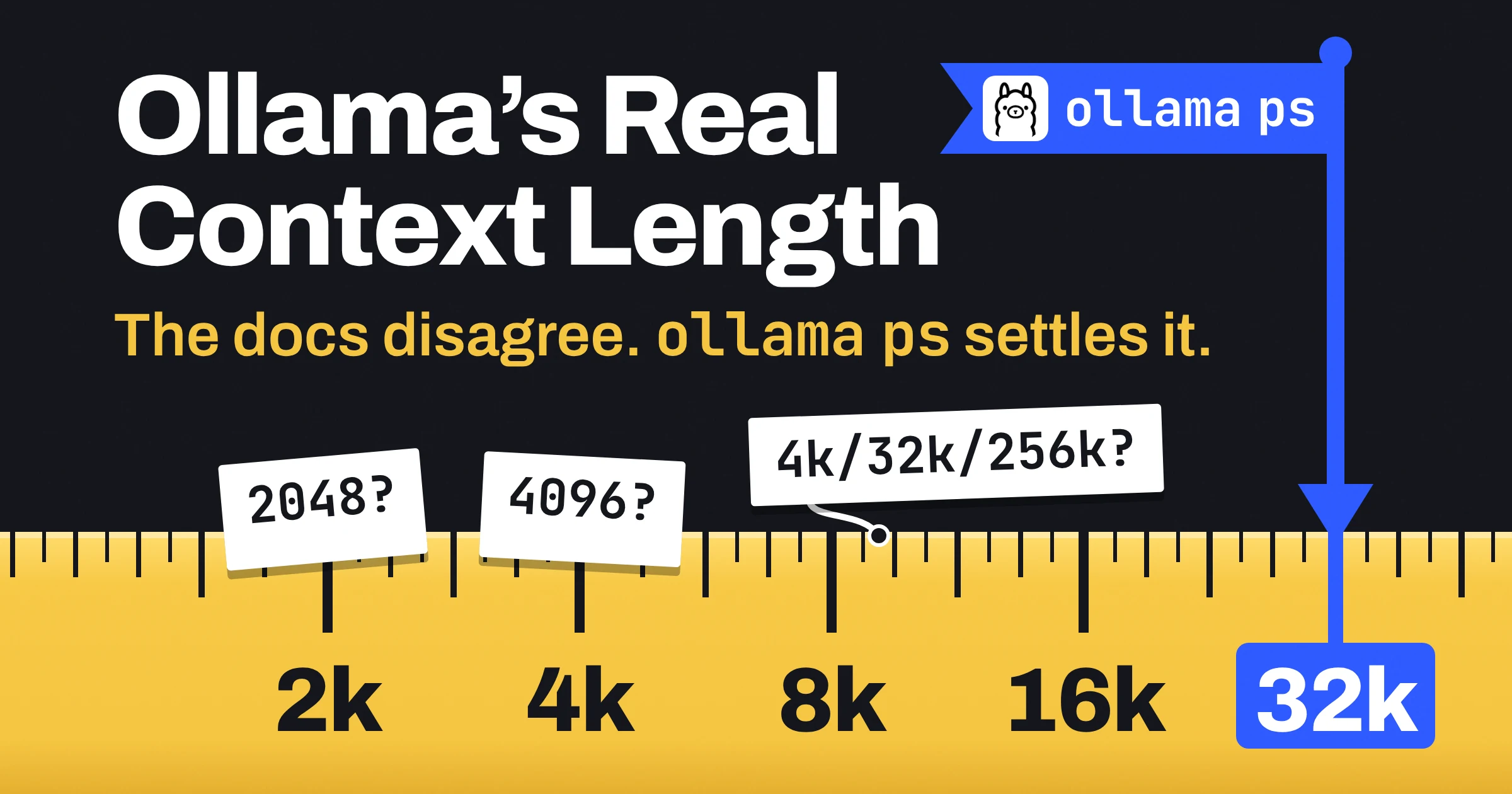
The catch: Ollama's own docs still disagree (the FAQ says 4096 tokens, the Modelfile reference says 2048), and they don't say what happens to a prompt longer than the window. Below you get the current rule, every documented way to change it in one table, and the check that ends the argument.
What is the default Ollama context length?
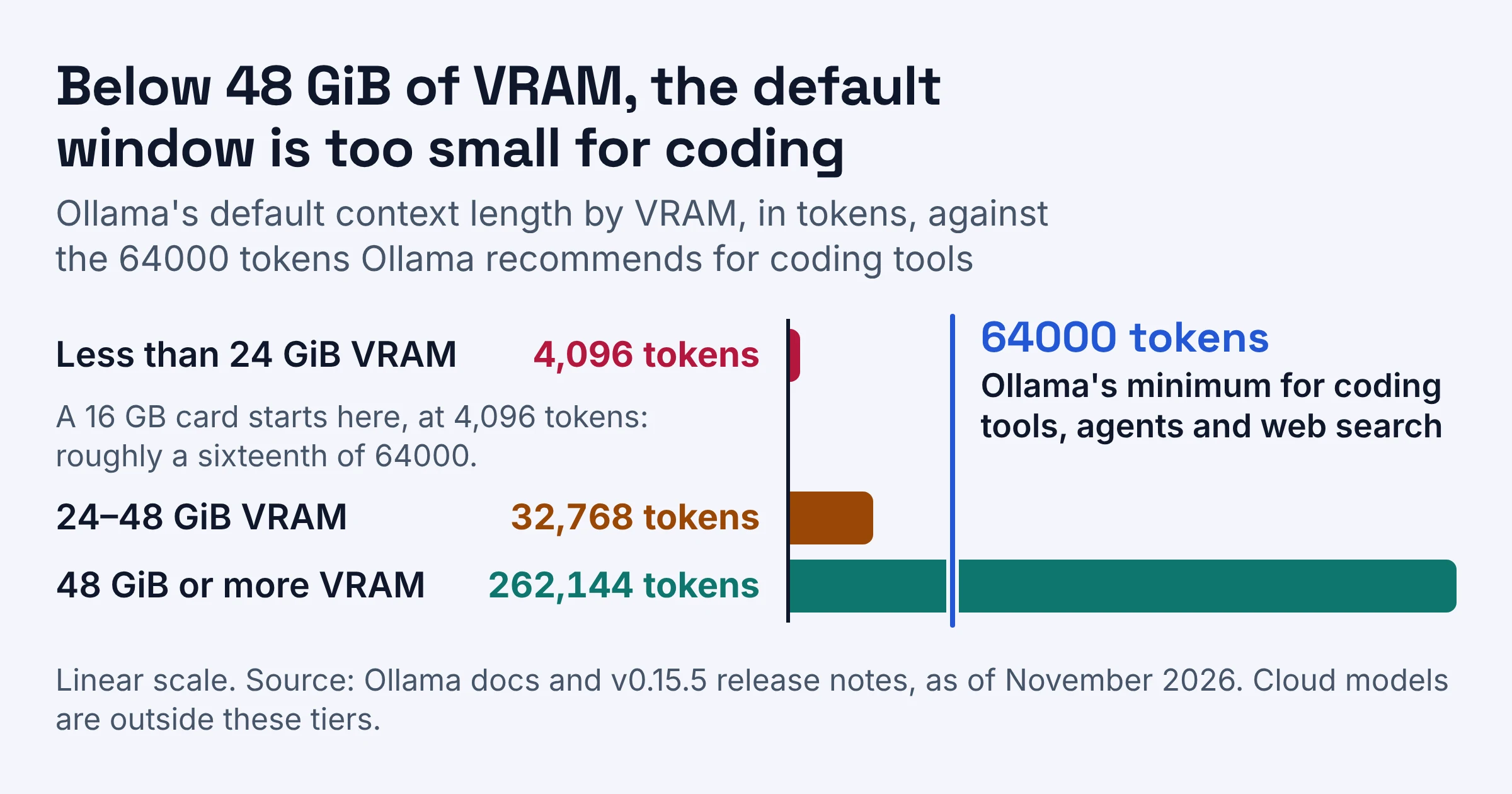
As of November 2026, Ollama sets its default context length from your VRAM: 4,096 tokens below 24 GiB, 32,768 tokens from 24 to 48 GiB, and 262,144 tokens at 48 GiB or more. The tiers arrived in Ollama v0.15.5; cloud models sit outside them because they are set to their maximum context length by default.
Ollama's context length page defines the term in one line: "Context length is the maximum number of tokens that the model has access to in memory." A token is a chunk of text, often part of a word. Think of the context length as the size of the model's desk: your instructions, the chat so far and the file you pasted all have to fit on it.
| Your VRAM | Docs page says | Release notes (tokens) | Best for |
|---|---|---|---|
| Less than 24 GiB | 4k | 4,096 | Short chats; raise it for anything long |
| 24-48 GiB | 32k | 32,768 | Long documents; still under Ollama's 64000 advice for coding tools |
| 48 GiB or more | 256k | 262,144 | Agents and big inputs, if the model still fits on the GPU |
| Cloud models | Model maximum | Not in release notes | Long context without local VRAM |
Everyday example: an 8 GB or 16 GB graphics card sits in the first row, so out of the box you get 4,096 tokens. Ollama's docs don't say whether the tier counts the combined VRAM of several GPUs, so if you run two cards, check the result instead of doing the sum.
Why the docs show three different defaults
Ollama's FAQ still says the default is 4096 tokens, and the Modelfile reference still lists num_ctx with a default of 2048. Both read like older text: the v0.15.5 release notes are the record of the switch to VRAM tiers, so the tiered rule is the current one.
| Where you read it | Default it states | Trust it? |
|---|---|---|
| Context length docs page | 4k, 32k or 256k by VRAM | Yes, the current rule |
| v0.15.5 release notes | 4,096, 32,768 or 262,144 by VRAM | Yes, this is the change itself |
| FAQ | 4096 tokens | Only for the under-24 GiB tier |
| Modelfile reference | num_ctx 2048 | No, older text |
So a forum answer that says the default is 2048 matches the old Modelfile line, not the current rule. Your own ollama ps output outranks all four rows.
num_ctx vs OLLAMA_CONTEXT_LENGTH: which one should you use?
OLLAMA_CONTEXT_LENGTH is a server-wide environment variable that overrides Ollama's VRAM-based default, while num_ctx is a parameter that sets the window for one model, one ollama run chat or one API request. As of November 2026, Ollama's docs do not publish which one wins when both are set, so treat ollama ps as the referee.
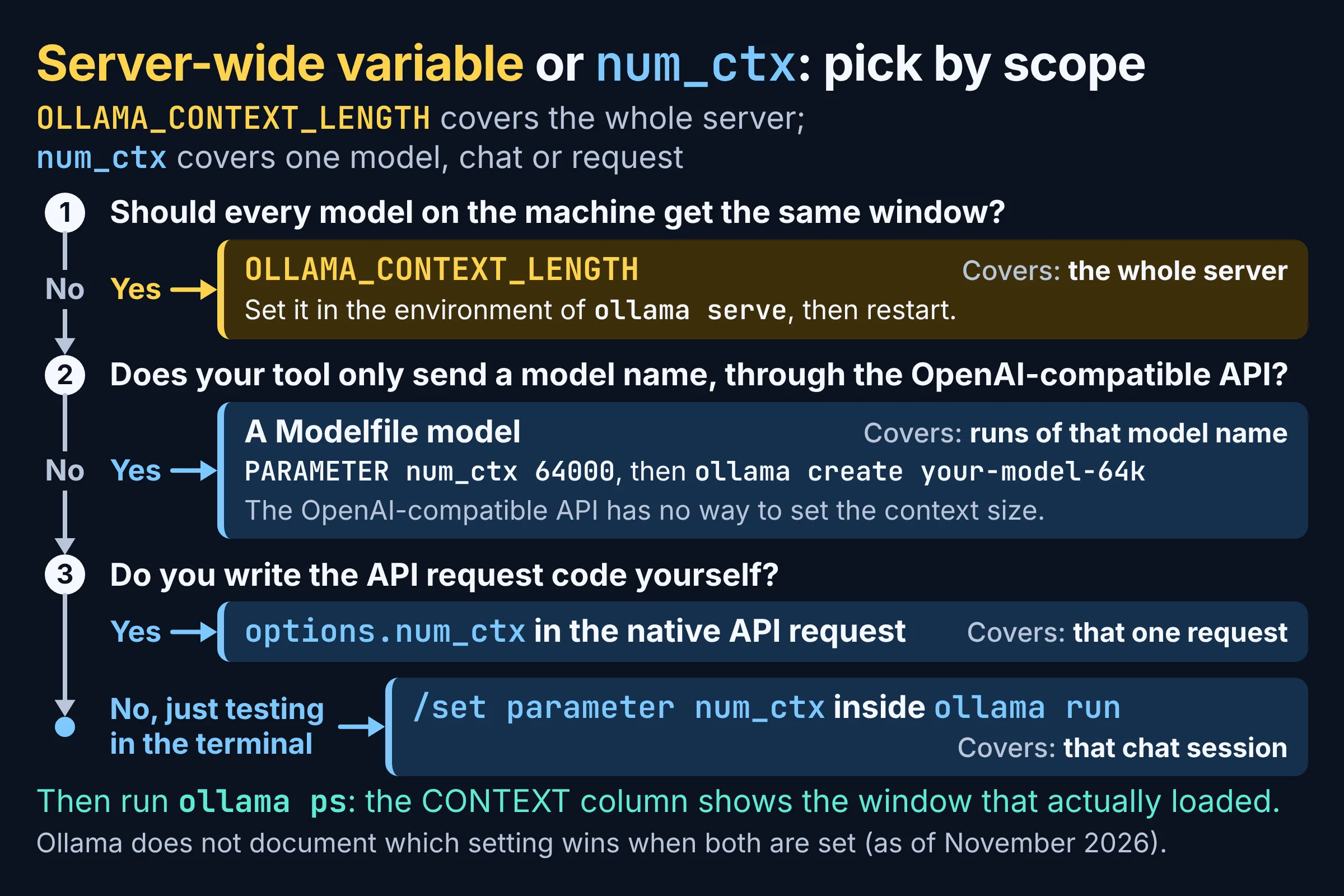
Here is every documented way to set the Ollama context length on one screen.
| Setting | Where you change it | What it covers | Confirm with | Best for |
|---|---|---|---|---|
| Nothing (default) | Nothing to change | 4,096, 32,768 or 262,144 tokens by VRAM | ollama ps CONTEXT | A machine you have not tuned yet |
| App slider | Ollama desktop app settings | The app's context setting | ollama ps CONTEXT | Desktop users who want to skip the terminal |
OLLAMA_CONTEXT_LENGTH | Environment of ollama serve | The whole server, read when it starts | ollama ps CONTEXT | One window for every model on the machine |
/set parameter num_ctx | Inside an ollama run chat | That chat session | ollama ps CONTEXT | Trying a size before you commit |
PARAMETER num_ctx | A Modelfile, then ollama create | Runs of the new model name | ollama show --modelfile, then ollama ps | Tools on the OpenAI-compatible API |
options.num_ctx | The body of a native API request | That one request | context_length from /api/ps | Your own code, with different sizes per job |
| OpenAI-compatible API | Not possible | Nothing | Not applicable | Nothing: point the client at a Modelfile model |
Pick by situation:
- Pick
OLLAMA_CONTEXT_LENGTHif every model on the machine should get the same window, such as a workstation that mostly runs coding agents. - Pick a Modelfile model if a tool only sends a model name, like an app built on an OpenAI client library. That API has no way to set the context size.
- Pick
options.num_ctxif you write the code: a small window for quick tagging calls, a large one for summarising long reports. - Pick
/set parameterto test a size in the terminal before you bake it into a Modelfile.
When settings seem to disagree, change one layer at a time. Ollama doesn't document a precedence order, and a thread on the Open WebUI subreddit shows users unsure whether a Modelfile num_ctx or another setting is the one that counts. After each change, send a fresh request and run ollama ps; if CONTEXT doesn't show your number, your setting is not the one that loaded.
How do you increase Ollama context length with OLLAMA_CONTEXT_LENGTH?
You increase the Ollama context length server-wide by setting OLLAMA_CONTEXT_LENGTH in the server's environment and restarting it, because the value is read when ollama serve starts. As of November 2026, Ollama's FAQ names this variable as the way to override the default.
The examples use 64000 tokens, the minimum Ollama recommends for coding tools. Swap in your own number.
If you start the server yourself
OLLAMA_CONTEXT_LENGTH=64000 ollama serve
macOS with the Ollama app
launchctl setenv OLLAMA_CONTEXT_LENGTH 64000
Then quit the Ollama app and open it again so the server starts with the new value.
Linux with the systemd service
sudo systemctl edit ollama.service
Add the variable as an Environment line under the service section:
[Service]
Envir
Then reload and restart:
sudo systemctl daemon-reload
sudo systemctl restart ollama
Windows
Add OLLAMA_CONTEXT_LENGTH as a user environment variable in Windows settings, then quit Ollama and start it again so the server reads the new value.
No terminal? Use the desktop app slider
In the Ollama desktop app, the context length is a slider under settings. When editing it in the app isn't possible, for example on a headless Linux box with no app at all, Ollama's docs point you back to the server-side setting above.
How do you set num_ctx for one model, chat or API call?
num_ctx is the parameter Ollama's generate API documents as the context length size in tokens, and as of November 2026 you can set it in three places: an ollama run chat, a Modelfile, or the options of a native API request. The OpenAI-compatible endpoint cannot set it, so Ollama's fix for those clients is a Modelfile model.
In an ollama run chat
$ ollama run your-model
>>> /set parameter num_ctx 64000
This is the quickest test: paste a long file, ask about something near the end, and see whether the answer holds up.
In a Modelfile
A Modelfile PARAMETER line defines a value the model runs with, so this is how you make a context size stick to a model name.
FROM your-model
PARAMETER num_ctx 64000
ollama create your-model-64k -f ./Modelfile
ollama show --modelfile your-model-64k
The second command prints the Modelfile back, parameters included, so you can see the setting was saved. Put the size in the name, as in your-model-64k, and you will know at a glance which variant a tool is calling.
In a native API request
curl [server]/api/generate -d '{
  "model": "your-model",
  "prompt": "Summarise this changelog",
  "options": { "num_ctx": 64000 }
}'
Replace [server] with your Ollama address. The response includes prompt_eval_count, the number of input tokens in your prompt, which you will use in the check below.
From OpenAI-compatible clients
Ollama's OpenAI compatibility page is blunt: "The OpenAI API does not have a way of setting the context size for a model." Its fix is the Modelfile route above: build your-model-64k with ollama create, then set that name as the model in your client.
How do you check the context length Ollama actually loaded?
Run ollama ps while the model is loaded and read the CONTEXT column, which as of November 2026 sits next to PROCESSOR, the column where Ollama tells you to verify the GPU and CPU split. In scripts, the /api/ps endpoint returns the running model's context length as context_length, plus size_vram, the VRAM in use in bytes.
$ ollama ps
NAME             ID     SIZE     PROCESSOR         CONTEXT     UNTIL
your-model-64k   [id]   [size]   [GPU/CPU split]   [context]   [time]
Treat it as a three-line checklist:
- CONTEXT shows the number you set. If it shows a tier default instead, your setting is not the one that loaded.
- PROCESSOR shows the model on the GPU. Ollama advises avoiding CPU offload for best performance, so a CPU share right after you raised the window is your cue to step back or shrink the cache.
prompt_eval_countfrom an API response sits comfortably under CONTEXT. If your input count lands at or near the window, raise the window before you blame the model.
Why does Ollama seem to ignore half my prompt?
Plenty of troubleshooting threads describe exactly that symptom when num_ctx is too small for a coding agent. Ollama's docs don't describe what happens to a prompt longer than the window, so skip the folklore and compare prompt_eval_count with CONTEXT. If you pasted a long log, asked about the last error, and the input count is close to the window, raise num_ctx and ask again.
How much Ollama context length do you need for coding?
As of November 2026, Ollama says tasks that need large context, including web search, agents and coding tools, should get at least 64000 tokens, and its Claude Code integration page asks for a 64k+ window. Both default tiers below 48 GiB of VRAM fall short of that, so on those machines a coding setup needs a manual change.
Worked example, a 16 GB card running Claude Code against a local model:
- Default: the card is under 24 GiB, so you start at 4,096 tokens, roughly a sixteenth of what Ollama recommends.
- Set: set
OLLAMA_CONTEXT_LENGTH=64000for your platform, as shown above, and restart the server. - Confirm: load the model, run
ollama ps, and check that CONTEXT reads your number. - Check the GPU: if part of the model moved to CPU, try a smaller model or quantize the K/V cache (next section) before you shrink the window again.
Ollama v0.15.5 also made ollama launch opencode set context limits for a set of models. The release notes don't list which models, so run ollama ps before you rely on it.
For a full offline setup, our air-gapped local coding stack guide pairs Ollama with Cline. And if you also use Claude Code with Anthropic's hosted models, our breakdown of Claude's context window by model shows how much room the cloud side gives you.
Does a longer Ollama context length need more VRAM?
Yes: Ollama's docs say a larger context length increases the memory needed to run a model, and as of November 2026 they tell you to make sure enough VRAM is available before you raise it. Parallel requests multiply the cost, because the FAQ says required RAM scales with OLLAMA_NUM_PARALLEL times OLLAMA_CONTEXT_LENGTH.
The FAQ's own example: "a 2K context with 4 parallel requests will result in an 8K context and additional memory allocation." OLLAMA_NUM_PARALLEL defaults to 1, so this bites when you raise it for a shared team server. Users in GitHub issues have also reported large-VRAM machines spilling models to CPU or failing to load under the new tiered defaults until they set the context length by hand.
Ollama's advice cuts both ways. Its context page says "For best performance, use the maximum context length for a model, and avoid offloading the model to CPU." Read together, that means: go as large as you can while PROCESSOR in ollama ps still shows the model on the GPU.
Ollama's FAQ covers two ways to stretch the same VRAM. It says Flash Attention can significantly reduce memory use as the context grows, and with Flash Attention enabled you can quantize the K/V cache (the model's working memory of the text already in the window) through OLLAMA_KV_CACHE_TYPE.
OLLAMA_KV_CACHE_TYPE | Memory vs f16 | Precision loss, per Ollama | Best for |
|---|---|---|---|
f16 (default) | Baseline | Baseline | Plenty of free VRAM |
q8_0 | About 1/2 | Very small | A longer window on a tight GPU |
q4_0 | About 1/4 | Small to medium | The longest window when exact recall matters less |
It is a global option, so every model on the server runs with the type you pick. If you're still choosing hardware or a runner, our guide to running AI locally with Ollama, LM Studio or llama.cpp has a rule of thumb for what your memory can hold.
Do this next: a three-step context check
To fix an Ollama context length problem, measure what loaded, change one setting, and measure again. Skip the first step and you are tuning blind.
- Measure. Load your model and run
ollama ps. Write down CONTEXT and PROCESSOR. - Set one layer. Use
OLLAMA_CONTEXT_LENGTHfor the whole machine, a Modelfile model for OpenAI-compatible tools, oroptions.num_ctxin your own code. For coding agents, start at 64000. - Measure again. Send a fresh request, run
ollama ps, and confirm CONTEXT moved while PROCESSOR still shows the GPU. If it slipped to CPU, tryq8_0for the K/V cache (it needs Flash Attention enabled) before you buy a bigger card.
Defaults and limits here come from Ollama's docs and v0.15.5 release notes as checked in November 2026; they shift between releases, so let ollama ps have the last word.