
Picture typing one long, slightly misspelled question into Google: a kid-friendly trip, a quiet hotel, two babies, a tight budget. AI Mode takes it all in one go.
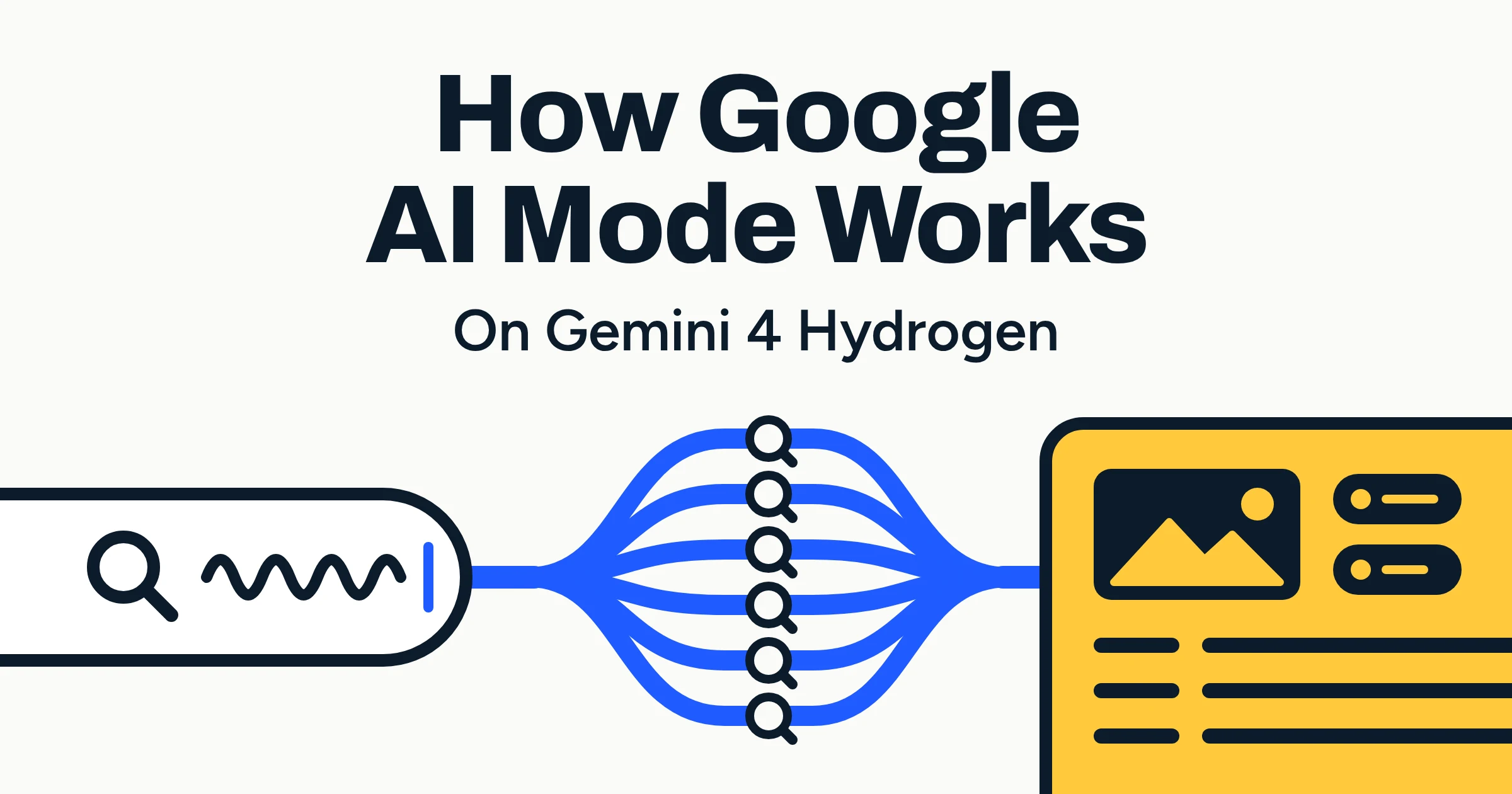
Since November, a new model called Gemini 4 Hydrogen does the reading for every user. Here is how Google AI Mode works now: it splits your question into smaller topics, searches them all at once, and builds one answer with links, tables and images.
One messy question, typed the way you think
Real questions rarely come out neat, and AI Mode is built for the messy ones. Here is an invented example. A tired parent types this into Google late at night, typos and all:
kid frendly beach trip next month, quiet hotel, we have two babies, short drive from home, not too pricey, what do we pack
With classic search, that parent would chop it into a handful of searches and open a pile of tabs. Each tab answers one piece. Fitting the pieces together is their job.
Google picks nearly the same example itself. In a closer look inside AI Mode, Google describes "planning a kid-friendly vacation with a quiet hotel for a family with two infants" as the kind of question AI is good at. Its UX research director also noticed people "intuitively asking longer, more complex questions."
Now Google tells you to lean in. Ask "in your natural flow of thought," it says, even with several parts, hard-to-read typos or very specific needs.
That is good news for you. You no longer have to turn your thoughts into keywords first. You can type the way you would text a friend who is great at research.
How Google AI Mode works, step by step
AI Mode does a few things in a row with every question. It reads what you mean, splits the question up and searches every part at once. Then it builds one answer and waits for your next move.

Here is each step, using the parent's beach question.
- It reads the whole question. Hydrogen works out what the parent really wants: a beach, calm nights, baby-friendly rooms and a modest bill. Google says "deeper instruction following and tool calling" help Search follow what you want more closely. Instruction following means doing what you asked, the way you asked it. Tool calling means the AI can use other programs to get a job done, like you grabbing a calculator for a tricky sum.
- It splits the question into subtopics. Google calls this query fan-out. Its help page for AI Mode says it divides "your question into subtopics." For our parent, that might be beach towns, quiet hotels, baby gear and packing lists.
- It searches every subtopic at the same time. Each piece gets its own search, and they run side by side instead of one after another. These searches reach past ordinary web pages. When Google first introduced AI Mode, it said answers could draw on other sources too. Those include the Knowledge Graph (Google's own store of facts), fresh info about the real world and shopping data for billions of products.
- It builds one answer. The results come back and get pulled together into "an easy-to-understand response," with links to the pages behind it. Google says this gives you "more breadth and depth of information than a traditional search." Breadth means more ground covered. Depth means more detail on each part.
- It waits for your next question. Google put the search bar at the bottom of the page to invite longer questions and follow-ups. So the parent can type which of these hotels has cots? and keep going. They can also come back later and pick up right where they left off.
The upshot: one well-packed question can do the work of a whole evening of tabs.
What is query fan-out? Think of a librarian with runners
Query fan-out is AI Mode turning your one question into many small searches that run at once. A busy library is the easiest way to picture it.
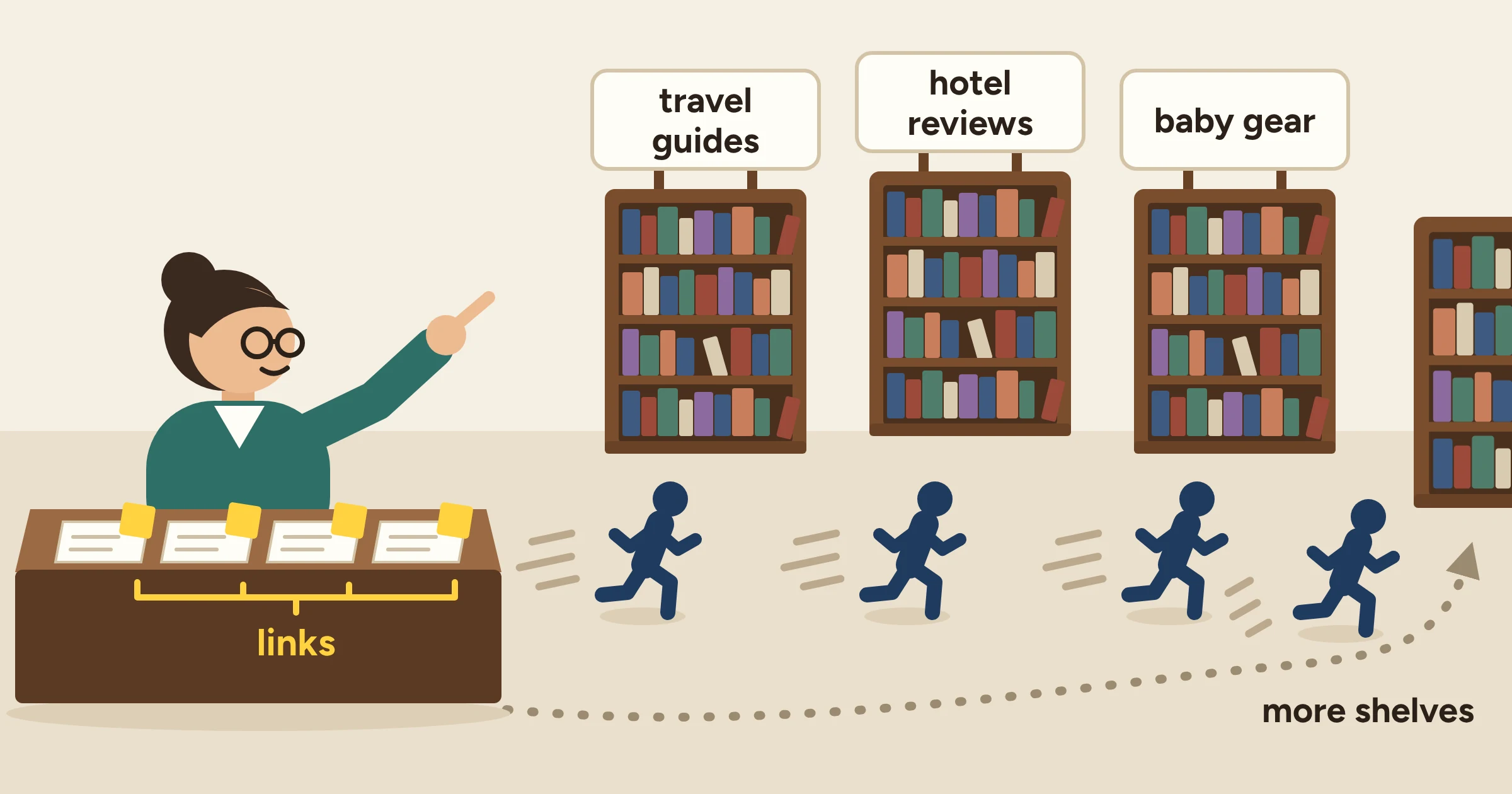
Classic search is like a card catalog. You look up one thing, walk to that shelf, come back and look up the next thing.
Now picture a librarian who hears your whole messy request in one breath. She doesn't send you anywhere. She sends runners to different shelves at the same time: one to travel guides, one to hotel reviews, one to baby gear.
They all come back, and she lays what they found on one desk. Each item keeps a sticky note saying which shelf it came from. Those notes are the links in your answer.
Google's guide for website owners says the same thing in drier words: "issuing multiple related searches across subtopics and data sources."
So what does Hydrogen change? It is a sharper librarian. Google says Hydrogen understands your question more fully and runs "simultaneous queries across all the relevant subtopics."
In library terms, the runners visit more shelves, including some you never knew existed. Google's claim is that this connects you "to a broader range of helpful links than before."
Here is where the picture breaks. A real librarian could tell you exactly which shelves she checked. Google doesn't say how many runners go out for one question, or which shelves they favor.
This librarian also sums up the pages instead of handing you the books, so a summary can slip.
Why it matters: fan-out is why an answer may link to sites you have never heard of. Google says that is the point, helping you find sites you might have missed. Click them and judge each source yourself.
What Gemini 4 Hydrogen changed in AI Mode
Gemini 4 Hydrogen made AI Mode better at messy questions, wider in its searching and more visual in its answers, Google says. In Google's announcement, the changes fall into four groups, shown in the table below.
Google announced the upgrade on November 12, 2026 and calls it "the biggest model upgrade to Search yet." It says Hydrogen is "now available globally in Google Search for all users."
TechCrunch reports that Google says the update is rolling out to all Search users worldwide. Rolling out means it reaches people over time, so if yours looks the same, give it a little while.
| Change | What Google says | What you should notice | Test it yourself |
|---|---|---|---|
| Understanding you | Search handles "more nuanced and complicated questions" and copes better with hard-to-read typos | Long, messy questions get a direct answer, not a guess at your keywords | Ask a long question and leave a few typos in |
| Wider fan-out | Searches run across every relevant subtopic at once and point you to more kinds of sites | Links to sites you would not have found yourself | Count how many different sites the answer links to |
| Visual answers | More images, structured answers, comparison tables and custom tools built for you | Answers you can scan quickly instead of a wall of text | Ask for a comparison table |
| Languages | More nuanced, helpful answers "across all supported AI Mode languages" | Fuller answers when you ask in a language other than English | Ask the same question in English and in another language you know |
Google also promises all this "at the speed of Search." Google's announcement doesn't explain what custom tools are.
A similar feature you can try today is an interactive visual, like a calculator built for your question. Question 4 below shows how.
Treat every row as Google's description, not a lab result. The last column is how you check it yourself.
Does Google AI Mode use Gemini? Hydrogen, Carbon and Argon
Yes. AI Mode runs on Google's Gemini models, and Hydrogen is the one everyone gets. Some Google AI subscribers can switch to two heavier models when a question needs more thinking.
Here is the lineup as of November 2026:
- Gemini 4 Hydrogen, the fast all-rounder. Google's help page says it is for "fast, all-around assistance on most questions." Google DeepMind, Google's AI research lab, says it was built for "rapid execution across diverse agentic workflows." In plain words: finishing jobs that take several steps, quickly.
- Gemini 4 Carbon, the deep thinker. Google calls Carbon its "new frontier model in Search" and says it thinks things through deeply. It is meant for your hardest problems. In AI Mode it is for Google AI Ultra subscribers aged 18 and over, and it has daily usage limits. You pick it from the menu in the "Ask anything" bar. Google adds that its AI plans may not be offered in every region or for every account type.
- Gemini 4 Argon, the long-haul solver. Google DeepMind says Argon "works longer and harder to solve highly complex scientific, coding, and agentic problems." Its launch post says Google AI Ultra and Pro subscribers can use it in AI Mode and the Gemini app. Google's current AI Mode help page does not mention Argon, though.
If you wonder how a model learns to reason at all, see how AI models get smarter through training.
AI Mode is also not the same as AI Overviews, the short AI summary that can appear at the top of a regular Google search. Google says AI Mode builds on AI Overviews with more advanced reasoning and more ways to interact. The two may use different models and techniques, so the same question can bring different answers and links.
The Gemini app is a separate place to chat with the same family of models. Free users there get Hydrogen through automatic model selection, when it is the right model for the prompt. You can also pick it from the app's model drop-down.
5 questions to try in AI Mode today
The quickest way to feel what Hydrogen changed is to ask questions built to use it. These five are sample questions written for this post, not Google's. Each one tests a different change.
To start, go to google.com, type a question in the search bar and tap AI Mode. That is one of three ways Google lists to open it.
1. A plan with many parts
Plan a weekend in Lisbon for two adults and a toddler who naps after lunch. We don't drive, we love food markets and we hate long queues.
Look for an answer that covers every part, from getting around to nap-friendly plans, with links you can open. That is fan-out at work.
2. A question full of typos
whats the diffrence betwen a heat pump and a furnace for a smal old house in a cold place
Don't fix the typos. Google says Hydrogen is better with hard-to-read ones, so check whether it understood you anyway.
3. A request for a comparison table
Compare three popular e-bikes for a hilly commute in a table: price, range, weight and warranty.
You should get a real table you can scan. Before you buy, check the prices on the sellers' own pages.
4. A calculator built for your question
Build me a calculator that shows how much I save each month if I take the bus instead of driving.
To get an interactive visual, Google says you must ask for it by name: a calculator, simulation, diagram, interactive model or something similar. For now this works only for signed-in users asking in English. Once it appears, try a follow-up such as add a line for parking costs. Google's help page says follow-ups can edit a simulation, so see if it works for a calculator too.
5. A question in another language, or about a file
¿Qué plantas de interior aguantan poca luz y son seguras para gatos?
That one is Spanish for which houseplants handle low light and are safe for cats. Ask in a language you know well and judge how natural the answer sounds.
Or try a file instead. AI Mode takes questions by text, voice, images or files, including PDFs and files from Google Drive. Upload a long document, like a phone contract, and ask what happens if I cancel early?
Want more phrasing ideas? Our list of AI prompts that improve your answers, ranked by evidence has plenty. And if an answer ever comes back with a question for you, here is why AI asks you questions back and how to answer.
What Google hasn't said yet
Google has explained what Hydrogen does in AI Mode, but a few key details are still missing. Here is what nobody outside Google can tell you yet:
- Which model Hydrogen replaced. Google hasn't said what powered AI Mode right before. Google DeepMind calls Hydrogen "a major standalone upgrade for teams migrating from Gemini 3.8 Flash." That line is about developers building their own apps, not Search.
- How many searches fan-out runs. Google hasn't said how many searches go out for one question, or which sites it prefers.
- Proof of the wider links. The promise of more and broader links is Google's own claim. No independent test of it turned up in the research behind this post.
Google is also open about mistakes. Its help page says "AI Mode doesn't always get it right" and may "misinterpret web content or miss context."
Before you book, buy or decide anything that matters, open the links and read the source yourself.
AI Mode now rewards asking the way you think. Put every part of your question in one go, ask for a table or a calculator when you want one, then follow up. Pick one of the five questions above and try it today.
Plan details and limits here were checked on Google's pages in November 2026 and change often.