
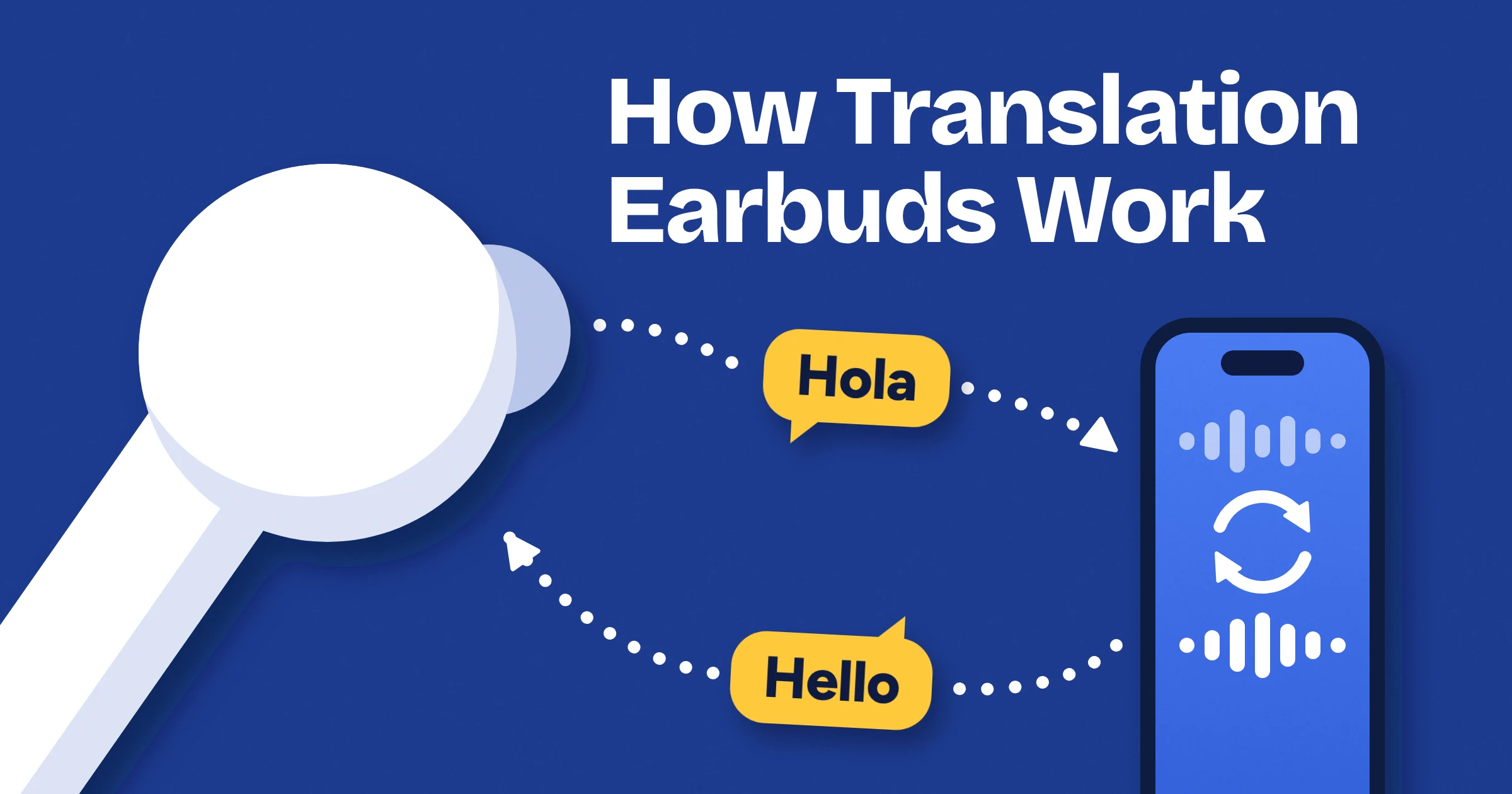
Picture Maya, an invented traveler, in a taxi abroad. The driver asks where she is going in Spanish, and a beat later her earbuds say it in English.
So how do translation earbuds work? The buds are mostly a mic and a speaker: the phone or the cloud turns speech into text, translates it and speaks it back, with a short, deliberate delay.
8:00, the taxi: the earbuds are the ears and the mouth
Translation earbuds do two small jobs: they catch a voice and play the translation back. Everything in between happens somewhere else.
AssemblyAI, a speech AI company, puts it bluntly: "The earbuds themselves are mostly a mic and a speaker." Speech recognition, translation and the synthetic voice all run on the phone or in the cloud (a company's computers, reached over the internet).
So the real translator in this taxi is the phone in Maya's bag.
Why not do it all inside the bud? An older explainer from the University of Kent's School of Computing gave three reasons.
The processor in earbuds was not powerful enough to translate by itself. Their memory was too small for the language and acoustic models, the files that describe how words fit together and sound. And that much processing would drain the batteries in a couple of seconds.
It is an older piece, but AssemblyAI describes the same split.
Think of it as a relay race. The earbuds run the first and last legs, and the phone, or the cloud, runs the hard middle part. That is why your phone, more than your earbuds, decides what you can do.
How do translation earbuds work? The relay, step by step
Every translated sentence travels from your ear to the phone, through three hand-offs, and back again. Here is the relay for one sentence from Maya's driver, based on AssemblyAI's explainer:
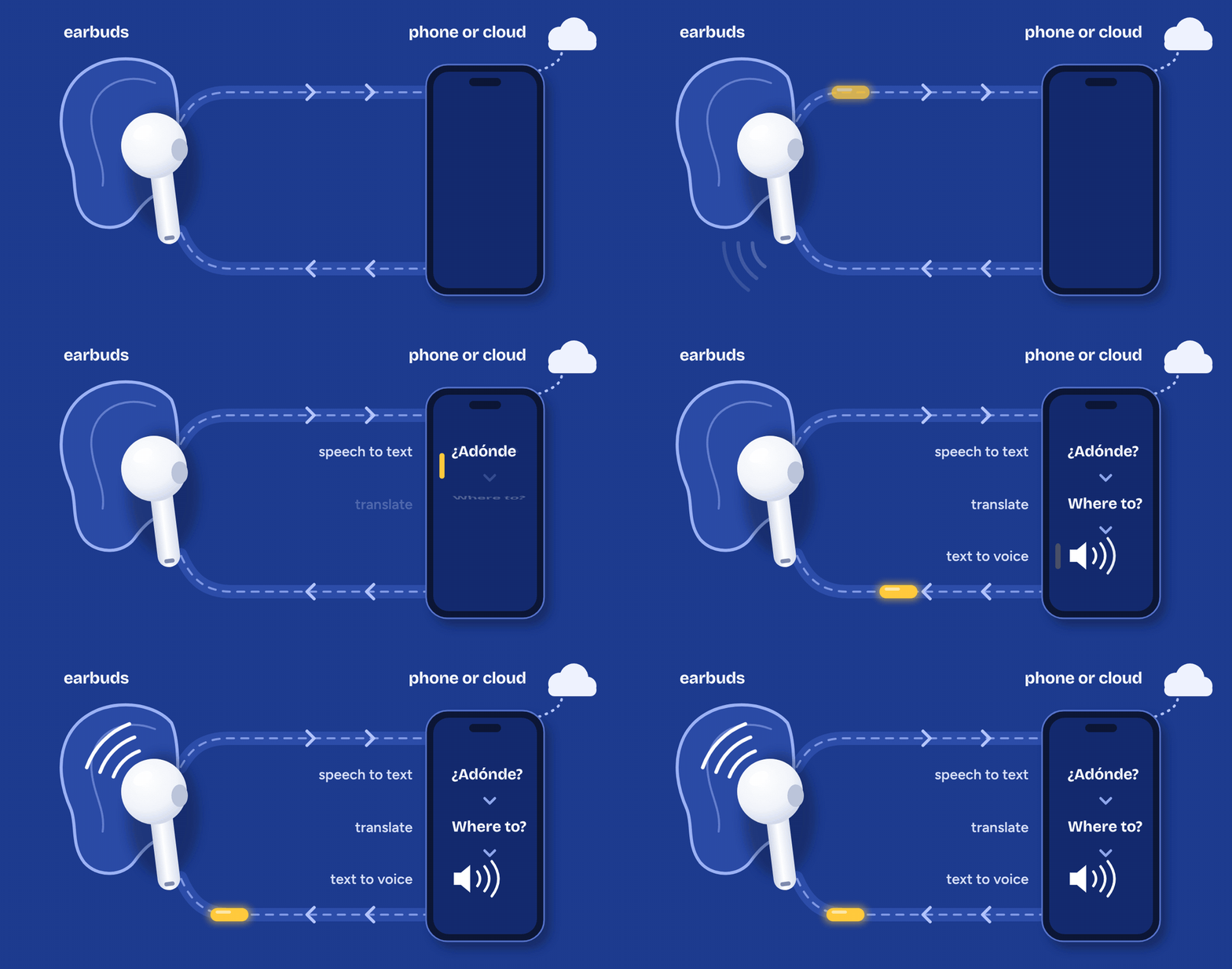
- The ear mic catches the voice. The earbuds pick up the sound and pass it to the phone.
- Speech becomes text. A streaming speech-to-text model (software that writes down speech as it hears it) types out the Spanish as the driver talks.
- Text gets translated. A machine translation model, or a large language model (the kind of AI behind chatbots), translates the finished sentence into English.
- Text becomes a voice. A text-to-speech model reads the translation aloud, and the phone streams that audio back to the earbuds.
Google's Pixel Buds help page describes the same rhythm: the text is read aloud after each sentence is translated.
Where the middle legs run depends on the brand. Apple asks you to download two languages first: the one the other person speaks and the one you want to hear. After that, Apple's support page says all Live Translation processing happens on your iPhone.
Why it matters: each hand-off is a place where something can slip. When a translation comes out strange, the steps tell you where to look.
10:00, the walking tour: listening mode vs talking mode
Translation earbuds work in two very different ways: you can just listen, or you can hold a two-way conversation. Maya's morning tour shows both.
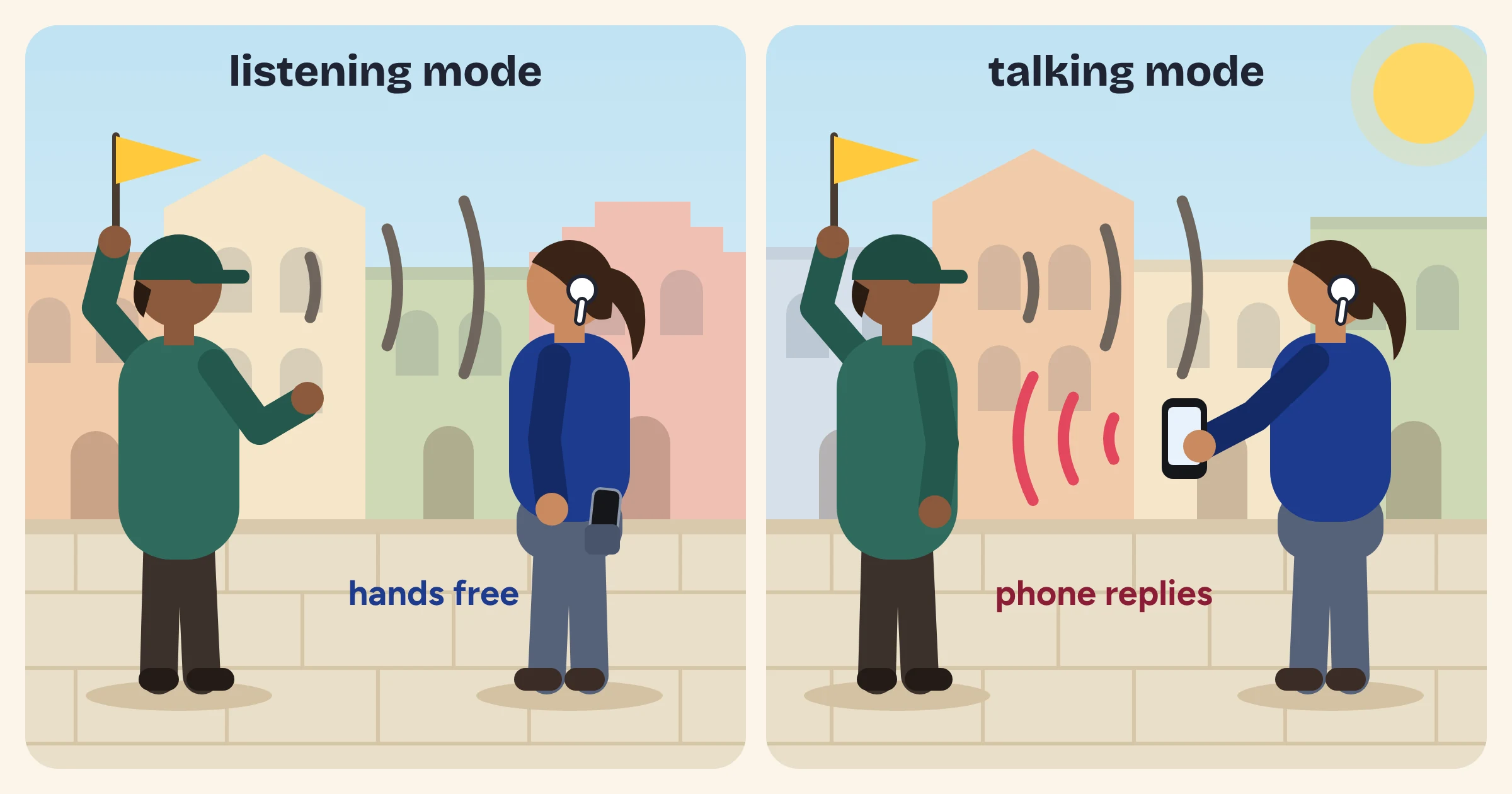
While the guide talks, Maya only listens. Pixel Buds have a listening mode for this, which works hands-free with the phone in your pocket. You can move around while the voices you hear are translated into your ear.
Timekettle, a maker of dedicated translator earbuds, has an On-Site Listening Mode where you wear both buds for one-way translation. Apple's AirPods do this too, translating what the other person said into your language while the words also appear on the iPhone.
Then Maya wants to ask the guide a question. The hard part now is getting her answer to someone who is not wearing her earbuds.
Most systems use the phone. In Pixel Buds conversation mode, the guide's voice is translated and played in Maya's ear. Her own words are translated and shown on the phone, and can be played out loud.
Samsung's Interpreter app does the same with Galaxy Buds3 earbuds: the phone's speaker plays your reply in the other person's language. Apple lets you show a transcript in its Translate app, or play your translated reply out loud.
The other option is to share the hardware. If both people wear supported AirPods, each one hears a translation. Timekettle's Two-Person Conversation Mode has you hand one earbud to the person you are talking with.
Why it matters: a tour is mostly listening, but a market or a pharmacy is talking. Pick the mode that fits your trips.
12:30, lunch: why there is always a beat of delay
The pause before each translation is mostly on purpose: the software waits for a sentence, or at least a clause, to end. At lunch, Maya's new friend tells a long story, and her earbuds stay quiet until each sentence ends.
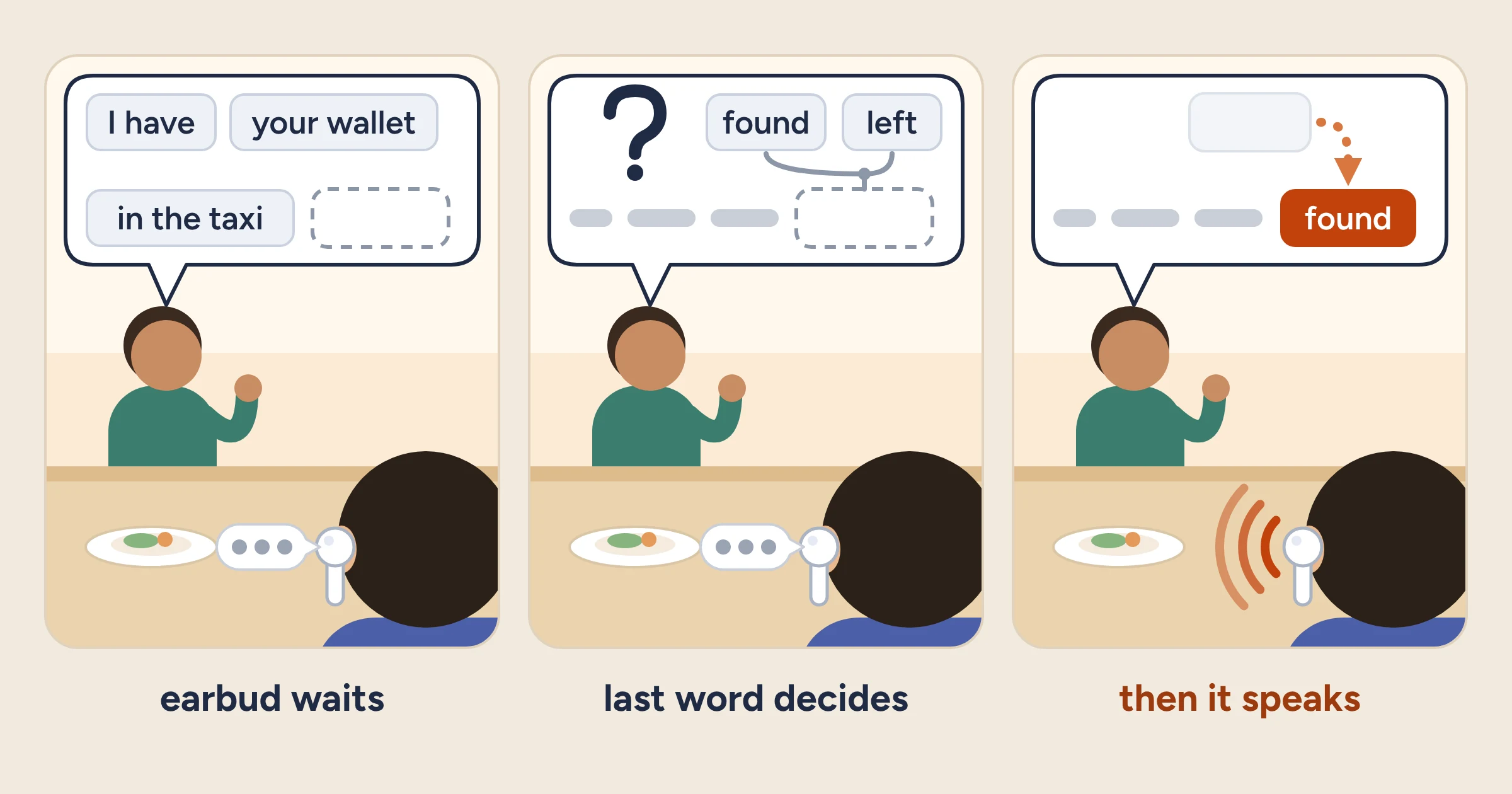
AssemblyAI puts it plainly: "Live translation always runs a beat behind the speaker, and most of that delay is deliberate."
That is because some languages save the key word for last. A German sentence can put its main verb at the very end. In Japanese, the not comes last, so I'm going only becomes I'm not going at the finish.
Here is a made-up English copy of that German word order: I have your wallet in the taxi... Does it end with found or left? Translate the first half early, and you might say the opposite of what the speaker meant.
This is where the relay race picture breaks. In a real relay, the next runner starts moving before the baton arrives. Here, the translator stands still until the whole sentence lands.
Every system has to pick a balance. End turns sooner, and you translate more half-thoughts; wait longer, and the listener waits too.
AssemblyAI says its own streaming model checks for the end of a turn after at least 320 milliseconds of silence. That is about a third of a second. It also warns that its timing figures for each stage do not add up to one end-to-end delay.
Timekettle lets you pick a side. Its Accurate Translation mode "takes a bit more time" but still only seconds, while its faster mode may miss some nuances. It also markets its buds as translating "just one sentence behind you", a sales line rather than a measured number.
The practical lesson: speak in short, complete sentences, then pause.
3:00, the pharmacy: what trips translation earbuds up
Translation earbuds stumble on the same few things, and most have a simple fix. Maya's pharmacy visit hits several at once:
- Distance. Earbud microphones sit in the wearer's ears, while the other person may be a meter or more away. Apple suggests moving the iPhone closer to the person speaking, and Google says to move closer to the sound.
- Noise. In a noisy place, Apple lets you use the iPhone's microphones as well as the AirPods' own. Apple also says Active Noise Cancellation (which blocks outside sound) helps lower the other person's real voice, so the translation is easier to follow.
- Talking over each other. Overlapping speech confuses speech recognition and leaves the translator with a mixed-up sentence. Take turns. Google suggests asking the speaker to talk louder, slower or more clearly.
- Names. A person's name, a street or a drug name can be heard as a common word and then translated as one. If the pharmacist names a medicine, ask to see it written down. Text tools fight the same battle, as our comparison of DeepL vs ChatGPT vs Gemini for business translation shows with product names.
- Mixed languages. Bilingual speakers often mix languages. A model that expects only one source language garbles the switch.
Notice that every slip on this list starts early in the relay, at the hearing and writing-down legs. So the cheapest fix is usually better sound.
6:00, the metro with no signal: do they work offline?
Whether translation earbuds work offline depends on the brand and the phone, and only some makers say so plainly. Maya's phone loses signal underground, so here is what each company says.
Do AirPods translate without internet?
Apple comes close but never quite says it. You download both languages first, and after that Apple says all processing takes place on the iPhone. Its support page stops short of promising the feature works offline, though.
So test it in airplane mode at home before you count on it. Our guide to what on-device AI really runs offline explains why airplane mode is the honest test.
What about Pixel Buds?
It depends on the phone. Google's help page lists an internet connection as a requirement. Yet it also says to download language packs (language files kept on the phone) for uninterrupted offline translation.
The Google Store says that on Pixel phones, Conversation Mode works offline thanks to the Tensor chip inside them. On other Android phones, plan on needing a connection.
And dedicated buds like Timekettle?
Timekettle is the most specific. Its W4 Plus has 13 offline language pairs (each pair links two languages), all free to download. You just have to grab them while you are online.
Its AI features, such as AI Specialized Translation and AI Live Summary, need cloud processing, so they need a signal.
Why it matters: download everything at the hotel, not on the platform.
Built-in feature or dedicated buds: what each one needs
The built-in options need a specific phone and software, while dedicated buds need their own app. Here is the side by side, as of November 2026. Supported AirPods are AirPods 4 (the noise-cancelling model), both AirPods 5 models, AirPods Pro 2 and 3, and AirPods Max 2.
| Option | What you need | How your reply reaches them | Languages and offline |
|---|---|---|---|
| AirPods Live Translation | Supported AirPods, an iPhone 15 Pro or later on iOS 26 or later, Apple Intelligence (Apple's built-in AI) turned on | A transcript in the Translate app, translated audio from the phone, or their own AirPods | English, French, German, Portuguese, Spanish, Italian and more, per Apple's November 2025 announcement; runs on the iPhone after downloads |
| Google Pixel Buds | A Gemini-compatible Android phone (one that can run Google's Gemini AI) and a Google Account | Shown on the phone, and can be played out loud | Offline on Pixel phones with downloaded packs; elsewhere, expect to need internet |
| Samsung Galaxy Buds3 series | A connected phone with Samsung's Interpreter app | The phone's speaker plays it in their language | Not covered on Samsung's support page |
| Timekettle W4 Plus | The Timekettle app on a phone | You hand them one earbud | 52 languages and 106 accents online; 13 offline pairs |
A few fine-print notes. Apple still labels the feature Live Translation (Beta) in the iPhone settings. It also says some features may not be available in all regions or languages.
If you already own one of the earbud and phone pairs above, you can try the built-in feature before you buy anything. Timekettle charges $14.99 a month for unlimited access to its premium features.
So, are translation earbuds worth it?
For most people, the best first step is the translation feature on earbuds and a phone they already own.
Start with what you own if you have supported AirPods and an iPhone 15 Pro or later, Pixel Buds with a compatible phone, or Galaxy Buds3 earbuds and a phone with Samsung's Interpreter app. For a holiday trip, a tour or a few taxi rides, that may be all you need. Apple's version even works on calls in the Phone app and on FaceTime while you wear AirPods.
Consider dedicated buds if you want to hand one bud to a travel partner or want free offline language pairs. Timekettle lists 52 languages online. Its premium features cost $14.99 a month.
Keep your expectations level either way. Apple still calls its feature a beta, and live translation always runs a beat behind the speaker.
The next step is already showing up on phone calls. Google's Voice Translate, which the Google Store describes as built only for Pixel 10 phones, runs on the device itself. For select language pairs, it can translate calls while keeping the speaker's natural voice.
Before you buy anything, check whether the earbuds and phone you already own have a built-in translation mode. Download both languages before you travel. And when it matters, hold the phone close to the person speaking.
Prices and plan details were checked on the vendors' pages in November 2026 and change often.