
OpenAI released the Agents API in public beta on September 10, 2026 - a managed Codex harness over /v1/agents/sessions so your app can run cloud agents with sessions, orchestration, and optional sandboxes. You pick an environment (none, openai_hosted, or self_hosted), stream the session, and budget tokens plus tools plus container minutes. There is no Agents API platform fee on top. This is a developer API, not ChatGPT Work, Sites, or GPT-Live-1.
In short
- Public beta as of Sep 10, 2026; OpenAI manages the Codex harness for your app (community announcement)
- Four concepts: Agent, Environment, Session, and Events/items (Agents API overview)
- Environments:
none|openai_hosted|self_hosted - Minimal first agent: create a session with
openai_hosted, stream events, then continue or delete - Cost: model tokens + tools + hosted container rates (pricing may change)
- Switch to BYO when you need a custom image, GPU, or private network (E2B, Modal, Vercel, and others)
- Hard boundaries: ChatGPT Work / Sites (consumer), GPT-Live-1 (voice), Agents SDK sandboxes (older path)
What is the OpenAI Agents API, and who is it for?
The OpenAI Agents API is how you embed the harness behind Codex into your own cloud agents. OpenAI manages sessions, orchestration, context compaction, and recovery. Your application provides tools, chooses the execution environment, and decides when to continue, steer, or tear down a session.
It is aimed at developers shipping an agent inside a product - not at people chatting in the ChatGPT UI. The community announcement and OpenAI changelog both mark it as a public beta available to all developers as of September 10, 2026. If you are mapping how multi-agent designs fit product roadmaps, see our 2026 multi-agent systems overview.
Think of four building blocks:
| Concept | What it is |
|---|---|
| Agent | The model plus instructions and tools you configure for the job |
| Environment | Where code runs (or does not): none, openai_hosted, or self_hosted |
| Session | The long-lived unit of work - create, stream, continue, steer, delete |
| Events / items | The stream of turns, tool calls, and status you observe |
If you only need a consumer agent that writes docs or Sites inside ChatGPT, stay on those surfaces. If you need a full-duplex voice front-end, that is GPT-Live-1 on /v1/live/sessions. This guide stays on /v1/agents/sessions.
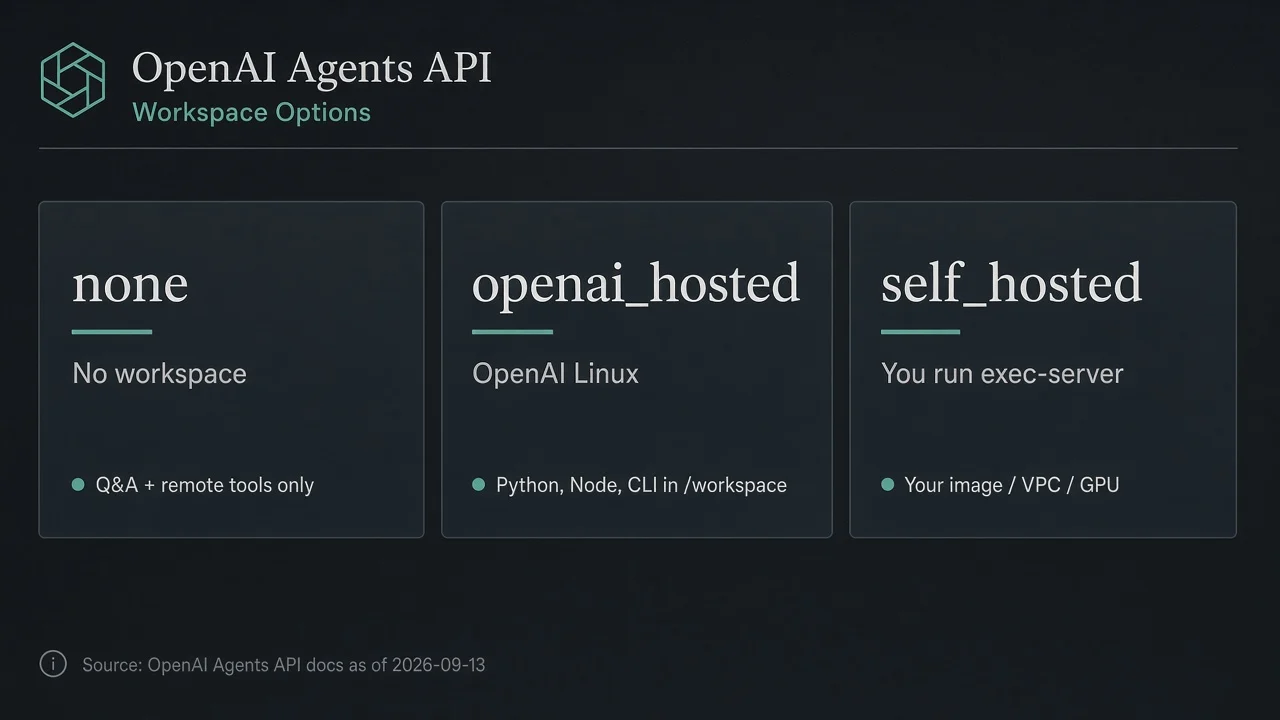
Which environment should your first agent use - none, openai_hosted, or self_hosted?
Your first product decision is who provisions the workspace.
| Type | Who runs the workspace | When to pick it |
|---|---|---|
none | No Bash, apply-patch, or local workspace | Q&A and remote tools only - no code execution |
openai_hosted | OpenAI provisions Linux with Python, Node.js, and CLI tools in /workspace | First cloud agent; fastest path to "run code and ship artifacts" |
self_hosted | You run codex exec-server in your image or provider sandbox | Custom image, compute, GPU, or private / VPC network |
For almost every first build, start with openai_hosted. You send a task; OpenAI spins the sandbox and connects it. Move to self_hosted when you outgrow that - for example when you need E2B, Modal, Vercel Sandbox, or another named provider for image and network control.
How do you build a minimal first cloud agent (hosted)?
Here is the hosted path from OpenAI's quickstart and sessions docs, in order. For a complementary "ship one real agent" mindset outside this API, see how to actually use AI's new agent features.
1) Create a project API key with the right scopes
You need api.agents.read and api.agents.write for sessions, plus api.responses.write for inference. Keep that application key outside the sandbox. Never bake it into agent code that runs inside /workspace.
2) Create a session
POST /v1/agents/sessions with the beta header:
OpenAI-Beta: agents=v1
In the body, set at least:
agent.model- official examples usegpt-6-astraenvironment.type:"openai_hosted"input- the task textstream:true
A classic first task from the quickstart: write tree.py, run it, and report the output. That forces the agent to use the sandbox, not only chat.
3) Wait for the environment, then watch the right events
Do not treat "idle" as success. Wait until the environment is connected before you assume live file ops work. Look for agent.session.turn.completed as the turn signal - and treat turn.failed, turn.cancelled, or session.failed as failures.
Two gotchas that trip first builds:
- A completed turn does not mean every tool call succeeded. Check tool results.
- Closing the stream does not cancel the task. The session can keep working until you steer or delete.
4) Continue, steer, save, then delete
Send follow-ups on the same session. Steer mid-turn when the agent drifts. Before you delete, pull anything you care about from /workspace/outputs - those artifacts are published after a turn and are what you keep when the sandbox later expires.
When you need remote tools beyond the sandbox (for example MCP servers), attach them on the session. Long-running IDE-style loops are a different product surface - see Cursor Automations if that is the workflow you are comparing against.
What can an OpenAI-hosted sandbox actually do?
An OpenAI-hosted sandbox is a Linux workspace with Python, Node.js, and common CLI tools. Working directory is /workspace. OpenAI provisions it and connects it to your session.
Documented capabilities include:
- Run code, work with files, and produce artifacts
- Install packages and run setup commands
- Add skills or plugins and supply files or env vars
- Reuse an
environment_template_idwhen you have a prepared template
Network modes:
| Mode | Behavior |
|---|---|
enabled | Default (unless a template overrides) - outbound allowed |
disabled | No network |
restricted | Allowlist of 1-100 exact host names - no wildcards, protocols, paths, or ports |
Hosted stdio MCP currently needs enabled network. If you need a tight allowlist, plan tool hosts carefully.
Lifetime and files: if activity and keep-alives stop for about an hour, the sandbox can be deleted. That idle timeout is not configurable. Files persist across turns while the sandbox is alive. Artifacts under /workspace/outputs are published as immutable artifacts after a turn - save those before you rely on the live workspace.
When should you bring your own sandbox (E2B, Modal, Vercel, …)?
OpenAI's hosted docs are blunt: choose self_hosted when you need your own image, compute, or private network. The architecture docs frame it as your infrastructure, private network, or custom software.
On self_hosted you run codex exec-server inside your environment. The executor registers with an environment ID and a restricted CODEX_API_KEY, then connects outbound over WebSocket to OpenAI. You own provision, reconnect, and shutdown.
OpenAI names first-class provider integrations including E2B, Modal, Vercel, Blaxel, Cloudflare, Daytona, DigitalOcean, Runloop, and OCI. Vendor isolation and lifetime claims belong to those vendors - for example E2B documents isolated VMs you can pause and resume; Modal documents secure containers with custom images, optional GPU, and timeout controls; Vercel documents Firecracker microVMs and (as of its Sep 10, 2026 changelog) wiring Agents API sessions to Vercel Sandbox plus Queues for scale-to-zero execution. Attribute those claims; do not treat them as OpenAI-certified numbers.
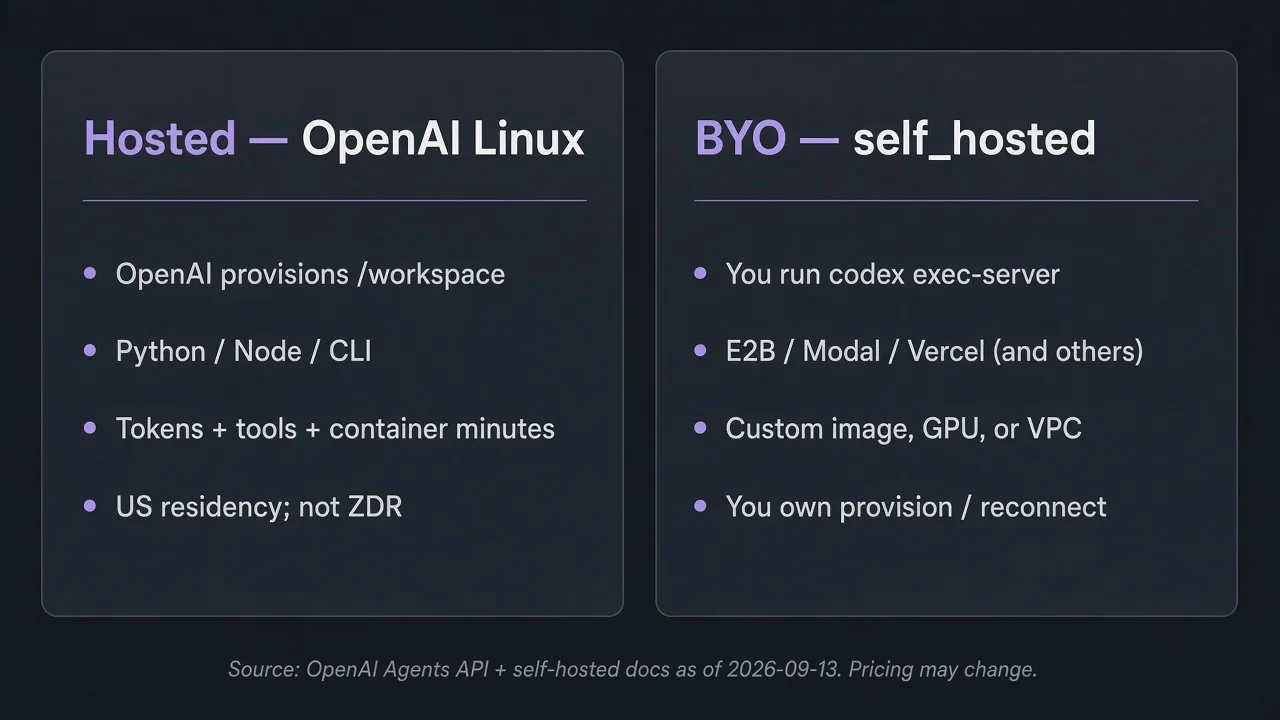
Do not invent a dollar winner between hosted and BYO. Hosted bills OpenAI container minutes. BYO adds your provider or compute bill on top of model and tool usage. Pick on control needs, not a made-up price chart.
How should you think about cost and security?
Cost shape (as documented): there is no Agents API surcharge. You pay:
- Model tokens (including subagents and retries)
- Tool usage at standard rates
- Hosted container minutes when you use
openai_hosted
As of a September 13, 2026 fetch of OpenAI's pricing page, published container rates for Hosted Shell and Code Interpreter look like this per 20-minute session per container: 1 GB at $0.03, 4 GB at $0.12, 16 GB at $0.48, 64 GB at $1.92. Eligible container sessions are billed by the minute with a 5-minute minimum (per-minute billing was announced in the June 2, 2026 changelog). Pricing may change - recheck the pricing page before you lock unit economics. Session usage fields are best-effort observability, not a final invoice.
A community follow-up on the announcement thread warns operators to calculate hosted container cost before spinning many sandboxes. Treat that as hard-won caution, not a published rate limit.
Security defaults from OpenAI's sandbox security docs:
- Isolate users and workloads from each other
- Restrict network when you can
- Keep the application API key out of the sandbox
- For BYO, use a restricted environment key as
CODEX_API_KEY(it connects environments; it is not your full app key) - Broker third-party secrets carefully
Data controls: Agents API supports US data residency only. It does not support Zero Data Retention (ZDR). Self-hosting does not unlock ZDR or non-US residency for this API.
When is this the wrong product?
Stay out of these traps:
| You actually need… | Use this instead |
|---|---|
| Consumer agent that finishes docs, sheets, slides, or Sites in ChatGPT | ChatGPT Work / Sites - not this API tutorial |
| Full-duplex spoken conversation with backend delegation | GPT-Live-1 on /v1/live/sessions (GA the same day, separate product) |
| Older open-source harness / provider sandbox client classes | Agents SDK sandbox guides - not Agents API environment.type values |
Same-day changelog noise is real: Agents API and GPT-Live-1 both shipped September 10, 2026. They share a launch week, not an endpoint. ChatGPT Work is the consumer "finish the document" path - keep that separate from /v1/agents/sessions.
FAQ
Is the Agents API the same as the Agents SDK?
No. The Agents API is the managed path at /v1/agents/sessions with environment types none, openai_hosted, and self_hosted. The Agents SDK is the older open-source harness path with its own sandbox client classes. Do not treat SDK client names as Agents API environment types - they are different products and different docs trees.
Do I pay an Agents API platform fee on top of model tokens?
No. OpenAI states there are no additional fees for using the Agents API. You pay for the model tokens and tools your agents use, plus standard container rates if you run an OpenAI-hosted sandbox. Recheck pricing before budgeting at scale - rates may change.
After the 1-hour hosted idle timeout, do my files and /workspace/outputs artifacts survive?
The live sandbox can be deleted after about an hour without activity or keep-alives, and that timeout is not configurable. Files only persist across turns while the sandbox still exists. Artifacts published under /workspace/outputs after a turn are the durable handoff - save those before you assume the workspace will still be there.
If I self-host on E2B or Modal, do I get ZDR or non-US data residency?
No. OpenAI documents that the Agents API supports US data residency only and does not support ZDR. Using a self-hosted sandbox - including E2B, Modal, Vercel, or another provider - does not make the Agents API ZDR-eligible or unlock non-US residency for this product.
Can I pass ChatGPT Work or GPT-Live-1 settings into an Agents API session?
No. ChatGPT Work and Sites are consumer ChatGPT surfaces. GPT-Live-1 is a separate voice API on /v1/live/sessions. Agents API sessions take Agents API configuration (model, environment, tools, input). Pick the product that matches the surface you are building; do not mix their settings into one session call.
Next step
Stand up one hosted session from the Agents API quickstart: project key, openai_hosted, stream events, save /workspace/outputs, delete when done. Then decide hosted vs BYO from image, GPU, and network needs - not from a guess about which is cheaper.
Container rates, token prices, and limits can change. Confirm current numbers on OpenAI's docs and pricing pages before you ship.