Your Pipedream workflows still run today, but Pipedream Workflows shuts down on March 31, 2027, and all Workflows data is deleted by April 30, 2027. So it is time to pack. The best Pipedream alternatives depend on the job your workflows did. Pick n8n for a canvas plus code you can host, Zapier for code with public packages, Make for code inside its scenarios, Activepieces for non-coders, and Windmill for scripts.
Is Pipedream shutting down? The dates that matter
Yes. Pipedream's shutdown notice says Pipedream Workflows and String will shut down on March 31, 2027. Workflows is now in maintenance mode, which means the lights stay on but no new features are coming.
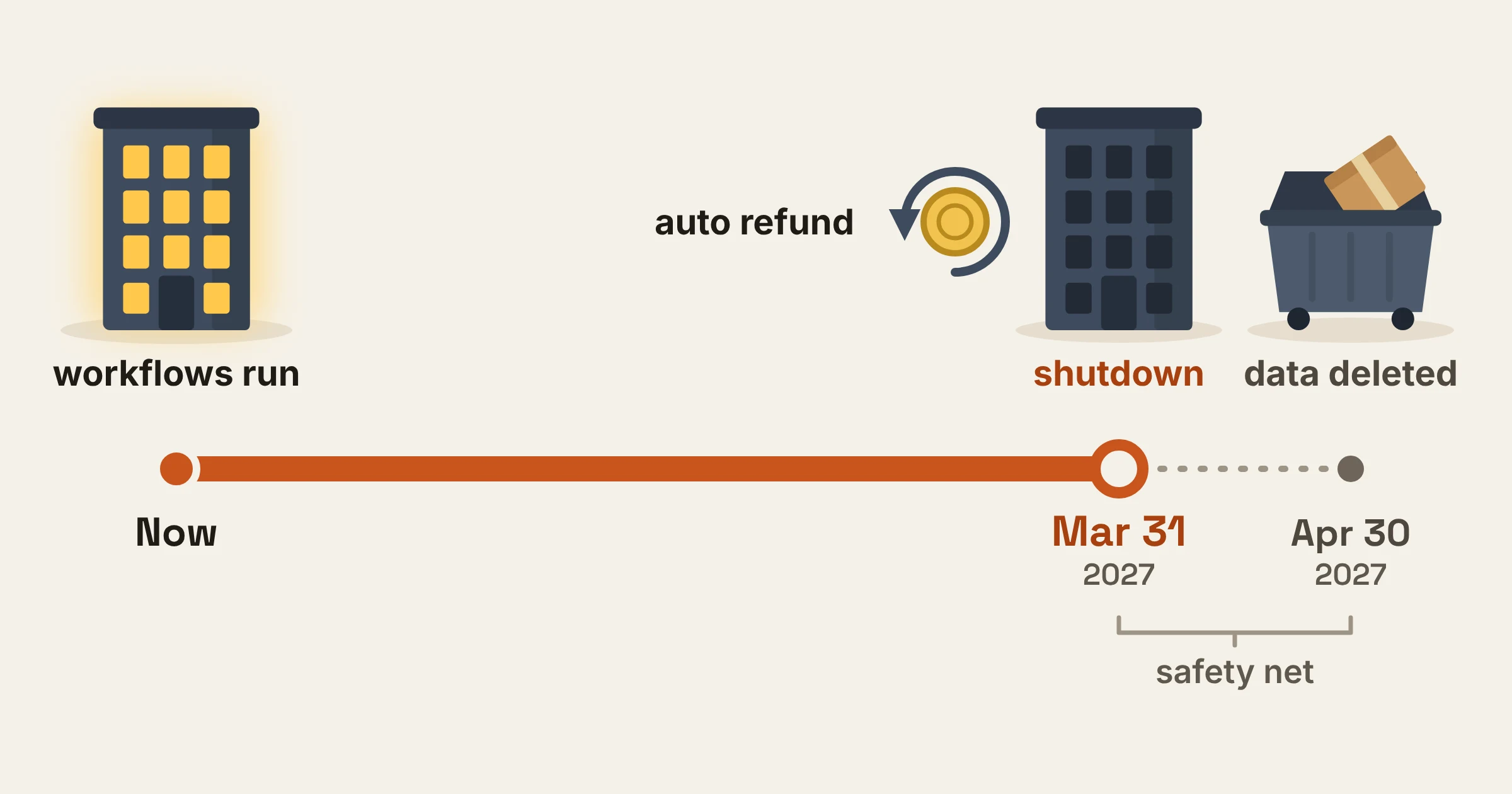
Think of it like your apartment building closing. The landlord gave notice, the heat stays on until moving day, and your deposit comes back on its own. But anything you leave behind gets thrown out a month later.
Here are the dates, in order:
- Now: your existing workflows keep running normally, and your subscription stays active.
- Before March 31, 2027, if you want out early: monthly subscribers can cancel themselves from account settings. Annual subscribers can contact support for an early cancellation and a prorated refund (money back for the time you did not use).
- March 31, 2027: Workflows and String shut down. Pipedream cancels any subscription still running and issues a prorated refund automatically, with no action needed from you.
- April 30, 2027: all Workflows data is permanently deleted.
The month between shutdown and deletion is a safety net, not a plan. Your workflows stop with the shutdown on March 31, 2027, so anything you rely on needs a new home before then.
Using Pipedream Connect? You can stay
The shutdown covers Workflows, not Connect. Pipedream says Connect is not affected, and it spells it out: "If you're using our Connect API, MCP Servers, or API Proxy, nothing changes for you."
MCP Servers let AI assistants use your apps (MCP is a standard way for AI tools to plug into outside services).
Pipedream calls Connect the place "where our focus is going forward" and says it "remains fully supported and actively developed." If Connect is all you use, you are not moving, and you can stop reading here. If you use Connect and Workflows, read on for the workflows.
What the Pipedream export keeps, and what you rebuild by hand
The export gives you the floor plan of every workflow, but not the keys or the furniture. Pipedream built an export tool that saves the structure of your workflows as JSON (a plain text format that computers read easily), one project at a time.
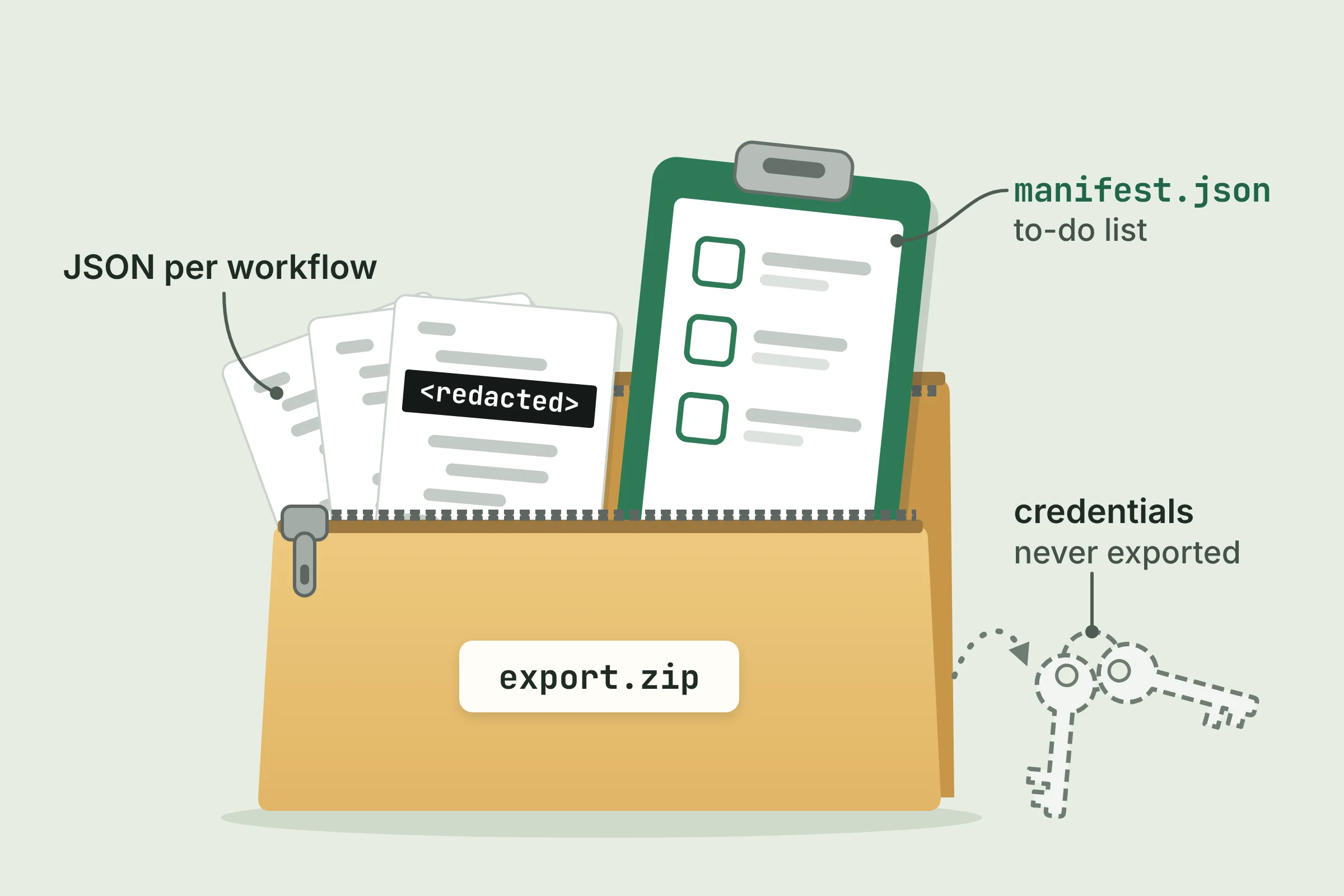
You get a ZIP archive (one compressed file that holds many files) with one JSON file for each workflow. Each file holds the latest deployed version of that workflow, with its structure and settings.
Pipedream suggests using it as a record of what you built and as a reference when you rebuild on another platform. In moving terms, it is the floor plan, not the moving truck.
| Part of your workflow | In the export? | What you do |
|---|---|---|
| Steps and their settings | Yes, the latest deployed version | Use it as your rebuild guide |
| Credentials and OAuth tokens | Never | Connect every account again on the new tool |
| Any value that is, or could be, a credential | Swapped for <redacted> | Type the real value in again |
| Data your workflows handled | No | Download what you need separately |
Credentials are your saved passwords and keys. OAuth tokens are the saved permissions that let a tool act inside your apps. Neither is ever exported, so whichever tool you pick, you will sign in to every connected app again. A new home needs new keys.
Your most useful file is manifest.json. For each workflow, its warnings list names every step and setting you must re-enter or connect again. Treat it as your to-do list.
A few limits to plan around:
- Your plan needs File Stores. The export is written to the project's File Store (its built-in file storage), so your plan must include them.
- One export holds at most 500 workflows or 256 MB of workflow content, whichever comes first. If a project is bigger, check that every workflow made it into the file.
- Private components need your own copy. If you published private components (custom building blocks you wrote), Pipedream says to keep a copy of their source.
- Data is a separate job. The export has no workflow data, so download anything you need on your own.
- The deadline is April 30, 2027. Pipedream says to export each project you want to keep before all Workflows data is deleted on that date.
Pick by the job your workflows did
Start from what your workflows actually did, not from a vendor's own top-ten list. Most setups lean one of these ways:
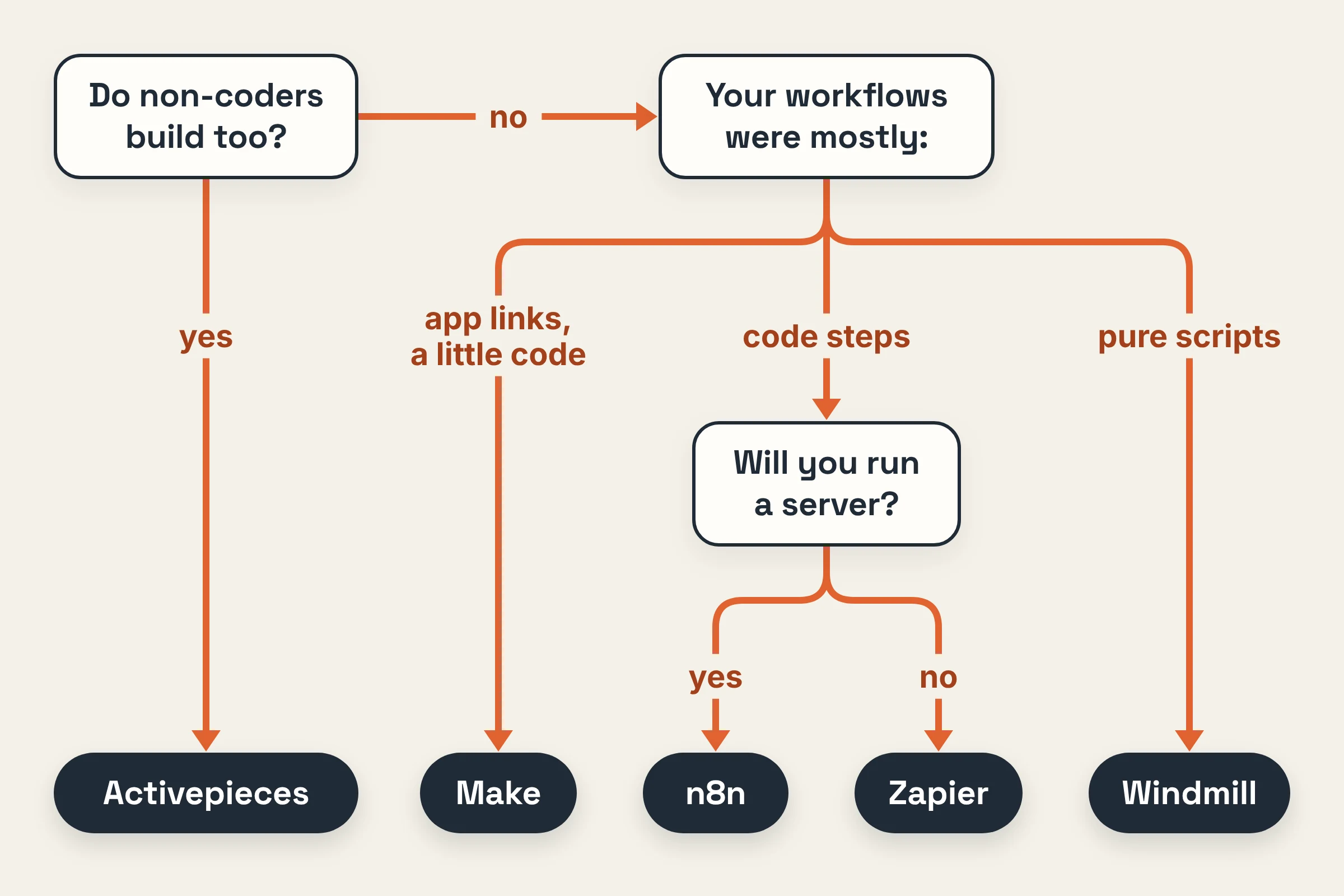
- Mostly code, and you are happy to run a server: n8n. It mixes a visual canvas with custom code, and self-hosting lets its code step import external npm modules (ready-made JavaScript packages).
- Code that leans on public packages, and you would rather not self-host: Zapier. Code by Zapier runs JavaScript and Python and can import public packages.
- Mostly connecting apps, with a little code: Make. Its Make Code app adds JavaScript or Python to a scenario.
- Teammates who do not code, plus open source: Activepieces. Its Community Edition is open source, and Activepieces says it can be self-hosted.
- Workflows that were really scripts: Windmill, an open-source, self-hostable platform that calls itself code-first.
If two of these fit, choose by your most important workflow, not your most common one.
1. n8n: a visual canvas plus code, self-hosted or cloud
n8n suits a Pipedream user who wants a visual canvas and real code in the same place. Its README says it combines the two, runs self-hosted or in the cloud, and connects to 1500+ integrations.
The code lives in the Code node (a box on the canvas where you write your own code). n8n's Code node docs say it runs your own JavaScript or Python inside a workflow. If your Pipedream steps were small scripts, this will feel familiar.
The catch is where you run it. If you self-host n8n, the Code node can import built-in and external npm modules. On n8n Cloud, you can't import external npm modules, and the Python option can't import any Python libraries.
So if your old steps leaned on packages, plan to self-host. Also, code in the Code node can't access the file system or make HTTP requests (calls out to other websites and APIs). A Pipedream step that fetched data from inside its code will need a new shape here.
On licensing, n8n calls itself fair-code, under its Sustainable Use License and n8n Enterprise License. That is not the same as classic open source, so read the terms if the difference matters to your company.
For AI steps, n8n says it connects to OpenAI, Anthropic, Google or open-source models. It also says you can switch providers without changing your setup.
Good fit if: you have a server, or can get one, and your workflows mix app steps with code.
2. Zapier: JavaScript and Python steps with AI help
Zapier's code feature, Code by Zapier, supports both JavaScript and Python. You can also describe what you want in plain English and let AI write the code, right inside the Zap editor (where you build a Zapier workflow).
The big change for Pipedream movers is packages. Zapier's help center says you can import public npm (JavaScript) and PyPI (Python) packages in Code by Zapier steps. npm and PyPI are the huge public shelves of ready-made code that developers borrow from.
Two catches come with those packages:
- Private registries (a company's own in-house package shelf) are not supported.
- Zapier does not scan packages for security vulnerabilities, so checking them is on you.
Run time is the other thing to check. Zapier's Code by Zapier page mentions run times up to ten minutes, with more on the roadmap. Zapier also says execution time limits vary by plan, so confirm yours before you move a slow step.
Good fit if: your steps were code that leaned on public packages, and you would rather not run a server.
3. Make: code steps in your scenarios, still in beta
Make Code is a built-in app that adds JavaScript or Python code to a Make scenario (Make's name for an automated workflow). It suits people who mostly connect apps and only sometimes need a few lines of code.
Make's docs say Make Code is in open beta, so it is usable but still being worked on. It is available to all customers on paid plans.
Billing works in credits, Make's unit for usage. The app uses two credits for every one second of code execution time. So code that runs for the full 30 seconds allowed on Core, Pro or Teams would use 60 credits.
The limits depend on your plan:
- Core, Pro and Teams: a sandbox (a sealed-off box where your code runs) with 1 CPU, 512 MB RAM and a 30 second maximum execution time.
- Enterprise: 2 CPUs, 1024 MB RAM and a 300 second maximum, which is five minutes.
The catch that matters most: only Enterprise plans can import custom libraries into Make Code. On any other plan, a step that depended on an outside library needs rewriting without it.
Good fit if: your workflows were mostly app-to-app, with short bits of code.
4. Activepieces: open source and friendly to non-coders
Activepieces fits a team where some people code and some never will, but everyone wants control over their data. The Activepieces GitHub page says its Community Edition is open source under the MIT license (a short, very permissive open-source license).
Activepieces says it can be self-hosted and network-gapped (cut off from outside networks) for control over your data. It also says its interface is built for both technical and non-technical users.
Its Code piece shows what that means. An Ask AI option lets someone who does not code still clean up data. Developers get room too: pieces, its name for integrations, are npm packages written in TypeScript (a stricter form of JavaScript).
There is a bonus for AI fans. Activepieces says all its pieces (280+) are available as MCP for use with AI models in Claude Desktop, Cursor or Windsurf.
Check first: that the apps your Pipedream workflows touched are on its list of pieces.
5. Windmill: when your workflows were really scripts
Windmill is built for people whose Pipedream workflows were really a stack of scripts. Its GitHub page describes it as an open-source, self-hostable, code-first platform for workflows, apps and AI agents. Code-first means the code is the main event, not an extra box on a canvas.
The language list is long: Python, TypeScript, Go, Bash, SQL, GraphQL, PowerShell, Rust and more.
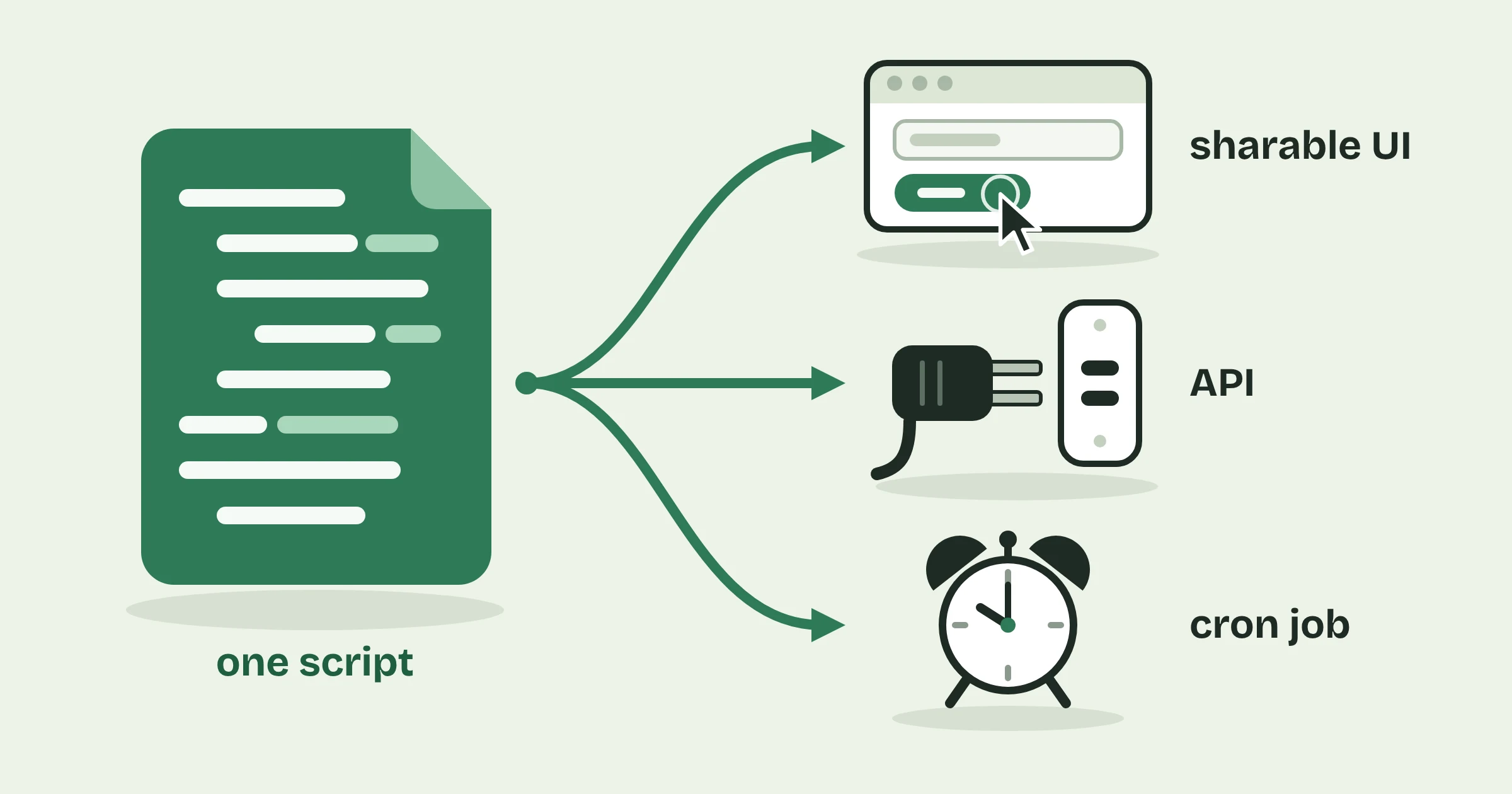
Its neatest trick happens after you write a script. Windmill turns scripts into sharable UIs (simple screens other people can click), APIs and cron jobs (tasks that run on a schedule, like an alarm clock) automatically. So a script you wrote once can become a little screen for a teammate or a job that runs every night.
One small surprise: Windmill calls itself a self-hostable alternative to Lovable, Retool, n8n and a simplified Temporal. Yes, it pitches itself against another pick on this list.
Good fit if: you write most steps as code and want to host the platform yourself.
The five Pipedream alternatives side by side
Here is the short version to keep open while you choose.
| Tool | Code you can write | Where it runs | Main catch |
|---|---|---|---|
| n8n | JavaScript or Python | Self-hosted or n8n Cloud | External npm modules need self-hosting |
| Zapier | JavaScript or Python, with public npm and PyPI packages | Zapier, with time limits by plan | No private registries, and packages are not scanned |
| Make | JavaScript or Python, in open beta | Make's sandbox, on paid plans | Custom libraries on Enterprise only |
| Activepieces | Code piece with Ask AI, pieces in TypeScript | Can be self-hosted (MIT Community Edition) | Check that your apps are covered |
| Windmill | Python, TypeScript, Go, Bash, SQL, Rust and more | Can be self-hosted | Code-first, so you need someone who writes scripts |
Example: moving one webhook workflow, step by step
Picture a made-up but typical workflow. A contact form sends each new entry to a Pipedream webhook (a web address an app pings when something happens, like a doorbell). A code step tidies the name and email, and a last step posts a message in Slack.
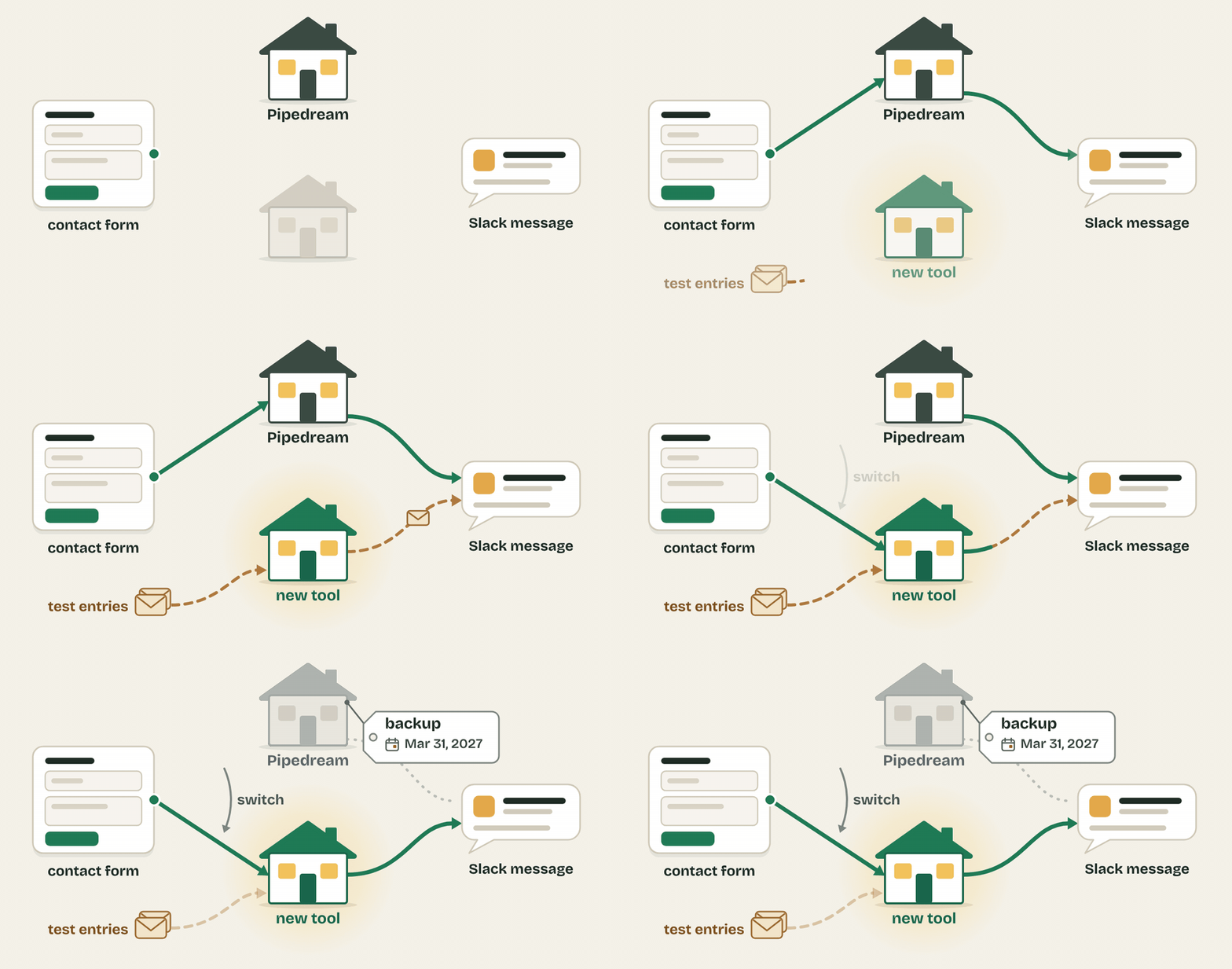
Here is how that move would go:
- Export the project. Pipedream saves a ZIP archive with one JSON file for this workflow.
- Read the warnings list. In manifest.json, it would name the Slack connection and any setting that came out as
<redacted>. - Rebuild the three steps. Recreate the trigger, the code and the message on your new tool. Copy the logic from the JSON file, not from memory.
- Reconnect your accounts. Credentials and OAuth tokens are never exported, so you sign in to Slack again.
- Test with sample entries. Send a few fake form entries to the new version while the real form still points at Pipedream.
- Switch the form over. Once the Slack messages match, paste the new web address into the form's settings.
This is where the moving analogy breaks, in your favor. You can live in both homes at once, because the old Pipedream version keeps running normally through March 31, 2027. Keep it as your backup until then.
So here is your next step. Export every project now, and remember your plan needs File Stores for that. Then rebuild your most important workflow first, on the tool that matches its job, and keep the Pipedream version running until March 31, 2027.
The plan limits above were checked on each vendor's pages in November 2026, and they change often.