You type "document about cancelling a subscription" into the search box. The page you need is titled "How to end your membership." Not one word matches. A keyword search shrugs and returns nothing useful, yet the answer clearly exists. That gap - between the words you typed and the words someone else wrote - is the entire reason vector databases exist.
Search used to live and die on matching characters. If the letters in your query did not appear in the document, the document did not exist, as far as the system was concerned. But humans do not search in keywords. We search in meaning. The promise of a vector database is simple and a little bit magical: let the computer compare what you mean against what every document means, and do it fast enough to feel instant.
What is a vector database? It is a store purpose-built to hold embeddings - numeric representations of meaning - and to run similarity search: find, fast, which stored vectors are nearest to the meaning of your query. That is the whole genre in one sentence; the rest of this post is the anatomy behind it.
This post is a dissection, not a product tour. We will strip a vector database down to five parts: the numbers, the store, the yardstick, the shortcut, and the decision. By the end you will know what each part does, why it exists, and - just as important - when you do not need one at all.
In short:
- An embedding turns text (or images) into a list of numbers where closeness means relatedness. Small distance, strong connection.
- A vector database stores those lists, plus metadata, and answers one question very fast: "which stored vectors are nearest to this query vector?"
- Exact search is perfect but does not scale. Approximate indexes like HNSW trade a little recall for enormous speed.
- You may not need one at all. Small corpora are fine with brute-force math, and Postgres with the pgvector extension often covers the middle ground.
Meaning, as numbers
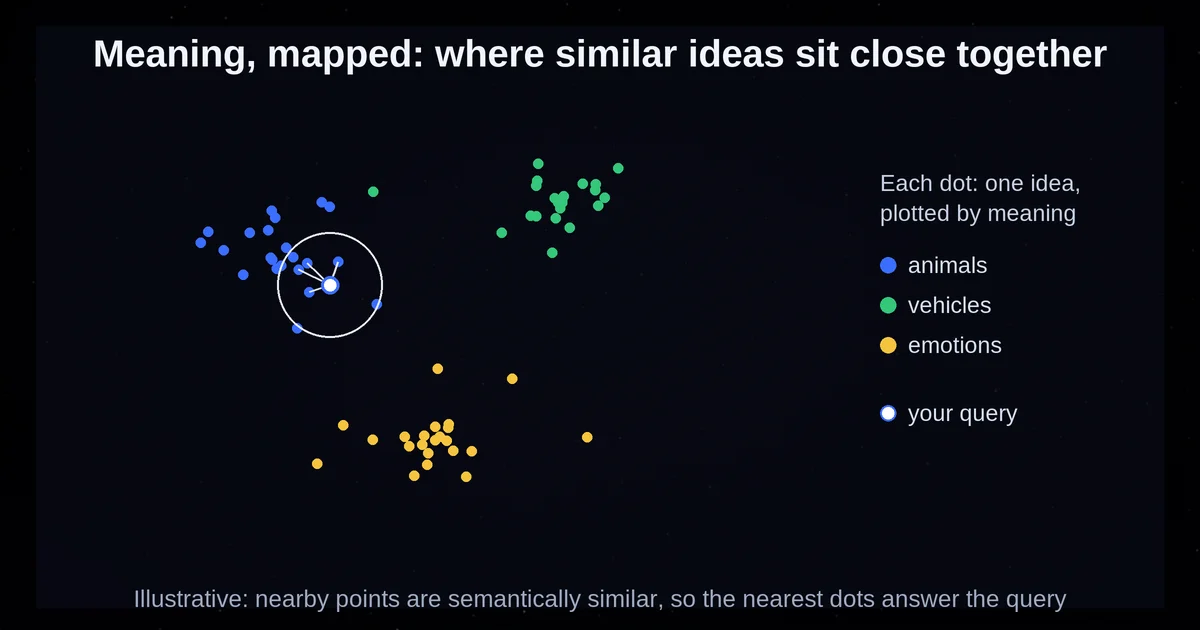
Everything starts with one clever trick. An embedding model takes a piece of text - a sentence, a paragraph, a whole document - and maps it to a long list of floating-point numbers called a vector. OpenAI's own definition is refreshingly plain: an embedding is a vector (a list) of floating point numbers, and the distance between two vectors measures their relatedness. Small distances suggest high relatedness, large distances suggest low relatedness.
How long is the list? OpenAI's text-embedding-3-small model produces 1536 numbers by default; text-embedding-3-large produces 3072. Every piece of text becomes a single point in a space with thousands of dimensions. You cannot picture 1536 dimensions - nobody can - but the geometry behaves like a map of meaning. "Puppy" and "dog" land near each other even though the words share no letters. Write the same idea in two different languages and the embeddings still land close together. The words are different; the meaning is the same; the numbers agree. That is what makes these "dense" vectors different from old-school keyword lists: they capture the meaning, not the words used - and comparing meaning instead of strings is the whole premise of semantic search.
There is one neat detail worth knowing early: OpenAI's models accept a dimensions parameter that lets you shorten the vector - keeping 256 of text-embedding-3-large's 3072 numbers while preserving most of its concept-representing power, per OpenAI's own claims on their embeddings guide. Like nesting dolls, the big idea survives in a smaller container. Hold that thought; it becomes useful when you are trading accuracy for storage.
So the first part of the anatomy is not a database at all. It is a translator: meaning in, coordinates out. Everything a vector database does afterward is geometry on those coordinates.
What the database actually stores
Strip away the marketing and a vector database holds three things per record: the vector itself, an ID, and whatever metadata you attach. Qdrant's data model is the cleanest example of this anatomy. A point is a vector plus an optional ID plus an optional JSON payload - the metadata. Points live together in a collection, and every vector in a collection shares the same dimensionality and the same distance metric, both fixed when you create the collection. That last rule matters more than it sounds: you cannot mix a 1536-dimension vector into a collection built for 3072, and you cannot compare fairly with two different yardsticks.
Different products wear the same anatomy in different clothes. Pinecone's serverless indexes hold documents that combine a dense vector, a sparse vector, and string fields with full-text search - semantic and keyword search living in one record, with metadata capped at 40KB per record. pgvector takes the most understated approach of all: a vector is just a column type in ordinary Postgres tables, alongside your normal columns, in the database you already run. Same skeleton, very different wardrobes.
The payload is where the real work happens. When you search, you almost never want "the nearest vectors, period" - you want the nearest vectors for this customer, in this category, from this year. Filtering by metadata is a solved problem in every serious store. It is also where naive setups go wrong - if you are wiring retrieval into a bigger system, our rundown of the most common automation mistakes covers exactly these plumbing traps.
Here is the mental model to keep: a vector database is not a new kind of magic. It is a store optimized for one query - "which stored vectors are nearest to this one?" - plus the usual filtering and metadata machinery you would expect from any database.
How near is near: measuring similarity
To say two vectors are "close," similarity search needs a yardstick. There are three in common use, and each fits in one line:
- Cosine similarity measures whether two vectors point in the same direction, ignoring their length. Ranges from -1 (opposite) to 1 (identical direction).
- Dot product measures direction and length together - and it equals cosine similarity when vectors are normalized.
- Euclidean distance is straight-line distance: how far apart the two points sit in the space.
Which should you use? Here is a punchline that saves a lot of agonizing: Qdrant's docs describe the differences, but for OpenAI embeddings the choice barely matters, because OpenAI normalizes its embeddings to length 1. Every vector sits exactly one unit from the origin. With normalized vectors, cosine similarity can be computed as a plain dot product - the cheaper calculation - and OpenAI's FAQ notes that cosine similarity and Euclidean distance give identical rankings for their embeddings. Same order, different formulas.
The practical rule falls out of that: with normalized vectors, the metric choice mostly does not matter. With your own un-normalized vectors, it does.
If you live in Postgres, pgvector makes the yardsticks tangible as operators you can type. <-> is Euclidean (L2) distance. <=> is cosine distance - so cosine similarity is 1 - (embedding <=> q). And <#> returns the negative inner product, a quirk that exists because Postgres only scans indexes in ascending order - one of those small gotchas that is delightful once someone explains it and maddening before.
Making billions of comparisons fast
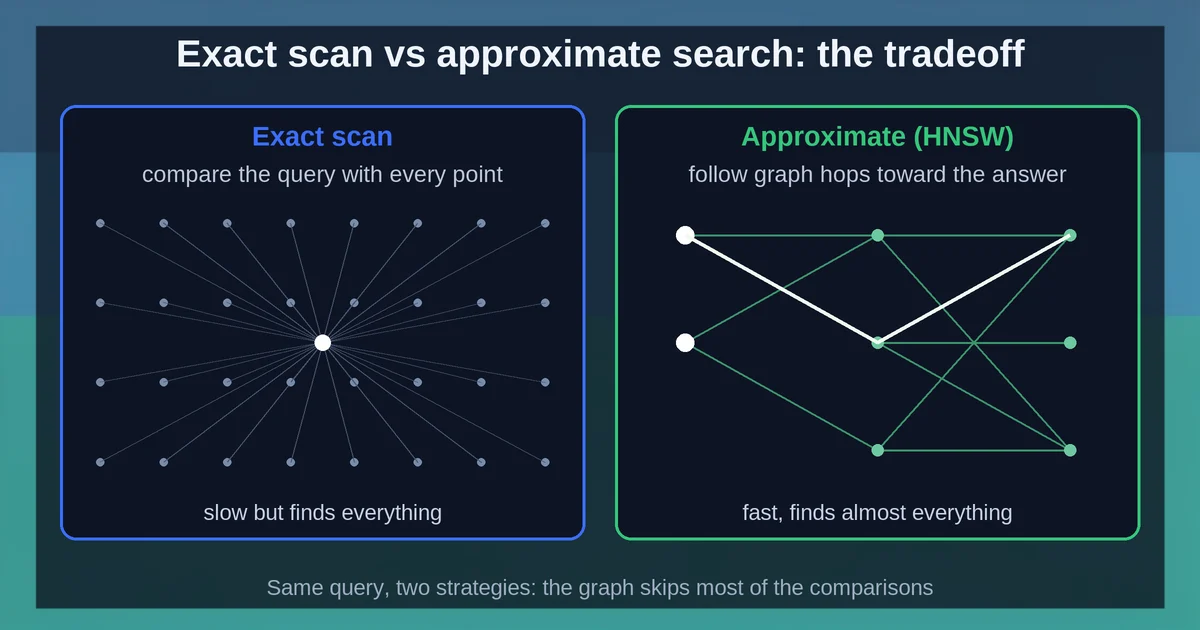
At scale, vector databases swap exact search for approximate nearest neighbor (ANN) search: a vector index such as HNSW examines only a promising subset of vectors instead of every one, trading a little recall for enormous speed. Now the hard part explains why that trade is worth it. Suppose you have one million vectors with 1536 dimensions each, and a query arrives. The naive approach computes the distance from the query to every single vector and sorts. Multiply it out: a million rows, thousands of dimensions, on every query. Qdrant's docs put it plainly - the brute-force approach "might work with dozens or even hundreds of examples" but becomes a bottleneck beyond that.
The fix is to accept a trade. pgvector states it more honestly than most: by default it performs exact nearest neighbor search, which provides perfect recall. Add an index and you switch to approximate search, which "trades some recall for speed" - and, pgvector warns, "you will see different results for queries after adding an approximate index." Read that twice. Different results after indexing are documented behavior, not a bug in your code.
The most popular approximate structure is HNSW - Hierarchical Navigable Small World graphs, introduced by Malkov and Yashunin. The idea is a multi-layer graph of proximity links. Every vector lands in the bottom layer; each vector also gets promoted to higher layers with an exponentially decaying probability, so the top layer is sparse and the bottom is dense. A search starts at the sparse top layer and takes long greedy hops toward the target, then drops down one layer at a time, each layer offering finer-grained neighbors, until it reaches the dense bottom layer. If you know skip lists from computer science, this is the same trick applied to geometry - which is exactly what the original HNSW paper says: searching from the top layer "allows a logarithmic complexity scaling." You visit a handful of candidates instead of a million rows.
The knobs are refreshingly few, and pgvector's defaults make them concrete: m = 16 connections per node per layer, ef_construction = 64 candidates considered while building, and ef_search = 40 candidates examined at query time. The one you will actually touch is ef_search - a higher value examines more candidates, which gives better recall at the cost of speed. pgvector also offers a second index shape, IVFFlat, which partitions vectors into lists and probes only the nearest ones: faster to build, less memory, but it needs training data present before you create the index. For recall guidance, pgvector suggests roughly rows/1000 lists for up to a million rows.
One gotcha deserves a lightbulb moment of its own: with an approximate index, metadata filters are applied after the index scan. If your filter matches 10% of rows and ef_search is 40, the scan surfaces roughly 4 matching rows on average - not enough candidates, thin results. pgvector's fix is iterative index scans (SET hnsw.iterative_scan = strict_order or relaxed_order), which keep pulling candidates until the filter has enough. File it under "surprising the first time, obvious ever after."
Three ways to get one
So you want to store vectors. The landscape looks crowded, but almost every product falls into one of three archetypes - and they differ on a single axis: who owns the index lifecycle? Your process, a vendor, or your database. Everything else - operations, syncing, cost, control - follows from that one choice.
Archetype A: an embedded library, in your process. Chroma is the clean example: pip install chromadb and you are running. Its core API is famously tiny - create a collection, add data, query, get by ID. It runs in-memory or as a client-server pair, and if you hand it raw documents it handles tokenization, embedding, and indexing automatically. Open source under Apache 2.0, with a hosted cloud option if you outgrow your laptop. This archetype is about zero ceremony: the index lives and dies with your application.
Archetype B: a managed server, an API away. Pinecone is the flagship here. Its serverless indexes combine dense vectors, sparse vectors, and full-text search (BM25 over Lucene) in a single record, with integrated embedding and reranking models and namespaces for multi-tenancy. It even ships an MCP server so AI agents can talk to it directly - if that protocol is new to you, our explainer on what MCP is and how it works is a friendly on-ramp. Qdrant refuses to pick a lane: open source under the hood, self-hostable via Docker, available as a managed cloud with a free tier, and now offering a lightweight embedded mode called Qdrant Edge for offline and edge devices - robots, kiosks, phones. Here a vendor owns uptime, sharding, and scaling; you own an API key and a bill. Pricing and plan details are as published by the vendor around September 2026 and can change - confirm on the official site.
Archetype C: a column in Postgres you already run. pgvector is an open-source extension whose pitch is one sentence: "Store your vectors with the rest of your data." You get exact and approximate search, ACID transactions, JOINs, point-in-time recovery - all the features of Postgres - plus hybrid search by combining vector search with Postgres full-text search via Reciprocal Rank Fusion. It works with Postgres 13 and up, and it is preinstalled on many hosted Postgres providers, which means for a lot of teams the "installation" step is already done.
Notice what the archetypes are not: a ranking, a maturity ladder, or a taxonomy of every product. They are three answers to the same question - who runs the index for you - and the honest way to choose is to ask where your data already lives and how much of the operations you want to keep.
When you do not need one
The most useful sentence in this whole post might be this one: many projects that install a vector db did not need one. Here is the honest anti-recommendation list.
- Your corpus is small. Qdrant's own docs concede the point: brute-force distance computation "might work with dozens or even hundreds of examples." If you have a few thousand vectors and no strict latency requirements, a NumPy array and a loop are perfectly respectable. Exact results, zero infrastructure, nothing to babysit.
- Your data already lives in Postgres. pgvector's default is exact search with perfect recall - no ANN index needed. For filtered queries, an ordinary B-tree index on the filter column can provide fast, exact nearest neighbor search when the filter matches a small slice of rows. And for normalized vectors, plain inner product without any index is the fastest exact option.
- Relevance means exact tokens, not meaning. If what matters is a specific SKU, an error code, or an exact identifier appearing in both the query and the data - Pinecone's own docs steer you to full-text search, not semantic similarity. BM25 is the right tool when the words themselves are the point.
- You would be adding a second database just to hold copies. pgvector's whole positioning argument: one system for your relational data and your vectors means no synchronization job between two stores, and ACID guarantees cover both.
A rough decision rubric, offered as synthesis rather than a vendor threshold: strict token-match needs point at full-text search. Somewhere under a hundred thousand to a million vectors with no hard latency SLA means exact scan or an embedded library is fine. Data already in Postgres means pgvector. Large scale, heavy multi-tenancy, or managed everything means dedicated or managed. And one more truth that outranks all of it: what you retrieve and put in front of the model matters more than the brand of the engine retrieving it - the skill of context engineering is about shaping what reaches the model, not worshiping the retrieval machinery.
Where RAG picks the idea up
Here is where the anatomy connects to the thing you probably actually care about: retrieval-augmented generation. The workflow is short. Take your documents and embed them. When a question arrives, embed it with the same model - the same translator, or the coordinates mean different things. Rank the documents by cosine similarity to the query, take the top matches, and place them into the LLM's context window. The model now answers from your facts instead of its training data, at a fraction of the token cost of stuffing everything you own into every prompt.
Where does the vector database fit? It is the retrieval half. Qdrant's docs are careful to note that vector search requires a separate component - a neural encoder - to turn text into numbers in the first place. The model makes the meaning; the database finds it fast. And it is the scaling layer, not a requirement: OpenAI's own guide recommends a vector database for "searching over many vectors quickly," which implies that when your vector count is modest, exact in-process search covers RAG just fine. The database earns its keep at scale.
One quiet side effect deserves a mention: good retrieval changes how conversations feel. When the right passages arrive in context before the model replies, it stops interrogating the user with clarifying questions and starts answering - the pattern we unpick in why AI keeps asking you questions instead of answering. What you feed the model is what it becomes.
So, run the mental model in reverse. A vector database is just a very fast way to answer the question "what is nearest to what I mean?" An embedding turns meaning into coordinates; a store keeps them with their metadata; a yardstick compares; an approximate index keeps it all fast; and the decision of who runs it for you is the only real choice on the table. Every product in the landscape is a different answer to that one question - and now you can read any of them like an anatomy chart.
Vector database FAQs
Do I need cosine similarity or dot product for OpenAI embeddings? Either - they give identical rankings here. OpenAI embeddings are normalized to length 1, so the dot product equals cosine similarity, and even Euclidean distance orders results the same way. Dot product is the cheaper computation, so it is the sensible default.
My search results changed after adding an HNSW index - is something broken?
No. Approximate indexes trade some recall for speed by design, and pgvector explicitly documents that query results differ once an approximate index is added. If recall drops too far, raise ef_search - more candidates examined, better results, slower queries.
Can one index handle both semantic and keyword search? Yes. Pinecone's document schema combines a dense vector and full-text-search string fields (BM25 over Lucene) in a single record, and pgvector pairs vector search with Postgres full-text search, merged via Reciprocal Rank Fusion. Hybrid search is a supported pattern in both archetypes.
Is a vector database required for RAG? No. The RAG loop is embed, rank by similarity, and put the top matches into the model's context - and at small scale exact, in-process search handles all of it. The vector database is the scaling and operations layer for when "many vectors, quickly" stops being true of a simple loop.