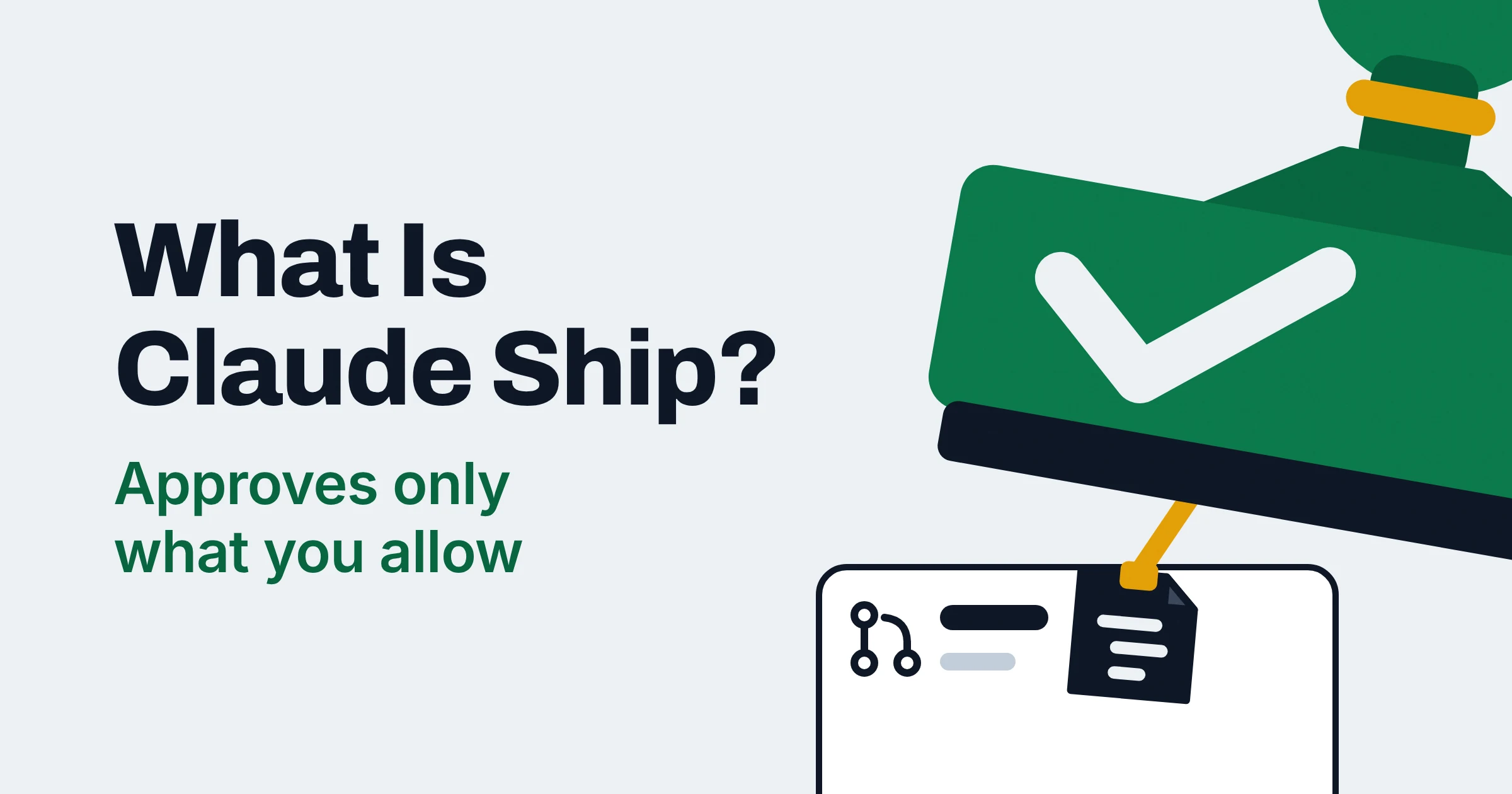
A code review bot points out bugs. Anthropic's new Claude Ship goes one step further: it can click Approve on a pull request. Whether it ever does that on your repository comes down to one small file your team writes.
Claude Ship is three Anthropic agents that review GitHub pull requests, fix them and approve only the ones your team's policy file allows, in beta for Claude Team and Enterprise plans.
What Claude Ship is: three agents on one pull request
Claude Ship is three agents that take turns on the same pull request (a proposed code change waiting for review). Only the last one can approve it. The easiest way to see this is to follow one change through.
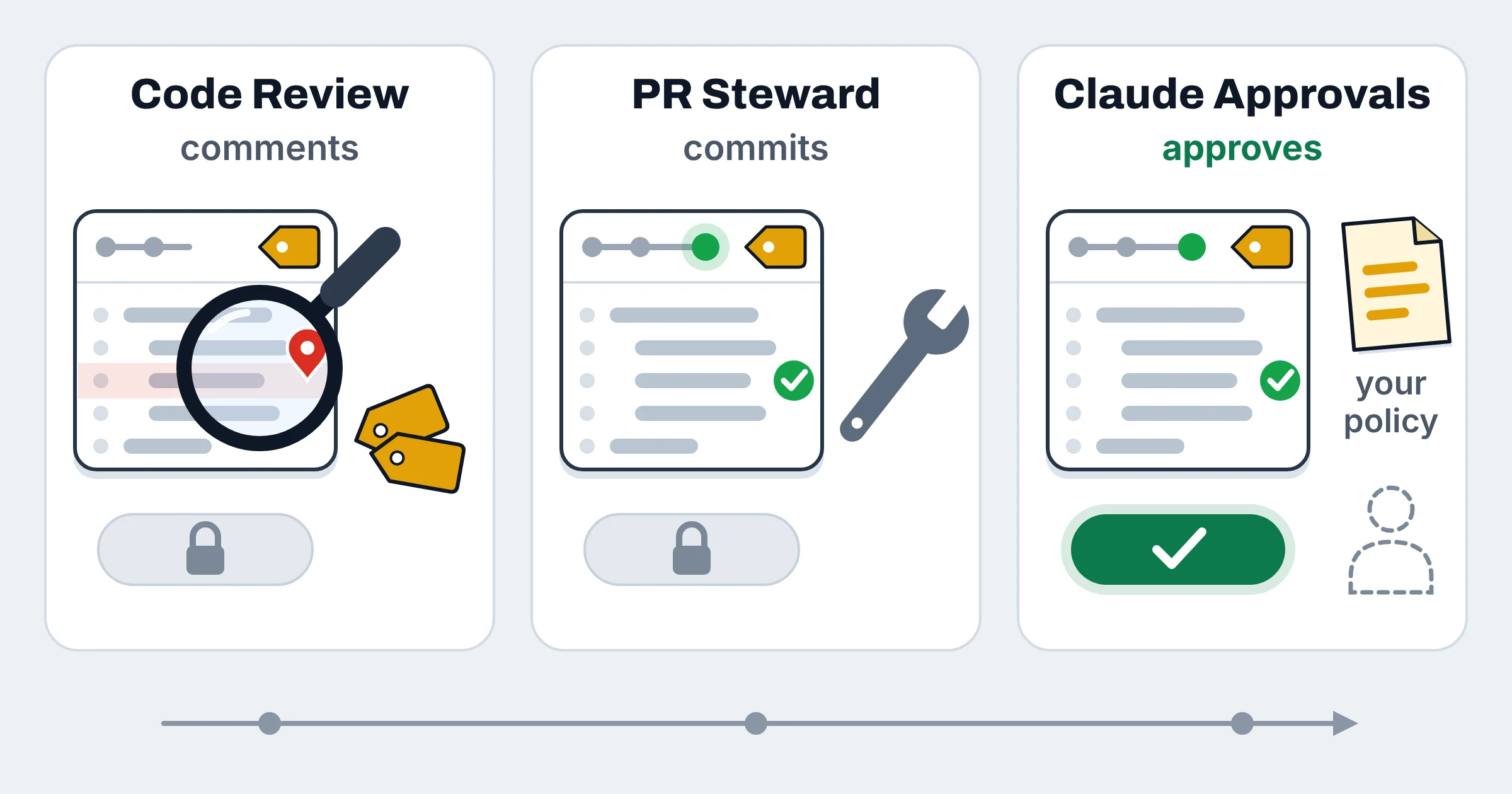
Picture a teammate who opens a pull request that adds discount codes to your checkout page. Here is what each agent does with it.
- Code Review reads it first. It reads the change alongside the surrounding code, looking for logic errors, security holes and broken edge cases. Findings arrive as inline comments on the lines concerned, ranked by severity. Say it flags that a shopper can apply the same code twice.
- PR Steward fixes what it can. It works on failing checks, merge conflicts (two edits to the same lines) and review comments from people and from review bots such as Code Review. It pushes commits with its fixes. In our picture, it pushes a commit that stops the double discount.
- Claude Approvals makes the call. It checks the pull request against an approval policy your team writes. If the policy lets Claude approve this kind of change, Claude approves. Either way, the change also waits for any people your policy asks for.
The split is deliberate: Code Review comments and PR Steward commits, but PR Steward is designed not to approve or merge pull requests. Anthropic's docs say to use branch protection to require the approvals you want. Branch protection is GitHub's set of rules for what a branch needs before a merge.
The three are not equally finished, either. Code Review is generally available, while PR Steward and Claude Approvals are in public beta. So the one agent that can approve is still in beta, which is why the steps below move slowly.
Who gets Claude Ship and what it costs
Claude Ship is for organizations on Claude Team or Enterprise plans with code on GitHub. It is billed by usage, and Anthropic lists no per-review price.
Here is who qualifies:
- Plans: Claude Team and Enterprise, for repositories on GitHub. Anthropic's pages name no other plans.
- GitHub: Claude Approvals works on github.com, including GitHub Enterprise Cloud.
- Left out: organizations with Zero Data Retention (Anthropic keeping no copy of your prompts and outputs), the HIPAA configuration (the setup for US health data) or customer-managed encryption keys.
- Claude Code: optional. Using Claude Ship does not require using Claude Code.
Billing is where the details hide. Each agent is billed on tokens (chunks of text a model reads and writes). They come out of your organization's usage credits, separately from your plan's included usage. Here is how that plays out per agent, and who can switch each one on.
| Agent | Who switches it on | How it is billed | Spend limit |
|---|---|---|---|
| Code Review | An Owner, in Organization settings | Tokens, from usage credits | Admins can set one |
| PR Steward | An Owner, in Organization settings | Tokens, from usage credits | None of its own until you set one |
| Claude Approvals | Anyone who can merge a policy file into the default branch, once prerequisites are met | No base charge, but classifiers in your policy bill on tokens | An Owner can set one, including for classifier runs, in Organization settings under Usage |
Two surprises sit under that table. First, a policy that uses Claude's review triggers a billed Code Review, even in observe mode (the trial run covered in Step 4).
Second, if you turn off usage credits in Organization settings, an agent that is on keeps running and billing your organization. Set spend limits rather than counting on that switch.
If you are on Enterprise, check the credit offer. Anthropic's announcement says eligible Claude Enterprise organizations can claim at least $10,000 in Claude Ship credits, to use within 30 days of claiming. The deadline to claim is January 15, 2027.
Step 1: Turn on Code Review in one repository
Start with Code Review alone, in a single repository. Anthropic's Claude Ship docs say to turn on one agent at a time in one repository. The order is Code Review, then PR Steward, then Claude Approvals.
- Go to Organization settings, then Claude Ship. You need an Owner role to change anything there.
- Connect one GitHub repo and set a monthly spend limit.
- Pick a review level. Code Review offers Quick, Standard or Deep, and Anthropic's pages list no price for any of them.
- Open an ordinary pull request. You should see inline comments on the lines concerned, ranked by severity.
- Once a few reviews are in, check your average cost per review before you add more repos.
That cost per review is the nearest thing to a price tag you will get, so write it down.
Step 2: Add PR Steward in Manual mode
PR Steward is the agent that pushes commits to your pull requests, so start it in Manual mode, where it waits to be asked. Five moves cover almost everything you will do with it.
- Start it by commenting
@claude stewardon a pull request. - Read its notes. After every push, it comments with what it changed and how to undo it.
- Steer it by commenting
@claudefollowed by an instruction, such as keep the old function name. - Stop it with
@claude stop, and it steps back. - Cap it. PR Steward has no spend limit of its own until you set one, so set one before its first run.
Remember that PR Steward is designed not to approve or merge, so your usual reviews still decide. Once your team trusts its commits, Anthropic suggests turning it on by default.
Step 3: Write your approval policy
Your approval policy starts as one file, .claude/approvals.yml. It tells Claude Approvals who has to approve a pull request and when Claude may approve it. Think of it as the note you leave on the fridge for a house-sitter: sign for routine parcels, but anything from the bank waits for me.
Anthropic's own comparison is more technical: "It works like a smarter CODEOWNERS file." CODEOWNERS is GitHub's file that names who must review which parts of a repository.
The file is YAML (a plain-text settings format) holding a list of rules. Each rule names the files it covers in paths, then says what a pull request that changes them needs:
seats: how many people have to approve.claude: whether Claudeapproves,commentsorblocks.
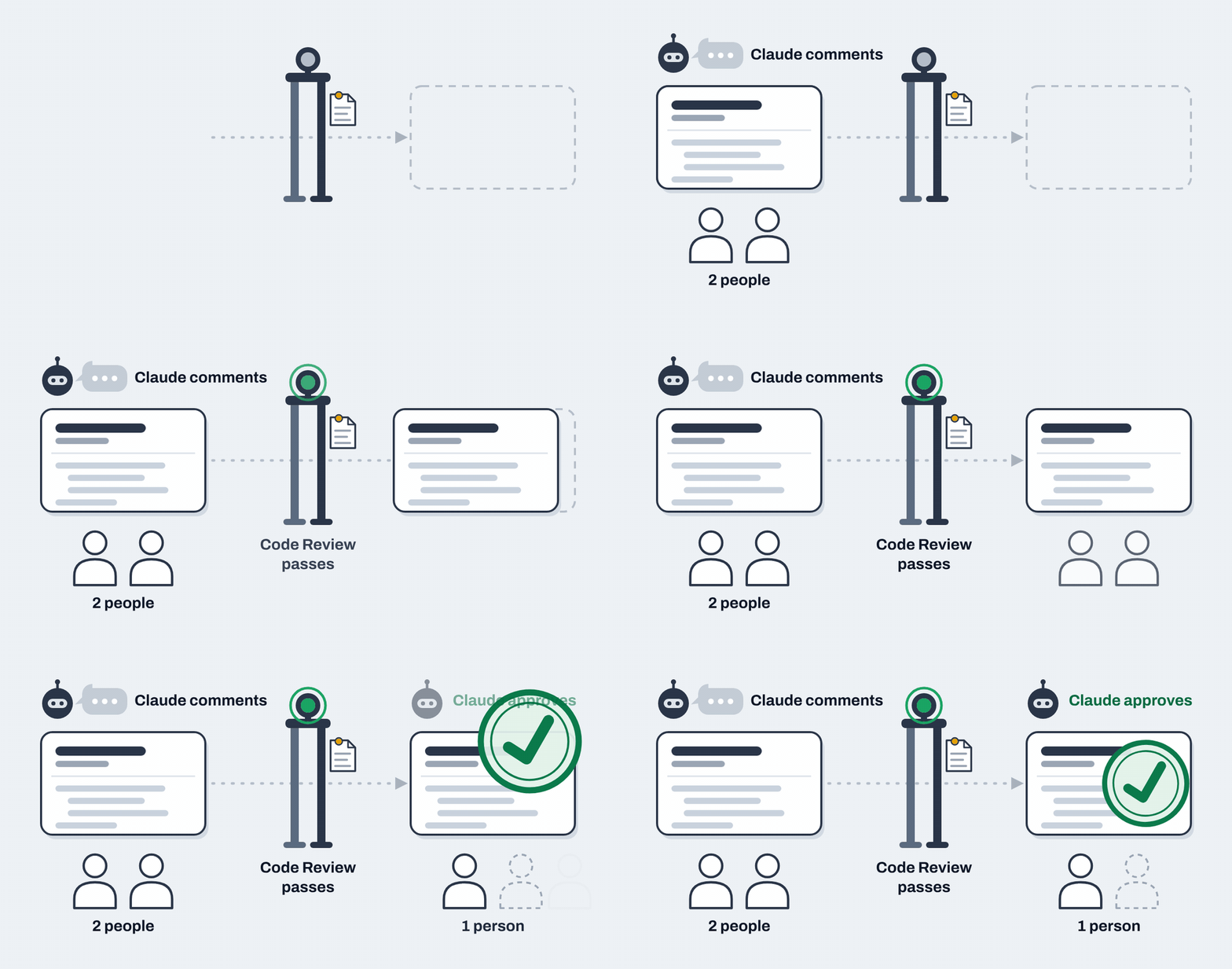
When several rules apply, Approvals takes the strictest verdict. blocks outranks comments, which outranks approves, and every rule's seats have to be filled. Anthropic's example: billing code can need two people, while test fixtures can need one person once Code Review passes.
The starter policy, decoded
The policy docs start you off with a ready-made policy. Its base rule ends in this verdict:
verdict: { claude: comments, seats: 2 }
Read it as: Claude may comment but not approve, and two people must approve.
An override sits under that rule:
- { if: "claude/code_review = pass", verdict: { claude: approves, seats: 1 } }
claude/code_review is a built-in classifier (a check that answers one question about a pull request). It tells a rule whether Code Review passed. If it did, the verdict flips: Claude approves, and one person is enough.
The docs sum it up in two sentences: "A change takes two people. When Claude's review passes, one is enough and Claude approves."
The second rule guards the rules themselves: a change to the review rules takes two people. That way, nobody can quietly rewrite the note on the fridge.
You can also write your own conditions. With a custom classifier, you write a question about a pull request and a Claude model answers it. One question might be does this change only touch test fixtures?
Check the mode before you merge. A policy file with no mode line is enforced: the check can block a merge, and Claude can approve where the policy allows. Anthropic's starter policies start in observe mode, which takes this line in the file:
mode: observe
Keep that line in any policy you write. The docs say to add the file in a pull request of its own, at .claude/approvals.yml in the repository's root. Approvals reads policy files from the default branch, so the rules apply only once that pull request is merged.
Step 4: Watch in observe mode, then enforce
Observe mode is a dress rehearsal: Claude Approvals posts its decision on each pull request but approves nothing. TechCrunch reports that, because the product is still in beta, Anthropic suggests running approvals this way first.
On each pull request, the Approvals check shows what your policy would decide, and Claude posts a comment with its reasons. Put those reasons next to what your human reviewers actually did. Each mismatch points at a rule to rewrite.
Two things to know while you watch:
- It still costs money. Reviews and classifier runs are billed in observe mode too.
- Automatic reviews can go quiet. Once the policy file is on the default branch, automatic Code Reviews normally stop where no matching rule names
claude/code_review. If you want a review on every pull request, make sure a matching rule names it.
When the decisions match your reviewers, Anthropic says to enforce the policy, require the check in GitHub and add more repos. The setup docs make the signal concrete: the check titles you see in observe mode match what your reviewers decide.
Enforcing is a one-line change. Delete mode: observe and merge that change. Before you enforce either starter policy, the repository needs two people with write access.
Don't skip the GitHub step, either. The check blocks a merge only where you make it a required check in GitHub.
How a change can merge with nobody looking
A Claude Ship setup can let a change merge without a second person ever seeing it, and Anthropic's docs spell out how. Check your own setup against this list.
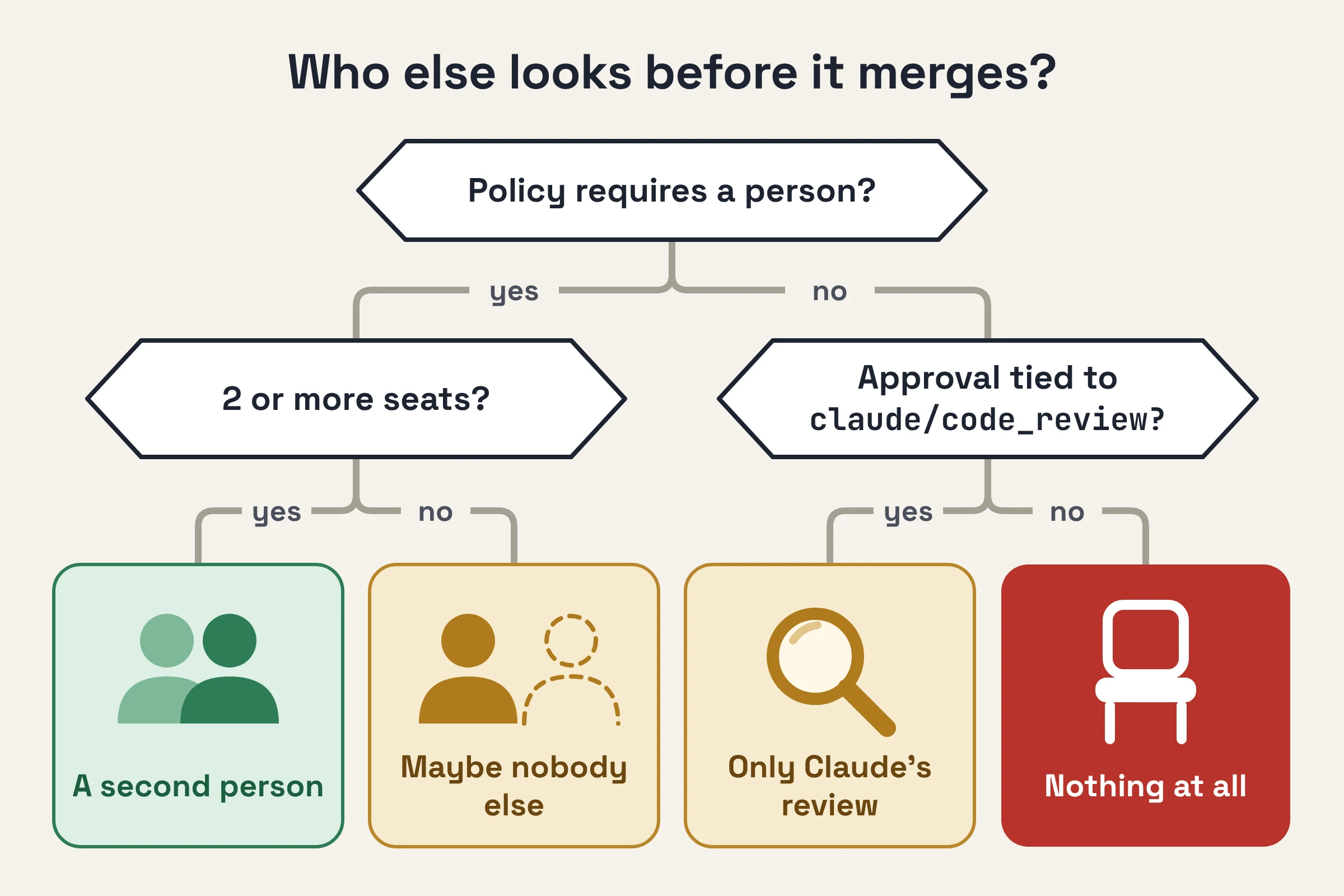
- Auto-merge or a merge queue, with no person required. GitHub auto-merge merges a pull request once its requirements are met. With it, or with a merge queue, and a policy that doesn't require a person's approval, a change can merge without anyone acting.
seats: 1with the author in the seat. The Claude Approvals docs note that the author can fill a seat, so withseats: 1nobody else has to look. The starter policy's override usesseats: 1, so read it with that in mind.- A bare
claude: approves. That rule starts no Code Review by itself, so Claude can approve a change that nothing has reviewed. Tie approvals to aclaude/code_reviewcondition, as the starter policy does. - Words aimed at the classifier. A pull request author's text can steer a classifier's answer. A description that says this only touches tests proves nothing.
- CI left out. A condition can't read CI results (the automated tests that run on each change). Keep CI as its own required check in GitHub.
- Direct pushes. A push straight to the default branch gets no check at all. Make GitHub require pull requests there.
- Claude as your one approval. Anthropic's page on GitHub rules says Claude's approving review can meet a GitHub branch rule that requires one approval. A one-approval rule alone does not prove a human looked.
This is where the house-sitter picture breaks. A sitter at least glances at a parcel before signing for it. A bare claude: approves rule starts no review by itself.
Some changes stay off-limits to Claude. It doesn't approve a pull request that changes a .gitattributes file, a symlink or a submodule pointer, whatever the rules say.
And where a rule covers a changed file, Approvals normally asks for a person on a change to a protected file. That is Anthropic's term for a file that controls how pull requests are reviewed, such as the policy file itself.
Not an admin? Try /ship on your own change
If you can't change your organization's settings, the /ship command lets you try the idea on one change from your own terminal. It is a Claude Code command that opens a GitHub pull request for your change if your branch doesn't have one.
The /ship docs say to run it from the Claude Code CLI (the command-line app) in a terminal. Run it inside your local clone of the repository. Cloud sessions don't have it. You also need Claude Code v2.1.330 or later.
The big difference from the team setup: the /ship docs tell you to merge the pull request yourself. When Claude acts without a message from you, Claude Code blocks gh and git commands that merge, approve, turn on auto-merge or force-push.
That block has gaps, though. With auto-merge on, a fix Claude pushes can let GitHub merge once checks and reviews allow, so switch it off with gh pr merge --disable-auto <number>. And if you type a message while Claude is idle, Claude Code's limits are off while it answers, so in auto mode Claude may be allowed to merge.
Running /ship counts as regular Claude Code usage, and the work runs in your own session. New to the tool? Our guide to what Claude Code can do covers the basics.
Is Claude Ship worth turning on?
For a team that already reviews every change by hand, Claude Ship is worth a small pilot. Just read the results for what they are.
What did it do for Anthropic? On its own Claude Code team, Anthropic reports that merged PRs more than doubled from June to September. Over the same months, it says the share of merged PRs that got reverted (undone after merging) fell by more than 40%.
These are vendor numbers from one team. Claude's review was one layer of a broader process there.
What do customers say? At TELUS, Director of Engineering Vatsal Bhatt sums it up. "We keep a human in the loop, and the human's time now goes to the changes that need it."
What is the catch? Anthropic's docs say Claude Ship uses AI and may miss bugs, security vulnerabilities or other issues. If a pilot goes badly, an Owner of the Claude organization can turn Approvals off for the whole organization.
For other angles on AI review, browse our code review articles.
So keep the pilot small. Start with one repository and a spend limit. Let the policy run in observe mode until its decisions match your reviewers. Only then let Claude approve the routine changes your file names.
Plans, credits and billing rules here were checked on Anthropic's pages in November 2026 and change often.