Use the Basic LLM Chain when you want n8n to do one fixed text job, like sorting an email or rewriting a product blurb. Switch to the AI Agent node only when the model has to call tools or remember the conversation, which is exactly where n8n's own docs draw the line as of November 2026. n8n's execution count won't settle it: a workflow run counts as one execution with either node, even though the agent runs multiple times inside it.
n8n AI Agent vs Basic LLM Chain: what actually differs?
The n8n AI Agent can call tools and use memory; the Basic LLM Chain can do neither. As of November 2026, n8n's agents vs chains guide puts it in one sentence: "An n8n AI agent decides which tools to call and can use memory, while a chain runs a sequence of LLM calls without tools or memory."
Picture the Basic LLM Chain as a recipe card: the same steps in the same order, every time it runs. The AI Agent is more like a new assistant with a phone and a notepad. You hand it a goal, it decides who to call, and it can jot down what you said earlier.
Two terms make the table below easier to read. An LLM (large language model) is the AI that reads and writes the text, such as a model from OpenAI or Anthropic. A sub-node is a small node you plug into the main one: a chat model, a tool, a memory or an output parser.
| What you compare | Basic LLM Chain | AI Agent | Best for |
|---|---|---|---|
| Tools (extra actions, like searching a sheet or calling another workflow) | Not supported | Required: at least 1 tool, and the agent decides which to call | Agent, when the model must look something up or act |
| Memory of earlier messages | Not supported; can't remember previous queries | Optional memory sub-node, such as Simple Memory | Agent, for chats that span several messages |
| Who picks the steps | You do: a predetermined sequence | The model decides which actions to take | Chain for repeatable jobs, agent for open-ended ones |
| Structured output | Optional output parser through Require Specific Output Format | Same setting; the parser is passed to the model as a formatting tool | Either; the chain has fewer moving parts for one-shot structured output |
| Model runs per workflow run | Follows the fixed sequence you set | Multiple; Max Iterations defaults to 10 | Chain, when you want predictable model usage |
| n8n executions counted | 1 per full workflow run | 1 per full workflow run | A tie: n8n counts runs, not steps |
An output parser makes the reply come back as clean fields, a bit like making the AI fill in a form instead of writing a letter. When you turn on Require Specific Output Format, n8n prompts you to connect one: the Auto-fixing, Item List or Structured Output Parser.
Two rows catch people out:
- The agent needs a tool. n8n's AI Agent node docs say "You must connect at least one tool", so the AI Agent is not a plain chatbot box. A job with no tools belongs in a chain.
- Extra agent runs don't add executions. The agent's extra model runs happen inside one execution, so they cost you more model calls, not more n8n executions.
When should you use the AI Agent node in n8n?
Use the AI Agent node in n8n when the job needs at least one of three things: a tool, memory of earlier messages, or the freedom to choose its own steps. n8n's docs describe the split this way: a chain follows a predetermined sequence of calls, while an agent uses a language model to decide which actions to take.
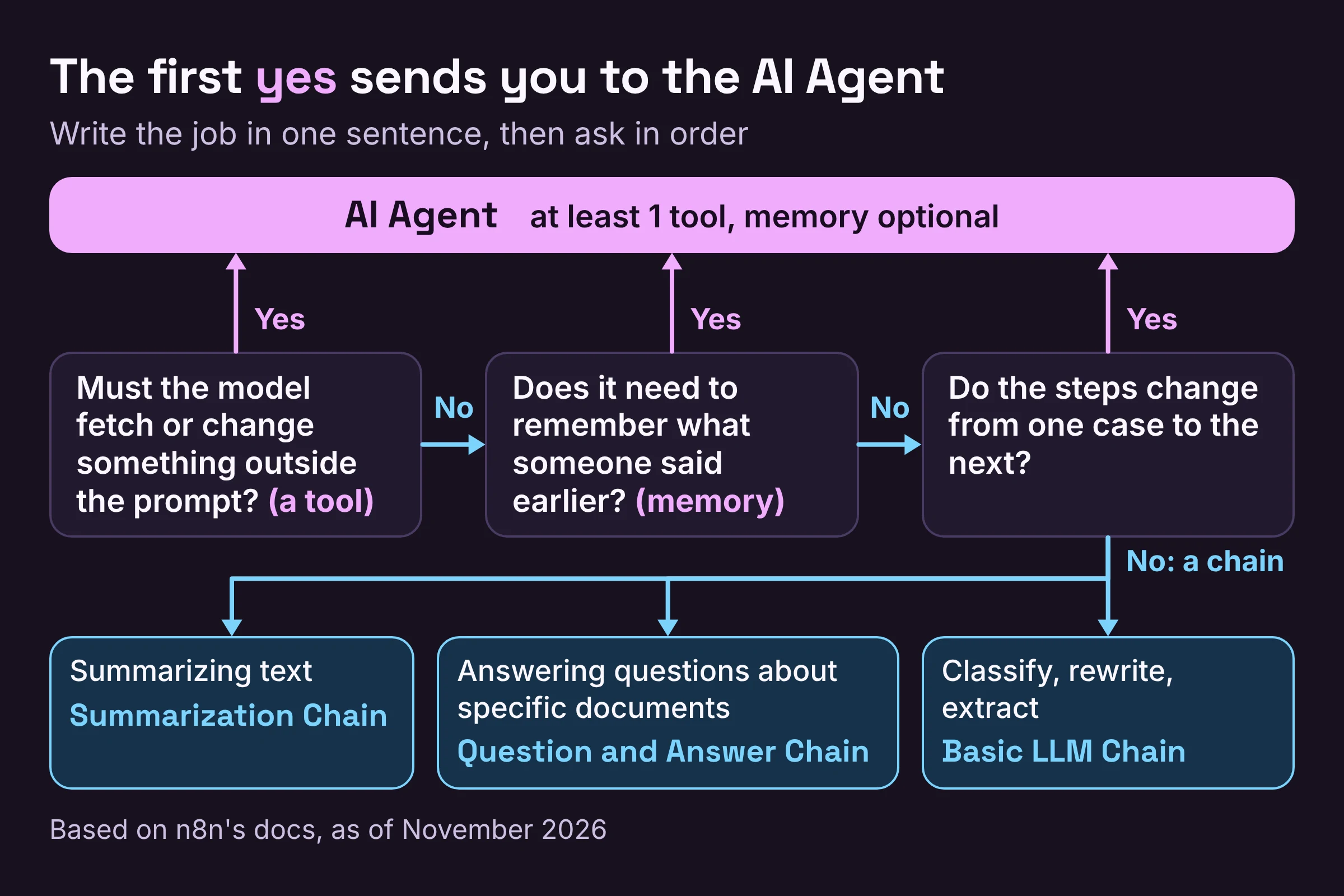
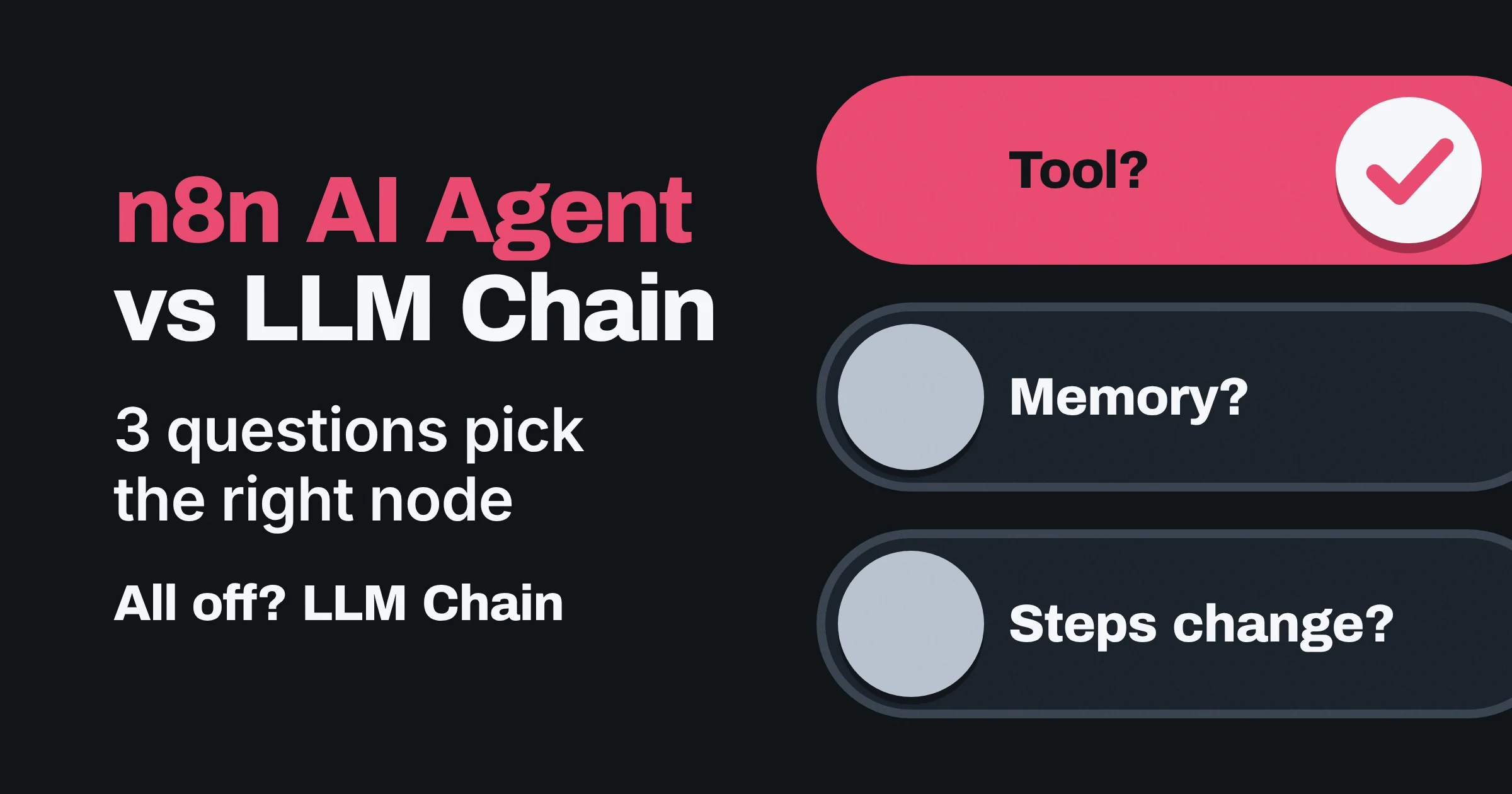
Run these three questions in order. The first yes sends you to the AI Agent; three no answers mean a chain will do the job with fewer moving parts.
- Does the model need to fetch or change something outside the prompt? Searching a spreadsheet or calling another workflow both count as tools, and the Basic LLM Chain doesn't support tools.
- Does it need to remember what someone said earlier? n8n's docs are direct here: if your workflow needs memory, use an agent, because chains can't remember previous user queries.
- Do the steps change from one case to the next? If you can draw the steps as a fixed flowchart, build that flowchart, and don't pay the agent to guess it.
Here is the rule applied to jobs you might automate this week.
| Everyday job | Tool? | Memory? | Steps vary? | Best for |
|---|---|---|---|---|
| Tag each support email as billing, bug or sales | No | No | No | Basic LLM Chain with a Structured Output Parser |
| Rewrite product descriptions in your brand voice | No | No | No | Basic LLM Chain |
| Turn a long meeting transcript into a recap | No | No | No | Summarization Chain |
| Answer staff questions about the HR policy document | No | No | No | Question and Answer Chain |
| Website chat that looks up an order and remembers the order number | Yes | Yes | Yes | AI Agent with a tool and Simple Memory |
| Check a lead in your CRM, then decide between drafting an email or a call note | Yes | No | Yes | AI Agent |
Most everyday text jobs land on the chain side. That is good news: a chain follows the same steps on every run, which makes it easier to test. For the same idea outside n8n, our guide to AI agents vs AI automation compares fixed workflows with agents in general.
How does the AI Agent compare with n8n's other LLM chains?
As of November 2026, n8n has three chain nodes: the Basic LLM Chain, the Question and Answer Chain and the Summarization Chain. n8n's docs say none of them support memory, and the AI Agent is the only one of the four that can use tools and memory.
| Node | What it does, per n8n's docs | Tools or memory | Best for |
|---|---|---|---|
| Basic LLM Chain | Uses the prompt you set, plus an optional parser for the response | Neither | Classifying, rewriting, extracting |
| Question and Answer Chain | Answers questions about specific documents | Neither | A policy handbook your staff keep asking about |
| Summarization Chain | Takes an input and returns a summary | Neither | Feed it a transcript, get the recap |
| AI Agent | Decides which tools to call and can use memory | Both: at least 1 tool, memory optional | Lookups, actions and multi-message chats |
On the agent side there is just one node. n8n's docs say its agent type setting is deprecated from n8n 1.82.0, and every AI Agent node now works as a Tools Agent. So if an older tutorial asks you to pick an agent type, it was written for an earlier version.
One naming trap: n8n also has a separate Agents feature, in Preview as of November 2026, which is not the AI Agent node. There, one turn with an agent counts as one execution, drawn from the same quota as your workflows.
How do you force the n8n AI Agent to use its tools?
To get an n8n AI Agent to use its tools, write each tool's description as an instruction, back it up in the system message, and move any must-run step into a normal node outside the agent. As of November 2026, n8n's docs describe the first two levers but don't explain why an agent sometimes answers in plain text instead of calling a tool, so treat them as strong nudges, not guarantees.
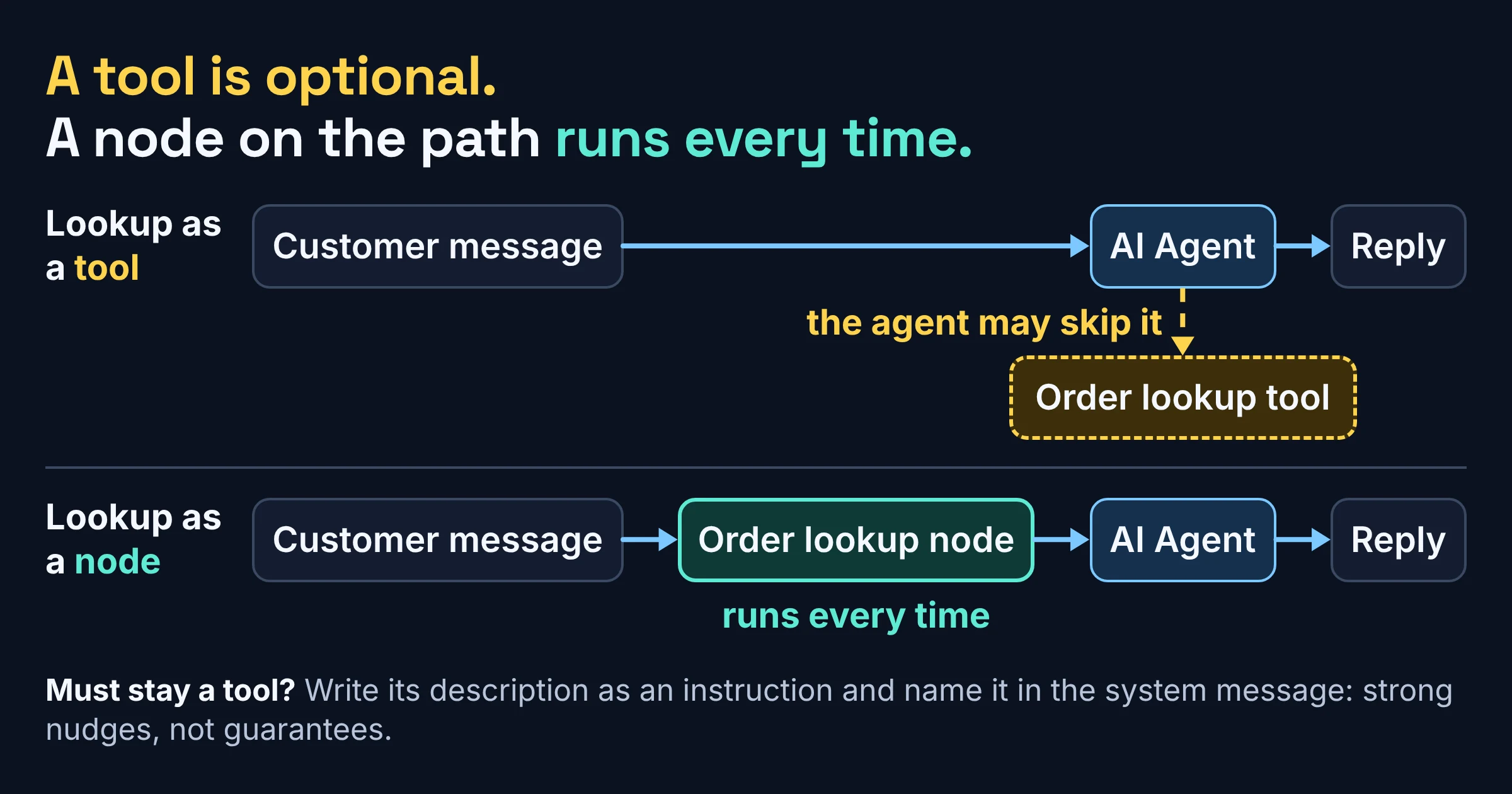
You're in good company if this happens: more than one n8n community forum thread is about an agent that won't use its tools, or replies in text instead of calling the tool you configured. Work through this checklist in order.
- Write the tool description as an instruction. n8n's Call n8n Workflow Tool docs say the description "tells the agent when to use this tool". So write Use this to look up shipping status whenever the user mentions an order number, not just Order tool.
- Back it up in the system message. n8n says the system message guides the agent's decision-making, so name the tool and the moment to use it: Before answering any delivery question, check the order lookup tool.
- Turn on Return Intermediate Steps. It adds the steps the agent took to the output, so you can see whether it skipped the tool or called it and ignored the answer.
- Move must-run steps out of the agent. If a lookup has to happen every single time, make it a normal node before the agent. A tool is something the agent may choose; a node on the workflow's path runs every time.
- Add a checkpoint on risky tools. You can require human approval before the AI Agent runs specific tools, which is handy for anything that sends, deletes or pays.
Our walkthrough of multi-agent workflows with n8n and Claude MCP shows a human approval step in a real workflow.
Running a model on your own machine? An n8n community forum thread reports a locally hosted model that couldn't call tools at all, so test with one simple tool before you build around it. Our guide to running AI locally with Ollama, LM Studio or llama.cpp covers the setup side.
How does memory work in the n8n AI Agent?
The n8n AI Agent remembers a conversation only when you attach a memory sub-node, such as Simple Memory, and n8n's docs say memory keeps a history of previous messages so the chat can carry on. As of November 2026, n8n's Tools Agent docs also warn that "Memory doesn't persist between sessions."
Say a customer types their order number in the first message and asks so where is it? two messages later. With memory attached, the agent still has the number. Without it, the agent has to ask again, and your customer sighs loudly at their screen.
Simple Memory has two settings worth knowing:
- Session Key: the key used to store the memory in the workflow data. Think of it as the label on a folder: messages filed under the same key are read back together.
- Context Window Length: how many previous interactions the model considers for context. The Simple Memory docs page doesn't state a default, so set it yourself rather than guessing.
The Basic LLM Chain has no memory slot at all. If you catch yourself pasting earlier messages into its prompt to fake a conversation, that's your sign to switch to the agent.
What goes in the user message vs the system message?
In both n8n nodes, the user message is the input for this particular run, and the system message is the standing instruction sent along with it. As of November 2026, n8n's docs say the Basic LLM Chain's system message helps guide the model in what it should do, and the AI Agent's system message guides the agent's decision-making.
Here is the split for the email-tagging job from the table above:
System message: You sort customer emails. Reply with one label: billing, bug or sales.
User message:   [the email body from the previous node]
A quick test: if a line would be the same for every email, it goes in the system message. If it belongs to this one email, it goes in the user message.
The prompt can come from the previous node automatically, or you can set it yourself in the node. In the Basic LLM Chain docs, the automatic option expects a field called chatInput from the previous node, so set the prompt yourself if your data arrives under another name.
Two error messages point straight at this setup:
No prompt specifiedoccurs when the agent expects to get the prompt from the previous node automatically. Check what the previous node actually sends.A Chat Model sub-node must be connectedappears when n8n tries to run the node without a chat model connected. Plug one in, then run it again.
Is the n8n AI Agent free to use?
n8n doesn't bill the AI Agent node separately: as of November 2026, n8n's pricing page says pricing is based on monthly workflow executions regardless of complexity, and n8n's docs say the self-hosted Community edition is free. If you connect your own model API key, your model provider bills that usage on its own terms.
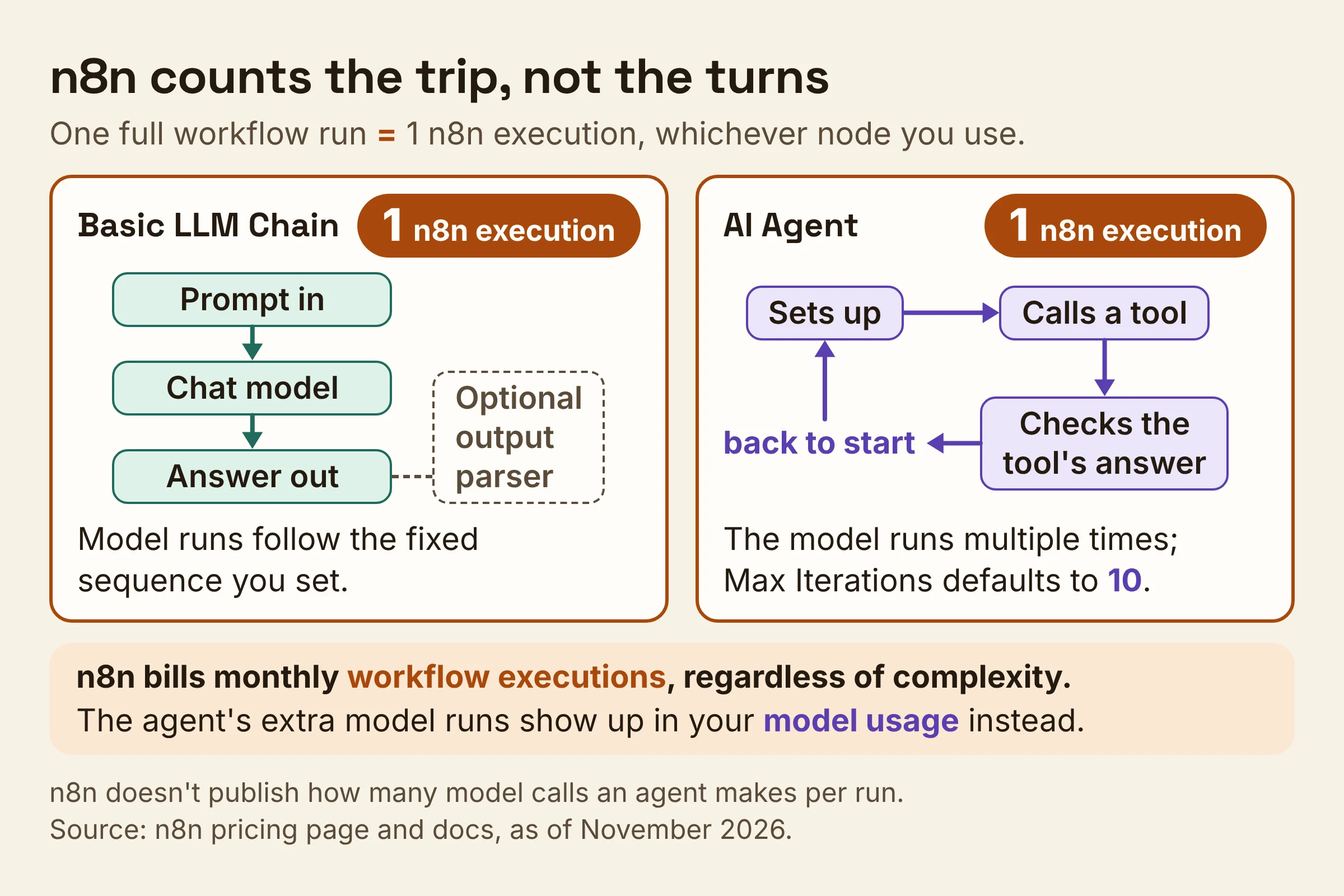
An execution, per n8n, is a single run of your entire workflow, and the number of steps or the amount of data doesn't change the count. So a workflow where the agent sets up, calls a tool and then checks the tool's answer is still one execution, exactly like a one-step Basic LLM Chain workflow. n8n counts the trip, not the turns.
The difference shows up in your model usage instead. n8n doesn't publish how many model calls an agent makes per run, beyond saying it runs multiple times. Its Max Iterations option, which sets how many times the model runs to try to produce a good answer, defaults to 10.
n8n's pricing page doesn't list model token prices, so check your provider's own pricing before you put an agent on a busy inbox.
If you're on the n8n Cloud trial, its limits are 1,000 executions, 5 concurrent executions, a 180-second execution timeout and 1 team project. An agent that loops through several slow tools has more to fit inside that timeout than a single chain call.
To pay n8n nothing at all, self-host. n8n says you can run the Community edition for free with almost the complete feature set, and registering it with your email gets you a free license key. Our guide to building your first AI agent for free includes the self-hosted n8n route.
So which n8n node should you start with?
Start with the Basic LLM Chain for any fixed text job, and reach for the n8n AI Agent the moment a tool, memory or changing steps enter the picture.
- Pick the Basic LLM Chain if the job is one prompt in, one answer out: classify, rewrite, extract.
- Pick the Summarization or Question and Answer Chain if you are summarizing text or answering questions about specific documents.
- Pick the AI Agent if the model must call a tool, remember the chat, or decide its own next step.
Do this next:
- Write the job in one sentence, such as tag each support email as billing, bug or sales, then run the three questions on it.
- If all three answers are no, build a Basic LLM Chain, and add a Structured Output Parser if another node needs clean fields.
- If any answer is yes, start the agent with one tool, a one-line description of when to use it, and Return Intermediate Steps switched on so you can watch what it does.
The trial limits and node settings above come from n8n's docs and pricing page as checked in November 2026, and they can change between releases.