




Plagiarism Detector

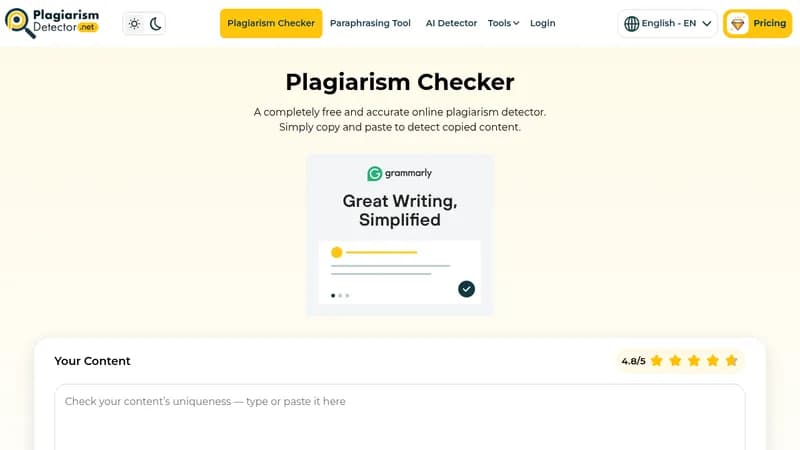
Detect plagiarism in text with accurate percentage reports

Monthly Visits: 1.6M
Free
Free Version
API Available
Visit Website
Plagiarism Detector

What is Plagiarism Detector?

This tool scans your text against the internet and databases to check for copied content. It provides a detailed report showing what's unique or plagiarized, along with links to original sources. This helps you avoid legal, academic, and professional issues by ensuring your work is original.

Key Features of Plagiarism Detector

  1. 1

    Free Usage

    Check for plagiarism unlimited times without any cost

  2. 2

    Deep Analysis

    Scans text thoroughly for comprehensive plagiarism detection

  3. 3

    File Upload

    Upload documents or URLs for easy plagiarism checking

  4. 4

    Multilingual Support

    Supports over 150 languages for global use

  5. 5

    Accurate Results

    Provides precise plagiarism percentages and source matches

Plagiarism Detector AI Tool Use Cases

  • 📝
    Check academic essays for originality
  • ✍️
    Verify blog posts for duplicate content
  • 🔍
    Scan websites for copied material
  • 📚
    Assist teachers in grading assignments
  • 🖼️
    Perform reverse image search for duplicates

FAQs from Plagiarism Detector

How does the plagiarism checker work?

It analyzes text based on lexical frequencies, word choice, and matching phrases, then compares it against databases and the internet to detect plagiarism.

Is the plagiarism checker free to use?

Yes, it is completely free with unlimited searches and no charges.

What languages does the tool support?

It supports over 150 languages for plagiarism detection.

Can I upload files or URLs for checking?

Yes, you can upload files or enter URLs as an alternative to copying and pasting text.

Pros & Cons of Plagiarism Detector

Pros (4)

  • Completely free with no usage limits
  • High accuracy with detailed plagiarism reports
  • Supports multiple languages and file upload options
  • Fast and immediate checking with unlimited searches

Cons (2)

  • Web-based only, no mention of mobile or desktop apps
  • May not detect all forms of plagiarism in highly complex texts

More Info About Plagiarism Detector

Who is using plagiarism detector?

This tool is best for:

  1. Students
  2. Teachers
  3. Writers
  4. SEO Specialists

Plagiarism Detector's Tags

Explore more niche AI tool websites by clicking on a tag* (works only if it has enough tools).

#ContentCreation #AcademicTools#PlagiarismChecker#OriginalityCheck#DuplicateContent

Website Analytics of Plagiarism Detector

Plagiarism Detector Website Traffic & SEO Analysis:

Recent data shows that Plagiarism Detector has 1.6M monthly visits (-2.9% decrease from the previous month), 46.0% bounce rate, and average 2.54 pages per visit.
Traffic is primarily driven by 6 different sources, with users from 5 countries worldwide, led by United States contributing 18% of total traffic. SEO performance is shown by 5 tracked keywords, with "plagiarism checker" being the top-performing keyword with 1.1M monthly searches. See below for more info.

Monthly Visits

1.6M

(-2.9%)

Pages per Visit

2.54

Bounce Rate

46.0%

Average Time on Site

2m 35s

Traffic Trend(Aug 2025 - Oct 2025)

Loading chart...

Top Keywords

SEO KeywordVolumeCPC
plagiarism checker
1.1M$0.53
plagiarism checker free
162.8K$0.74
check đạo văn
36.6K$0.08
detector de plagio
102.1K$0.12
plagiarism detector
37.5K$0.63

Traffic Sources Distribution

Traffic Share by Source

Loading chart...

Source Breakdown Details

SourceTraffic Share
Direct
34%
Search
63%
Referrals
3%

Global Traffic Distribution

Traffic Share by Country

Loading chart...

Geographic Breakdown Details of top 5 countries

Country NameTraffic Share
United States18%
India9%
Philippines8%
Spain7%
Vietnam4%
Analytics data is estimated (from third-party analytics providers) and for reference only.

🚀 Plagiarism Detector Launch Badge

Promote your Toolbit Launch by using the badge on your website. It can be inserted on your home page or footer easily.

How to use: Simply copy and paste the embed code into your homepage or footer HTML to display it instantly and build community support.

ToolBit badge

Reviews for Plagiarism Detector