






Zupport AI

Automate SaaS customer support with AI-powered issue resolution

Monthly Visits: 2.8K
Subscription
Visit Website
Zupport AI

What is Zupport AI?

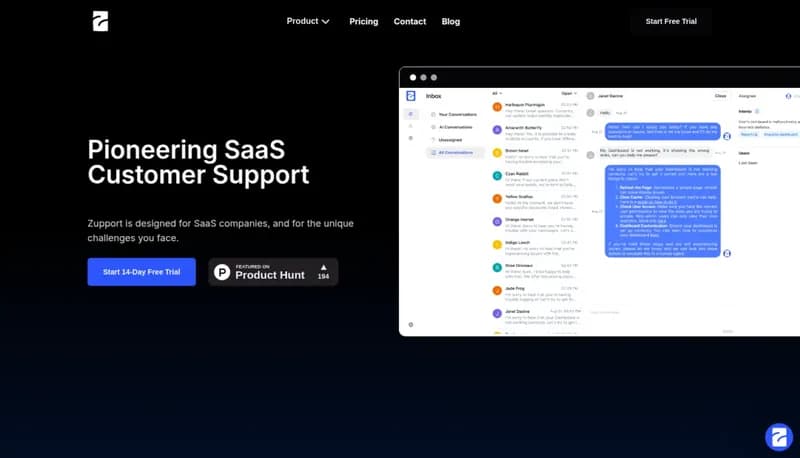
Zupport AI helps SaaS companies streamline customer support by automatically handling duplicate issues and providing smart solutions. It uses AI to understand user needs and enriches bug reports with technical details. The platform also collects feature requests directly within your app and syncs conversations with Slack teams.

Key Features of Zupport AI

  1. 1

    AI Intent Detection

    Understands user messages to provide context-aware responses

  2. 2

    Duplicate Handling

    Automatically detects and resolves repeated customer issues

  3. 3

    In-App Requests

    Collects feature suggestions without users leaving your app

  4. 4

    Bug Enrichment

    Adds technical context like console errors to reports

  5. 5

    Slack Sync

    Keeps teams updated by integrating support conversations

Zupport AI Tool Use Cases

  • πŸ”„
    Automate duplicate ticket resolution
  • πŸ€–
    AI-powered support responses
  • πŸ“₯
    Collect in-app feature requests
  • πŸ›
    Enrich bug reports automatically
  • πŸ’¬
    Sync support chats with Slack

FAQs from Zupport AI

Does Zupport integrate with our existing tools?

Offers Slack synchronization and in-app feature request collection

How does AI improve support responses?

Uses intent detection to provide context-aware replies to users

Is this suitable for non-SaaS businesses?

Specifically designed for SaaS companies' unique needs

Pros & Cons of Zupport AI

Pros (4)

  • SaaS-specific solution with tailored features
  • Reduces repetitive support tasks through AI automation
  • Direct integration with product development via feature requests
  • Seamless team collaboration through Slack sync

Cons (2)

  • Exclusively focused on SaaS companies
  • Limited platform support beyond web/Slack

Zupport AI's Pricing Plans

For the latest pricing info, pleaseΒ visit the official website

More Info About Zupport AI

Who is using zupport ai?

This tool is best for:

  1. SaaS company support teams
  2. Customer success managers
  3. Product managers in SaaS

Zupport AI's Tags

Explore more niche AI tool websites by clicking on a tag* (works only if it has enough tools).

#CustomerSupportAI #SlackIntegration#SaaSSupport#HelpDeskAutomation#FeatureRequestTool

Integrate Zupport AI With This App

Zupport AI can be integrated with this app or service:

  • Slack

Zupport AI Social Media

Visit Zupport AI on social media to stay updated with the latest news and features.

Website Analytics of Zupport AI

Zupport AI Website Traffic & SEO Analysis:

Recent data shows that Zupport AI has 2.8K monthly visits (529.4% increase from the previous month), 39.0% bounce rate, and average 1.04 pages per visit.
Traffic is primarily driven by 6 different sources, with users from 3 countries worldwide, led by United States contributing 50% of total traffic. SEO performance is shown by 5 tracked keywords, with "aicustomer service statistics" being the top-performing keyword with 150 monthly searches. See below for more info.

Monthly Visits

2.8K

(+529.4%)

Pages per Visit

1.04

Bounce Rate

39.0%

Traffic Trend(Apr 2025 - Oct 2025)

Loading chart...

Top Keywords

SEO KeywordVolumeCPC
aicustomer service statistics
150-
multilingual information and support
120-
toolboxai – ai tools directory saas
70-
aidirectories
60-
also, our queries are still not addressed -- improve this statement
60-

Traffic Sources Distribution

Traffic Share by Source

Loading chart...

Source Breakdown Details

SourceTraffic Share
Direct
27%
Search
27%
Social
4%
Referrals
40%
Paid Referrals
1%

Global Traffic Distribution

Traffic Share by Country

Loading chart...

Geographic Breakdown Details of top 3 countries

Country NameTraffic Share
United States50%
India30%
Philippines20%
Analytics data is estimated (from third-party analytics providers) and for reference only.

πŸš€ Zupport AI Launch Badge

Promote your Toolbit Launch by using the badge on your website. It can be inserted on your home page or footer easily.

How to use: Simply copy and paste the embed code into your homepage or footer HTML to display it instantly and build community support.

ToolBit badge

Reviews for Zupport AI