Your best video took you a week to make. It took the dubbing model about four minutes to turn it into Spanish, German, and Japanese, and in all three of them your name is now pronounced wrong.
That is the honest shape of AI video dubbing in late 2026. The voice cloning is genuinely good, the lip sync has stopped being a party trick, and the price has collapsed from the twenty to fifty dollars per finished minute that professional dubbing studios still charge to something you can expense on a starter plan. The bottleneck moved. It is no longer producing the dub. It is checking whether the dub is faithful.
This is a practical guide to both halves: what the tools actually do to your voice and your video, and the spot-check protocol that separates a usable localization from an embarrassing one.
What dubbing actually does to a voice
Every serious dubbing tool in 2026 runs roughly the same pipeline under the hood. First it transcribes your audio with speech-to-text. Then it translates the transcript. Then it regenerates the speech in the target language using a clone of your voice, and finally it aligns the new audio with your original timing.
The step that matters for quality is the third one, and it is where the 2026 generation of tools made its biggest leap. Older models generated the translation as flat text-to-speech and then tried to make it sound like you. The current ElevenLabs model, Dubbing v2, is audio-to-audio: it "conditions on the original performance," in the company's own words, so your tone, pacing, and emotional delivery carry into the translated track rather than being re-synthesized from a script. YouTube's Expressive Speech, which the platform rolled out to every channel in February 2026, is built to solve the same problem: the dub should sound excited where you sounded excited, not read your words in a level voice.
What the pipeline still costs the original speaker, even in the best case:
- Performance compression. When your target language needs more syllables than your source one (German and Spanish are the classic offenders), the dub has to speed up or trim to fit your slot. Pauses you used for effect disappear first.
- Name drift. Your name, your company's name, and every proper noun in the script are the least reliable tokens in the chain, because they pass through both the transcription and the translation step with no dictionary entry to anchor them.
- Emotional flattening at the extremes. Whispered asides, shouted punchlines, and sarcasm survive translation the worst, because they sit at the edges of what the voice model learned.
- Background audio casualties. Music, effects, and overlapping speakers all degrade the transcription step that everything else depends on. Dubbing tools now handle them better than they used to, but "better" is not "cleanly."
The upstream translation is still the dominant failure mode. A perfect voice clone reading a subtly wrong sentence is worse than an obviously robotic voice reading the right one, because nobody notices the first kind.
The spot-check protocol: ten minutes that saves your reputation
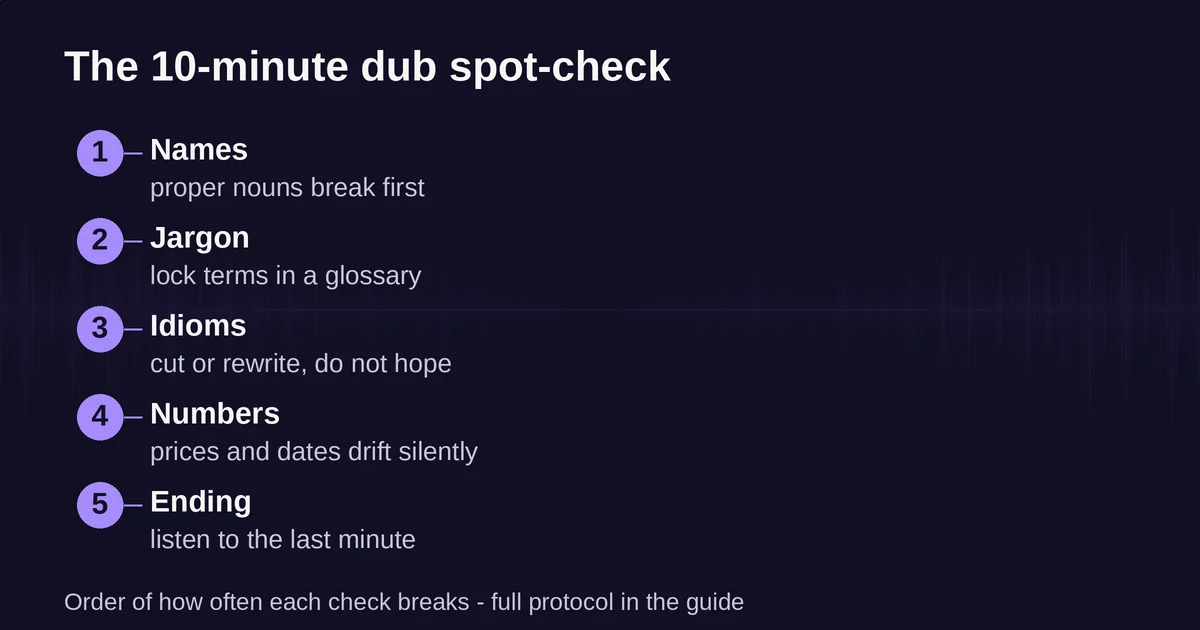
The core workflow is the same no matter which tool you use: take one representative 3 to 5 minute clip, dub it into every language you plan to publish, and manually check the output before you commit to the whole back catalog. Here is what to check, in order of how often it breaks.
1. Names, first and hardest. Play the first thirty seconds of each dub and listen only for proper nouns: your name, guests, companies, products, places. Mispronunciation is the best case; silent mistranslation is worse (a German surname "translated" into its literal meaning is a real category of error). If the tool offers pronunciation control, fix names there before anything else.
2. Technical terms and jargon. Every field has words that must not be translated. If you talk about "tables" and "joins" in a database video, a French dub that renders them as physical furniture is technically correct and useless. HeyGen solves this with its Brand Glossary, which locks the pronunciation and translation of specific terms across every run. Rask offers a translation dictionary on its business tiers. Use one of these, because fixing jargon per-video does not scale.
3. Idioms and humor. This is where you decide between fixing and cutting. An English pun will not survive into Japanese, and the dub will either flatten it or invent something adjacent. If a joke depends on wordplay, the right call is usually to cut the joke or replace it in the localized script, not to hope. Sarcasm is worth a listen too, because deadpan delivery across languages often reads as sincerity.
4. Numbers and units. Prices, dates, and measurements go wrong in ways that are invisible in audio and expensive in consequence. "Fifty dollars" becoming "fifteen dollars" in one language track is the kind of error you only catch by checking, and only if you check deliberately.
5. The ending and any call to action. Translations drift the most at the end of long clips, and your call to action is the one part of the video that has a job. Listen to the last minute of every dub every time.
How much of the dub do you need to hear? A useful heuristic: listen to the first minute, the last minute, and thirty seconds around each technical term, in a language you can judge or with a native speaker you trust. Full review of every second is what you do for flagship content; spot-checking is what you do for everything else, and it is the difference between localized and simply loud.
YouTube itself, now that auto-dubbing is on by default for eligible channels, tells creators to review generated tracks in Studio and unpublish the ones that came out wrong, especially for videos with rapid overlapping speech, heavy background noise, or specialized jargon. The platform is not being cautious. It is describing exactly what breaks.
Lip sync vs voice cloning: you are choosing what to preserve
The interesting tradeoff in 2026 is not between tools. It is between two things the dub can try to keep: the speaker's mouth movements matching the new audio, and the speaker's actual voice.
HeyGen's Video Translation is the lip-sync-first option. Its three engines spell out the tradeoff in credit prices: Audio Only costs 4 credits per minute with no lip sync, Speed costs 6 with natural lip sync, and Precision costs 10 for the highest-quality sync that handles side profiles, occlusions, and speaker switches. A talking-head course video or an interview looks dramatically better synced, because a mouth moving against the words is the one artifact casual viewers notice immediately. But re-rendering a face costs quality budget: lip sync is where uncanny artifacts live, and it is the most computationally expensive thing in the pipeline, which is why it is the most expensive line on the menu.
Rask charges for lip sync in time rather than credits: a standard lip-sync job consumes one minute of your allowance per minute of video, while its Enhanced Lip-sync (currently in beta) consumes three additional minutes per translated minute. A one-minute clip into one language with Enhanced sync burns four minutes of your plan. Lip sync is a multiplier on your localization budget, so reserve it for content where the face is the point.
ElevenLabs, by contrast, is the voice-first option. Its Dubbing product preserves the original speaker's voice characteristics and supports 90+ languages with regional dialect control (Castilian versus Latin American Spanish, Brazilian versus European Portuguese), but it is an audio product: what you get back is a dubbed track, not a re-rendered face. For voice-heavy content like podcasts, lecture recordings, screen-capture tutorials, and anything where the speaker is not on camera, this is strictly the better trade. You keep the voice that people came for and skip paying for pixels nobody is watching.
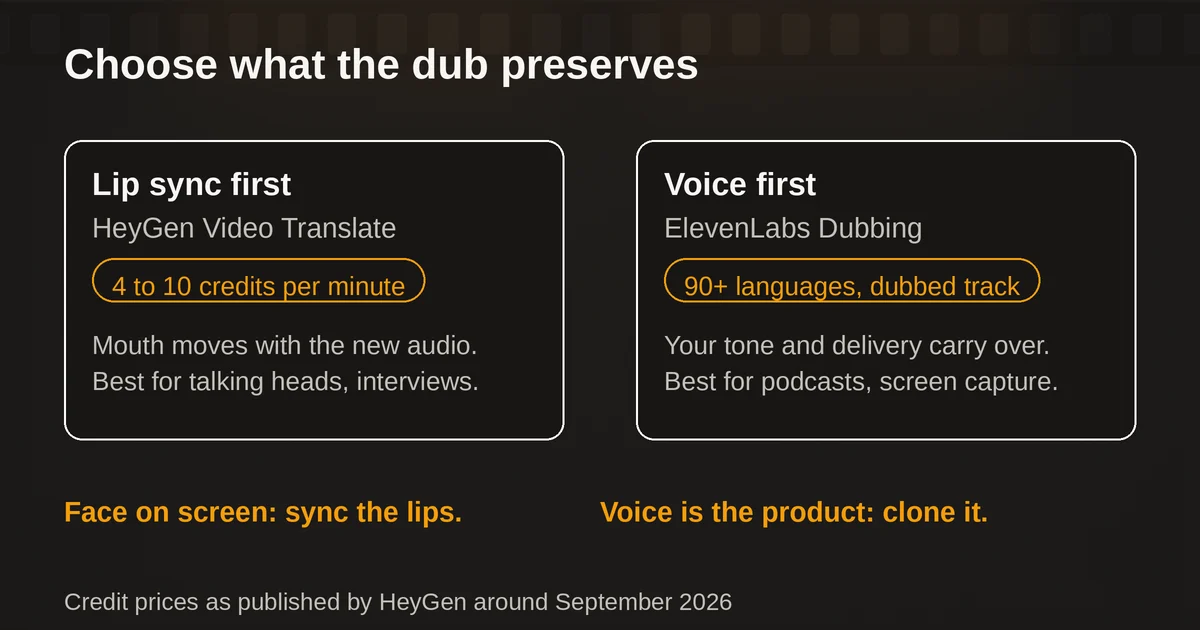
The decision rule is simple. If your face is on screen and the video is short, sync the lips. If your voice is the product, clone the voice and spend nothing on the mouth. And if you are publishing a dubbed track on YouTube, note that the platform's own lip-sync feature is still in the pilot stage as of September 2026, so third-party tools are the reliable path for that last mile.
The tool landscape in September 2026
All three of the dedicated dubbing tools named in most "best AI dubbing" roundups are alive and actively shipping this year. Here is where each actually stands, verified against first-party pages in September 2026.
ElevenLabs Dubbing is the audio-first heavyweight. Dubbing v2, the current model, handles 90+ languages, automatic speaker detection, and background audio better than its predecessor, and it is available on every plan including the free tier (free dubs are watermarked with no removal option, paid dubs are not). Billing is per minute of source media, per target language: 2,000 credits per minute for automatic dubbing without a watermark, against Creator-plan pools of 121,000 credits a month at $22. That works out to roughly 40 minutes of no-watermark dubbing a month, enough for a few localized clips and a clear reason to plan your language list before you click. One real limitation: the editable Dubbing Studio product is v1-only and in maintenance mode, and transcript editing through the API requires an Enterprise workspace. Cheap automatic dubbing and post-hoc editing do not coexist here.
HeyGen Video Translate is the face-first option, built into a broader avatar-video platform. Translation supports up to 10 target languages per job, a single-language source, and a script proofread step on higher tiers that is genuinely useful for the spot-check workflow: you edit the translated text before the dub renders, which is cheaper than re-dubbing. Brand Glossary locking is the feature that makes recurring localization sane. Two caveats from its own help center: credits are shared across everything HeyGen does, so a month of avatar videos eats your translation minutes, and per-video duration caps (30 minutes on Creator and Pro, 60 on Business) apply no matter how many credits you have left.
Rask AI is the localization-workflow specialist, now part of Brask Inc., and it is very much a going concern: SOC 2 Type II, a dubbing API, a built-in editor, translation dictionaries, and plans from $60 a month for 25 minutes on monthly billing (its site is running a "prices changing soon" promo as I write, so lock in yearly rates if you are signing up now). Rask's pitch is that dubbing sits inside a review workflow rather than a one-shot generation, which matches how localization actually gets done when more than one person is involved.
And the free floor: YouTube auto-dubbing. In February 2026, YouTube opened auto-dubbing to every creator on the platform, in 27 languages, at no cost. Expressive Speech (which carries the creator's original emotion into the dub) is live in eight languages including English, Spanish, and Hindi, and the feature is on by default for eligible channels. In December 2025, more than six million daily viewers watched at least ten minutes of auto-dubbed content. The price is unbeatable and the quality is exactly what "free and automatic" implies: the tracks carry a label, creators cannot fine-tune the voices, and the failure modes are the ones YouTube's own guidance names: names, jargon, humor, overlapping speech. Treat it as a discovery layer that occasionally produces something publishable, not as your localization pipeline.
There are also dozens of AI-dubbing and AI-voice tools built on top of these engines, offered by smaller brands and agencies. Some are genuinely useful wrappers; many are the same API with a markup and worse limits. Before paying a third party for dubbing, check whether the product underneath is one of the three above.
Consent and disclosure: the part that is now law
Dubbing is a voice-cloning technology wearing a translation hat, and the rules around it tightened meaningfully in 2026. Three things to know.
First, consent. If you are dubbing yourself, you are on solid ground everywhere. If you are dubbing a video featuring someone else, you need their permission to clone their voice into new languages, full stop. The contract with a voice actor settles whether you may use the voice; it does not settle whether the audience must be told, which brings us to the second point.
Second, the EU AI Act. Article 50 transparency obligations became enforceable on August 2, 2026. If you publish dubbed content that reaches EU viewers, the disclosure duty sits with you as the deployer, not with the tool vendor. The European Commission's guidance is explicit on a point that catches experienced producers: a watermark in the file does not count as disclosure to the audience, and consent does not remove the transparency obligation. If the dub generates phrases the speaker never recorded, say so, in the description, in plain language. The vendor-side machine-readable marking obligations have targeted transitional relief toward December 2, 2026, but that is the vendor's problem, not yours.
Third, platform rules. YouTube's own disclosure policy explicitly lists "cloning one's own voice to create voice overs or dubs" among the things you do NOT need to label, and equally explicitly lists cloning someone else's voice among the things you DO. YouTube also states that disclosing AI content does not limit a video's reach or its monetization. So if you are on the fence about labeling an AI dub of yourself: the label costs you nothing, and the honest line in the description buys goodwill with exactly the viewers most likely to notice.
A verdict for each use case
Solo YouTube creator, audience in 3 to 5 markets. Turn on YouTube's auto-dubbing today and let it run; it is free, labeled, and on by default anyway. Then use HeyGen or ElevenLabs for the two or three languages where you actually have traction, with a manual spot-check of the first minute, the last minute, and every technical term. The paid dub earns its cost on the markets the free tracks proved exist.
Course and training content. HeyGen with lip sync (Speed engine) is the strongest fit: talking heads dominate this format, the Brand Glossary keeps terminology consistent across a whole curriculum, and the per-video 30-minute cap matches how most modules are chunked. Budget one full review pass per language with a native speaker before launch; training content is where a mistranslated instruction has real consequences.
Podcasts, lectures, screen-capture tutorials. ElevenLabs Dubbing. No face means no lip sync means no reason to pay for it. The voice-first trade keeps your delivery recognizable across 90+ languages and the per-minute pricing is predictable. Spot-check names and numbers and publish.
Marketing and brand campaigns. Rask or HeyGen with a human review workflow, and treat the EU disclosure rules as a design constraint, not a footnote. This is also the tier where professional human dubbing ($20 to $50 per finished minute per language) still makes sense for flagship spots: AI is for the long tail of markets a human studio would never fit in the budget.
Comedy and wordplay-heavy content. Do not automate the humor. Dub the information, cut or rewrite the jokes per language, and expect to be in the editor more than the dashboard. The tools are honest about this; YouTube names humor and idioms as a known weak spot in its own guidance.
FAQ
Can AI dubbing preserve my original voice across languages? Yes, that is the core feature of every tool in this article. ElevenLabs Dubbing v2 conditions on your original performance so tone and delivery carry into 90+ languages; HeyGen clones the speaker's voice into the target language with an option to keep your accent (base language) or adopt a native one (localized variant); Rask brands the same capability as emotion-preserving voice cloning. Preservation is strong for tone and identity, weakest for sarcasm, whispers, and shouted delivery.
Is AI video dubbing good enough to publish without review? For names and jargon, no. Translation errors upstream of a convincing voice clone are the most common failure, and they are exactly the errors a non-speaker cannot hear. Spot-check the first minute, the last minute, every proper noun, every technical term, and every number in each language before publishing. That ten minutes per language is the difference between localization and liability.
Pricing and plan details are as published by the vendors around September 2026 and can change, and Rask in particular is running a price-change promotion at the time of writing. Confirm on the official sites before committing.
Curious why translation models mangle proper nouns and idioms in the first place? We wrote a plain-English breakdown of why AI hallucinates and what actually helps that goes one layer deeper. If you are assembling a broader productivity stack around your video workflow, our guide to the best AI tools for every job role covers what people actually use day to day. And if you are piping dubs through automated pipelines, the real risks of AI agents nobody talks about apply to your dubbing cron job too.
Pricing and plan details are as published by the vendor around September 2026 and can change - confirm on the official site.