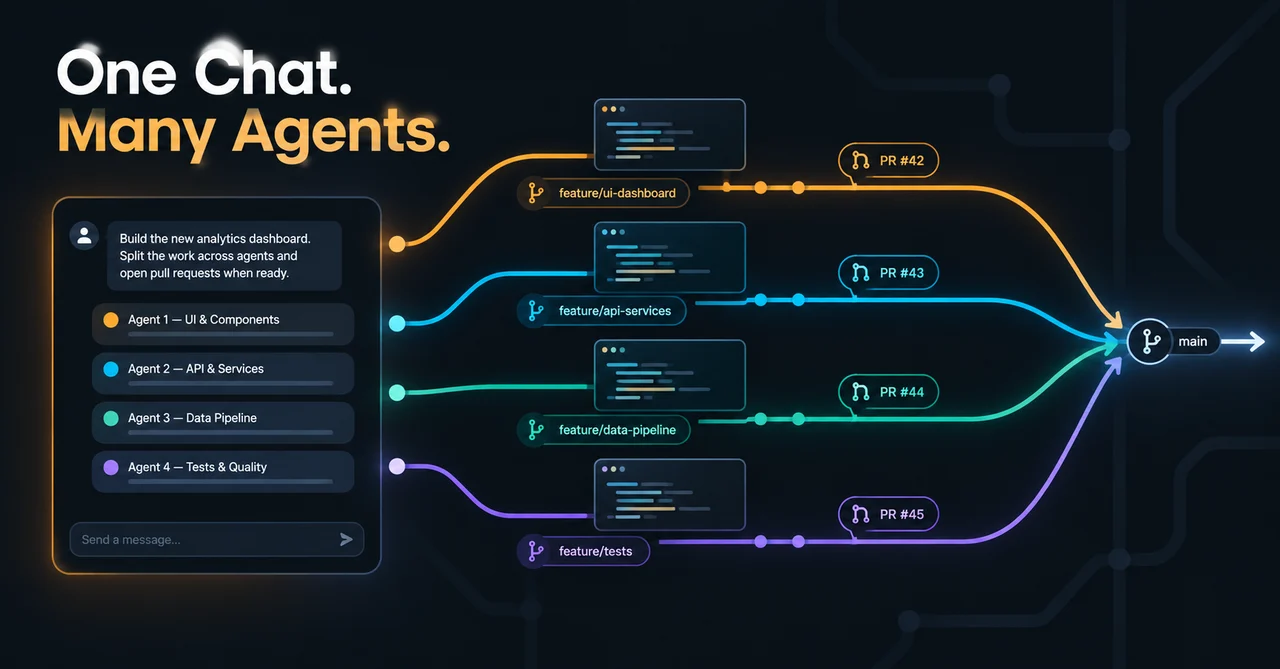
Anthropic's redesigned Projects in Claude Code, announced on September 17, 2026, is one always-on conversation where Claude acts as a coordinator that splits your work into parallel Claude Code cloud-session threads - each thread working on its own branch and its own copy of the repository, and all of them drawing on a shared project memory. Instead of juggling half a dozen sessions and pasting context between them, you brief one conversation the way you'd brief a chief of staff, and it decides how the work gets divided, routed, and tracked.
It is the clearest move yet by a major AI lab toward treating AI coding agent orchestration itself as the product. The interesting question is no longer just "can a coding agent finish a task?" but "can something above the agents remember the mission, delegate the pieces, and keep the whole effort coherent while you sleep?" Here is how the feature actually works, who gets it, what it costs, where the confusing naming came from, and the limitations that matter before any team leans on it.
What is Claude Code Projects?
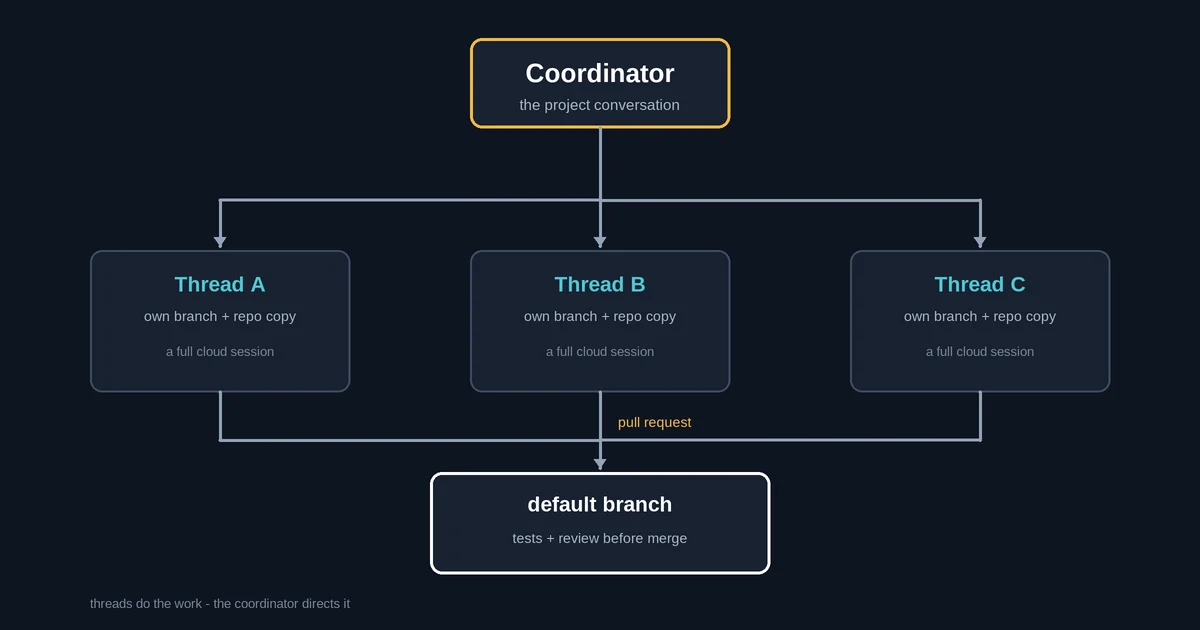
At its core, the redesigned Projects feature is a coordination layer built on top of Claude Code's existing cloud sessions. As Anthropic's launch post puts it, projects have threads that do the work and a coordinator that directs them. You brief Claude in the project conversation the way you'd brief a chief of staff, and it routes each request to a new thread or to a pre-existing one that is already working on something related.
The feature lives at claude.ai/code and in the Code tab of the desktop app. It is explicitly not part of the terminal CLI, and it is not available through Amazon Bedrock, Google Cloud Agent Platform, or Microsoft Foundry. That placement matters: this is not a new model and not a new CLI, it is a layer above the cloud sessions you may already use - a place to delegate, monitor, and steer a whole portfolio of agent work rather than one task at a time.
How the coordinator-and-thread model actually works
The project conversation is one long-running session where Claude acts as the coordinator. It decides what becomes a thread, keeps track of every thread it has started, checks in, and follows through on work in progress. You can keep talking to it as requirements evolve rather than waiting for one task to finish before issuing the next.
Each thread is a separate Claude Code cloud session with its own context window, working on one piece of the effort on its own branch and its own copy of the repo. When the work calls for a pull request, the thread opens one, and when it is done, it reports back. Threads can go further and split their delegated work into pieces using subagents, loops, and workflows, so large assignments finish faster. With repositories connected, threads open PRs and run tests on their own.
You configure each project's cloud environment, connectors, plugins, instructions, and model. By default, new projects run Opus everywhere - worker threads at high effort and the coordinator at low effort - and you can change the model and effort level for both the coordinator chat and the worker threads in Project settings. The model choice is worth attention because, as we'll get to below, it directly affects how fast you burn through your plan's usage limits.
What shared project memory does that a normal session can't
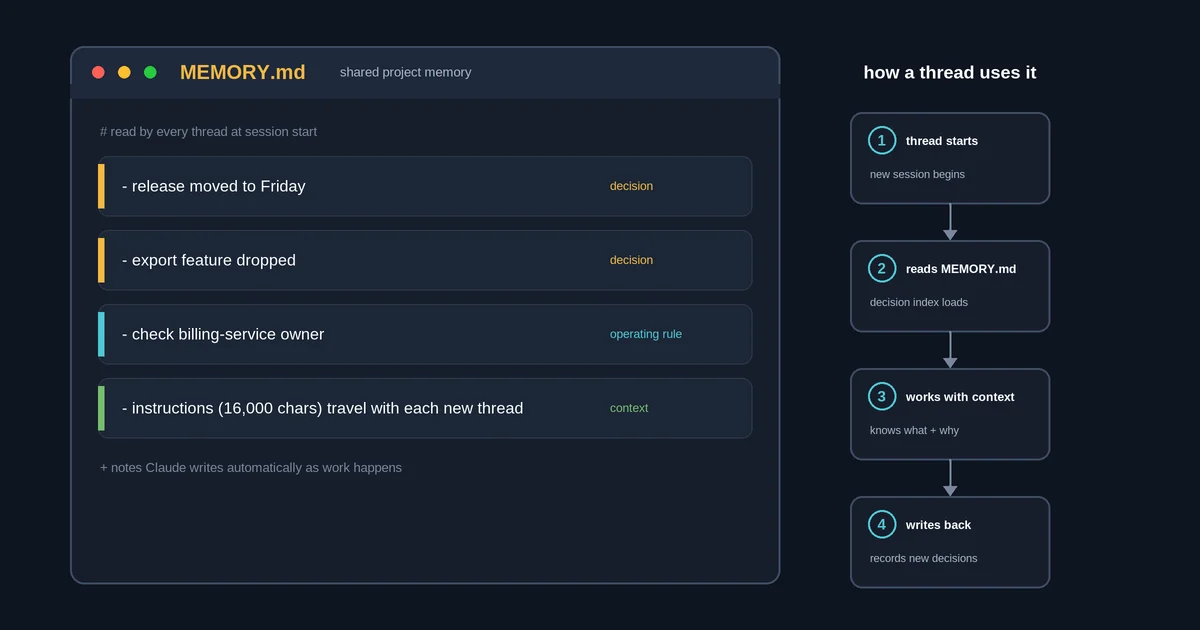
Every thread in a project adds to and draws from a shared memory. In Anthropic's own examples, Claude can remember that the release moved to Friday, why the export feature was dropped, or who to check with before touching the billing service. That last category is the quietly powerful one: not just facts, but operating instructions about who must be consulted before certain code is modified.
Under the hood, the mechanics are concrete rather than magical. Per the official docs, project memory consists of notes Claude keeps about the project - requirements, decisions, pitfalls - stored as files. Every thread reads the index file MEMORY.md when it starts and opens the other memory files when it needs them. Claude writes this memory automatically, and you can inspect it under Project settings > Memory. It is separate from the machine-local auto memory and from a repository's CLAUDE.md file.
On top of that, project instructions of up to 16,000 characters are sent to each new thread, so conventions and constraints travel with the work instead of living in a prompt you have to re-paste. The net effect, as Anthropic frames it, is a much reduced need for complex prompt engineering across sessions - the project remembers itself.
The library, the Overview panel, and steering from your phone
The Overview pane is the human's window into the fleet. It has four tabs: Threads, Library, Pull requests, and Routines. The Library holds both the files you added to the project and the artifacts Claude and its threads produced, so later work has a persistent pool of material to draw from. The Routines tab runs scheduled work as project threads - recurring jobs like triage or monitoring can live inside the same coordination structure as everything else.
Threads are grouped by state so you can triage at a glance: Ready for review, Waiting on you, Working, Landing, Idle, and Resolved. The panel is designed to surface what needs your attention, and Anthropic says you can steer any thread, even from your phone. Threads also keep working after you step away - even when your computer is offline, since they run in the cloud.
Worth being precise about: the primary sources say "even from your phone" but give no detail about a dedicated mobile app versus a browser, so treat that as remote supervision in general terms rather than a specific mobile product surface.
Claude Projects vs. Claude Code Projects: untangling the names
The naming is genuinely confusing, so let's untangle it. Classic Claude Projects - the ones in claude.ai chat and Cowork - are self-contained workspaces that combine chat history with a knowledge base. Per Anthropic's help center, free users can have up to five projects, paid plans add knowledge-capacity boosts, and Team and Enterprise plans can share them. The official docs state flatly that these are "a separate feature" with no threads and no coordinator.
VentureBeat offered the cleanest one-line framing of the difference: Claude Projects help Claude remember the context you gave it, while Claude Code Projects are designed to help Claude remember and coordinate the work it is doing. The older product is a knowledge container for conversations; the new one is an operational memory and dispatch system for agentic development. (If you have seen a claim that the original Claude Projects launched in June 2024, that date comes from VentureBeat's reporting rather than an Anthropic primary source.)
Who gets the beta, what it costs, and how fast you'll hit limits
At launch, the redesigned projects are in beta for select Claude Pro and Max subscribers who use cloud sessions in Claude Code and don't have any existing projects on the web or desktop. Anthropic says access expands to more Pro and Max users over the coming week, then to all of Claude including Team and Enterprise plans after that. A waitlist exists if you're on the right plan but don't have access yet. Existing projects on Pro and Max keep working as they do today during the rollout.
There is no standalone pricing. A project draws on the same plan limits as your other Claude Code sessions - and uses them faster, because each thread is a full Claude Code session and projects can run several at once. The docs are blunt that the Opus-at-high-effort default "draws on your plan fastest," and threads that hit five-hour or weekly limits auto-retry until the limit resets. You can check project-specific usage and dial the model and effort levels down in settings if the burn rate is too hot.
The practical takeaway: start with fewer, well-scoped threads and a cheaper model mix while you learn how the coordinator behaves with your workload.
How it compares with OpenAI Codex, GitHub, and Google Jules
Anthropic is not alone in recognizing the orchestration problem. OpenAI, GitHub, and Google have all moved toward asynchronous, parallel, longer-running agent workflows, and the competitive layer is shifting from "which agent writes better code" to "how do you delegate, monitor, and remember a portfolio of agent work." In other words, multi-agent coding is becoming the default way teams run AI development, and every major vendor is now building a manager layer for it.
OpenAI's Codex describes itself as a command center for agentic coding, with built-in worktrees and cloud environments so agents work in parallel across projects. The overlap with Claude Code Projects is substantial - both normalize parallel agents rather than treating concurrency as an advanced workflow. VentureBeat's analysis is that the notable difference in Anthropic's design is the explicit coordinator sitting above the worker threads: you keep talking to one persistent conversation, and Claude itself decides whether a new instruction joins an existing thread or spawns a new one.
GitHub's approach, as characterized by VentureBeat, leans on the repository itself as the control plane - tying agent sessions closely to branches, issues, pull requests, and CI. Google's Jules is an autonomous coding agent that clones repos to a cloud VM, plans, and opens PRs, with fully async multi-agent development and concurrent-task plans at higher tiers. VentureBeat attributes "repository-level memory" phrasing to Jules, though the product's own page doesn't use that exact term. The products are converging on the same primitives - parallel execution, isolated environments, async work, memory, human intervention - but they place the control plane in different places: a multi-agent workspace (OpenAI), the repository (GitHub, per VentureBeat's framing), async work around a repo (Jules), or one long-running coordinator conversation (Anthropic).
The limitations enterprise teams must know before adopting
The big one: threads run in the cloud only. They work on GitHub repositories and on the files, folders, and Google Drive folders you upload to the project - not on files or tools that exist only on your machine, and not on systems behind your internal network. A local session can't be part of a project, and threads don't pick up anything from your local Claude Code setup. Anthropic says support for running on your machine alongside local tools and behind your network is "coming very soon," but no date has been given. Teams whose environments depend on private packages, internal services, or air-gapped networks should plan around this being cloud-only today.
GitHub integration has prerequisites: github.com repositories only - no GitHub Enterprise Server, GitLab, or Bitbucket. The Claude GitHub App must be installed, push access is required, organization repos need owner approval, and SSO organizations need authorization.
During the beta, projects are single-user with no org-level controls - no team sharing yet. Operationally, threads run in auto mode where supported, with permission prompts waiting inside the thread. The sandbox pauses between turns, and uncommitted changes can be lost if a session can't resume - a real risk for long-running threads. And if you set thread-count limits like "run at most two threads at a time," the docs are clear these are saved preferences Claude follows, "not enforced settings... not a hard cap."
Finally, coordination doesn't eliminate ordinary development conflict. If two threads modify overlapping code, the overlap resolves as a merge conflict just like any other PR. Thread cards surface next-step actions such as Resolve conflicts, Fix CI, Address comments, and Merge it, and threads branch from the repo's default branch - so your review workflow still matters.
FAQ
Do project threads keep running when my computer is offline?
Yes - project threads run in the cloud and keep working even with your computer offline, and you can steer them from your phone. One caveat: the sandbox pauses between turns, and uncommitted changes can be lost if a session can't resume, so merged PRs are the safe checkpoint for finished work rather than in-progress thread state.
Can I cap how many threads run at once, and is that a hard limit?
No - a thread-count limit is a saved preference that Claude follows, not an enforced cap. Per the official docs, settings like "run at most two threads at a time" are "not enforced settings... not a hard cap." If you're trying to protect your usage limits, treat the cap as a soft steering signal and verify actual thread counts in the Overview panel.
Do I need GitHub to use Claude Code Projects?
Only for repository work - github.com repositories only, with the Claude GitHub App installed, push access required, and owner approval for organization repos. GitHub Enterprise Server, GitLab, and Bitbucket are not supported. For non-repo work you can skip GitHub entirely by uploading files, folders, and Google Drive folders directly to the project.
Can I share a Claude Code Project with my team?
Not during the beta - Claude Code Projects are single-user with no organization-level controls yet. Anthropic's rollout plan brings updated projects to Team and Enterprise plans after the initial Pro and Max expansion, so shared, governed project spaces are coming but aren't here today. Teams evaluating now should plan on a single owner per project initially.
Which model do projects use, and can I change it?
Opus everywhere by default - worker threads at high effort and the coordinator at low effort - which the docs note draws on your plan fastest. You can change both the thread and coordinator model and effort levels in Project settings > General. A common cost move is keeping the coordinator on a lighter setting while selectively lowering thread effort for routine work.
What happens if two threads change the same code?
The overlap resolves as an ordinary merge conflict, just like any pull request - there are no silent overwrites. Threads branch from the repo's default branch, so conflicting changes surface as normal PR conflicts, and thread cards offer next-step actions like Resolve conflicts, Fix CI, Address comments, and Merge it to work through the conflict in the standard PR flow.