Most comparison posts about grammar checkers follow the same tired script: a table of checkmarks, an affiliate link, and a confident declaration of one winner. But there is a twist almost none of them have caught: the company behind Grammarly is not even called Grammarly anymore. In October 2025 it rebranded as Superhuman, folded in the Coda docs app and the Superhuman email client, and started selling an entire AI productivity suite. The grammar checker you were comparing is now one product inside a much bigger machine.
That matters, because the three tools people most often compare, Grammarly, LanguageTool, and ProWritingAid, have quietly turned into three different species of software. One is becoming an AI work platform. One is a multilingual, open-source proofreader owned by a US education conglomerate. One is a manuscript doctor built for novelists. Picking a "winner" among them is like picking a winner among a Swiss Army knife, a screwdriver, and a torque wrench. The right answer depends entirely on the job.
They are not substitutes
Start by dropping the assumption that these three overlap completely. They overlap about sixty percent, and the remaining forty percent is where your decision actually lives.
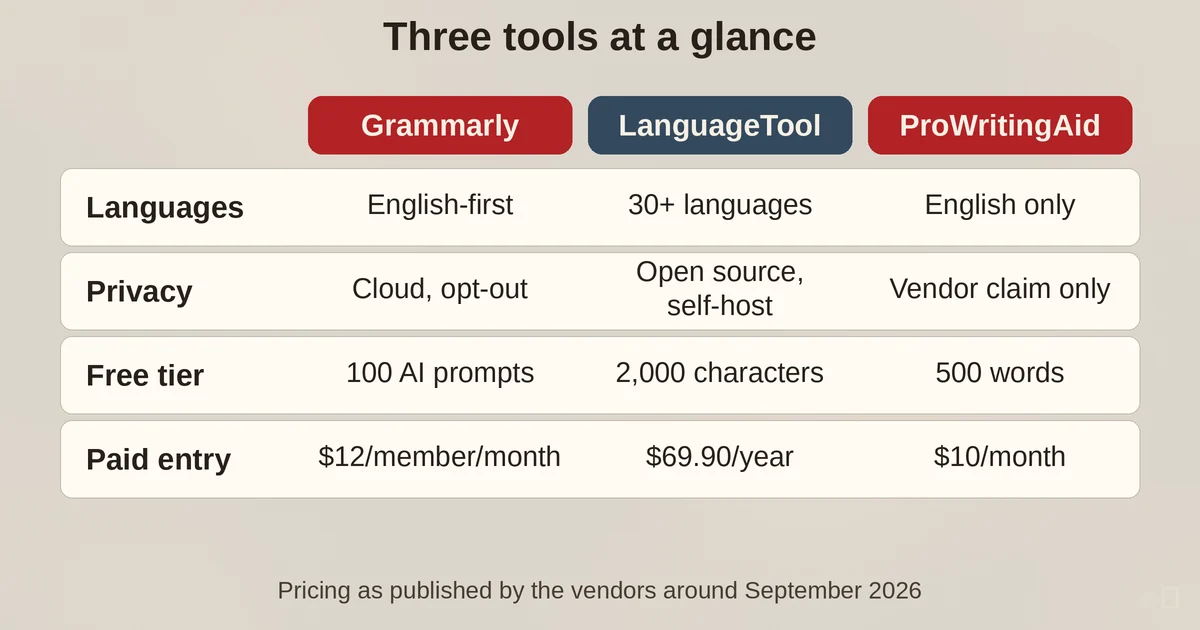
| Grammarly Pro (Superhuman) | LanguageTool | ProWritingAid | |
|---|---|---|---|
| Best at | Everyday email, tone, clarity rewrites | Multilingual checking, privacy, self-hosting | Long-form and fiction style analysis |
| Languages | English-first grammar engine, translations in 19 languages | 30+ languages, native-quality in several | English only |
| Privacy stance | Opt-out model, enterprise controls | Open-source core, self-hostable | Text processed but never stored (vendor claim) |
| Free tier | 100 AI prompts, basic corrections | 2,000 characters, 3 AI rephrases a day | 500 words, 10 rephrases a day |
| Paid entry (annual billing) | $12/member/month | $69.90/year | $10/month ($120/year) |
| Company | Superhuman Platform Inc. (rebranded from Grammarly, Oct 2025) | Learneo Inc. (US parent since 2023), German product roots | Orpheus Technology Ltd, London |
Two rows in that table surprise most people. Grammarly the company is Superhuman now, and LanguageTool, the tool privacy forums love to recommend as the "European" alternative, has answered to a San Francisco-based parent company, Learneo, since April 2023. Neither fact changes how well the products catch typos, but both change what you are actually buying.
The 60-second test
Before you read another feature table, run this test yourself. It takes a minute and tells you more than any review.
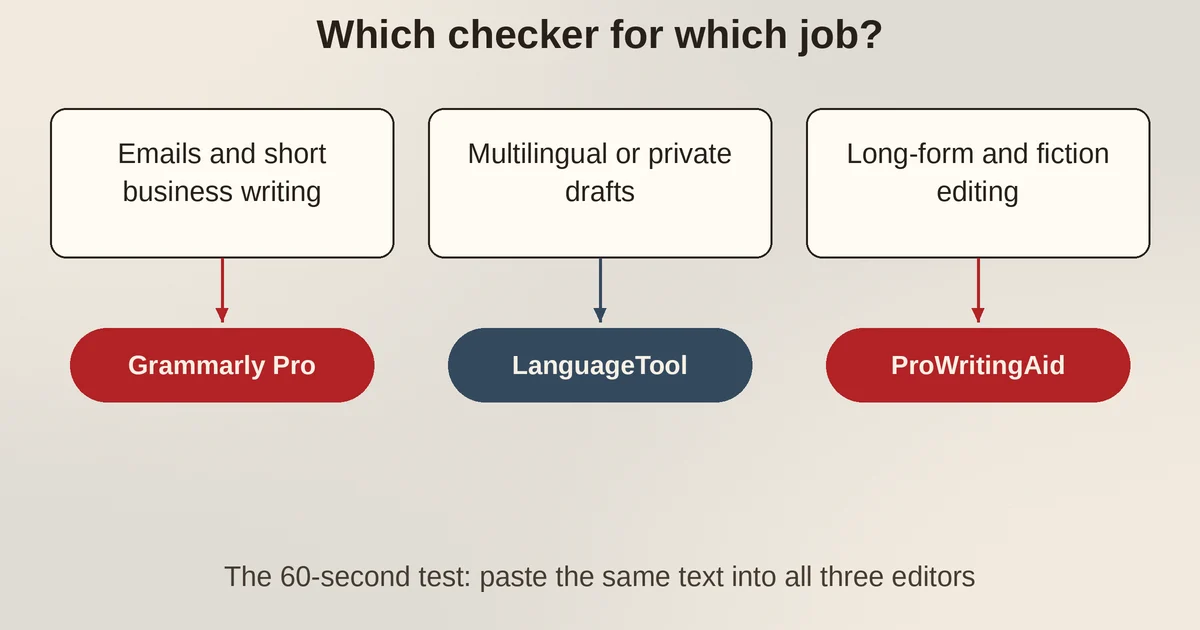
Test one: a real work email. Take something you actually need to send, a client update with a slightly complicated second paragraph, and paste it into all three editors. Grammarly Pro shines here. It reads the email the way a busy colleague would, flags the sentence that sounds passive-aggressive, offers a full-sentence rewrite that tightens your request, and shows the tone dial so you can see that "per my last email" lands colder than you intended. This is the muscle Grammarly has been building for a decade, and it is why the company says professionals use it to revise over fifty million emails a week. Email is, by the company's own account, its number-one use case.
Test two: a long paragraph of prose. Take a few hundred words of an article, a blog section, or a chapter draft. ProWritingAid behaves differently from the other two here. Where Grammarly gives you a handful of clarity suggestions, ProWritingAid offers its twenty-five-plus analysis reports: repeated sentence starts, overused words, sticky sentences, pacing, dialogue tags. It is not checking your grammar so much as auditing your style. LanguageTool sits in the middle, solid on grammar and punctuation, with its Picky Mode flagging wordiness and repetition, though its stylistic suggestions are blunter instruments.
Test three: a non-English sentence. Write a sentence in German, French, Spanish, or Polish with a deliberate mistake. This is where the field splits completely. LanguageTool checks thirty-plus languages natively, and for German, its birthplace, it is arguably the best grammar checker on the market, full stop. ProWritingAid will do nothing at all: it is English-only by design, as its own FAQ states plainly. Grammarly's grammar engine is still built for English first. The free tier of the Superhuman suite now writes "without mistakes in 6 languages" and the Pro tier translates into nineteen, but translation and native grammar checking are different jobs, and if you draft in anything other than English, you will feel the difference immediately.
On false positives. All three occasionally flag correct text, but they fail differently. Grammarly's machine-learned suggestions sometimes rewrite a perfectly fine sentence into a flatter one, and its enthusiasm for "clarity" can sand the texture off intentional prose. LanguageTool's rule-based engine is more conservative: it will reliably fix your comma splice, but it can flag colloquialisms or unusual constructions as errors because a rule says so rather than because context does. ProWritingAid's reports are the noisiest of the three, though that is partly the point: it shows you everything and trusts you to judge. When you run the test, note not just what each tool catches but what it gets wrong, because the false positives tell you how much attention you will need to pay it every day.
Who should pay for Grammarly
Now the Superhuman suite's Grammarly Pro plan, twelve dollars a month per member with annual billing, or thirty with monthly. The Pro tier unlocks the things the free plan teases: full-sentence rewrites, tone adjustment, unlimited personalized suggestions, plagiarism and AI-text detection, and two thousand AI prompts a month.
Pay for it if your writing day looks like this: emails, Slack messages, LinkedIn posts, the occasional doc. Grammarly's real product is not grammar, it is the confidence layer over everything you type, and its browser extension works in more or less every text box on the web. The company claims over a million app and website integrations, and in practice, if you write where you work, Grammarly follows you there.
There are two honest caveats. First, the company's ambitions have moved past grammar checking. The Superhuman suite bundles the Grammarly editor with the Coda workspace (now Superhuman Docs), the Superhuman Mail client, and an AI assistant called Go that proactively surfaces context across a hundred-plus apps. If you just want a proofreader, that is a lot of platform swirling around a simple need, and the rebrand means the free product now nudges you toward the whole suite. Second, if your writing is long-form creative work, Grammarly's suggestions can feel like a well-meaning intern who wants everything to sound like a corporate memo. That is not a flaw; it is a tuning choice. Know it before you pay.
Privacy-wise, Grammarly's position is better than its reputation. The company states it does not and will not sell your content, that you own what you write, and it offers an explicit opt-out, the Product Improvement and Training control, that stops your text being used to train its models. The trade is that your text does go to its cloud to be checked, and documents you save in its editor stay there until you delete them. Enterprises can add BYOK encryption and data loss prevention. For most office work that trade is fine. For sensitive drafts, keep reading.
When LanguageTool is the better default
LanguageTool is the choice people arrive at for two reasons, and they are both good ones: languages and privacy.
The multilingual case is open and shut. If you write in more than one language, or you write in any language other than English, LanguageTool is the only tool of the three that actually checks your grammar rather than translating it. Premium raises the character limit from two thousand to a hundred and fifty thousand per text field, unlocks unlimited AI paraphrasing, adds over twenty thousand additional checks across English, German, French, Spanish, Dutch, Polish, and Portuguese, and costs $69.90 a year, or $119.80 for two years, with a limited-time twenty percent discount typically running on its pricing page. That is roughly half of Grammarly Pro's annual price, and for a non-English writer there is no comparison to make.
The privacy case is more interesting than the marketing suggests. LanguageTool's core engine is open source, which means anyone can run their own LanguageTool server locally or in the cloud, pipe text to it, and never send a word to a third party. Its privacy policy states that content sent for checking is not stored. Privacy Guides, a nonprofit that evaluates tools for exactly this kind of risk, recommends it on that basis. For a novelist with an unfinished manuscript, a lawyer, or anyone whose drafts are genuinely sensitive, self-hosting LanguageTool is the strongest privacy story any mainstream grammar checker offers, and it is the one feature Grammarly cannot match at any price.
Now the asterisk. Since April 2023, LanguageTool has been owned by Learneo, a US-based platform company whose portfolio includes Course Hero, CliffsNotes, and QuillBot, and its legal pages now run under Learneo's privacy policy. The product is still built by the German team that created it in 2003, the open-source core is still open, and self-hosting still means nobody sees your text. But the comfortable story of "the independent European alternative" is outdated. The honest version: the engine's architecture gives you a privacy option nobody else offers, even if the corporate parent is now American. If self-hosting matters to you, that option survives the ownership change intact.
The free tier is also the most generous of the three for casual use. Two thousand characters covers most emails, and if you mostly write short things in multiple languages, you may never need to pay.
ProWritingAid, for when the draft is the product
ProWritingAid is the specialist. It is built by Orpheus Technology in London for people whose writing is long, deliberate, and personal: novelists, academics, bloggers who care about rhythm. Its free plan is the most limited of the three, five hundred words at a time, two report runs a day, ten rephrases, but its paid plans are built around depth rather than breadth.
Premium runs ten dollars a month on annual billing, thirty if you pay monthly, and unlocks unlimited words and the full set of twenty-five-plus reports (pricing page). Premium Pro, twelve dollars a month annually, adds higher limits on AI features and, more distinctively, access to live workshops, a library of over two hundred recorded sessions, and beta community features like group critique. There is even a lifetime license, $399 for Premium and $699 for Premium Pro, which no other tool in this comparison offers.
The killer feature for fiction writers is Chapter Critique, a structured critique of a chapter that reads more like feedback from an editor than a grammar report. The author comparison report benchmarks your prose against ninety fiction authors across genres. These are analysis tools, not correction tools, and they are aimed at a job Grammarly does not attempt: helping you understand your own writing habits so the next draft is better, not just cleaner.
The trade-offs are real. It is English only, no exceptions. The interface is heavier and slower than Grammarly's quiet underlining, and in browser extensions it can feel like it is interrupting rather than assisting. And its privacy claim, that text is encrypted, processed, and never stored, is a vendor statement rather than something you can verify by reading source code, unlike LanguageTool. For its target user, none of that outweighs the reports. If you write forty thousand words and then edit them, ProWritingAid's editing pass is worth more than any rewrite button.
One useful pattern many writers land on: draft and develop long projects with ProWritingAid's reports, then run the final pass through the tool that lives in your email client and browser. For thoughts on using AI to sharpen text without flattening your voice in the process, our piece on how to rewrite with AI without losing your voice goes deeper on keeping the texture in.
Who should pay for what
Here is the decision, compressed:
- You write emails and short business content, mostly English, all day: Grammarly Pro. The rewrite and tone features earn the twelve dollars a month faster than any alternative. If you are building broader AI habits around your writing, the suite approach might even suit you, and our guide to the best AI tools for every job role covers how it fits a fuller stack.
- You write in more than one language, or in any language other than English: LanguageTool, and it is not close. Do not pay for Grammarly hoping it will check your German.
- You have drafts that cannot leave your control: self-hosted LanguageTool. Open source, runs on your machine, no cloud round trip. It is the only one of the three where you can verify the privacy story yourself.
- You write long-form, especially fiction: ProWritingAid. Its reports and Chapter Critique do a job the other two do not attempt, and the lifetime license makes it cheap over a writing career.
- You are a student or a light user: stay free. LanguageTool's free tier handles the most, Grammarly's free tier is the most polished, and ProWritingAid's free tier is mostly a trial. Do not subscribe to a grammar checker until a free one has actually failed you.
The overlap is real; the three tools all catch your typos. But the deciding factors, language support, text handling, and the kind of writing you do, point in completely different directions, and the right pick is the one that matches the writing you actually produce rather than the one with the best marketing. For more ways to sharpen drafts with prompts before you ever pay for a checker, see these ten AI prompts that instantly improve your writing.
FAQ
Is LanguageTool good enough to replace Grammarly?
For English email and business writing, Grammarly's suggestions are still more polished and its tone features are unmatched. But for anything multilingual, LanguageTool is not the budget alternative, it is the better tool, and its free tier is genuinely usable. Many people run LanguageTool for free and never miss Grammarly; heavy email writers do notice the difference.
Which one is best for privacy in 2026?
Self-hosted LanguageTool, because the open-source core means you can inspect and run it yourself with no text leaving your machine. Grammarly offers a solid opt-out and does not sell content but still processes text in its cloud, and LanguageTool's own cloud service, despite its German roots, is now under US-based Learneo's policies. ProWritingAid states your text is never stored, but that claim is not independently verifiable.
Pricing and plan details are as published by the vendors around September 2026 and can change; confirm on the official sites before subscribing.