
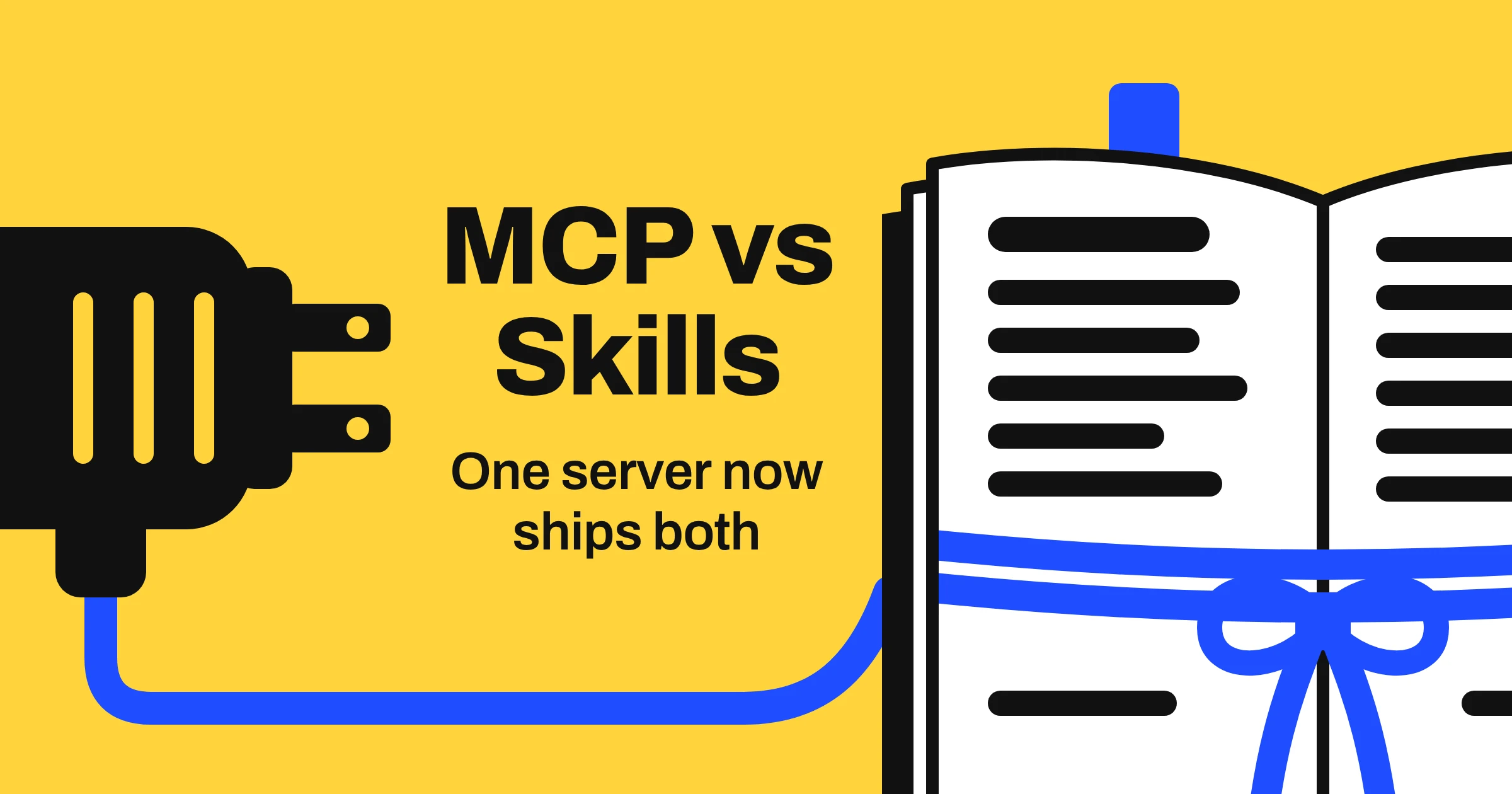
Type mcp vs skills into a search bar and the suggestions include is mcp replaced by skills, and even mcp is dead skills killed it. Then, as the Model Context Protocol (MCP) turned two this week, Anthropic let MCP servers ship skills themselves. Short answer: MCP connects an AI agent like Claude to tools and data, and a skill teaches it how to use them for a specific job. With Skills over MCP, now in public beta in Claude, one server can ship both.
The verdict: MCP is access, a skill is know-how
MCP is how Claude reaches things, and a skill is how Claude knows what to do with them. Anthropic's guide to skills and MCP servers explains it with a store: "MCP is like having access to the aisles."
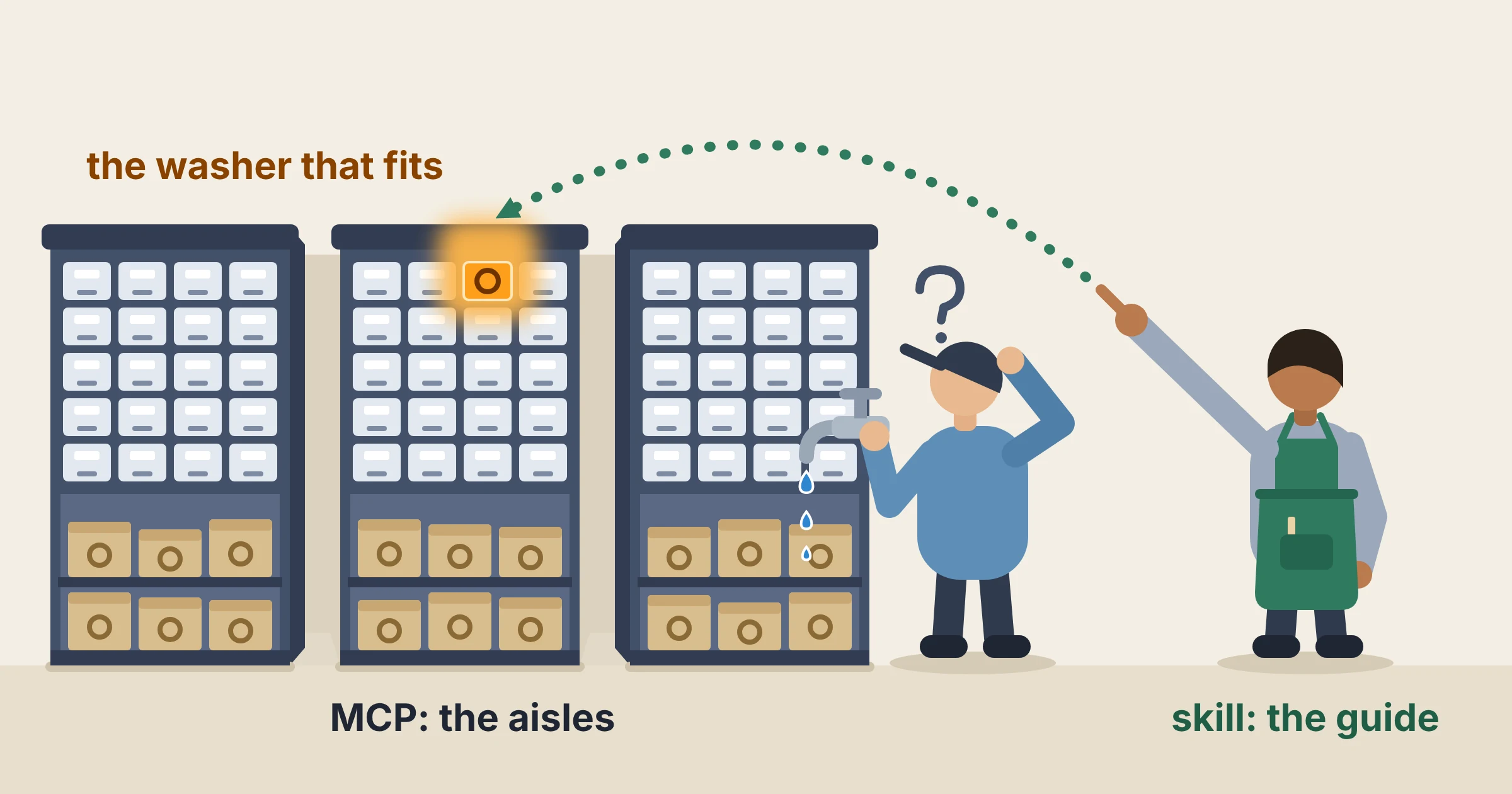
A skill, in Anthropic's words, "is like the helpful employee who walks you through the repair process, points you to the right supplies."
Picture fixing a leaky tap with every aisle open to you. You can reach every washer in the building. You still don't know which one fits.
That is the split. MCP handles connectivity. Skills handle expertise: the know-how and workflow logic that turn raw tool access into reliable results.
Without that know-how, Claude has to guess at what you want. Anthropic's rule of thumb is worth keeping: "If you're explaining how to do something, that's a skill. If you need Claude to access something, that's MCP."
So no, skills did not kill MCP. They sit on different layers, and they are built to work together. Once you see that, the real question shifts from which one to pick to where your know-how should live.
Round 1: what each one gives Claude
MCP gives Claude a connection and a skill gives it a playbook, so the two stack rather than compete. MCP is an open-source standard for connecting AI applications to outside systems. Its docs compare it to a USB-C port for AI apps: one plug shape, many devices.
Support is wide. ChatGPT, Visual Studio Code, Cursor, MCPJam and many others work with MCP, as does Claude. Our MCP explainer for developers covers the protocol itself.
A skill is a folder of know-how. Anthropic's engineers say building a skill is like writing an onboarding guide for a new hire. Our guide to agent skills walks through one from scratch.
| MCP server | Skill | Skill shipped over MCP | |
|---|---|---|---|
| What it is | An open standard link to an outside system | A folder of instructions, files and optional code | A skill the server publishes next to its tools |
| What's inside | Tools (search, calculators), data (files, databases) and workflows (specialized prompts) | A SKILL.md file that opens with a name and description, plus optional files and scripts | The same folder format, read through MCP |
| Its instructions cover | How to use the server and its tools correctly | How to use tools for one process, or across several servers | How to use this server's tools for a specific job |
| Who writes it | The server's developers | Anyone who knows the process, you included | The team that runs the server |
| Example | A Notion connection that lets Claude search your workspace | A meeting-prep skill that knows which pages to pull | Shopify's server, which helps Claude design and update a store |
That opening block in SKILL.md is YAML frontmatter (a short header of settings), and the name and description in it are required.
Why it matters: when an agent fails at a job, check which layer is missing. No connection means it can't see your data. No skill means it sees the data and guesses.
Round 2: MCP vs skills token usage
Skills start almost free and grow only when used. Connected MCP tools sit in context from the start, unless tool search trims them. Context means the context window: the text a model can keep in mind at once, counted in tokens (small chunks of text).
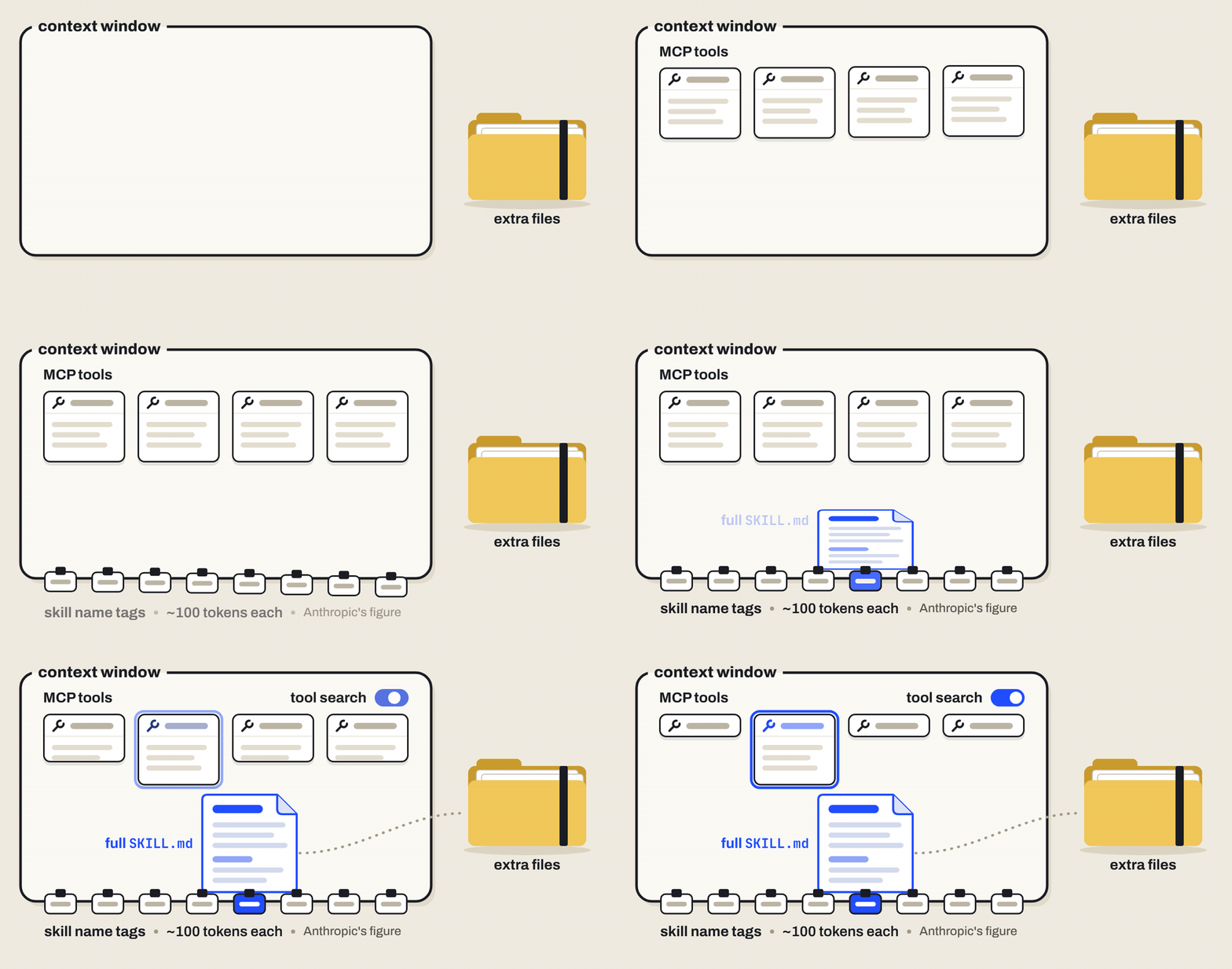
What sits in context from the start?
In Anthropic's comparison table, MCP tools are always available once connected. Skills work differently. At startup, the agent pre-loads only the name and description of each installed skill.
The Agent Skills docs put that at about 100 tokens per skill. Until a skill is triggered, nothing more of it sits in context, so you can install many skills without a context penalty. In store terms, you can see every employee's name tag, but nobody follows you around until you ask.
When do a skill's full instructions load?
Only when Claude thinks the skill fits the task in front of it. Then it reads the full SKILL.md into context. Anthropic's table calls this loading on demand, which preserves context.
Why do bundled files and scripts cost nothing until used?
A skill's extra files don't take up context until Claude opens them. That is why a skill can carry full API documentation, large datasets or many examples.
Scripts save tokens a second way. Claude can run code instead of writing out every step as text. Anthropic's engineers note that sorting a list by generating tokens is far more expensive than running a sorting algorithm.
Does tool search change the math for MCP?
Yes, a lot. Anthropic says tool search loads tool definitions (the name, description and inputs of each tool) only when needed. By its own count, that can cut the context those definitions use by over 85% in multi-server setups.
So which one uses fewer tokens?
No published test compares MCP and skills on the same task yet, so be wary of any hard number you see quoted. The design points one way, though. Skills are built to stay small until called, and with tool search on, MCP tools now behave much the same.
Round 3: where the know-how lives, and the new Skills over MCP
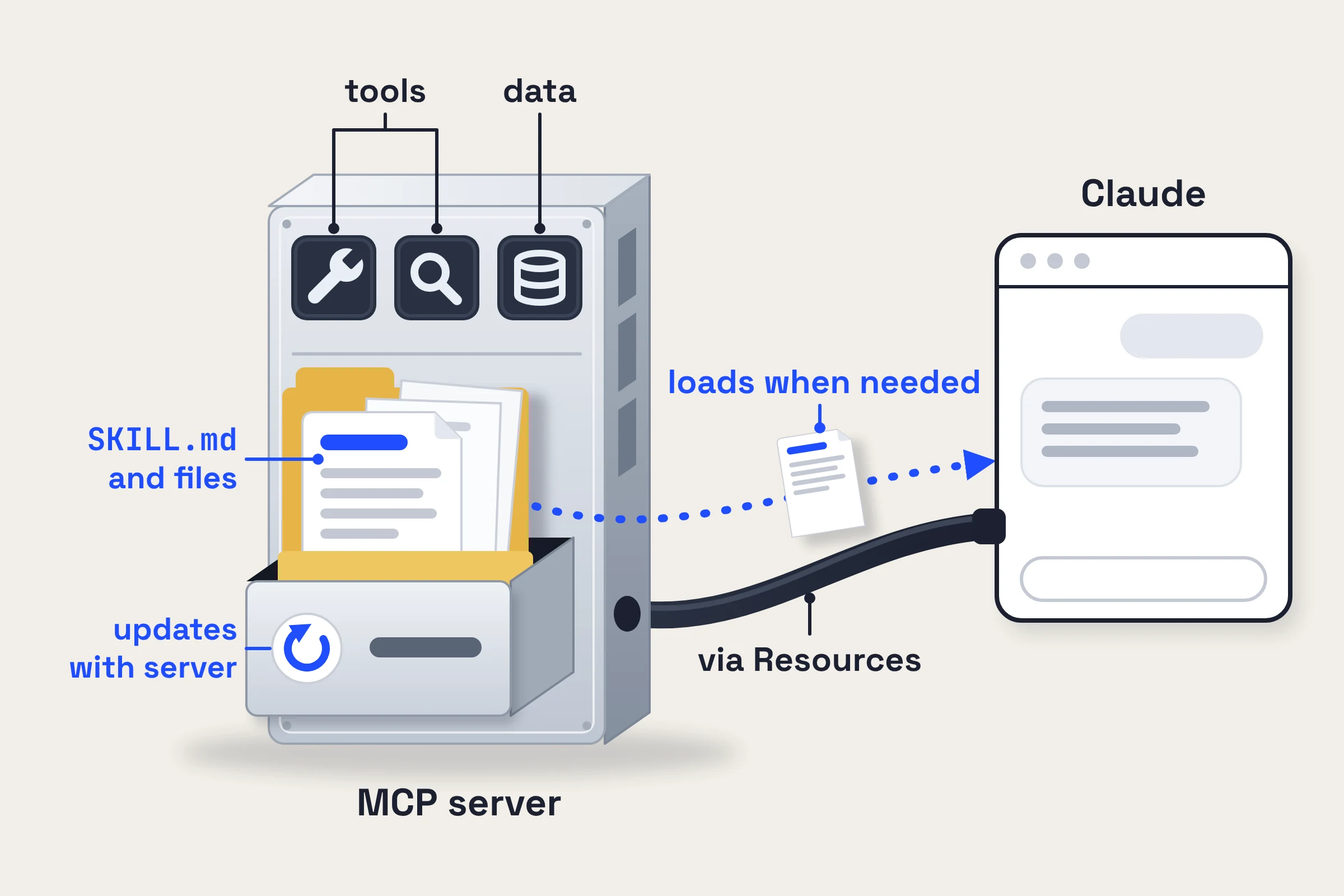
Until this week in Claude, tools came from a server, and the know-how came from wherever you kept your skill folder. Skills over MCP lets one server carry both.
The old split. In Claude Code, custom skills are plain files on your machine, with no upload needed. On claude.ai you upload them as zip files, on Pro, Max, Ultra, Team and Enterprise plans with code execution enabled. And custom skills don't sync across surfaces, so a skill uploaded in one place doesn't automatically show up in the others.
That left a gap. Tool names and descriptions tell Claude what a server can do, but they don't cover how to handle specific use cases.
What changed. Skills over MCP, now in public beta in Claude, lets MCP servers ship skills alongside their tools. Anthropic's announcement says the aim is longer, multi-step work. Claude loads a server's skill only when it is needed, which keeps context use low.
The skills update with the server, so users have nothing separate to install. They can cover best practices, step-by-step workflows, or playbooks tailored to a user's account or organization.
Back in the store, you used to bring your own guide. Now the store supplies one, trained by the people who stock the shelves. Here the analogy starts to bend: a real employee doesn't change overnight, but a server's skill can change whenever the server does.
How it works underneath. The MCP Skills extension lets servers expose workflow instructions and supporting files to clients. A skill served this way has the same shape as a local one: a SKILL.md file plus optional extra files, per the Agent Skills specification.
Clients find and read these skills through Resources, the part of MCP that servers already use to share readable content. The instructions and files load only when needed.
Not just Claude. These features are part of the open MCP spec and its extensions, Anthropic says. So a server that supports them works in any compatible client.
The spec's own page adds a caveat: across MCP clients, SDK (software development kit) and host support is still being implemented. A host is the app that runs the AI and talks to servers, as Claude does. So don't assume other MCP apps load server skills today.
One job, three ways: prepping a meeting from Notion
Anthropic's own example is meeting prep from Notion, and running it three ways shows what each layer adds. Picture typing prep me for tomorrow's roadmap review into Claude.
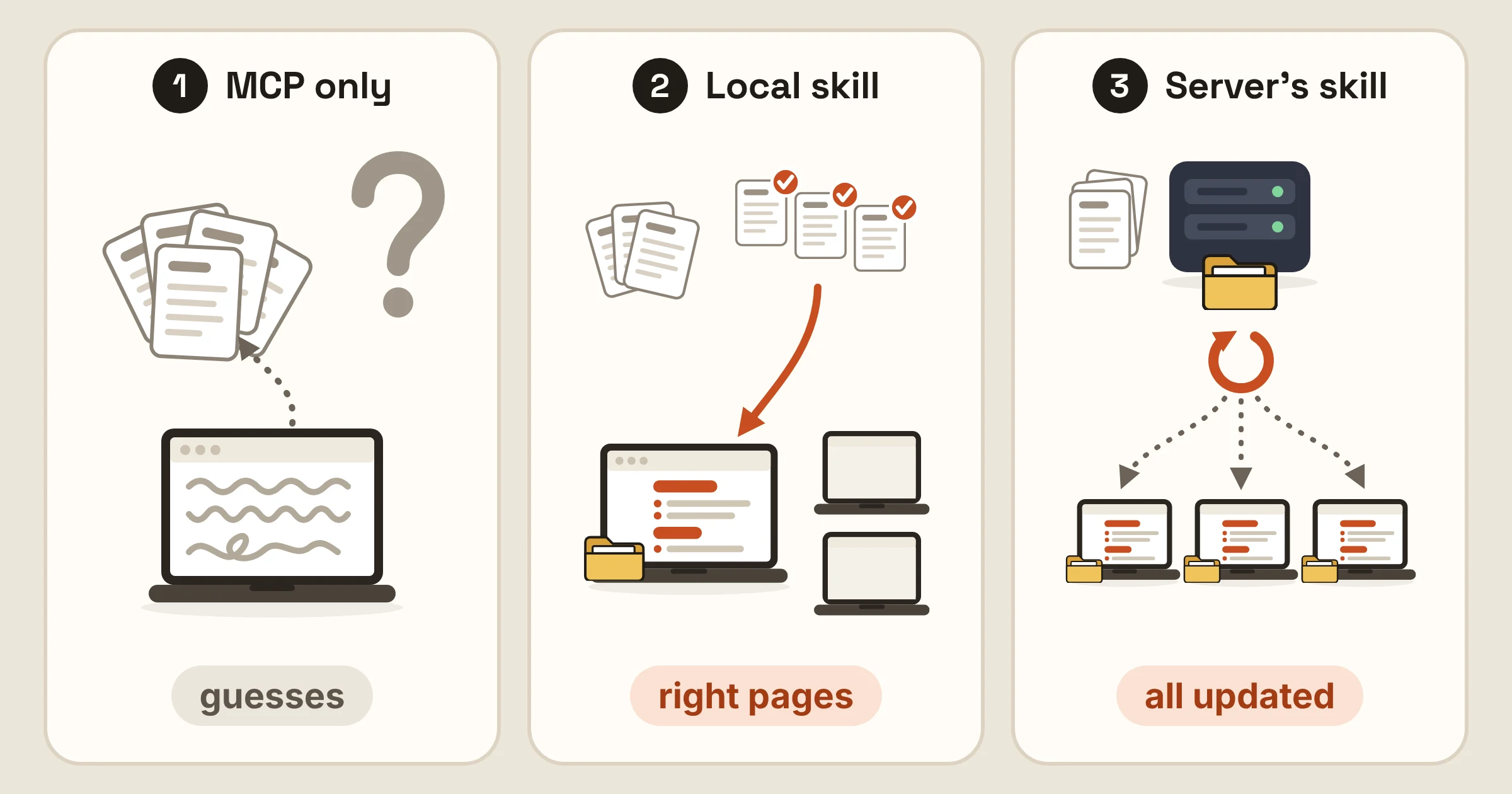
Way 1: MCP only. An MCP connection to Notion lets Claude search your workspace, so it can find pages. But nothing tells it which pages matter or what the prep doc should look like. It guesses, and you get a summary of whatever matched roadmap.
Way 2: add a local skill. Now Claude knows which pages to pull from and how to format the prep document. This is Anthropic's advice in action: let MCP handle connectivity, and let skills handle presentation, sequencing and workflow logic.
The catch is sharing. The skill lives in your folder or your account. Getting it to each teammate, and keeping it current, is a separate job.
Way 3: the server ships the skill. This part is a what-if, to show the pattern. You connect the Notion server, and the meeting-prep playbook arrives with the tools. When the server's owners improve it, everyone gets the new version, with nothing separate to install.
It need not stop at one. Clients discover a server's available skills through the MCP Skills extension, so one server can offer several. The same server could carry one for meeting prep, one for weekly reports and one for handoffs.
What changes for you: answer quality jumps at Way 2, and the upkeep disappears at Way 3.
Round 4: safety, because a skill can run code
Treat a skill like software you install, because it carries instructions and code that Claude acts on. These rules come from Anthropic's docs and the MCP spec.
- A bad skill can misuse good tools. A malicious skill can direct Claude to call tools or run code in ways that don't match the skill's stated purpose.
- Install from sources you trust. Anthropic's advice is to use skills only from trusted sources: ones you created yourself or got from Anthropic.
- Hosts must treat skill text as untrusted. The MCP spec tells the host to treat skill content as untrusted input.
- Any change needs a fresh yes. If a skill file is changed, added or removed, the earlier approval is revoked. The host must ask again before loading or running it.
- Skill files don't load early. Hosts must not fetch skill files ahead of need, even when you connect, list skills or approve one.
- Vet the server too. Claude Code's MCP docs say to verify you trust each server before connecting it. Servers that fetch outside content can expose you to prompt injection, meaning hidden instructions planted in text the AI reads.
That re-approval rule patches the weak spot in the store analogy. If the employee's script changes, you get asked again before they help.
Who gets Skills over MCP today, and who ships skills
Skills over MCP is a public beta in both Claude and Claude Code, and your plan decides whether you have it yet.
Skills over MCP: who has it
- Pro, Max and Ultra: on by default.
- Team: available once an admin enables it.
- Enterprise: not yet; Anthropic says it is coming soon.
Anthropic's announcement names a few servers that ship skills. Shopify's helps Claude design and update a merchant's online store end to end. HubSpot's onboards customers and gets them set up in Claude.
Atlassian's helps Claude draw on deep organizational context for insights and work analysis. Carta's, marked coming soon, will help Claude draft and issue equity from an uploaded document.
Two companion features came with it. With Tasks, a server runs slow jobs, or even full agent loops, while Claude keeps working and collects the result later.
With Elicitation, a server can pause to ask you for input through a form or link, then carry on. Supabase uses it to confirm costs before creating a paid project and before running destructive SQL. GitHub has users type a repository's name before an agent deletes it.
Anthropic's announcement says Tasks and Elicitation are now generally available in Claude and Claude Code for Pro, Max and Ultra plans. A third feature, File Uploads, is not live yet; it is rolling out soon.
Under all this sits a big base. Anthropic reports over 700 million monthly MCP SDK downloads and over 10,000 MCP connectors for Claude. These plan details were checked on Anthropic's announcement in November 2026, and betas change often.
Which should you build? A quick decision
Start from Anthropic's rule of thumb: explaining how means a skill, and needing access means MCP. Then find your situation below.
- Claude can't see the data or take the action. Build or connect an MCP server. No skill can stand in for access.
- Claude can reach everything but does the job badly. Write a skill. The MCP spec says skills suit reusable workflows that combine several tools or need supporting references, such as code review or document processing.
- The job spans several services. Write one skill that ties them together, since a single skill can orchestrate multiple MCP servers.
- You run a server, and users keep asking how to use it well. Ship the skill over MCP, so your playbook travels and updates with your server, in any compatible client.
Two notes if you ship skills from a server. The spec says a server should not exceed 512 files or 16 MiB per skill, SKILL.md included. And write the name and description with care: the model picks skills from those two fields, unless the user picks one directly.
Stop asking which one wins. Connect MCP for access and write a skill for the process.
If you run a server, ship your skills with it, so users get your playbook without installing anything. And whatever you install, take skills only from sources you trust.