An agent skill is a folder of instructions your AI can find and follow on its own, whenever a task calls for it. The file at the heart of every skill is SKILL.md, and AI skills in this format now work across Claude, ChatGPT, Cursor, Codex, Gemini CLI, and GitHub Copilot.
Here is why that matters. Every morning, a helper with a perfect memory problem walks into your kitchen. They are smart. They are eager. But they woke up today remembering nothing from yesterday. So you do what you always do: you grab a sticky note, write down how you like your coffee, and stick it on the fridge. Tomorrow morning, you will write the same note again. And the day after that.
That is exactly what chatting with an AI feels like. Every new chat starts with a fresh brain. If you want the AI to follow your way of doing things - your format, your steps, your rules - you have to paste the same instructions again and again. It is tiring. And the helper never gets to learn it once and keep it.
Here is the good news: there is now a shared way to hand your AI a recipe card once, and have it find that card on its own every time it needs it. It is called Agent Skills, and the little file at the heart of it is called SKILL.md. This post explains agent skills from top to bottom: what they are, how they work inside, which AI apps can read them today, and how to write your first one in about five minutes. No coding experience needed - if you can write a to-do list, you can do this.
In short
- A skill is a folder of instructions your AI can find and follow when it needs it - like a recipe card in a cookbook.
- SKILL.md is the file inside every skill folder. The whole thing follows one shared rulebook.
- Your AI only reads the index line first. It opens the full recipe only when your task matches.
- Almost every major AI helper - Claude, ChatGPT, Codex, Cursor, Gemini CLI, GitHub Copilot - can read skills (as of September 2026).
- Skills are advice, not magic handcuffs. The AI usually follows them, but nothing forces it to.
The note your AI keeps forgetting
Imagine you hired a helper who gets a brand-new brain every single morning. Kind, capable, and completely blank. Anything you want done your way, you must explain today - because tomorrow, the explanation is gone.
That is the note on the fridge. In AI terms, it is called a prompt: the message you type into a chat to tell the AI what to do. There is also a cousin called custom instructions - a settings box where you can park things like "always answer in short sentences." The Claude docs describe prompts as "conversation-level instructions for one-off tasks." In kid words: a prompt is instructions for this one meal, in this one chat.
The short answer: prompts and custom instructions both live inside one chat, so the AI forgets your rules the moment that chat ends.
The problem is what this costs you over time:
- You repeat yourself. Every new chat starts empty, so the note goes back on the fridge.
- The AI follows it differently each time. Same note, different day, slightly different result. That is inconsistency.
- You cannot share it. Your hard-won workflow lives in your chat history. Handing it to a teammate means... sending them a giant copy-paste blob.
So what is the fix? It is not writing a better note. A better note still needs re-pasting tomorrow. The fix is giving the helper a cookbook - a place where written-down knowledge lives, so the helper can look things up instead of being told things. And here is the nice part: because skills are just files in a shared format, lots of AI helpers can use them - you are not locked to one helper.
A recipe card for your AI
Think about a recipe card in a real kitchen. It sits in the cookbook until a dish comes up. The helper finds it, follows it step by step, and puts it back. Nobody has to re-explain the recipe. It is just there.
A skill is exactly that, but for an AI. So, what are agent skills in exact terms? Here is the precise version: a skill is a folder that contains a file called SKILL.md. That file has two parts - a tiny label section at the top (the card's title and index line) and the instructions below it. A skill folder can also hold extras: small programs (called scripts), reference pages, and templates. The AI loads these only when the recipe calls for them.
Anthropic, whose team built the original version of this system, describes skills as folders with instructions, scripts, and resources that the AI can load when needed. They compare building one to "putting together an onboarding guide for a new hire" - the welcome packet you would hand a new teammate on day one so they stop asking you the same questions.
Why is the recipe card better than the fridge note?
- Written once. You do the work a single time.
- Found automatically. The AI discovers the card when your task matches - no pasting.
- The card never changes. The same instructions every time - no mood swings between chats.
- Shareable. A folder of files can be zipped and handed to anyone.
Here is a real example we will build later in this post: a card called commit-message-writer that knows your exact taste in git commit messages (yes, people have exact tastes in those). Today you probably re-explain it every time. By the end of this post, it will be a card in your cookbook instead.
If you want the official definition and the reasoning behind the design, it lives at agentskills.io, the home of the standard.
One cookbook everyone shares
Once upon a time, every kitchen wrote recipes in its own scribble. One used boxes, one used arrows, one wrote everything sideways. Cards only worked in the kitchen that made them. Then a big cookbook publisher wrote down one shared way to format a recipe card - and every kitchen agreed to read it.
That, in miniature, is what happened here. Anthropic launched Agent Skills on October 16, 2025. At first it was just a Claude feature. Then, on December 18, 2025, Anthropic published it as an open standard - a shared rulebook - so skills could travel between different AI apps (per Anthropic's announcement).
The short answer: skills launched with Claude in October 2025, opened up as a shared standard two months later, and today most major AI apps can read the same skill files.
Quick kid-level definition, because "open standard" is one of those grown-up phrases: an open standard is a public rulebook that anyone can read and follow, without asking permission. Anyone who builds an AI app can pick up the rulebook and make their app read the same recipe cards.
Where does the rulebook live? The official home of the standard is agentskills.io. The exact format rules - what fields exist, how long they can be, how folders are laid out - live in the specification page. (You may also run into Anthropic's GitHub repository called anthropics/skills - that is their own collection of example skills, not the rulebook itself.)
And who reads the rulebook today? As of September 2026, all of these are verified from their own documentation - and remember, this may change over time:
- Claude apps, Claude Code, and the Claude API - the original home of skills.
- ChatGPT and Codex (OpenAI's apps) - standalone skills work in the ChatGPT desktop app, Codex CLI, and the IDE extension.
- Cursor - the code editor reads skills from several folders automatically.
- Gemini CLI - Google's command-line helper reads them too, with a safety prompt we will meet later.
- GitHub Copilot - reads skills in its coding agent, CLI, and agent mode.
Many more apps are listed on the standard's own client showcase at agentskills.io. The important part: the format is one recipe-card shape, and every big kitchen has agreed to read it. Write a card once, and it works in every kitchen that reads the standard.
Inside a skill: the recipe card parts
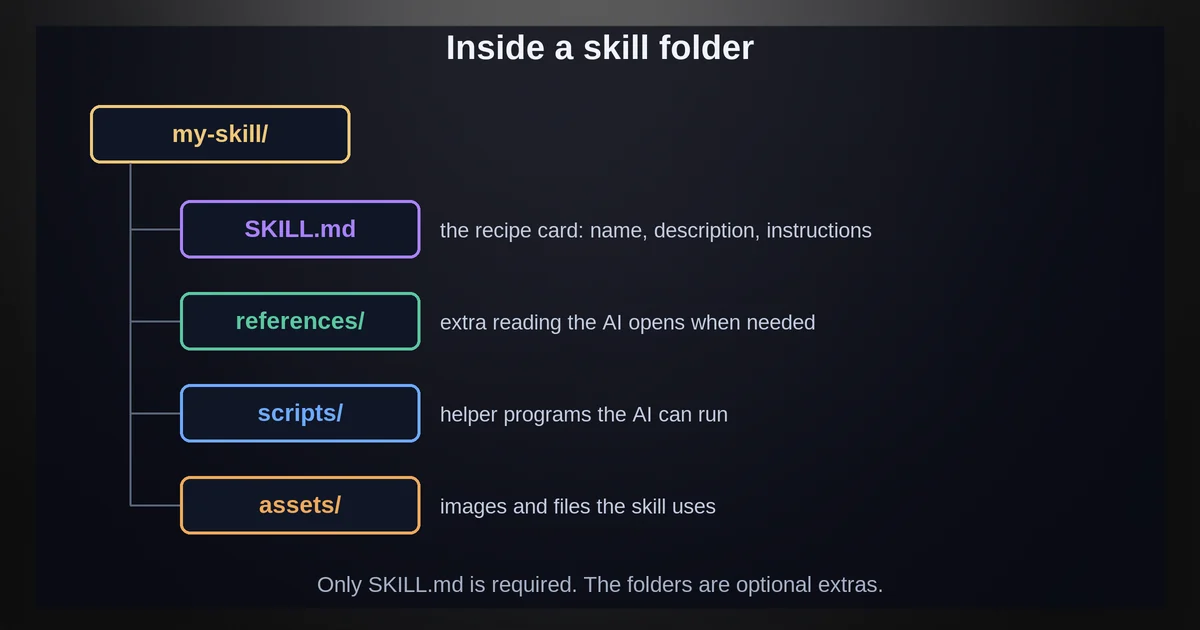
Flip a recipe card over. A really good one has more than just the front: it has pockets. A pocket of extra reference pages. A pocket of little gadgets. A pocket of blank templates. A skill folder is the same - the card plus its pockets.
The short version: a skill folder is one required file, SKILL.md, plus three optional pockets - scripts/, references/, and assets/.
Here is the anatomy, exactly as the official specification describes it:
commit-message-writer/     <- the folder (a "skill")
├── SKILL.md              <- REQUIRED: the card itself
├── scripts/              <- optional: little programs (gadgets)
├── references/           <- optional: extra pages of documentation
└── assets/               <- optional: templates and resources
SKILL.md is the one required piece - the card. It has two halves:
- The frontmatter - a small label block at the very top of the file, written in a simple format called YAML (a way of writing
key: valuepairs that both humans and programs can read). Two labels are required:name- the card's folder name in lowercase. Rules: 64 characters max, only lowercase letters, numbers, and hyphens, and it must exactly match the folder's name.description- the index line. Up to 1,024 characters. It must say what the skill does and when to use it, because this line is what the AI actually searches. It is the single most important sentence in the whole card.- Optional labels exist too:
license,compatibility(what environment the skill needs),metadata(any extra info), and an experimentalallowed-toolsfield.
- The body - everything after the frontmatter. This is the actual set of instructions, written in plain markdown. The spec puts no restrictions on the format, but recommends keeping it under about 500 lines and moving fine detail into reference pages.
The three pockets are optional, and the spec is honest about this: they are conventions (shared habits), not requirements. scripts/ holds executable code - little gadgets the AI can run. references/ holds longer documentation, opened only when a step says to. assets/ holds templates and files the skill might need. A skill is officially allowed to be nothing more than a folder with a SKILL.md in it.
One honest footnote: some apps add their own extra labels on top of the standard. Cursor adds fields like paths, icon, and color. Codex can use an extra agents/openai.yaml file for extra settings. These are client add-ons, not part of the shared rulebook - which is fine, as long as you do not mistake them for the standard.
How your AI finds the right recipe
Nobody reads a whole cookbook to make dinner. You scan the one-line index entries, find the dish that smells right, open that one card - and only then pull out the gadgets and reference pages the card points to.
The short answer: at startup your AI reads only the one-line index of every skill, and it opens a full card only when your task matches that line.
That is exactly how your AI finds skills, and it happens in three stages. The official name for this trick is progressive disclosure - load a little, then more, only as needed - and the Claude docs spell out each stage:
- Discovery (the index scan). When the AI starts up, it loads only the
nameanddescriptionof every skill - the index line. That costs roughly 100 tokens per skill. "Tokens" are just the little chunks AI reads text in; 100 tokens is a tiny sip. - Activation (opening the card). When your task matches a description, the AI reads the full SKILL.md body - the whole recipe. The recommended size for this is under 5,000 tokens, so cards stay small.
- Execution (pulling out the pockets). Files like scripts and references load only when a step points to them. Scripts run as programs, and only their output enters the AI's reading window - the code itself never does.
Two practical takeaways fall out of this. First, your description is the most important sentence you will ever write in a skill. The spec's own example of a bad one is "Helps with PDFs." - it says nothing about when to use the skill. Second, you can keep a big collection without paying much upfront, because it only ever sips the index lines at first.
Each app adds its own little flavor on top (as of September 2026). Codex keeps the skills list small - around 2% of its reading window, or 8,000 characters when the size is unknown - and can also summon skills explicitly with a $skill command. Gemini CLI adds a consent step: before a new skill's folder gets access, it shows you a confirmation prompt first. Different kitchens, same recipe cards.
Skills, prompts, tools, and MCP: who does what
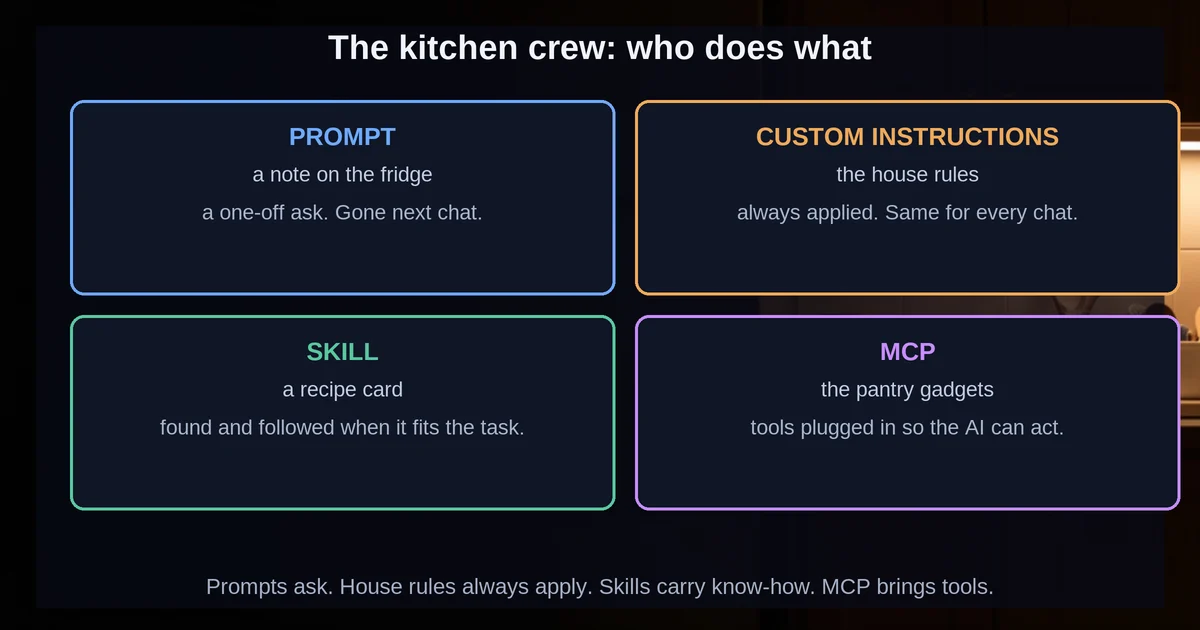
Time to meet the whole kitchen crew. Four things live there, and each has one job:
- The note on the fridge - a prompt. One-off instructions for this one meal, in this one chat. Gone tomorrow.
- The recipe card - a skill. Written once, found when needed, followed every time.
- The kitchen gadget - a tool or MCP server. The blender or stand mixer the recipe may call for: a connection to something outside the AI, like a database or a web service.
- The poster of house rules on the wall - custom instructions (or files like GEMINI.md and AGENTS.md). Always-visible background rules, hanging there for every task.
That last one is the quick version of custom instructions vs skills: the poster is always on the wall, while a card comes out of the cookbook only when a task calls for it.
Now the two comparisons people actually Google:
Prompt vs skill. Straight from the Claude docs: prompts are conversation-level instructions for one-off tasks, while skills load on demand, so you do not have to repeat the same guidance across conversations. Kid version: the note is for tonight's dinner; the card is for every dinner from now on.
Skill vs MCP. No single official one-liner exists for this, so here is the honest, verified framing: skills are instructions - they tell the AI how to work through a task. MCP (the Model Context Protocol) is about connections - it is a protocol that gives AI apps a standard way to reach outside systems, like plugging the mixer into the wall. The evidence that they are separate layers that stack together: OpenAI's docs describe plugins that bundle MCP connections alongside skills, and Cursor's docs list skills and MCP as separate customization layers. A skill's recipe can even say "now use the blender" - they combine happily.
Even inside one skill, the official advice splits labor three ways: instructions for flexible guidance, code (scripts) for steps that must happen exactly the same every time, and resources for facts the AI should look up.
So, a tiny decision list for choosing:
- One-off task, tonight only? Prompt.
- A workflow you will repeat? Skill.
- The AI needs to reach an outside system? MCP server - and yes, you can use all three together.
Write your first skill in five minutes
Here is the truth that surprises everyone: you do not need to be a chef to write a recipe card. If you can write a to-do list, you can write a skill. Let's build the commit-message-writer card for real.
How to write a skill, in one line: make a folder, add a SKILL.md file with a name and a when-to-use description, drop the folder where your app looks for skills, then test it.
Step 1: Make a folder called commit-message-writer. (The folder name matters - hold that thought.)
Step 2: Inside it, create a file named SKILL.md with the content below. This is a minimal, validated example that follows the official format - frontmatter at the top, instructions below:
---
name: commit-message-writer
description: Writes clear git commit messages from a staged diff. Use when the user asks to commit changes, write a commit message, or describe what changed in the code.
---

# Commit Message Writer

## Instructions

1. Run `git diff --staged` to see exactly what changed.
2. If nothing is staged, ask the user to stage files first.
3. Write a commit message with:
   - A one-line summary under 50 characters, imperative mood ("Add", "Fix", not "Added").
   - A blank line, then 2-3 bullet points explaining the key changes.
4. Show the message to the user before committing.
Read it again and notice how simple it is. The frontmatter is just two lines: a name and a when-to-use description. The body is a numbered to-do list. That is a real, working skill.
Step 3: Drop the folder where your AI looks for skills. Each app has a favorite shelf (paths verified from each app's own docs, as of September 2026):
- Claude Code:
~/.claude/skills/ - Cursor:
.cursor/skills/or.agents/skills/(Cursor also reads existing.claude/skills/folders) - Gemini CLI:
.gemini/skills/or.agents/skills/ - Codex:
$HOME/.agents/skills/
Notice .agents/skills/ showing up more than once - that is the cross-app convention, the shared shelf. And a small exception: the Claude app on the web works differently - you upload a skill as a zip file in Settings.
Step 4: Test it. Ask your AI to do the task ("commit my changes"). If the skill does not trigger, the official advice is to sharpen the description and try again - triggering depends entirely on that index line.
While you are at it, dodge the three most common beginner mistakes:
- Folder name and
namedo not match. The spec requires them to be identical. This one typo breaks everything. - A vague description. "Helps with commits." tells the AI nothing about when to reach for the card.
- Stuffing everything into SKILL.md. The body is the recipe; the details belong in
references/pockets.
And here is the win: you now own a reusable, shareable AI ability. Zip that folder, send it to a teammate, and their AI has your skill too. That is the whole point of a shared standard.
The honest limits (and the safety bit)
A recipe card cannot grab the cook's hand. The cook usually follows the card - usually very well - but the card is advice, not a robot arm. Every honest article about skills should say this out loud, so here it is.
The short version: skills are advice, not enforcement, and a skill folder can contain code - so treat skills from other people like software and install only what you trust.
Skills are advice, not enforcement. The AI is instructed to follow a skill's guidance - the Gemini CLI docs say to prioritize it "within reason" - but the app decides, and nothing hard-guarantees behavior. Whether a skill even gets picked up is probabilistic: it depends on how well the description matches your task. That is why the advice is always "sharpen the description and test," not "trust it blindly."
Skills can run code, so treat them like software. A skill can contain scripts the AI executes. Anthropic's own guidance is to stick to trusted sources to keep your data safe. Some apps add guardrails - Gemini CLI shows a confirmation prompt before a new skill's folder gets access (as of September 2026).
The same card behaves differently in different kitchens. Runtime rules vary by app: skills used through the Claude API run in a locked-down sandbox with no network access and no package installs; skills in Claude Code run with the same access as any other program on your computer; the claude.ai app depends on your settings. Same recipe, different kitchens, different amounts of freedom.
No syncing between kitchens. A skill uploaded to the claude.ai app does not automatically appear in Claude Code or the API, and same-name skills are not merged either (Codex, for one, keeps them separate). If you want the card in two places, you put it in two places yourself.
None of these are reasons to stay away. They are just the honest fine print that comes with any powerful tool.
Start with one small skill that fixes one repeated annoyance - the note you are tired of re-pasting. Write the card this week. Then write another next week. A folder a week becomes a personal cookbook that makes every AI you use work your way - and that you can hand to anyone else, because every kitchen reads the same cards.
The standard is young and spreading fast. As more apps adopt the format, every card you have already written gets more valuable without you touching it again. So leave one note on the fridge - the one that says "read the cookbook."
Skill FAQs
Is a skill just a saved prompt? No. Prompts are one-off, conversation-level instructions you paste each time. A skill is a folder of instructions the AI finds and loads on demand, so the same guidance works across every chat - and the folder can be shared with other people.
Do skills work in ChatGPT, Cursor, and Copilot - or only Claude?
They work in all of them. Skills began as Claude skills, but as of September 2026, ChatGPT and Codex, Cursor, Gemini CLI, and GitHub Copilot all read them too, according to their own docs. Cursor and Copilot even pick up existing .claude/skills/ folders, and .agents/skills/ is the shared convention across apps.
Can a skill force the AI to behave a certain way? No. A skill is guidance the model is told to prioritize "within reason" - the app decides. If a skill does not trigger, sharpen the description and test again rather than assuming it will always work.
What is the difference between a skill and an MCP server? Skills are instructions - they tell the AI how to work through a task. MCP servers are connections to outside systems, like databases or apps. They are separate layers that combine happily: a skill's steps can call MCP tools.
Are skills safe to install from other people? Treat them like software, because they can contain code the AI runs. Stick to trusted sources - and some apps help by asking for confirmation first, like Gemini CLI's prompt before activating a new skill.