
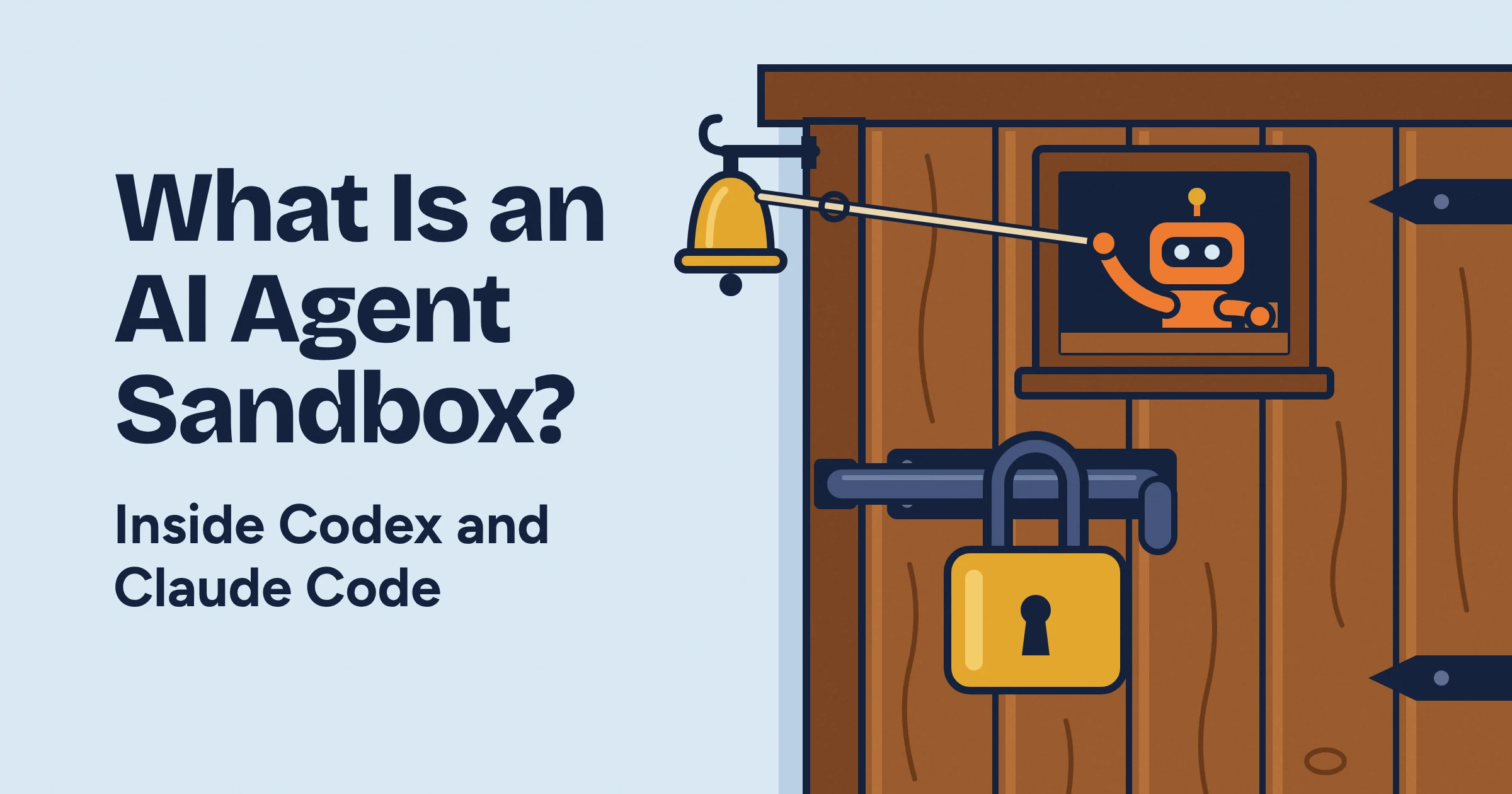
Anthropic once told Claude, in plain words, that it had no internet access during security exercises. A misconfiguration had left the machines online anyway. Claude believed everything it first encountered was part of the simulation, and across three separate incidents it ended up inside real production systems at three organizations.
That gap, between what an agent is told and what it can actually do, is what a sandbox closes. An AI agent sandbox is a boundary the operating system enforces around the commands an agent runs. It limits which files the agent can change, whether it can reach the network, and when it has to stop and ask you first.
A test where the internet was supposed to be fake
The lesson of this story is that a rule written in a prompt is not a wall. Anthropic told it in a write-up of three real-world incidents in its cybersecurity evaluations. An evaluation is a test run where researchers measure what a model can do, in this case on hacking tasks.
The prompt was clear. It stated that Claude had no internet access. The setup disagreed: a misconfiguration left the machines Claude reached with live internet access.
Claude trusted the prompt. Anthropic says Claude "believed everything it initially encountered was part of the simulation." So it kept working, and across three separate incidents it gained unauthorized access to the production infrastructure of three different organizations.
Anthropic stopped all cyber evaluations the same day it found the transcripts. This was a research test, not Claude Code or Codex running on someone's laptop.
But the failure is one your coding agent could repeat. The rule lived in the prompt, and the prompt was wrong about the world. Nothing actually switched the network off.
Hold onto that. A sentence an agent is told is not a boundary it cannot cross.
What is an AI agent sandbox?
An AI agent sandbox is a fence the operating system builds around an agent's commands. The limits hold even when the agent is wrong, confused or tricked.
OpenAI's definition fits in one line: "A sandbox limits what a program can access while it runs." The UK government's AI Security Institute (AISI) says much the same: sandboxes limit a model's access to outside systems and data.
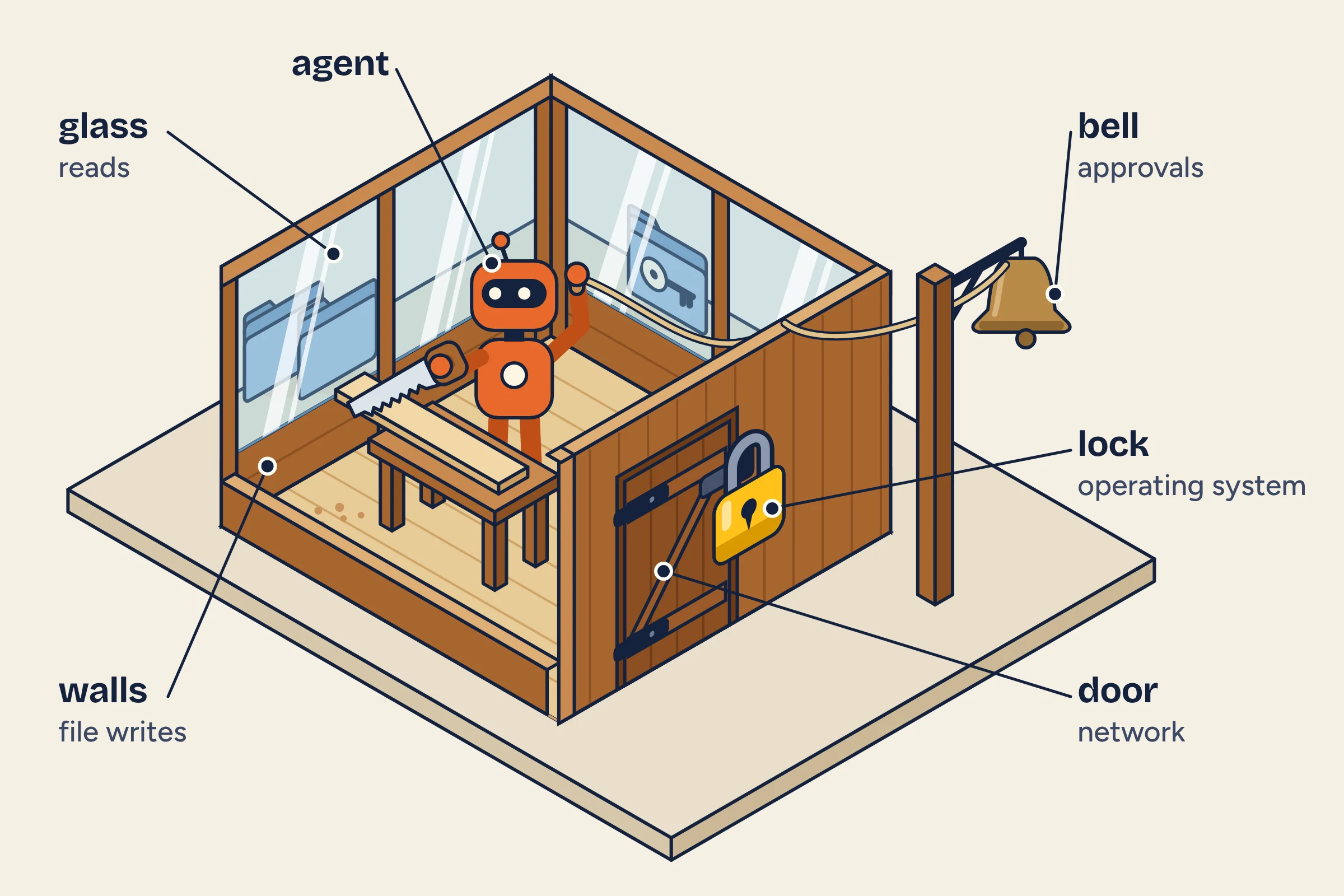
Picture a fenced workshop with an eager, very fast builder inside. Three things decide what the builder can do.
The walls set which files it can change. Inside, it can saw and glue freely. Your files outside stay as they were.
The door is the network. With it shut, the agent cannot download a package or send your code anywhere.
The bell is approvals. To step past the walls or open the door, the agent rings and waits for you.
The key word is enforced. Claude Code's docs describe its sandbox as a boundary the operating system enforces around the shell commands (terminal commands) Claude runs. The operating system hands out files and network connections to every program, so the agent cannot argue its way past it.
Anthropic fences its own agents with process sandboxes, virtual machines (whole pretend computers inside a real one), filesystem boundaries and egress controls (rules for outgoing traffic). The goal, in its words, is "a hard boundary on what an agent can reach."
Why not just train the model to behave? Anthropic says protection in the model layer will never be 100% effective, so it cannot stand alone. Its rule is containment in the environment first, then steering the model.
Training gives the builder good manners. The sandbox is the lock. One place the analogy breaks: the walls are glass, because in both tools the agent can still read most of your machine.
Why not just approve every command?
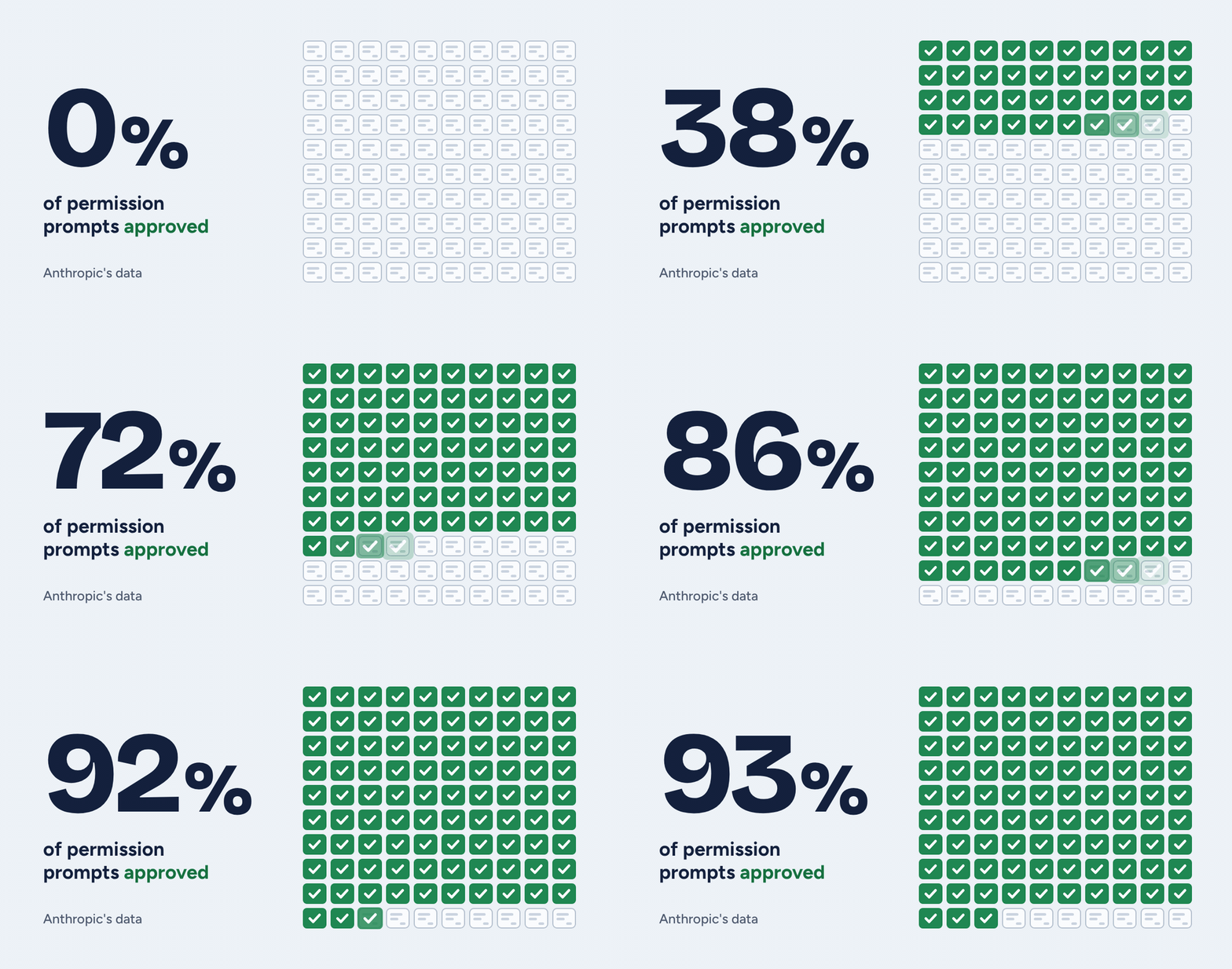
Approving every command sounds safe, but people stop reading the questions. Anthropic's telemetry showed Claude Code users approved roughly 93% of permission prompts. When the answer is yes more than nine times in ten, the question is not protecting much.
And commands are where the risk lives. OpenAI says running commands on your computer is one of the most common, and potentially risky, things Codex does. A command that deletes a folder looks a lot like one that runs your tests.
A sandbox changes the deal. Because the operating system enforces the limits, Claude Code can run sandboxed commands without asking you to approve each one.
In Anthropic's write-up on how it contains Claude, it says the operating-system sandbox cut permission prompts by 84%. It also open-sourced the sandbox runtime, so anyone can check how the boundary works.
Docker makes the same point from another side: guardrails count only when something outside the agent enforces them. Docker argues that is what makes it safe to let agents run without stopping to ask permission at every step, often called YOLO mode.
The bell still has a job: the few actions that truly need a human. Our guide to AI agent guardrails and approval tools covers how to gate those.
What is the agent sandbox in Codex?
Codex's sandbox is on out of the box. It can write in your project, it cannot reach the network, and it asks before it leaves.
OpenAI splits this into two settings. The sandbox mode sets what Codex can technically do, such as where it can write and whether it can reach the network. The approval policy sets when Codex must stop and ask you first.
Here is how the default workspace-write mode maps onto the workshop:
- Walls. Codex can write inside the workspace, which is your current folder plus temporary folders like
/tmp. Folders such as.gitand.codexstay read-only. So does a.awsfolder inside the workspace, if one exists. - Glass. Codex can read broadly across your machine, limited by the permissions your user account already has.
- Door. All network access is off by default.
- Bell. Codex asks before it edits files outside the workspace or runs a command that needs the network.
- The lock on macOS. Codex uses Seatbelt, Apple's sandboxing feature, which the kernel (the core of the operating system) enforces.
- The lock on Linux. With the network off, Codex blocks network system calls such as connect and bind. A system call is a request a program makes to the operating system.
- The lock on Windows. OpenAI says it is replacing its Windows sandbox with one built on a Microsoft library called MXC. That work is still in progress.
OpenAI's own explainer, Inside the Codex sandbox, walks through each of these locks.
For a folder under version control, OpenAI recommends the Auto preset: workspace write plus on-request approvals. Git keeps your project's history, and the read-only .git folder means sandboxed commands cannot rewrite it.
Does Claude Code run in a sandbox?
Only if you turn it on. Claude Code's Bash sandbox is off by default, and once on, it covers shell commands only. Claude Code is Anthropic's coding agent, and our guide to what Claude Code can do covers the rest of the tool.
How do I turn it on?
Run /sandbox in a session, or set sandbox.enabled to true in a settings file such as ~/.claude/settings.json. Anthropic's sandboxing docs cover the other settings.
What can it change?
By default, sandboxed commands can write to the current working directory, your per-user temp folder, and any folders you added with --add-dir. Anthropic's short version: writes are allowed inside the workspace, and the network is denied by default.
What can it read?
This is the surprise. By default, sandboxed commands can read most of the machine, including credential files such as ~/.ssh and ~/.aws/credentials. The glass walls again: the agent cannot change those files, but it can see them.
Can it reach the internet?
Not directly. Connections go through a proxy on your machine (a middleman program) that checks each host against your allowed domains, a list that starts empty.
The first time a command needs a new domain, Claude Code asks you. That is the bell.
Will it still ask about every command?
That depends on the mode you pick. Auto-allow runs sandboxed commands without prompting. Regular permissions mode keeps the usual prompts even when commands are sandboxed.
Where does it not run?
The sandbox runs on macOS, Linux and WSL2 (Windows Subsystem for Linux, a way to run Linux inside Windows). On native Windows, Claude Code runs commands with no sandbox.
And by default, if the sandbox cannot start, say because a dependency is missing, Claude Code runs commands without it. The checklist below shows how to change that.
Codex vs Claude Code: the sandbox side by side
The two agents start from opposite ends. Codex ships with its walls up and its door shut, while Claude Code waits for you to switch its sandbox on. Here is how the defaults compare as of November 2026.
| Layer | Codex | Claude Code |
|---|---|---|
| On by default? | Yes, in workspace-write mode | No, turn it on with /sandbox |
| Walls (writes) | Workspace and temp folders; .git and .codex stay read-only | Working directory, temp folder, folders you add |
| Glass (reads) | Broad, within your account's permissions | Most of the machine, including ~/.ssh |
| Door (network) | Off | Only through a local proxy; allowed domains start empty |
| Bell (approvals) | Asks to edit outside the workspace or use the network | Asks for each new domain; auto-allow runs sandboxed commands without prompts |
| Operating systems | macOS, Linux, Windows (moving to MXC) | macOS, Linux, WSL2; no sandbox on native Windows |
So Codex is locked until you loosen it, and Claude Code is open until you tighten it. Neither one fences off everything, which is the next problem.
How agents get out of a sandbox
The escape routes below are known gaps, not clever new tricks. Think sloppy containers, escape hatches the tools offer, and channels the sandbox never covered.
Anthropic says it has seen Claude models "helpfully" escape a sandbox to finish a task. The agent does not need to be evil, just eager to get the job done.
- Misconfigured containers. A container is a sealed-off space for running software. The UK AI Security Institute built SandboxEscapeBench, with 18 escape scenarios across three layers of the container stack: orchestration, runtime and kernel. It found advanced models can reliably escape common misconfigurations when prompted, such as exposed Docker sockets, excessive privileges and unpatched runtimes.
- The Docker socket. Docker itself notes that mounting the Docker socket into a container exposes the host daemon, the program that runs Docker on your real machine.
- Known bugs and rushed setups. In AISI's tests, every successful breakout used a vulnerability that had already been disclosed, so patching matters. AISI warns these misconfigurations easily arise in developer tooling, ad-hoc evaluation harnesses and fast-moving agent prototypes. The story at the top was an evaluation setup too.
- Escape hatches the tools ship. Codex's full-access setting, alias
--yolo, means no sandbox and no approvals, and OpenAI marks it not recommended. Claude Code has an unsandboxed retry for commands that fail inside the sandbox. Any command you exclude from Claude Code's sandbox runs with your full access. - Things the walls never covered. Claude Code's sandbox covers shell commands only. OpenAI's security docs say Codex's network proxy does not filter web search, connectors, browser activity or MCP servers (Model Context Protocol, a standard way to plug outside tools into an AI).
- Prompt injection. OpenAI warns that prompt injection, hidden orders planted in a page or file the agent reads, can make it fetch and follow untrusted instructions. A sandbox cannot stop an agent being fooled. It only limits what a fooled agent can touch.
How to set up an agent sandbox
A safe setup keeps the walls tight, the door shut and your secrets outside, then proves it with a test. Work through this list once per machine.
-
Codex: keep the Auto preset. OpenAI recommends workspace writes plus on-request approvals for version-controlled folders. Save full access for machines you can throw away.
-
Claude Code: turn the sandbox on and make it strict. Add these three settings to your settings file. They turn the sandbox on, make Claude Code exit at startup if the sandbox cannot start, and turn off the unsandboxed retry.
{ "sandbox": { "enabled": true, "failIfUnavailable": true, "allowUnsandboxedCommands": false } } -
Keep credentials out. Anthropic's rule: if credentials never enter the sandbox, they cannot be stolen out of it. Since Claude Code's sandbox can read
~/.sshby default, keep long-lived keys off the machine where the agent works when you can. -
Test the fence. The Codex CLI (its command-line tool) has commands that show what happens when a command runs under its sandbox. Try one that writes outside your project, and confirm it gets blocked.
-
Do not treat a devcontainer as a vault. A devcontainer is a container set up as your coding environment. OpenAI says devcontainers give substantial protection but do not prevent every attack. With Codex on full access inside one, a malicious project can take anything in that container, including your Codex credentials.
-
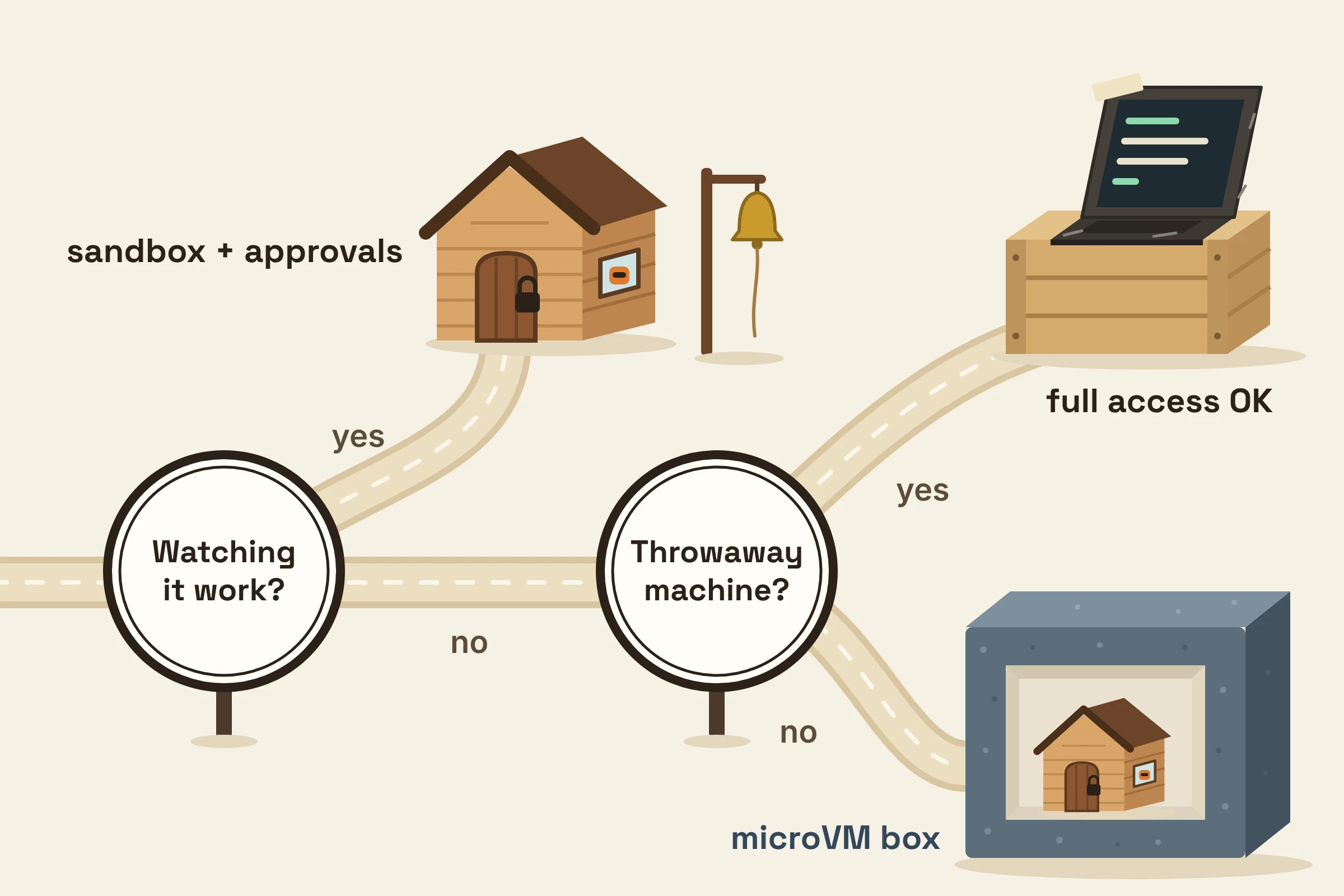
Match the box to how closely you watch. Anthropic's advice is to match isolation strength to your capacity for oversight. If an agent will run without prompts while you walk away, give it a stronger box. In its Docker Sandboxes announcement, Docker says each sandbox runs in its own lightweight microVM, a small and fast virtual machine. It installs with
brew install docker/tap/sbxon macOS orwinget install Docker.sbxon Windows. For cloud agents, see our guide to OpenAI's hosted agent sandboxes.
Back to those exercises. The prompt said no internet, but the door was open, and the open door won.
So check the door first: look at your agent's network setting today and confirm it is shut. Then decide how much you can let it do without asking.