
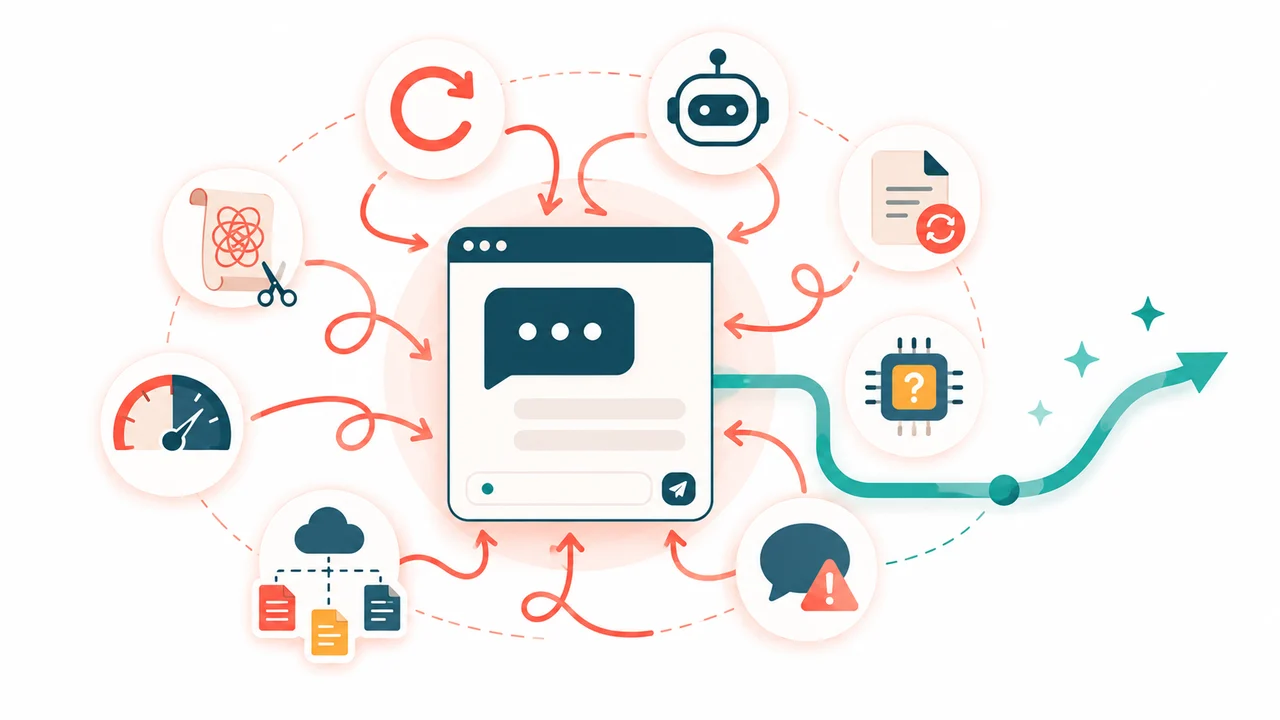
Most common AI mistakes are not bad prompts. They are features you never switched on, like Claude's memory, Projects and connectors, so you keep re-typing context the tool could already hold.
The result: after one sitting, new chats start with your context, files live in a project, and your prompts get shorter. In Claude, all three fixes work on the free plan.
Most AI time loss is unused features
The biggest leak is setup you repeat in every chat. Claude's memory, Projects and connectors exist to hold that setup for you, and most of them work on every plan.
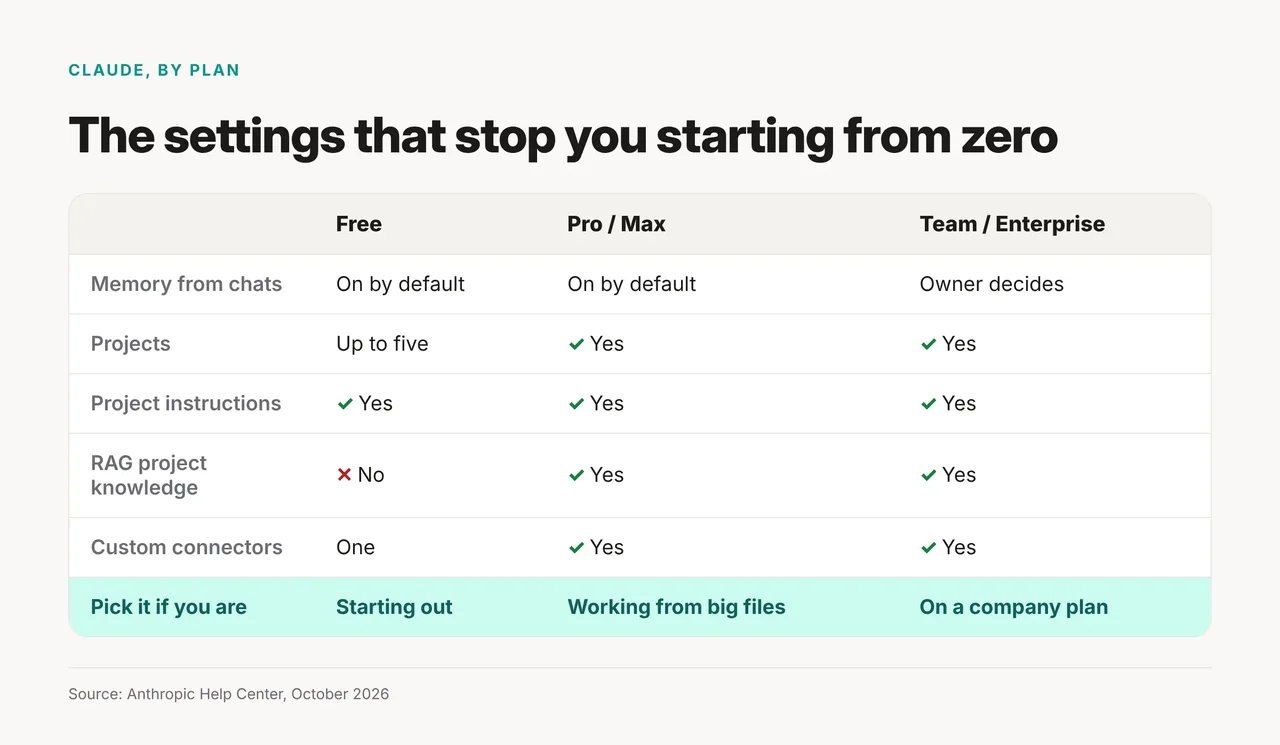
On Claude's Free plan, memory is on by default, you get up to five Projects, and you can add one custom connector. Paid plans add RAG, which lets a project search larger file sets. On Team and Enterprise, the owner decides whether memory is available.
The 8 mistakes, each with the setting that fixes it
1. You start every chat from scratch
If you re-explain your job, style or product in each new chat, memory is off or unused. Anthropic says memory is on by default for Free, Pro and Max on the web, Claude Desktop and Claude Mobile.
Check it in Settings > Memory. The toggle is called "Generate memory from chats." A second toggle, "Search and reference chats," lets Claude memory look through your past chats. You can also import memory from another assistant. On ChatGPT, our guide to ChatGPT memory and project memory shows what it stores and how to turn it off.
2. You use one tool for every task
The tool that is already open is not always the right one. Use Claude if you want a project with its own files, instructions and chat history; on paid plans, RAG project knowledge lets a project search larger file sets. Use ChatGPT if your memory already lives there. Our Claude Projects vs ChatGPT Projects vs Gemini Gems comparison shows which workspace fits which kind of work.
3. You regenerate everything to fix one paragraph
A full rewrite means you re-read the whole draft to find what changed. Paste the one paragraph back and ask for a single change instead:
Change only this paragraph. Keep the rest of the document as it is.
Paragraph: [paste it]
What to fix: [say what is wrong]
You get back one paragraph to check, not the whole document.
4. You never check which model you're using
A weak answer can be a model or limit problem, not a prompt problem. Check the model before work that matters. In the Claude, ChatGPT and Gemini apps, the model picker sits near the chat box; we could not verify its exact location this month. In Claude Code, Anthropic says the simplest way to switch is the /model command.
Free plans have limits too. Google lists "Standard limits" for Gemini users without an AI plan. That limit refreshes every 5 hours until you reach a weekly limit, and the free context window is 32k tokens, which is about how much text it can hold at once, so very long files may get cut off. If answers get weaker late in a session, you may have hit Standard limits.
5. You trust one answer without checking it
AI sounds just as sure when it is wrong. Ask it to check itself before it hands over the answer. Anthropic's prompting guide suggests adding a line like this:
Before you finish, verify your answer against [test criteria].
Then check any fact that will go into something public yourself.
6. You paste the same files into every chat
If you paste the same brief or spreadsheet each time, put it in a project once. Anthropic describes Claude Projects as "self-contained workspaces with their own chat histories and knowledge bases." You can also add project instructions so every chat inside follows your rules.
Projects work on free accounts, up to five of them. For live data, a custom connector links Claude to another app. Free users get one, and on Pro or Max you add them under Customize > Connectors.
7. You never ask for thinking on hard tasks
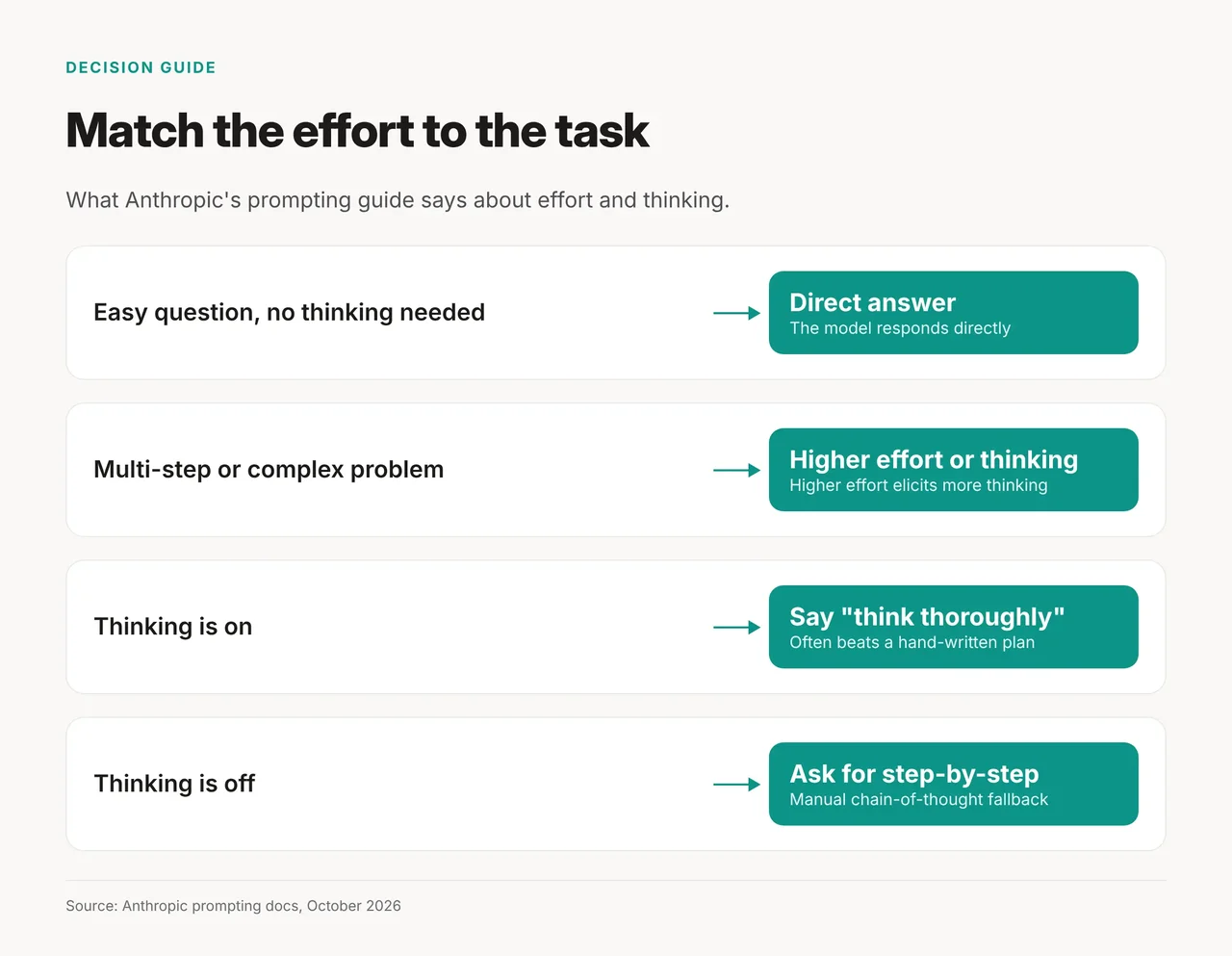
Effort controls how hard a model thinks. Anthropic's guide says "Higher effort elicits more thinking, and more complex queries do the same." On easier queries that don't require thinking, the model responds directly. For multi-step work, ask for careful reasoning or turn thinking on if your tool offers it.
If you use the API, effort is a parameter you set per request; app users can skip that detail. Our guide to AI effort mode covers the levels in detail.
8. You lean on old prompt tricks
Some old tricks still work, but only in the right place. A role prompt does: Anthropic says "Even a single sentence makes a difference." So one clear role line is enough to start; you don't need a long persona. For more prompt basics, see Learn Prompting.
"Think step by step" depends on thinking. With thinking off, step-by-step prompting is still the fallback. With thinking on, Anthropic says a prompt like "think thoroughly" often beats a hand-written step-by-step plan.
Where each setting lives
| Habit | Fix | Where | Plan |
|---|---|---|---|
| Starting from scratch | Memory | Claude Settings > Memory | Free, Pro, Max (on by default) |
| Re-pasting files | Projects | Claude Projects | Free: up to five |
| Re-typing rules | Project instructions | Inside each project | All plans |
| Copying live data | Custom connector | Customize > Connectors (Pro/Max path) | Free: one; paid: more |
| Thinking skipped on hard tasks | Effort setting | Claude API parameter | API |
| Wrong model | Model picker | Near the chat box in the apps (location not verified); /model in Claude Code | All |
Where each fix breaks down
Some fixes stop short depending on your plan or tool:
- Team and Enterprise: owners control whether memory is available, and it stays off for each member until they turn it on.
- Free projects: RAG project knowledge is only on paid plans, so very large file sets fit better on Pro or Max.
- Newest Claude models: asking the model to write out its reasoning in tags may be declined. Turn thinking on instead.
- ChatGPT and Gemini: we could not confirm their exact menu paths for this update. Check the settings in your own account, or see our guide to ChatGPT memory and project memory.
Make it a habit: one sitting, then weekly
Do these once, then glance at them each week:
- Open Settings > Memory and confirm "Generate memory from chats" is on.
- Create one project for your main kind of work and add its instructions.
- Upload the files you paste most often to that project.
- Add one connector for the app you copy from most.
- Check the model before any task that matters: the picker near the chat box in the apps, or
/modelin Claude Code. - Add the self-check line to prompts for factual work.