Pick almost any operations team and you will find the same quiet argument: the spreadsheet people want formulas, the wiki people want pages, and everyone wants AI to just handle the boring parts. Two tools have spent 2026 competing to be the answer. One of them is not even called the same thing it was a year ago.
On July 8, 2026, Coda became Superhuman Docs. Grammarly had acquired Coda back in December 2024, renamed itself Superhuman in October 2025, and folded Coda into a suite alongside Grammarly, Superhuman Mail, and an assistant called Go. The rebrand changed the name, the URL, and the logo, but the product carried over intact: every doc, table, formula, automation, and Pack kept working, and existing customer pricing stayed put, as Superhuman's own help center confirmed at launch. Notion went through a quieter transformation in the opposite direction, rebuilding its AI from a writing helper into a system of agents that run recurring operations on a schedule.
So which one should run your team's sprint tables and internal operations in late 2026? The honest answer is that it depends less on whose AI is smarter and more on how each tool stores your data in the first place. The data model is the ceiling on what the AI can do.
Two data models, two very different machines
Coda's building blocks: tables that behave like spreadsheets
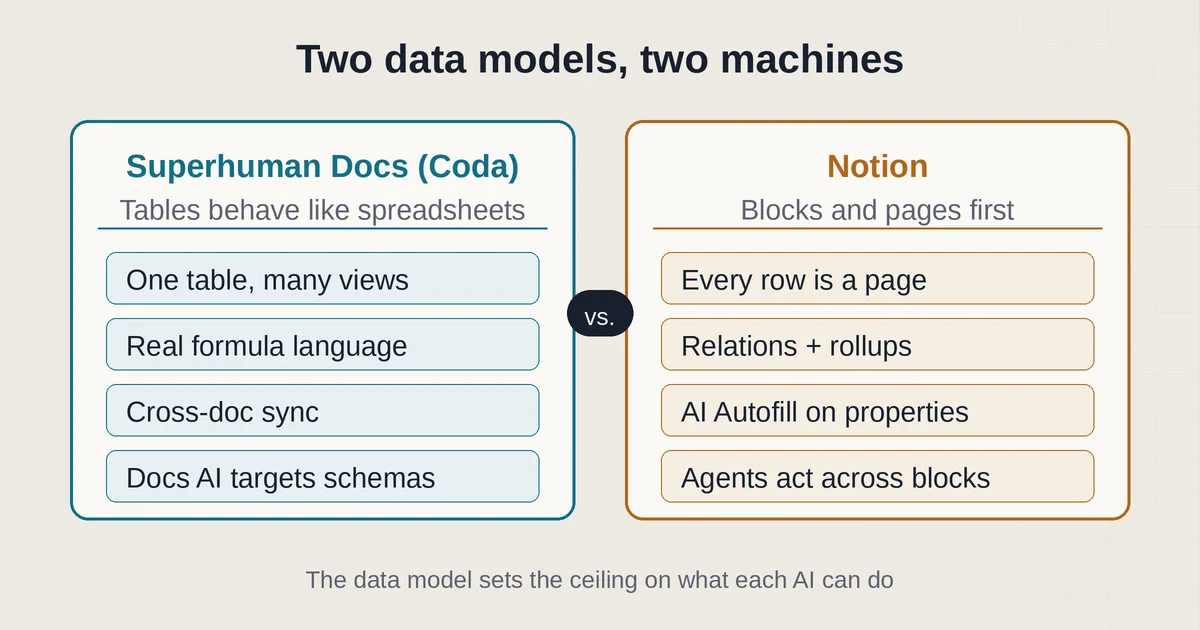
Coda, now Superhuman Docs, is built on a doc-as-app philosophy. A doc is a canvas where pages, tables, buttons, sliders, and charts are all first-class building blocks, and tables are the load-bearing structure. These are not HTML tables for arranging text. They are spreadsheet-grade tables with row references, filterable views, cross-doc sync, and a real formula language that can chain, recurse within limits, and reach into other tables inside the same doc. A sprint tracker in Coda is one table with views: a kanban for the board, a calendar for deadlines, a summary table grouped by assignee, all pointing at the same rows.
That structure is precisely what the new Docs AI (still in beta) leans on. Docs AI is the rebuilt in-document assistant that replaced the original Coda AI: you describe what you need and it builds formatted tables, writes and debugs formulas, drafts sections, and answers questions using the actual data in your connected tables rather than generic guesses. If you say "add a column that flags overdue items and turns the row red," it has a real table schema and a real formula language to target. The AI is working inside a structure that was already designed for computation.
Two more pieces matter for operations teams. Table Pages, which shipped with the rebrand, give heavy tables their own full-page home for bulk editing and data management. And Superhuman Databases, a beta feature on the Business tier, targets up to a million rows per table, which attacks the long-standing complaint that classic Coda tables slow down somewhere past the low tens of thousands of rows. That last number is vendor-reported while the feature is in beta, so treat it as a promise, not a guarantee, until it is generally available.
There is also an MCP server built into the product, as listed on the Superhuman Docs plans page. Superhuman's own pricing page lists Pro at $12 per Doc Maker per month billed annually. Any Doc Maker on a paid plan can connect Claude, ChatGPT, or Cursor to their workspace, and those external AI tools can read and edit docs and update tables directly. Your doc becomes something an outside agent can operate on, with the doc staying the source of truth.
Notion's blocks and databases: pages first, structure second
Notion's model inverts this. Everything is a block: a paragraph, a to-do, an image, a whole page. Databases are collections of blocks, which is why Notion now calls them data sources, and they carry relations, rollups, subtasks, and dependencies. You can absolutely build a sprint tracker in Notion: a projects database, a tasks database, a relation linking them, rollups counting open bugs per project. It works well. But the deeper structure is page-shaped. A row in a Notion database is really a page wearing a table costume, which is wonderful for prose-rich records and less wonderful when you want to write a formula that spans 40,000 rows at spreadsheet speed.
Notion's 2026 AI story is not about writing formulas inside that structure. It is about agents acting across it. The personal Notion Agent chats with you, reads your workspace and connected apps, and executes multi-step tasks: build a page, fill a database, draft a doc, search Slack. It runs inside your existing permissions, so it only sees what you can see. AI Meeting Notes transcribes and summarizes meetings and pulls out action items. Enterprise Search answers questions across Slack, Google Drive, and GitHub, not just Notion. And AI Autofill fills database properties like status, tags, and summaries in bulk, which is the closest Notion gets to Coda's row-level AI.
The headline feature is Custom Agents: autonomous agents that run on triggers or schedules. A task routing agent captures incoming requests and assigns them. A status update agent compiles and posts weekly progress reports. A Q&A agent answers the same five questions your team asks in Slack every week. You describe the workflow once, set the trigger, and it runs 24/7 with its own permissions, logged runs, and reversible changes, per Notion's agents page. They went generally available on May 4, 2026, and here is the part your finance person will care about: every run consumes Notion credits, sold at $10 per 1,000 monthly credits as an add-on, shared across the workspace, with no rollover. The personal Agent, Meeting Notes, and Enterprise Search stay included in the Business plan.
What shipped in 2026, side by side
| Superhuman Docs (ex-Coda) | Notion | |
|---|---|---|
| Core AI | Docs AI (beta): build tables, write formulas, ask your data | Notion Agent plus Custom Agents (GA May 2026) |
| AI on tables | AI columns, AI trackers, AI views (beta); formula generation | AI Autofill on database properties |
| Automation | Native automations, unlimited on Business tier | Custom Agents on triggers, schedules, Slack, email |
| External AI access | Built-in MCP server (Claude, ChatGPT, Cursor) | Notion MCP plus partner integrations, External Agents API |
| Scale story | Superhuman Databases beta, targets 1M rows | Granular database permissions, per-row access control |
| AI billing | Included in paid plans while in beta, fair use | Included in Business; credits ($10/1,000) for Custom Agents |
| Entry price for full AI | Pro at $12 per Doc Maker per month billed annually ($15 monthly list) | Business at $24 per member monthly ($20 billed annually) |
Where each one actually wins in operations
Coda's sweet spot is the team that builds its own tools. If your ops person lives in formulas, wants cross-doc sync so the vendor tracker in one doc updates the master table in another, and needs AI to stop hand-writing lookups, Superhuman Docs is the stronger fit. The billing model reinforces this: you pay only for Doc Makers, the people who create docs, while every editor and viewer is free. A team of three builders serving fifty people who mostly fill in forms and read dashboards pays for three seats. The Pro tier, at $12 per Doc Maker per month billed annually (about $15 on monthly billing), now includes Docs AI access, AI trackers and views, and MCP. If you have been comparing Notion's per-member pricing against Coda's list prices and feeling sticker shock, this is the number that changes the math.
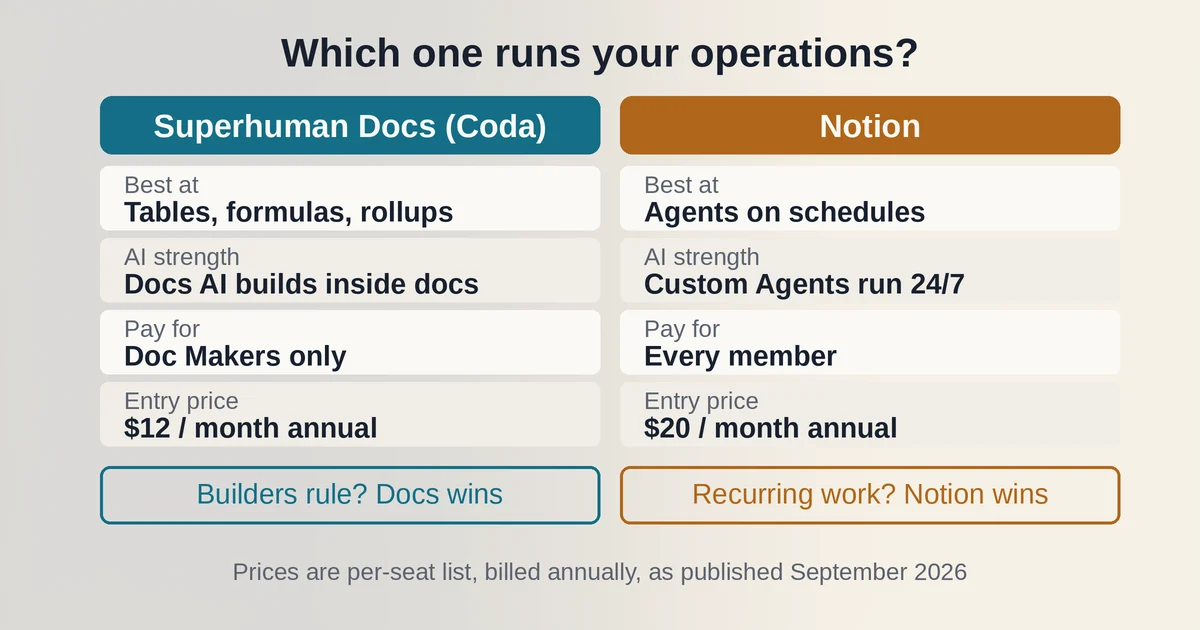
Notion's sweet spot is the knowledge-heavy team that wants automation to run itself. If your pain is not formulas but rather that nobody updates the status doc, answers repeat questions, or writes the Friday update, Custom Agents are a genuine answer. The permissions model is the most mature part: each agent gets its own read and write scopes, every run is logged, changes are reversible, and admins get spending caps with auto-pause so a runaway agent cannot quietly drain the credit budget. Notion is also blunt about the security trade-off, warning that agents reading connected content can encounter prompt injection attempts, and building detection guardrails for exactly that. That candor is worth something when you are deciding what an agent is allowed to touch.
Neither tool wins the meeting-notes-versus-database-formula war on the other's turf. Notion's Autofill is bulk property filling, not a formula engine. Coda's automations are native workflow rules, not always-on autonomous agents; if you want a Coda agent that watches a Slack channel and triages bugs overnight, today you get there via MCP with an external assistant like Claude doing the driving, not a built-in scheduled agent. That difference is the whole decision in one sentence: Coda gives AI a better structured substrate to compute on; Notion gives AI more autonomy to act without you.
FAQ
Is Coda still a separate product from Superhuman? No. On July 8, 2026, Coda was renamed Superhuman Docs and folded into the Superhuman suite with Grammarly, Mail, and Go. It is a rebrand, not a shutdown: existing docs, formulas, Packs, and pricing carried over, and old coda.io links redirect to the new home.
Can I use Notion AI without paying extra credits? Yes, on the right plan. The personal Notion Agent, AI Meeting Notes, and Enterprise Search are included in the Business plan ($20 per member per month billed annually; $24 billed monthly) according to Notion's pricing page. Credits at $10 per 1,000 only apply to Custom Agents and the Workers beta. Free and Plus plans get a limited trial.
The verdict
If your team operating system is fundamentally a set of interconnected tables that must compute, roll up, and sync, and your builders outnumber your bureaucrats, Superhuman Docs is the better machine, and its AI is built to make that machine faster to build. If your team operating system is fundamentally a knowledge base where the database is a byproduct, and your real bottleneck is recurring coordination work, Notion's agentic approach does something Coda does not currently attempt: it removes you from the loop entirely.
One purchasing note: both vendors changed their AI packaging within the last twelve months, Coda through a rebrand and Notion through the move to credits. Pricing and plan details are as published by the vendors around September 2026 and can change, so confirm on the official sites before you commit. And if you want a deeper look at Notion's AI toolset before deciding, our comparison of Notion AI and NotebookLM covers its research strengths, while our guide to building an AI second brain shows the knowledge-management patterns that work in either tool. For teams weighing this decision alongside broader automation tooling, the line between AI agents and AI automation is exactly where these two products diverge.