A lawyer's contract file. A therapist's session notes. A startup's cap table, an unfiled patent draft, a doctor's patient summaries. These documents have something in common: pasting them into a browser tab and hoping the right policy applies is not a workflow anyone can defend, and increasingly not one anyone wants to explain to a client or an auditor.
The good news in September 2026 is that you no longer need a server rack to avoid it. A normal laptop can now run a capable language model, index a folder of sensitive documents, and answer questions about them with citations, with the network cable unplugged the entire time. The bad news is that "private AI" has become a marketing phrase that hides as much as it explains. Several popular "local" apps now ship with optional cloud tiers, web search, and remote model tabs, and the difference between a private setup and a leaky one is usually a single toggle you were never asked about.
So this is a privacy-architecture guide, not a tool roundup. We'll define what private actually has to mean, check each major tool against that definition, walk through a realistic sensitive-document setup on modest hardware, and be honest about what you give up. If you just want to know which local chat app to install and don't have sensitive files involved, that's a different question, and our LM Studio vs Ollama vs Jan decision guide answers it in about a minute: https://www.toolbit.ai/blog/local-llm-lm-studio-vs-ollama-vs-jan
What "Private" Actually Requires
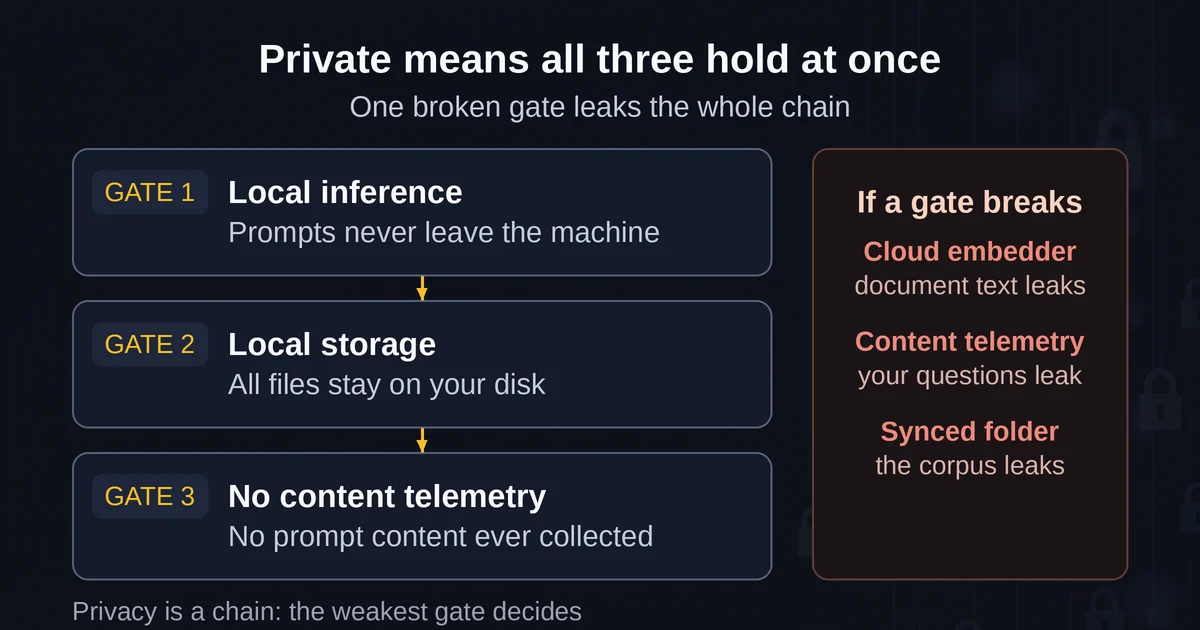
A tool is private for your sensitive documents only when three conditions hold simultaneously.
Local inference. The model weights run on your hardware, and your prompts travel exactly zero network hops. This is the part most people picture, and it's the easy part in 2026. Every tool in this article can do it.
Local storage. Your documents, the extracted text, the vector index built from them, and the chat history all live on your disk. A tool can run its model locally but still phone home with telemetry, or store your workspace in a synced folder you forgot about, or push document text to a vendor's embedding API. The pipeline has more exits than the model itself.
No content telemetry. The vendor collects, at most, anonymous usage metadata, never prompt or response content. This is where you have to read the actual policy rather than the landing page. Ollama's privacy policy (https://ollama.com/privacy) is unusually direct about it: the company states it does not "collect, store, transmit, or have access to" your prompts, responses, or model interactions when you run locally, and that it collects only limited device and usage metadata that does not include prompt content. That's the standard the rest of this article holds everyone else to.
The reason all three matter: each one is a separate failure mode. A local model with a cloud embedding service still leaks document text. A local model with content telemetry still leaks your questions. A tool that stores its index in a cloud-synced directory leaks everything eventually. Privacy is a chain, and the weakest link is the one that matters.
Each Tool's Real Architecture
Here is what each major option actually does under the hood, checked against the three conditions, as of September 2026.
Ollama is the engine underneath most local setups: open source, built on llama.cpp, now at v0.33.3 stable with a v0.34.0 release candidate in early September. On its own it's a terminal and a local API server, which makes it the least leaky and least friendly option at once. Two things changed recently that matter for privacy. First, Ollama now offers cloud-hosted models; the company processes those transiently and says it never trains on them, but if your goal is a sensitive corpus, simply don't connect an account, and the local mode is untouched. Second, the v0.34.0 candidate lets you use Ollama models inside ChatGPT Desktop on macOS, which is a sign of where things are heading: local engines becoming a setting inside cloud apps. For now, treat Ollama as the plumbing, not the product.
LM Studio made the biggest category pivot of 2026. In July it launched Bionic (https://lmstudio.ai/blog/introducing-lm-studio-bionic), a separate agent app for work with documents, PDFs, spreadsheets, and code. The privacy story is genuinely local-first: local models run natively through the LM Studio runtime, voice transcription happens on-device (it ships Mistral's Voxtral at launch), and document work happens in a sandboxed project environment with automatic checkpoints. The nuance: Bionic also offers frontier open models through LM Studio Secure Cloud with a Zero Data Retention commitment, meaning cloud requests are processed transiently and not stored. That's a reasonable design for non-sensitive work, but it means Bionic is private by configuration, not by construction. For sensitive documents, stay on the local models tab and the sandbox does the rest.
Jan is the open-source desktop app that got the most privacy-relevant interface improvement of the year. Version 0.8.0 (May 2026, changelog at https://www.jan.ai/changelog/2026-05-22-jan-v0.8.0) rebuilt its inference engine as a single router process that loads and unloads models on demand, and redesigned the provider list to split Local (llama.cpp, MLX) from Remote (OpenAI, Anthropic, Google, Groq) sections, so it's visually obvious which providers run on your machine and which send data to the cloud. That's exactly the affordance this category needed. Jan also shows model fit labels ("Fits", "May be slow", "Won't fit") based on your hardware before you download anything, and its RAG results come back as citation cards with source previews. Apache 2.0 licensed, with over four million downloads claimed on its homepage.
GPT4All, from Nomic, is the simplest honest answer in the category: a desktop app whose whole design brief is running models on machines with no GPU and no terminal. Its LocalDocs feature is built-in document chat (https://docs.gpt4all.io/gpt4all/localdocs.html). Point it at a folder of PDFs, Word files, Markdown, or plain text, and it indexes them with Nomic's on-device embedding models, storing vectors locally. One genuine gotcha: the settings include an optional Nomic API embedding option that speeds up indexing on weak hardware but routes your document text through Nomic's servers. If privacy is why you're here, that setting stays off. The current v3.10.0 release also added a tab for remote providers (Groq, OpenAI, Mistral), which is opt-in and irrelevant as long as you don't add a key.
AnythingLLM is the one to pick when the corpus is the point. It's a full local RAG application: you create workspaces, upload mixed file types, and it handles chunking, embedding, vector storage (LanceDB by default), retrieval, and cited answers, all against a local model provider like Ollama if you choose. The desktop app is single-user; the Docker version adds multi-user permissions for teams. The 2026 releases pushed it beyond document chat: v1.15.0 added "Magic Features" that bring on-device dictation, text actions, and autocomplete to your whole OS, and the August v1.16.0 (https://github.com/Mintplex-Labs/anything-llm/releases/tag/v1.16.0) added folder drag-and-drop uploads and mid-session tool toggles. It now also transcribes and summarizes meetings entirely on your computer, no bots, no cloud processing, which extends the private corpus from "documents you have" to "conversations you're having."
The honest summary table:
| Tool | Inference | Storage | Watch out for |
|---|---|---|---|
| Ollama | Local (llama.cpp/MLX) | Local | Optional cloud models; leave account unconnected |
| LM Studio Bionic | Local + optional ZDR cloud | Local, sandboxed projects | Cloud tier is off-switchable, not absent |
| Jan | Local (llama.cpp, MLX) | Local | Remote provider sections are one click away |
| GPT4All | Local | Local | Nomic API embedding option must stay off |
| AnythingLLM | Local (via Ollama etc.) | Local (LanceDB) | Default web search sends queries out; disable for sensitive work |
The Sensitive-Document Workflow, Realistically
Here's a concrete setup for the most common case: you have a few hundred pages of confidential documents, a normal computer, and no interest in becoming a sysadmin.
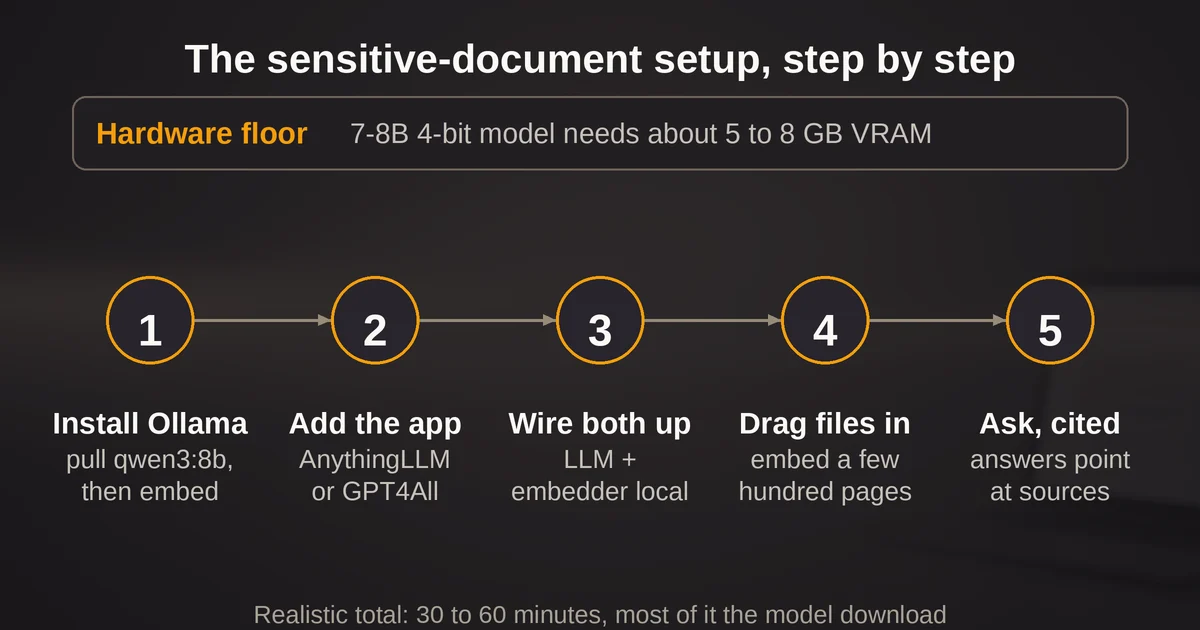
Hardware floor. The working rule in 2026 is about half a gigabyte of VRAM (or unified memory) per billion parameters for a 4-bit quantized model, plus 20 to 30 percent for context. A 7-8B model, which is the sweet spot for document Q&A, wants roughly 5 to 8 GB. That means: any 8 GB gaming GPU runs it comfortably; a 16 GB Apple Silicon Mac runs it well because unified memory counts; and a CPU-only machine with 16 GB of RAM runs it, slowly, at a few seconds per token. The embedding model is not a concern; models like nomic-embed-text are around 137M parameters and index happily on a CPU. Retrieval is cheap. Generation is the bottleneck.
The build, step by step:
- Install Ollama, then pull a model:
ollama pull qwen3:8b(about 5 GB) andollama pull nomic-embed-text(a fraction of a GB). This is the only terminal work. - Install AnythingLLM's desktop app (or GPT4All if you prefer the simpler tool and have a smaller corpus).
- In settings, point both the LLM and the embedding provider at Ollama. Both. A local model with a cloud embedder still leaks the document text, and this is the single most common silent mistake.
- Create a workspace, drag your documents in, and embed. On modest hardware, a few hundred pages index in minutes.
- Ask questions. Answers come back with citations pointing to the source chunks.
Total time for a non-technical person: 30 to 60 minutes, most of it spent waiting for the model download. The failure modes worth knowing in advance: if the machine starts thrashing, the model doesn't fit and you should drop a size; scanned PDFs produce garbage unless they've been through OCR; and once documents are embedded, don't switch embedding models, because the stored vectors become incompatible with the new one and your searches will quietly return nonsense.
Two hygiene rules that have nothing to do with the tools: put the workspace somewhere that isn't inside a cloud-synced folder (an indexed corpus of your sensitive documents synced to someone else's cloud defeats the entire exercise), and check whether the app has web search enabled by default before you start asking real questions. AnythingLLM made web search a default-on feature in 2026, which is great for research and wrong for a folder of client contracts.
The Tradeoffs You Actually Accept
Running sensitive documents locally is not free. The costs come in three flavors.
Quality. This is the big one. A local 7-8B model in 2026 is genuinely good at the tasks document work mostly consists of, which are extraction, summarization, and answering questions from retrieved text. It is measurably weaker than frontier cloud models at complex synthesis, multi-step reasoning, and long, nuanced drafting. For "what does this contract say about termination liability across these five agreements," local is fine. For "draft the negotiation strategy implied by the last two years of correspondence," you will feel the ceiling. That gap is why hallucination behavior matters even locally, and we've covered why models invent plausible answers even when the correct text sits right there in the context: https://www.toolbit.ai/blog/why-does-ai-hallucinate-examples
Speed. On a GPU, a 7-8B model generates fast enough that you'll stop noticing. On CPU only, a few seconds per token turns a long answer into a coffee break. Document search survives this fine, because retrieval plus a short answer is quick regardless. Iterative drafting on CPU is where local stops being pleasant.
Ownership. Nobody updates your stack for you. Model choice, quantization, backups of the index, the security of the machine itself: all yours. The flip side of no vendor seeing your data is no vendor seeing your problems.
There's also a class of risk local doesn't fix. A local model reading retrieved chunks can still be steered by content inside those chunks, and if your tool fetches web pages alongside your private files, the boundary between trusted corpus and outside input blurs. Prompt injection works on local models too, a topic worth understanding before you wire any automation on top: https://www.toolbit.ai/blog/prompt-injection-hidden-security-risk
When Local Is the Right Call (and When It Isn't)
The verdict, stated plainly:
Local is the right call when the documents can't leave, full stop. Client privilege, regulated health or financial data, unreleased financials, anything under an NDA or a data-residency rule, anything where "the vendor's policy said so" is not an acceptable answer to a client or regulator. It's also the right call when there simply is no reliable network: field work, air-gapped machines, planes.
Local is a reasonable call when the corpus is modest and the questions are lookup-shaped. Summarize these files, find every mention of this clause, compare these three versions. This is most personal and small-team document work, and a 30-minute setup covers it permanently.
Local is the wrong call when you need frontier-quality reasoning on the sensitive corpus itself and can't get it any other way. The correct move then is not "paste it into a chatbot anyway," it's either hardware (a 24 GB GPU card moves you into 30B-class model territory, or a 64 GB Mac runs 70B-class models), or a governed enterprise deployment with contractual no-training and residency guarantees. What it's never the right call for is the middle path people actually take: deciding the documents are "probably fine" to upload. If you need a rule for which side of that line a given document falls on, we wrote a whole guide to what never goes into a cloud chatbot: https://www.toolbit.ai/blog/what-not-to-paste-into-chatgpt
The category itself is converging on a sane shape: local engines as the default, private cloud tiers with zero data retention as the pressure-release valve, and clear UI separating the two. Jan's local/remote split, LM Studio's ZDR cloud, AnythingLLM's on-device everything: the tools are finally making the privacy architecture visible instead of asking you to trust it. That visibility is new, and it's the real reason September 2026 is a better time to move your sensitive documents onto your own hardware than any previous September was.
Two Questions People Always Ask
Can I really run this with no GPU?
Yes, with a size adjustment. A 7-8B model on a 16 GB RAM CPU-only machine works and stays entirely offline, just slowly for long answers. GPT4All is built specifically for this case, and Jan's fit labels will tell you what your machine can hold before you download anything. If your questions are mostly "what do these documents say," the retrieval does the heavy lifting and CPU speed matters less than you'd expect.
Is a local model better for privacy than a cloud model with a no-training promise?
For sensitive documents, the structural answer beats the contractual one. A no-training or zero-retention promise is enforceable only to the extent you can verify it, and it does nothing about breaches, subpoenas, or policy changes. Local inference with local storage and no content telemetry removes the question instead of answering it. The tradeoff is that you accept the quality and maintenance costs above, which is exactly the decision this article exists to let you make with open eyes.