
The best AI image generator depends on the job. Use Midjourney for art and mood, Adobe Firefly for brand work you need to defend, Google's Nano Banana for edits that keep the same subject, and ChatGPT Images if you already live in ChatGPT.
Checked October 2026: Midjourney V8.2, ChatGPT Images 2.5 and Nano Banana 2.1 are the current models, and Firefly's IP indemnity is for eligible enterprise customers only.
Which AI image generator should you pick?
Pick by the job in front of you, not by the most famous name. Each tool below gets one label, and it keeps that label in its section and in the table.
Quick picks
- Best for art and mood: Midjourney
- Best for brand-safe work: Adobe Firefly
- Best for edits and consistent subjects: Google Nano Banana
- Best for everyday images inside a chat: ChatGPT Images
- Want to pay nothing? Start with Nano Banana 2 in the free Gemini app, ChatGPT's free tier or Firefly's free daily generations.
Most people who make images every week end up with two tools: one for looks, one for production work like edits, text or brand-safe assets.
How we chose these four
We picked the four names most readers already know, each strong at a different job, and checked each on its own pages in October 2026. We compared five things: the current model, where you can use it, the top resolution, the commercial terms and the entry price.
We did not test these tools hands-on for this update. Every model name, limit and price below comes from the vendor's own docs or plan pages, unless we name a third party. Prices are monthly unless we say otherwise.
Best for art and mood: Midjourney
Verdict: open Midjourney when the brief is simply to make it look beautiful and you're happy to pay from day one.
Midjourney's docs say the current default version is V8.2, released as the default on July 24, 2026. It focuses on aesthetics, image quality and Personalization. The bigger change is the new Edit Model. Midjourney opened it to everyone for testing on August 27, 2026. It replaces Omni Reference, Character Reference and the Retexture tool, so older advice to use Omni Reference on V7 no longer applies.
Midjourney says the Edit Model can:
- edit an image from plain instructions
- generate from up to 4 image references at once
- change one area of an image (inpainting) or extend the canvas (outpainting)
HD mode (added in V8.1) makes 2K images without a separate upscale step. It costs more GPU time: 1.3 minutes per HD image against 0.8 minutes for SD, about 1.6x. You can work on the web or in Discord, so the old "Discord-first" warning is out of date.
Price (October 2026): Basic is $10 a month ($96 a year, which works out to $8 a month) with 200 minutes of fast GPU time. Standard is $30 and adds unlimited Relax Mode generations. Pro is $60 and Mega is $120. See Midjourney plans for the full table.
Commercial use: Midjourney says subscribers can use their images "in just about any way you want". A company making more than $1,000,000 a year in gross revenue must buy Pro or Mega.
Skip it if you need a free option. The plans page lists no free plan, and Zapier reports free trials are suspended. We couldn't confirm that on a Midjourney page.
Best for brand-safe work: Adobe Firefly
Verdict: pick Adobe Firefly when a legal or brand team will ask where the image came from.
Adobe's plans page says "Outputs from Adobe Firefly AI models are safe for commercial use." Read that scope carefully. It covers Adobe's own Firefly models. Firefly also runs partner models, and for those Adobe says you're responsible for deciding whether the output fits your project.
Don't assume a paid plan buys legal cover. Adobe's page says eligible enterprise customers can receive IP indemnification for select Firefly outputs. So a solo Standard subscriber does not get indemnity.
The "unlimited" line needs a scope too. Adobe says all paid plans include unlimited standard image features, such as Generative Fill. Unlimited use of specific image models is a first-year promotion that varies by plan. Pro covers select models, Pro Plus covers all image models at 1K and 2K, and Premium goes up to 4K. Adobe's page isn't explicit about which plan gets which models, so check the Firefly plans page before you buy.
Price (October 2026): Firefly Standard is $9.99 a month with 2,000 generative credits. Pro is $19.99 with 4,000 credits, Pro Plus is $49.99 and Premium is $199.99 with 50,000 credits. You also get free daily generations without any plan.
Skip it if you want a signature artistic look first. That's still Midjourney's job.
Best for edits and consistent subjects: Google Nano Banana
Verdict: use Nano Banana in Gemini when you need the same person or product across a set of images.
Nano Banana is Google's image model family. Google's API docs list three current models:
- Nano Banana 2.1: an update to Nano Banana 2 and Google's main high-efficiency model for generation and conversational editing, at 1K, 2K and 4K.
- Nano Banana 2: the previous-generation workhorse.
- Nano Banana Pro: Google's premium choice for the most complex visual tasks.
Reference limits are the point of this pick. Nano Banana 2.1 accepts up to 10 images of objects and up to 4 images of characters. Pro takes up to 6 object images and up to 5 character images. Our old line about 5 people and 14 objects was wrong for the main models; Google lists 14 objects only for Flash-Lite.
In the Gemini app, the free tier runs Nano Banana 2. Nano Banana 2.1 needs a Google AI plan, and "Redo with Pro" switches to Nano Banana Pro. App images carry an invisible SynthID watermark plus a visible one, and the consumer page lists 2K output. The 4K option is in the API, per Google's Nano Banana models docs.
Price (October 2026): free to start. Zapier lists Google AI Plus at $4.99 a month and AI Pro at $19.99; we couldn't confirm those on a Google page.
Skip it if you need images without a visible watermark from the free app.
Best for everyday images inside a chat: ChatGPT Images
Verdict: use the ChatGPT image generator when you already work in ChatGPT and want to refine an image by talking to it.
OpenAI introduced ChatGPT Images 2.5 on September 8, 2026. It's available to all ChatGPT, ChatGPT Work and Codex users on desktop, mobile and web. OpenAI says image generation latency dropped by up to 50% compared with Images 2.0.
Two things are new for you:
- Sketch: you draw directly in ChatGPT as a reference for the final image.
- Two API models, for developers: GPT-Image-2.5 Flare matches the app's gains in quality, editing and speed. GPT-Image-2.5 Sunburst trades longer generation times for extra precision on detailed work.
If our older guide sent you to GPT Image 2, that's no longer current. OpenAI's Images 2.0 post now points readers to Images 2.5. Our ChatGPT Images 2.5 guide walks through Sketch and edits.
Price (October 2026): Zapier lists ChatGPT as free with limits, Go at $8 a month and Plus at $20 a month. We didn't confirm image limits per plan, and API prices for 2.5 disagreed across sources, so we don't quote them.
Skip it if you need written commercial terms or indemnity you can show a client. We didn't check OpenAI's terms for this update.
How do the four compare side by side?
They split cleanly by job, and the prices sit close at the entry level. The table holds the facts we checked; the image after it shows the same rows.
| Midjourney | Adobe Firefly | Google Nano Banana | ChatGPT Images | |
|---|---|---|---|---|
| Current model | V8.2 with Edit Model | Firefly models plus partner models | Nano Banana 2.1, 2 and Pro | Images 2.5 (API: Flare, Sunburst) |
| Where | Web and Discord | Firefly app and plans | Gemini app and API | ChatGPT, ChatGPT Work, Codex |
| Top resolution | 2K in HD mode | Up to 4K on Premium | 2K in the app, 4K in the API | Not listed in our sources |
| Commercial note | Pro or Mega above $1,000,000 revenue | Firefly models safe; indemnity for eligible enterprise | SynthID on every image | Not checked |
| Entry price | Basic $10 a month | Free daily; Standard $9.99 | Free (Nano Banana 2) | Free with limits (Zapier) |
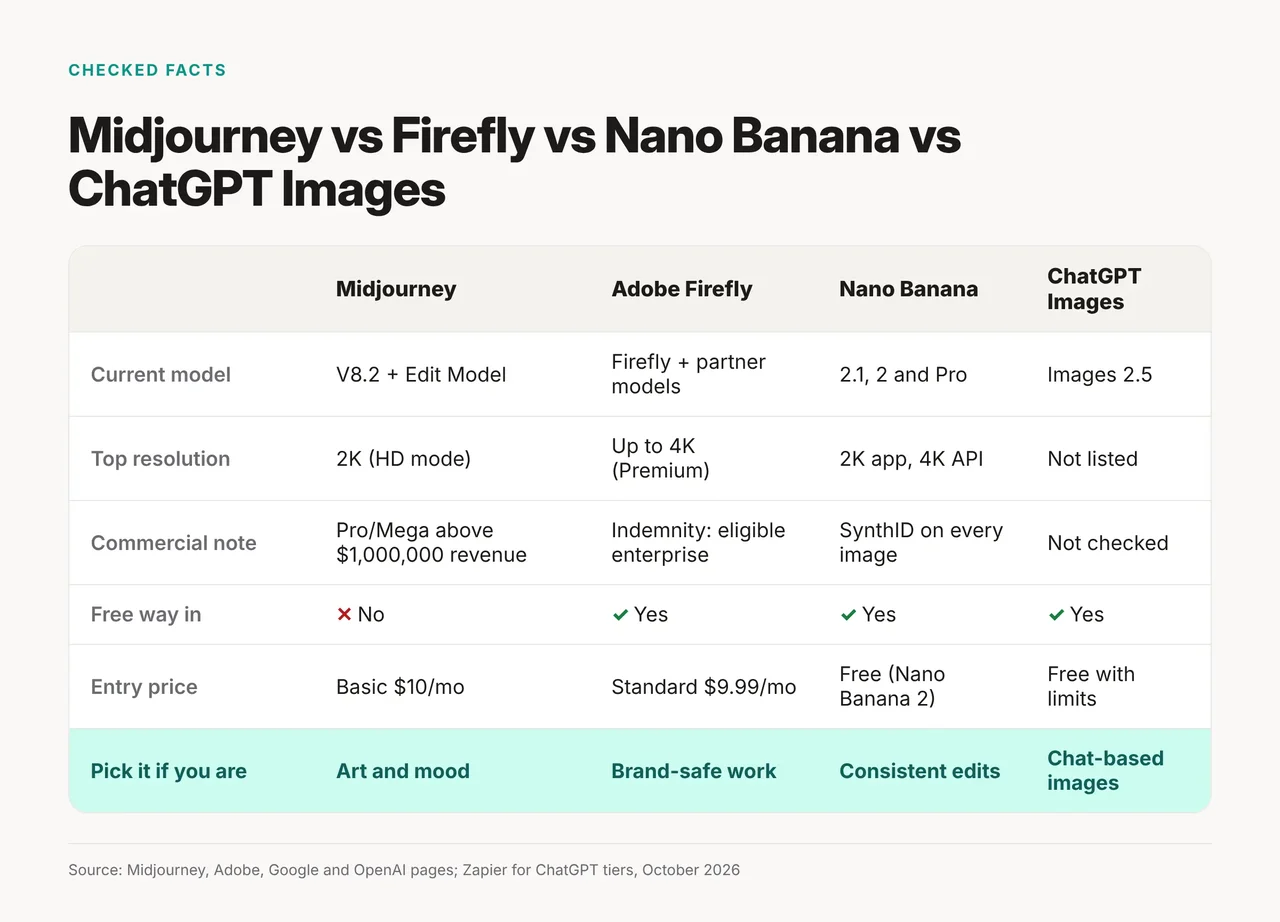
Midjourney is the only one of the four whose plans page lists no free plan. Firefly is the only one whose own page calls its outputs "safe for commercial use", and its indemnity is for eligible enterprise customers.
Checked and cut
These came up in research and didn't make the list, or were removed from our old version:
- GPT Image 2 and DALL-E 3: superseded by Images 2.5. We also dropped the old retirement dates and leaderboard claims, which we couldn't verify on a primary source.
- Our 1-10 capability scores: they weren't based on a test, so they're gone.
- Firefly Image Model 5 and "4MP" output: we couldn't load Adobe's own pages for them this month.
- Ideogram and Recraft: Zapier names Ideogram for text in images. We compare it with Recraft in our readable text guide rather than here.
How to choose your AI image generator
Start from the job, then check the entry plan. If two rows fit, that's your two-tool setup.
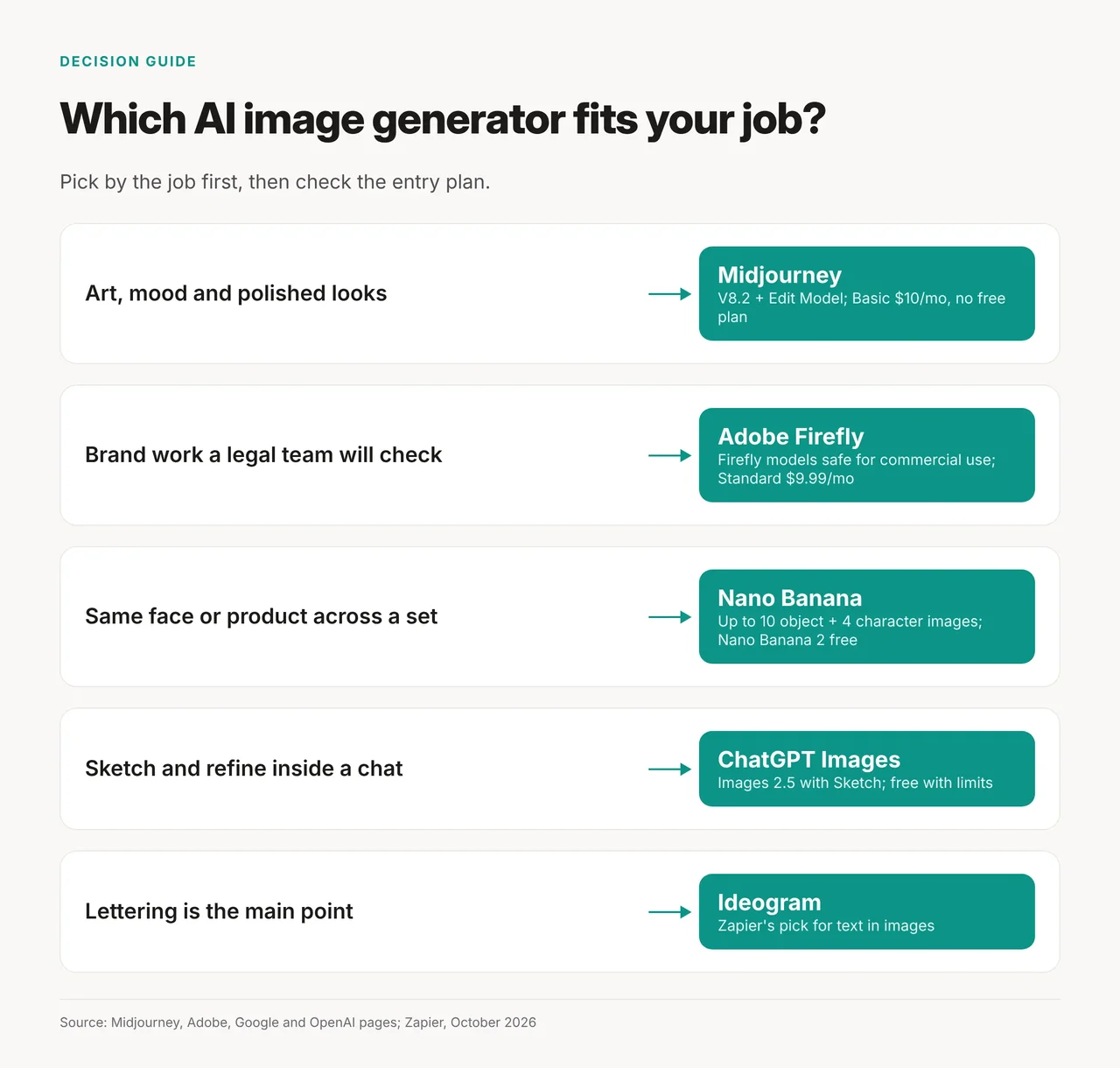
- The image has to look stunning, and you'll pay $10 a month: Midjourney.
- A client or legal team will ask about rights: Firefly, and check whether you qualify for enterprise indemnity.
- You need the same face or product across a set: Nano Banana.
- You want to sketch an idea and refine it in a chat: ChatGPT Images.
- The words on the image matter most: Ideogram, which Zapier names for text.
Selling products online? Our product photos comparison covers tools built for that one job.
How we checked
- What we did: read Midjourney's version and plan docs, Adobe's Firefly plans page, Google's Gemini API image docs and Gemini app page, and OpenAI's Images 2.5 and 2.0 posts, plus Zapier's list for consumer prices, October 21, 2026.
- Hands-on: We did not test these tools hands-on for this article.
- AI assistance: Researched and drafted with AI assistance; fact-checked and approved by the Toolbit team before publishing.
- Last verified: October 21, 2026